
How to Download Comics from Piccoma: The Complete Guide

Summary: To download comics from Piccoma, this guide walks you through bypassing regional blocks, explains how to use the official app for basic in-app offline reading, and introduces BookFab Piccoma Converter as the best solution to download purchased manga from Piccoma as PDF or EPUB files.
Table of Contents
Want to download comics from Piccoma? Piccoma is a popular Japanese manga platform, but its official download feature is mainly for temporary offline reading inside the app, not for saving comics as regular files. This guide explains how Piccoma works, how users outside Japan may access it, and how to download Piccoma manga for offline caching or long-term personal backup.
What is Piccoma?
Piccoma is a Japanese digital comic platform operated by Kakao Piccoma. It offers manga, SMARTOON-style vertical comics, light novels, and other serialized stories through its mobile app and web version. Unlike a traditional eBook store that only sells complete volumes, Piccoma is known for chapter-based reading, paid episodes, and its "wait and read for free" model, where some chapters can be unlocked after a waiting period. For users in Japan, it is a convenient way to read manga on a phone, tablet, or browser. For users outside Japan, however, access can be more limited because Piccoma's Japanese WEB service is mainly intended for domestic users.
Why read manga on Piccoma?
- Rich Japanese content library: Piccoma offers Japanese manga, SMARTOON, light novels, and original titles for manga fans and Japanese learners.
- Wait-and-read-free model: Some chapters can be unlocked for free after a waiting period.
- Chapter-based reading: Users can read many titles chapter by chapter without buying a full volume first.
- Mobile-first experience: Piccoma is designed for smooth reading on smartphones and tablets.
- Web version: Users can also read through Piccoma WEB.
Before Downloading Manga: How to Access Piccoma in the US/Outside JP
Piccoma is mainly built for the Japanese market, so US users may need a Japan-based setup to access the website or app smoothly. Here is the practical route:
1. Change your network to Japan
To access Piccoma, non-Japan-based users need to use a VPN to switch to a Japanese network environment before signing in.
2. Install the Piccoma App or Access the Web Version
- App Version: Download it from the App Store or Google Play. Non-Japan-based users will need a Japanese Apple ID or a Japanese Google Play region to find and install the app.
- Web Version: If you prefer reading on a browser, you can also access the Piccoma web version directly.
3. Create a Piccoma Account
Tap the sign-up option, often shown as "新規登録" (New Registration), and register using one of the available login methods. Registration generally supports Facebook or X (formerly Twitter).
⚠️ Note: New user registration requires a Japanese phone number for SMS verification, so make sure you can complete this verification before purchasing manga.
4. Use Translation Tools if Needed
Since Piccoma is a Japanese service, using browser translation tools or a mobile translation app can help you easily navigate menus, account settings, and purchase screens.
How to Download Comics from Piccoma for Offline Caching
Piccoma's official download feature is best for temporary offline reading inside the mobile app. It does not save comics as visible files, but it can help you read eligible volumes later when your connection is weak or unavailable.
Step 1: Open the Piccoma app online.
Launch the Piccoma app while connected to Wi-Fi or mobile data, since the app needs an internet connection to download manga.
Step 2: Go to the comic you want to download.
Open the title page, bookshelf, or purchased volume list, then choose the eligible volume you want to read offline.
Step 3: Tap the download icon for that volume.
Use the download button or downward-arrow icon shown next to the eligible volume. After the volume is cached, you can return to the Piccoma app bookshelf to read it offline.
Optional: Delete cached data when needed.
To free up storage, open the app's download list or storage management area and remove downloaded volumes you no longer need.
Limitations of Piccoma's official download method:
- Cached comics can only be opened inside the Piccoma app.
- It does not export comics as PDF, EPUB, JPG, or other open formats.
- If you lose your account, you will lose access to all the manga you purchased.
- Cached data cannot be moved to Kindle or another reader app.
- You still cannot access these offline resources without a VPN.
How to Download Manga from Piccoma for Permanent Backup
For long-term backup, Piccoma's in-app download feature simply isn't enough because it traps your comics inside the app. If you want to download Piccoma manga as local files on your computer, you can use BookFab Piccoma Converter as your go-to Piccoma comic downloader.
While you might find some Piccoma download scripts on GitHub, BookFab Piccoma Converter is not only much easier to use, but it also supports exporting to PDF, EPUB, and JPEG formats. This makes it far more convenient and versatile for different reading scenarios.
Below are the steps to download comics from Piccoma using BookFab Piccoma Converter.
Step 1: Open BookFab Piccoma Converter.
Download and open BookFab on your computer. Then, enter the Piccoma Converter module.
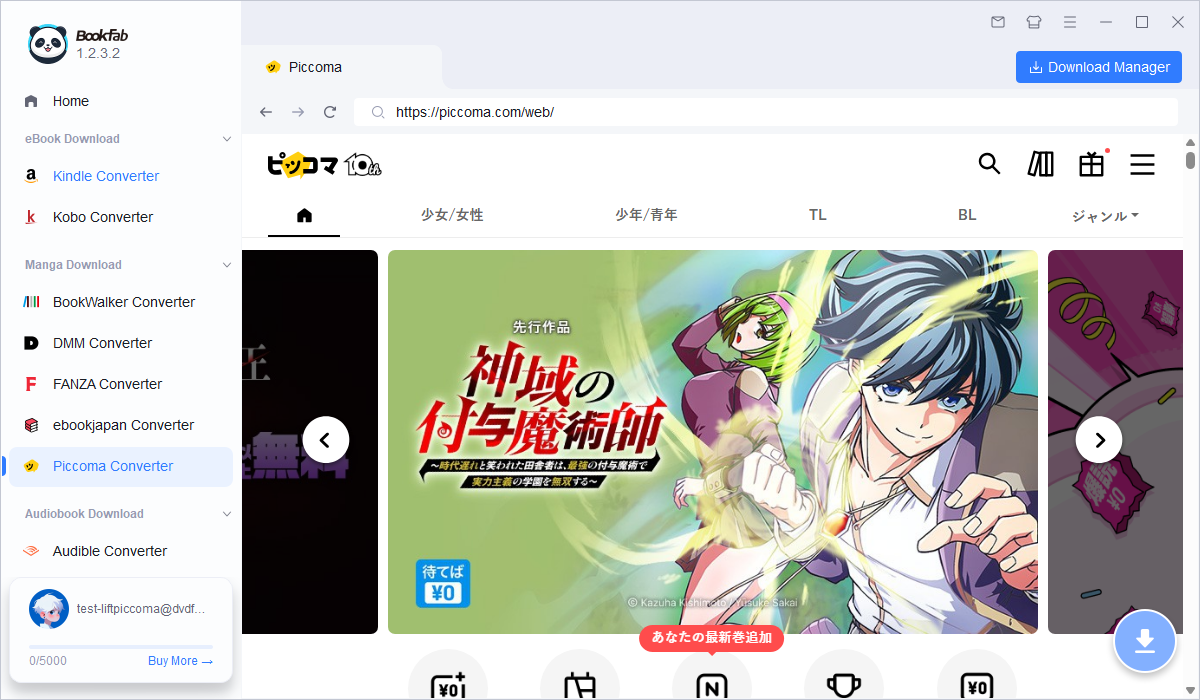
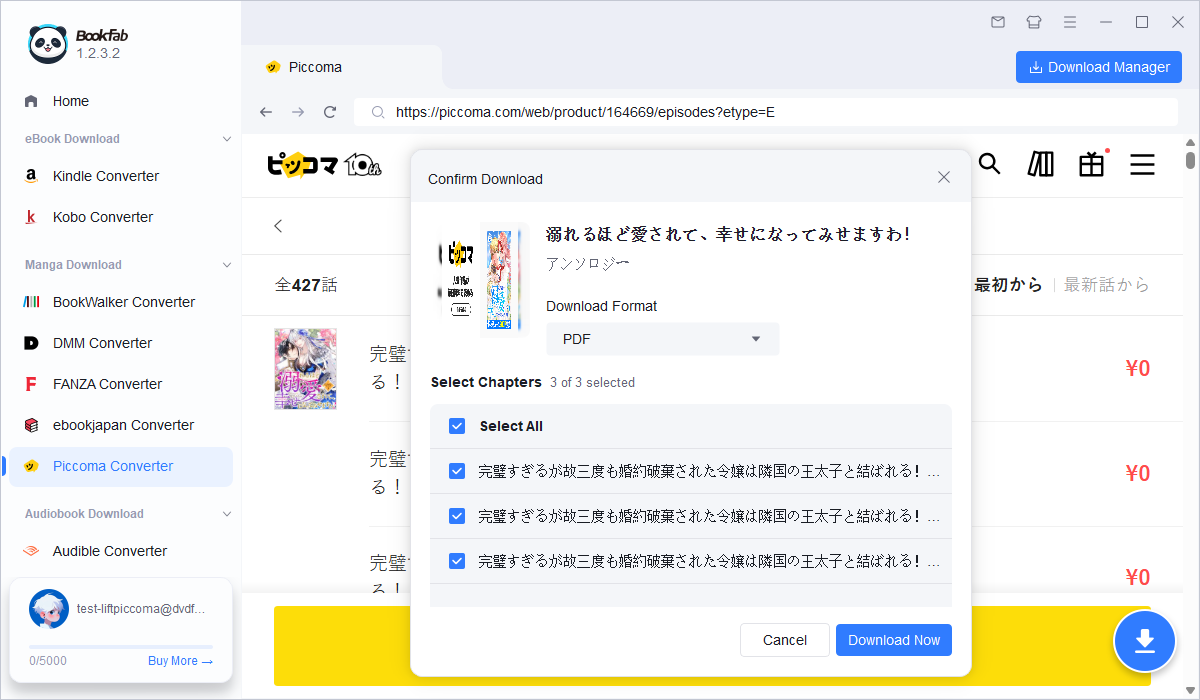
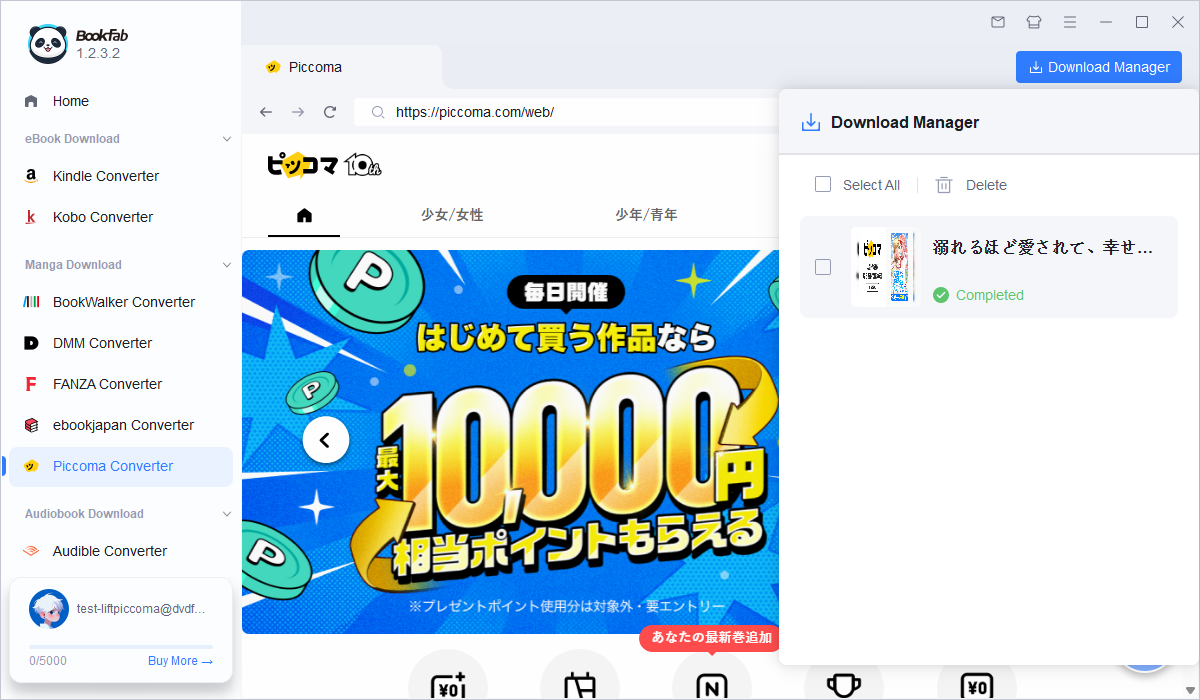
Step 2: Log in to your Piccoma account.
Use the built-in browser to sign in to the Piccoma account that holds your purchased manga. (Note: If the page fails to load, turn on your VPN and try again.)
Step 3: Open your purchased manga.
Go to your Piccoma bookshelf, then open theopen the chapter list of the manga you want to back up. ookFab automatically detects the content and activates the download button.
Step 4: Choose the output format and start download
Select an output format, such as PDF, EPUB, or JPG. Then, click Download Now and wait for the process to complete. Once finished, your comics are instantly ready to read offline on any device.
Why Choose this Piccoma Manga Downloader?
- Save your purchased comics forever as local files, so you never lose access even if your account or region gets restricted.
- Easily transfer your manga to a Kindle, Kobo, iPad, or PC to enjoy your favorite series on much larger screens.
- Once downloaded, you can read your comics completely offline anywhere—no Japanese VPN verification needed.
- Download entire volumes or complete series automatically with a single click, instead of saving chapters one by one.
- Preserve the flawless high-resolution quality of the original manga without any compression or blurriness.
- Enjoy consistent performance with regular technical updates and customer support.
Conclusion
The best way to handle Piccoma comics depends on how much control you want over your library. If you only need to read a few volumes during a trip or commute, the official app cache is enough, though users outside Japan may still need a VPN to access Piccoma smoothly. If you have purchased titles that you want to organize, store, or read outside the Piccoma app, or if you no longer want your reading experience to depend on VPN access, saving them with BookFab Piccoma Converter is the more practical route.

 How to Download BookWalker Books: Official Methods & PDF/EPUB OutputBy Amber Collins - Aug 20, 2026
![What Is FANZA? How to Download FANZA Manga & eBooks [2026]](https://r6.dvdfab.cn/upload/bookfab/en/how-to-download-fanza-manga-ebooks-dM1L.jpg) What Is FANZA? How to Download FANZA Manga & eBooks [2026]By Amber Collins - Aug 20, 2026
What Is FANZA? How to Download FANZA Manga & eBooks [2026]By Amber Collins - Aug 20, 2026![[Solved] How to Remove DRM from DMM Books?](https://r1.dvdfab.cn/upload/bookfab/en/remove-drm-from-dmm-books-rQxZ.jpg) [Solved] How to Remove DRM from DMM Books?By Amber Collins - Jul 30, 2026
[Solved] How to Remove DRM from DMM Books?By Amber Collins - Jul 30, 2026