
Playboy Magazine Download: Official Access and PDF Options

Summary: Find a specific US Playboy issue through the official archive and distinguish subscription reading from PDF downloads. Compare magazine file formats and learn when a Readly conversion tool applies.
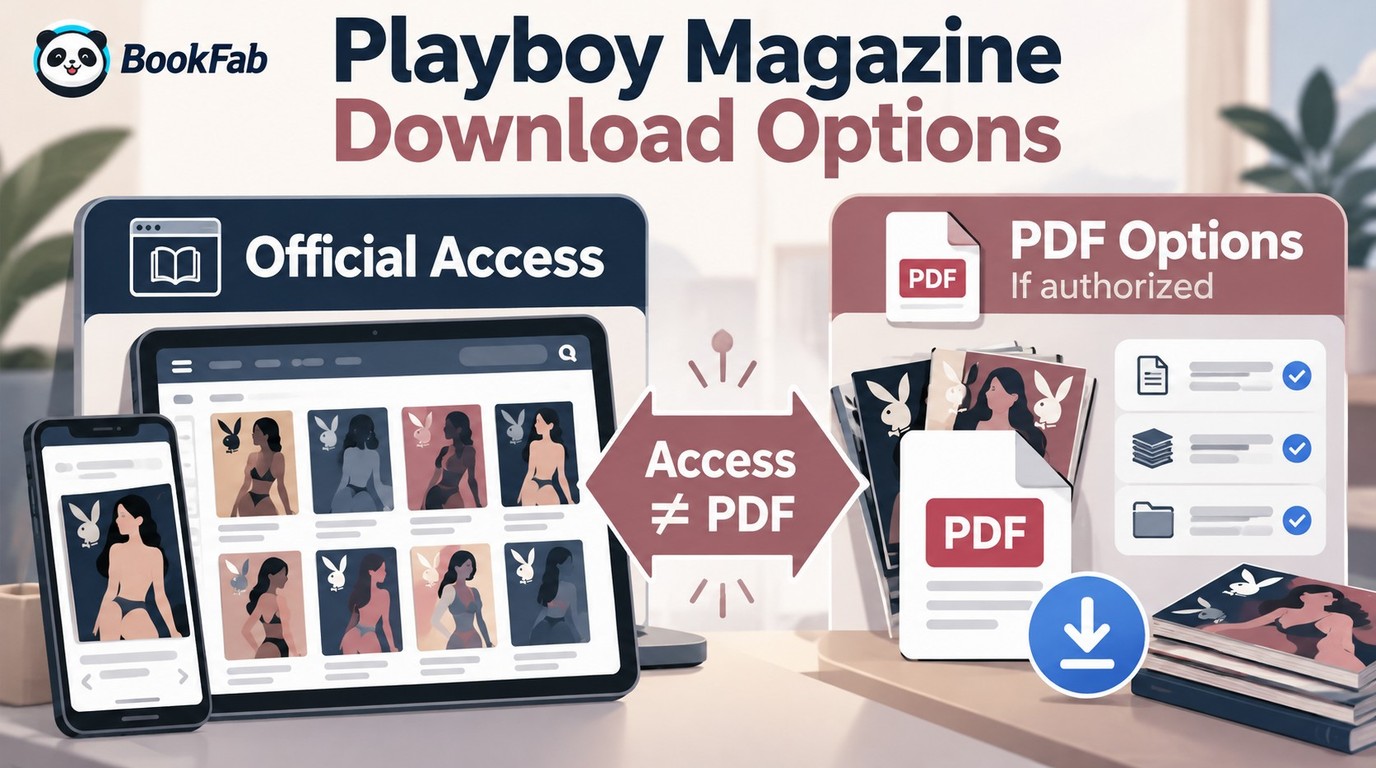
A Playboy magazine download starts with the right edition and issue. Playboy’s official archive provides subscription reading, but that access does not automatically include a PDF file. For a Playboy magazine PDF, you need a source that explicitly permits a file download.
An archive link can lead to a long issue list without settling whether it contains the issue you want. I would rather start with a reliable issue checklist than a folder described as a complete collection. The cover, edition, and publication date give that checklist something concrete to match. I’ll work from those details to reading access, then to the file options available for supported content.
Table of Contents
Find Your Issue in the Official Playboy Archive
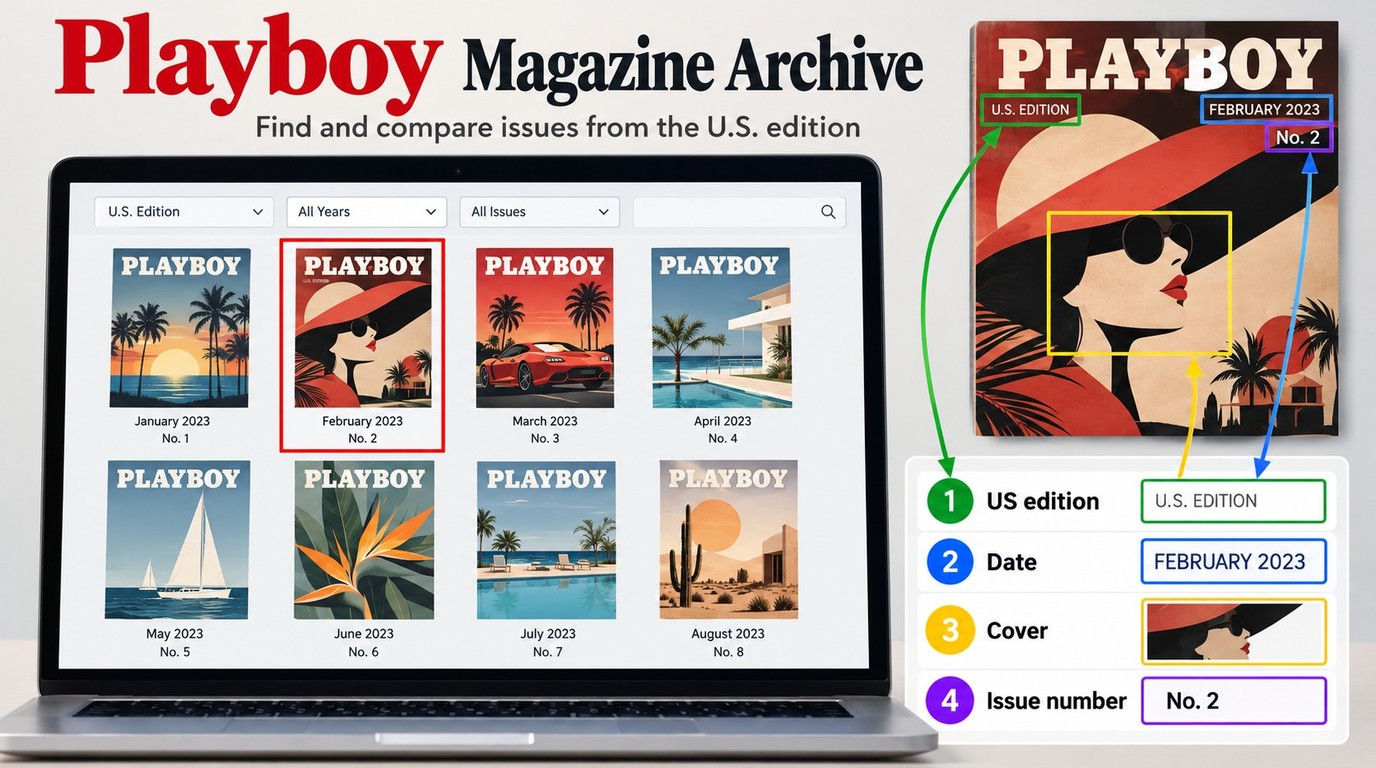
Start at Playboy.com’s magazine archive and match the US edition, publication date, and cover to the issue you need. The official digital subscription includes archive access and new quarterly digital issues; finding the correct issue comes before deciding whether a separate file is available.
You must be at least 18 to use the site. For subscriber reading, you also need an account with the relevant digital access. Have the issue details ready before selecting a plan, especially when you are seeking an older issue rather than the latest release.
Identify the Edition, Date, and Issue
A matching title is not enough. Record the country edition, month or season, year, and issue number if one is shown. Add a cover description or the article title you are trying to locate. A photograph of a physical cover is a useful reference, but a thumbnail alone does not establish what is inside a digital copy.
The US edition and an international edition with the same date are different publications. A result labeled Weekly Playboy also needs an identity check before you treat it as the US magazine. Keep the publication date separate from the date someone uploaded a file or posted a listing.
One r/DataHoarder reader put the checklist problem plainly in January 2026: “I’ve been trying to put together a complete collection of digital editions of playboy magazines and I’ve got all of the standard issues and a ton of the specials, but I am not sure if I have them all or not. I was curious if anyone out there had a complete list of issues I can work off of?”
I would keep standard issues and specials on separate lines. That prevents an extra edition from being mistaken for a missing regular issue, without assuming any particular collection is complete.
Look for the Issue on Playboy.com
Use the official archive as your starting point:
- Open the Playboy magazine archive.
- Review the dated issues displayed there and compare the date and cover with your checklist.
- Open the matching issue’s entry and confirm its identity before proceeding to subscriber access.
Those steps establish which issue you are seeking. A featured selection is a place to begin browsing, rather than a checklist of every issue you expect to find. If your target is not among the displayed entries, retain its exact details for an inquiry through Playboy’s official support options.
Match the Subscription to the Issue You Need
The official digital plan lists archive access from 1953 to today and each new quarterly digital issue. As of October 2026, the page displayed a limited-time digital offer of $24.99 per year against a regular $59.99 annual price. That is a promotional subscription price, not the price of a downloadable PDF collection.
The archive’s starting year helps you understand its scope. It does not settle whether a specific special, international edition, or individual issue is included in your access. For a single back issue, resolve that question with the publisher before treating a general archive description as confirmation.
Open the Issue and Check Its Reading Order
Continue within the official service:
- Sign in with the account that holds your digital access and open the issue through the reading option provided.
- Compare its cover and date with your checklist, then inspect the contents page and the sequence of pages.
- Check a spread and a text-heavy page at a comfortable size, and note where you stopped reading.
The issue should be usable beyond its cover. Follow an article that continues elsewhere, examine captions beside images, and make sure neighboring pages belong to the same issue. These are inspection tasks, not a promise about a particular reader’s features. I would settle an issue mismatch here, before spending time on file formats.
Does Playboy Access Include a Downloadable PDF?
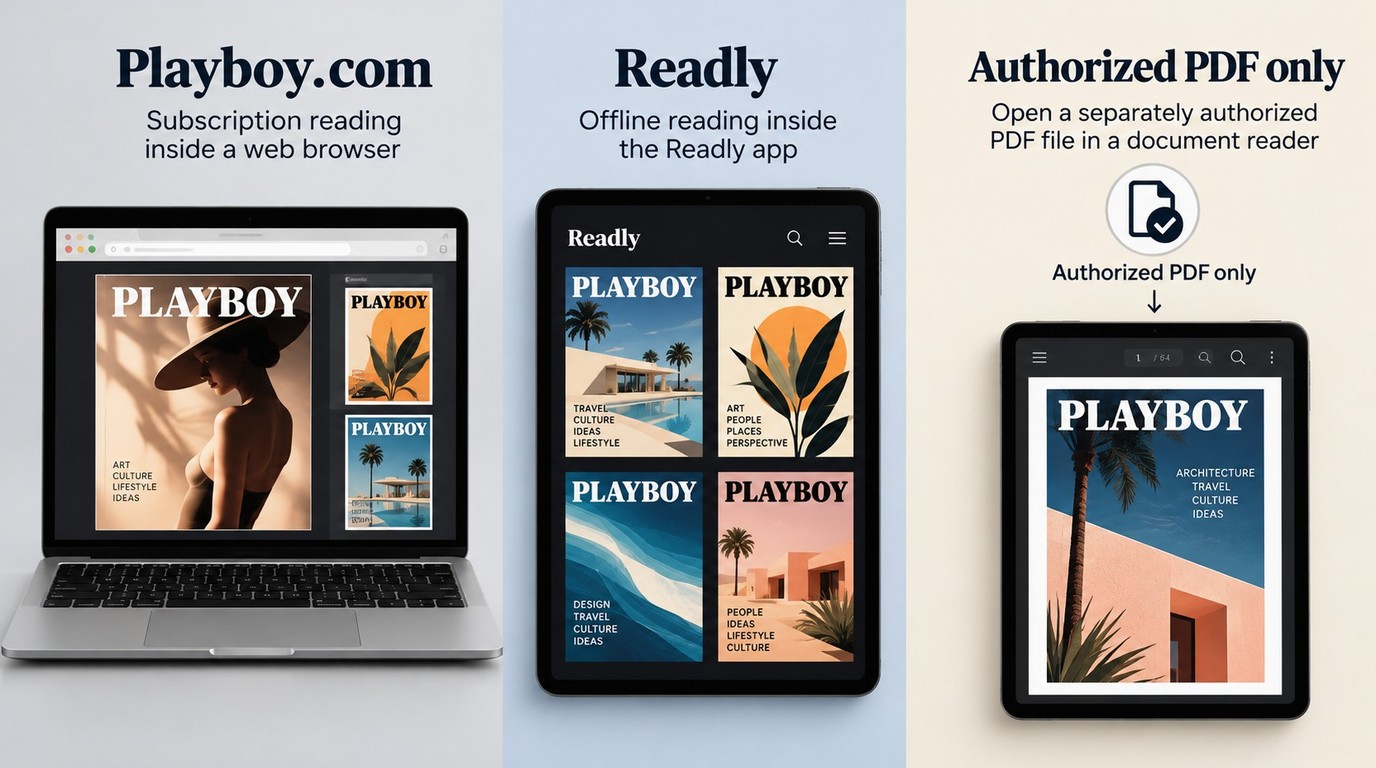
A Playboy digital subscription provides reading access; it does not by itself establish a PDF download entitlement. Playboy’s site terms specify online personal, noncommercial use unless another use is expressly permitted, so a subscription and permission to export a file are separate questions.
Online Access and Download Permission Are Different
An issue opening in a browser confirms access to that reading experience. A PDF download is a separate file you would save and open in another application. Payment for one does not automatically supply the other.
Playboy’s Terms of Use describe site content as available for online personal, noncommercial use and require prior written permission for other uses unless explicitly allowed. An express download entitlement must come from the service, rather than from the fact that the page is visible.
I would resolve the file question at the source. If an issue offers only online reading, a browser’s general save function is not evidence that the publisher supplies a complete magazine PDF. A saved webpage also need not contain the issue’s pages in reading order.
What a Free PDF Listing Can and Cannot Tell You
A free Playboy magazine PDF listing is an offer to examine, not proof of an authorized copy. A year, page count, and PDF label describe what the uploader claims to have. They do not establish permission, completeness, or file safety.
Keep the magazine task separate from unrelated installation requests. A page asking you to install a browser extension, enable notifications, or enter payment details for an unexplained “free” file has introduced a different transaction. Leave that page rather than completing those requests just to reach an issue.
A clear cover image is only a starting check. It does not show whether an article continues on the correct page or whether a spread has been omitted. For an authorized file, compare the contents and page sequence after opening it; do not judge completeness by the filename or download size.
Readly Offline Downloads After the Cafeyn Move
Readly’s app download feature serves offline reading inside the app. It is distinct from exporting a PDF for another reader. The US migration help page explains that magazines saved locally in the old app cannot transfer to the new app, while the new app supports fresh downloads.
The new Readly app and website instructions direct readers to Readly.co and the new apps. To locate your target, sign in to your own US account and inspect the edition and issue actually offered there. A title listed for another country does not establish your account’s access; an empty public catalog page does not settle that question either.
For reading within the app, its offline feature covers that task. For a separate file, you need supported source content and the relevant permission. The account’s actual issue list is where the next option begins.
When BookFab Readly Converter Is an Option
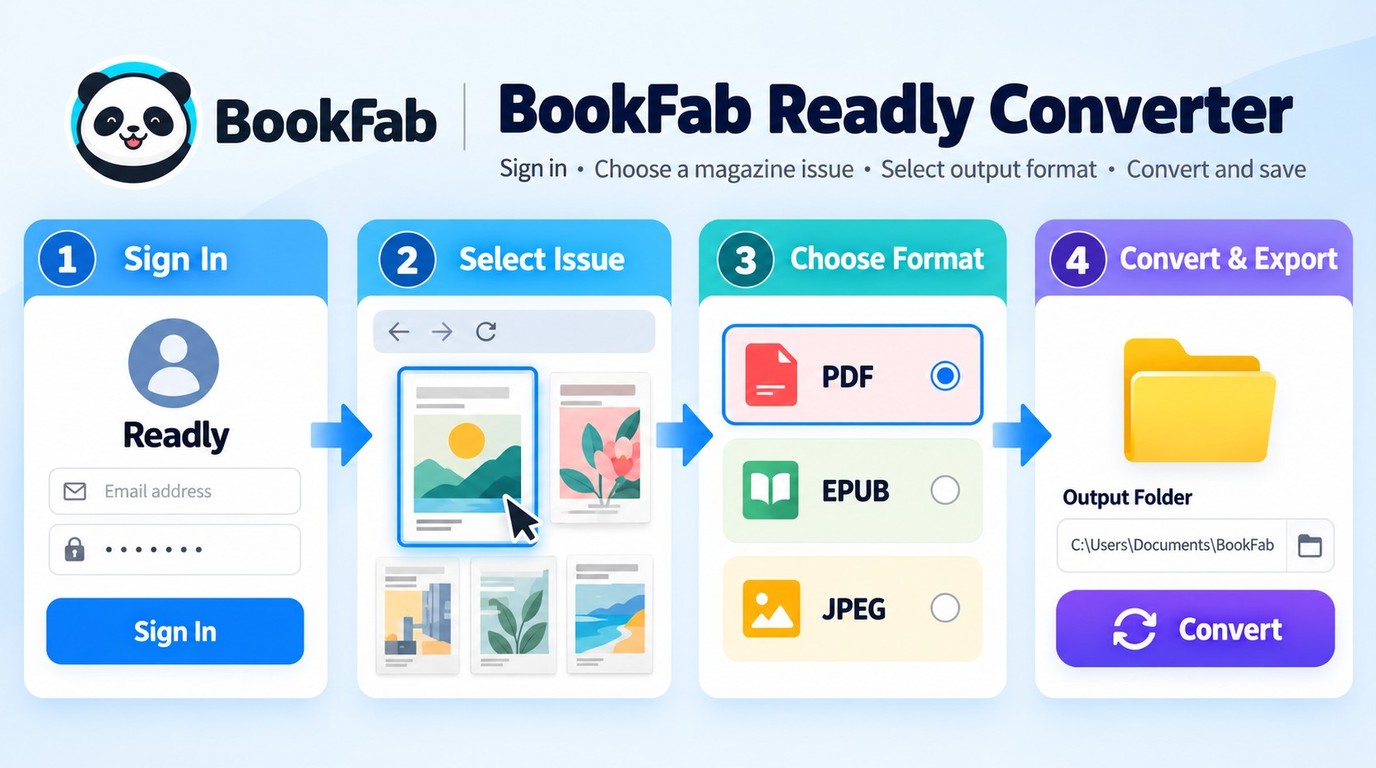
BookFab Readly Converter applies when the issue you want is already accessible through your supported Readly or Readly.co (Cafeyn) account and you are authorized to export it. It is a desktop conversion tool separate from the official app’s offline feature, with PDF, EPUB, and JPEG outputs for Windows and Mac.
Confirm the Issue Is in Your Supported Account
Your target issue needs to be readable in that account. BookFab Readly Converter uses a built-in browser to reach supported content, so you select an issue from the service you use rather than supplying an unrelated archive link.
The limitation is source access: BookFab Readly Converter does not supply missing issues or download the Playboy.com archive. Keep the publisher’s archive as the starting point for those issues; the converter’s official page identifies its supported Readly services. Automatic region detection recognizes the account’s setting; it does not add another region’s catalog to your subscription.
Use the Three-Magazine Trial to Judge an Export
The conversion itself centers on a few choices. Sign in through the built-in browser, select an accessible issue, choose PDF, EPUB, or JPEG, and save the output to your selected folder. The broader Readly PDF and EPUB explanation covers how those files differ from an app’s offline copy.
The free trial converts up to three magazines, giving you an output to inspect in your intended reading app. Start with one issue containing both ordinary text pages and a spread. Check the cover, publication date, page sequence, and whether the application opens the file as expected. I would judge a magazine export by those pages, rather than by a completed task indicator.
Cover, title, and issue-number metadata support library sorting. Batch tasks also let you group issues and pause, resume, or delete queued tasks, with a limit of 100 items per content source per day. Those controls help organize accessible issues; they are not a way to establish that a collection is complete.
For an issue available in your supported account with export permission, start with the BookFab Readly Converter trial and inspect the file in the app where you plan to read it.
Whole Issues or Page Images: PDF, EPUB, and JPEG
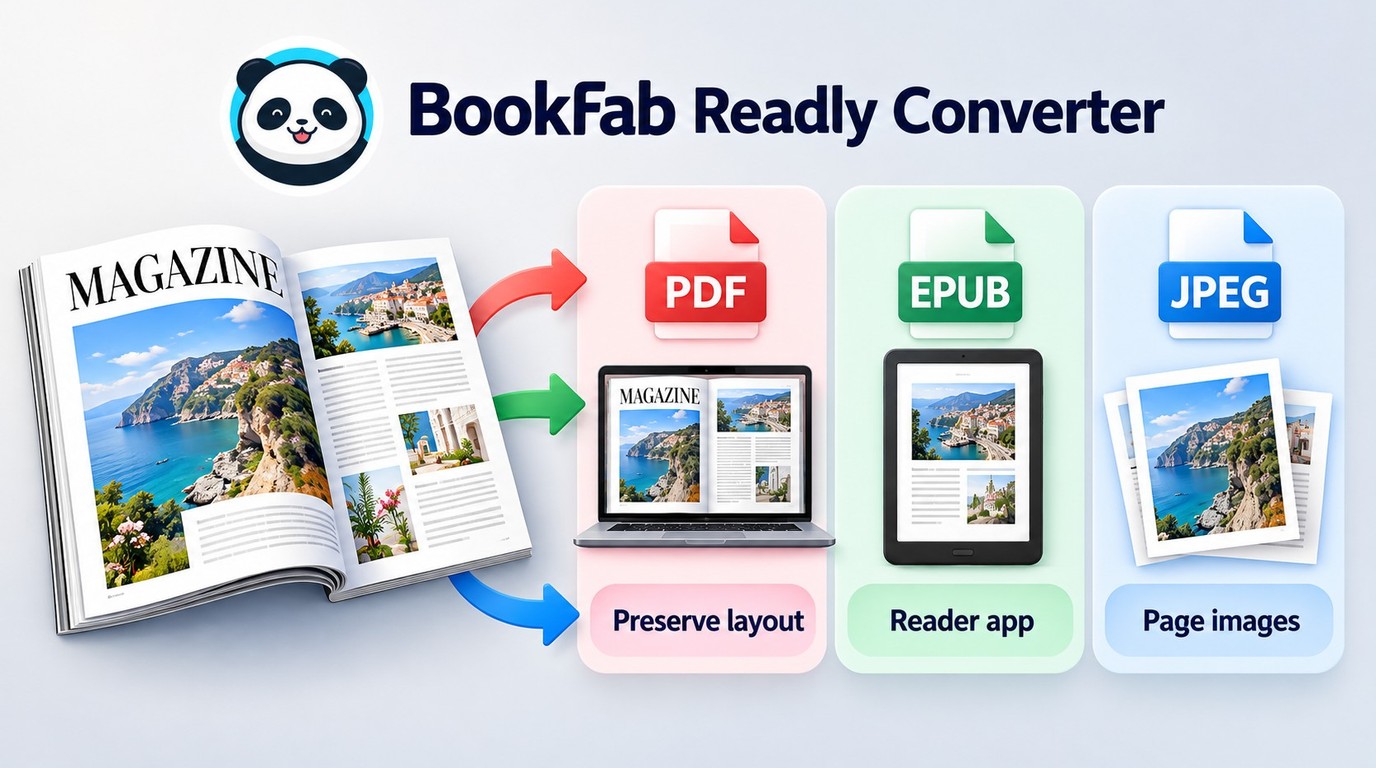
PDF keeps magazine pages together in a document, EPUB packages an issue for a compatible reading app, and JPEG stores page images. None of those extensions establishes completeness or photo reuse rights, and an EPUB magazine does not necessarily offer adjustable text.
Compare the Reading Outputs
A complete-issue file and an offline app copy serve different reading needs. For a publication whose columns, captions, and images share a designed page, I would start by checking the PDF’s spreads. EPUB deserves a separate inspection in the intended app, especially on a small screen.
| Output | Access needed | Reading check | Key limit |
|---|---|---|---|
| Official web reader | Playboy digital subscription | Correct issue and page order | Online personal use |
| Readly app offline copy | Issue available in your account | Open downloaded issue before disconnecting | Old app downloads do not transfer |
| Supported content with export permission | Page order and two-page spreads | Fixed pages need suitable zoom | |
| EPUB | Supported content with export permission | Layout in intended reading app | Adjustable text is not assured |
| JPEG | Supported content with export permission | Page sequence and filenames | Page image, not licensed photo asset |
Source: Playboy’s magazine archive and Terms of Use, Readly’s US Help Center, and BookFab Readly Converter’s official product page, as of October 2026.
The PDF option keeps the issue together; JPEG makes page order a file-management task. An EPUB extension alone tells you neither how text resizes nor how a two-page layout appears. Open the exported file and examine a dense article and an image-heavy spread before adding it to your main library.
Magazine Pages Are Not a Free Photo Library
A page image is not the original photograph. It can include headings, captions, borders, and neighboring text. Searches for free Playboy magazine pictures or photos sometimes blur those two objects, but exporting a JPEG page does not supply a separately licensed photographic asset.
For reading, a whole issue gives an article its surrounding context. A single page is useful for examining that page’s layout, but it will not include an article continued elsewhere. Requests to publish a photograph belong with the rights holder, rather than with the choice of file extension.
Keep the edition and issue date visible in your filenames. For page images, use a consistent page sequence and check that sorting puts the cover first. For a whole-issue file, confirm the cover, title, and issue information in the reading app. That last check turns a folder of files into a library you can navigate.
Frequently Asked Questions
What Can I Do If a Particular Issue Is Missing?
A: Send the publisher the edition, publication date, and issue details you have, and ask about an authorized digital copy or back issue. In August 2026, a reader in r/DHExchange described the problem as “there are quite a few I can’t find and quite a few I suspect I don’t even know exist.” I would distinguish an identified missing issue from an uncertain entry on a checklist. That gives support a specific question to answer, without asking a converter to locate content outside its supported account.
ACan I Rely on an Offline Copy While Traveling?
A: Test the actual issue without a connection before leaving. In an app that offers offline downloads, finish the download, disconnect, reopen the issue, and turn to an interior page. For an authorized local file, open it in the intended reader while offline. A browser tab left open is not the same check, and Playboy’s online archive should not be treated as an offline feature. I would check the article I plan to read, rather than stopping at a visible cover.
AWhat Happens If I Replace My Phone or Reinstall the App?
A: Treat the new installation as needing fresh offline preparation. Account access and a magazine stored locally on a phone are different things. After signing in, locate your issue and download it again through the app’s supported feature if it is available. Before erasing the old device, confirm that the issue opens on the new one. Readly’s migration illustrates why local copies need attention: the old app’s saved magazines did not move into the replacement app.
ACan I Share a Downloaded Issue or Reuse Its Photos?
A: Saving a file does not grant permission to share it or publish its photos; request the rights holder’s permission for those uses. Keep authorized downloads for your own offline reading, do not redistribute or resell them, and follow the service’s terms and applicable local law, since third-party conversion may fall outside a service’s permitted uses.
AIs It Safe to Sign In Through a Magazine Converter?
A: Get the installer from the converter’s official publisher and use its documented sign-in method, keeping the service’s normal account verification enabled. A magazine download page asking for your subscription password is not equivalent to a supported sign-in screen. I would stop if an unexpected form asks for account details outside that process. An official installer and recognizable sign-in steps are concrete checks; they do not amount to a guarantee about every application or download site.
A
 Free Apple Books Download: From the Store or EPUB FilesBy Amber Collins - Oct 20, 2026