Free Apple Books Download: From the Store or EPUB Files

Summary: Download complete free titles from Apple Books or import compatible EPUB files from legitimate sources. Learn how to confirm offline access and distinguish store downloads from files you can move to another reading app.
A free sample is not the full book you meant to read. For free Apple Books downloads, find a complete title marked Get, acquire it, then download it in your library. You can also import a compatible free EPUB. Neither task requires a paid converter.
Free collections can be tucked away, while samples are easier to spot. I would judge the result by whether you can open the book’s chapters, not by its cover appearing in your library. That distinction matters when learning how to download books on Apple Books. Start with acquisition, then check the reading copy.
Table of Contents
How to Download Free Books with Apple Books
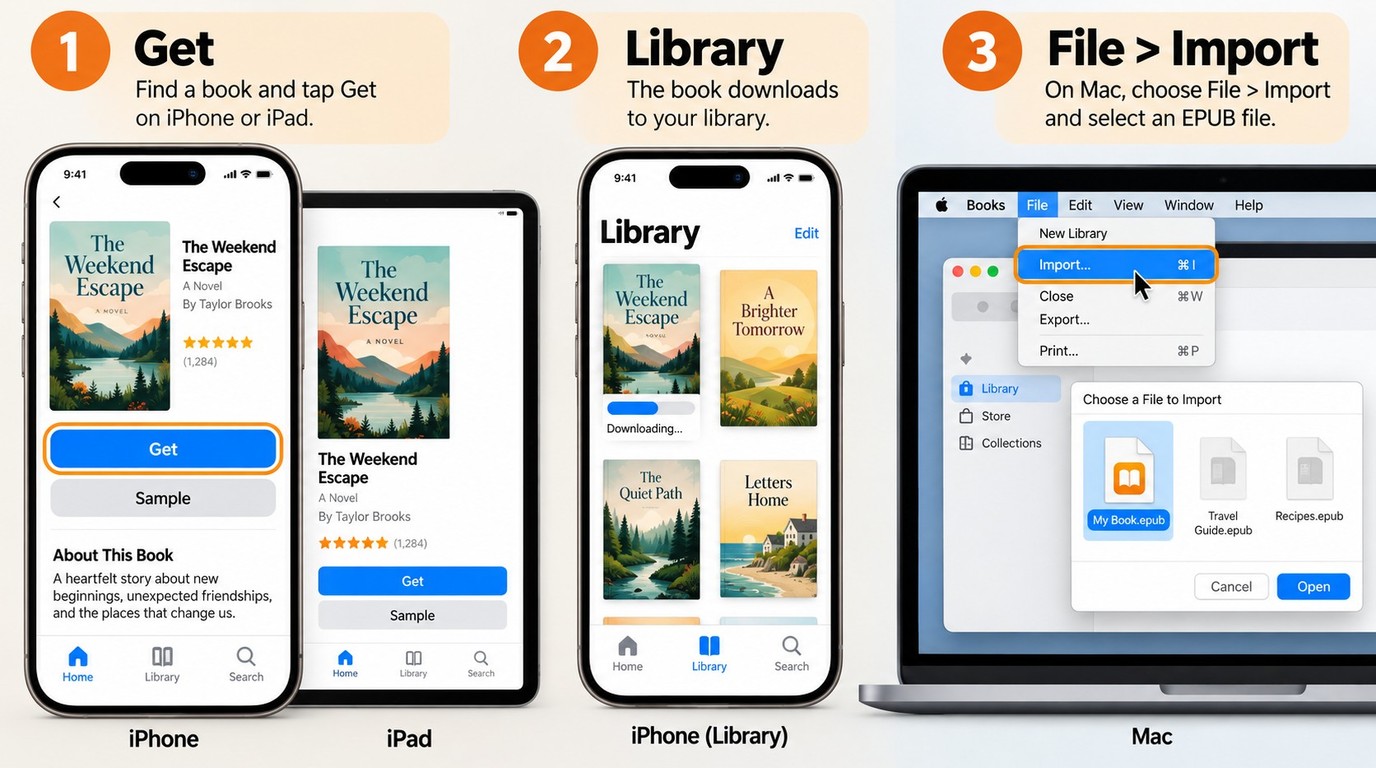
Find a free full title in Apple Books, select Get, and open the acquired book from your library after its download finishes. If you already have a compatible EPUB, import that file instead; the store and file-import methods start with different sources.
Have an iPhone, iPad, or Mac with Apple Books, an internet connection, and room for the download. Store acquisitions and redownloads use the Apple Account associated with the book. For an existing EPUB, have the actual file available locally before starting the import.
Find and download a free full book on iPhone or iPad
The book’s detail page is where you distinguish a complete title from a preview. A search result, recommendation, or free-books collection gets you to that page; it does not replace checking the edition itself.
The useful stopping point is a readable chapter. If you reach the end of a short preview, return to the listing and check what you acquired rather than assuming the rest is still downloading.
One reader in r/classicliterature described the discovery problem this way: “I discovered recently that Apple Books has a fairly extensive collection of free ebooks and audiobooks. They're a bit tucked away, though.” The chart gives you a place to browse, but the Get action and the listing’s description tell you what you are obtaining.
Download an acquired book on Mac
Your Mac needs its own local reading copy. A book acquired on an iPhone is associated with your account, but that does not mean its contents have already downloaded to the computer.
Keep the account, library entry, and local download separate. If the title is missing altogether, the account is worth checking; if the title appears with a cloud icon, downloading is the next action. Repeating the store search will not resolve those two situations in the same way.
Import a free EPUB you already have
Apple Books can read compatible EPUB files, including books obtained outside its store. EPUB is a book format that often lets text resize to your screen. Importing adds the file to Books; it does not purchase the book or convert it from another format.
To add an EPUB to Apple Books on Mac:
A file opening is the beginning of that inspection. Try a table-of-contents link to a later chapter and look at an image-heavy page, if the book has one. Those checks reveal more about reading comfort than the cover thumbnail does.
Where to Find Free Books to Read in Apple Books
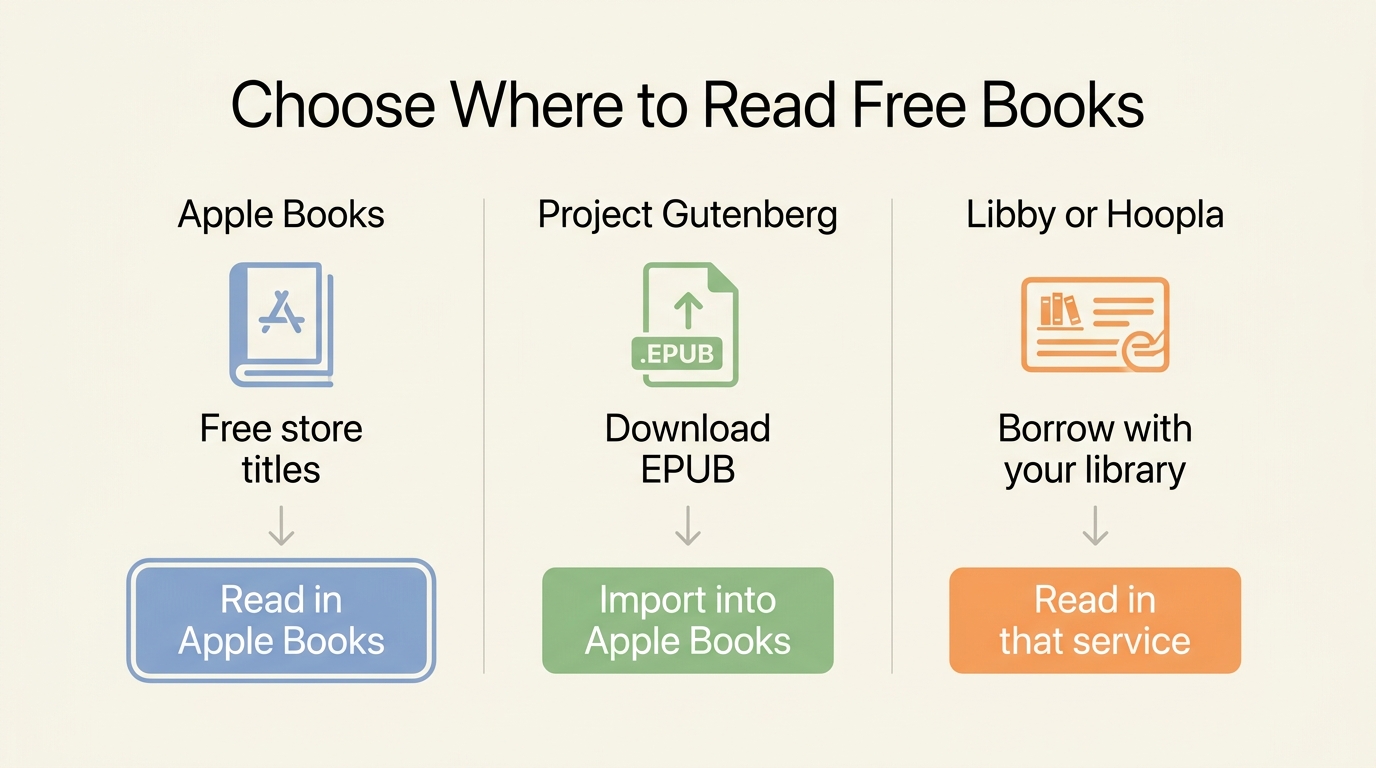
The Apple Books US store and legitimate EPUB collections offer two ways to obtain books for Apple Books. A participating public library offers borrowing through its supported services, which is different from receiving an EPUB to import into Books.
Once you know how to open a book, its source determines what you receive. I would keep store acquisitions and downloaded EPUBs distinct when organizing a library: one begins with an account entry, while the other begins with a source file you can save separately.
| Source | Cost or access | What you get | Apple Books use |
|---|---|---|---|
| Apple Books US store | Get for a free title | An acquired store title | Read in Apple Books |
| Project Gutenberg | No fee or registration | Public-domain EPUB where offered | Import a compatible EPUB |
| Participating public library | Eligible library access | A loan under library rules | Read through the supported borrowing service |
Apple Support, Project Gutenberg, and Hoopla’s official catalog, as of October 2026. Catalog and device availability may change; confirm support on the relevant official service page.
For reading inside Books, the first two rows lead to the store-download or EPUB-import instructions above. The library row answers a different need: borrowing a book through a service your library provides.
The store is convenient when you want a title already listed in Apple Books. Browse its free collection, then examine the particular edition. A free edition and a paid edition can have different introductions, illustrations, translations, or formatting. Pick the book you want to read rather than treating matching titles as interchangeable.
Project Gutenberg suits reading from a downloadable source file. Its collection focuses on older works whose US copyright has expired, and it requires neither a fee nor registration. When an EPUB is offered, save that version for importing into Books. A site calling a book “free” does not, by itself, establish that the provider has permission to distribute it.
Library services suit borrowing rather than building a folder of unrestricted files. Access depends on your eligibility, the participating library, and its available services. Libby and Hoopla are examples of library reading services; a reader’s card and the library’s borrowing rules govern access. Watch the return date, and use the reading location provided for that loan rather than assuming it belongs in Apple Books.
The source you select should lead to the reading result you want. A compatible EPUB gives you a file to import; a library loan gives you access under borrowing conditions. Neither needs to be presented as a substitute for the other.
What Offline Downloads Do and Do Not Give You
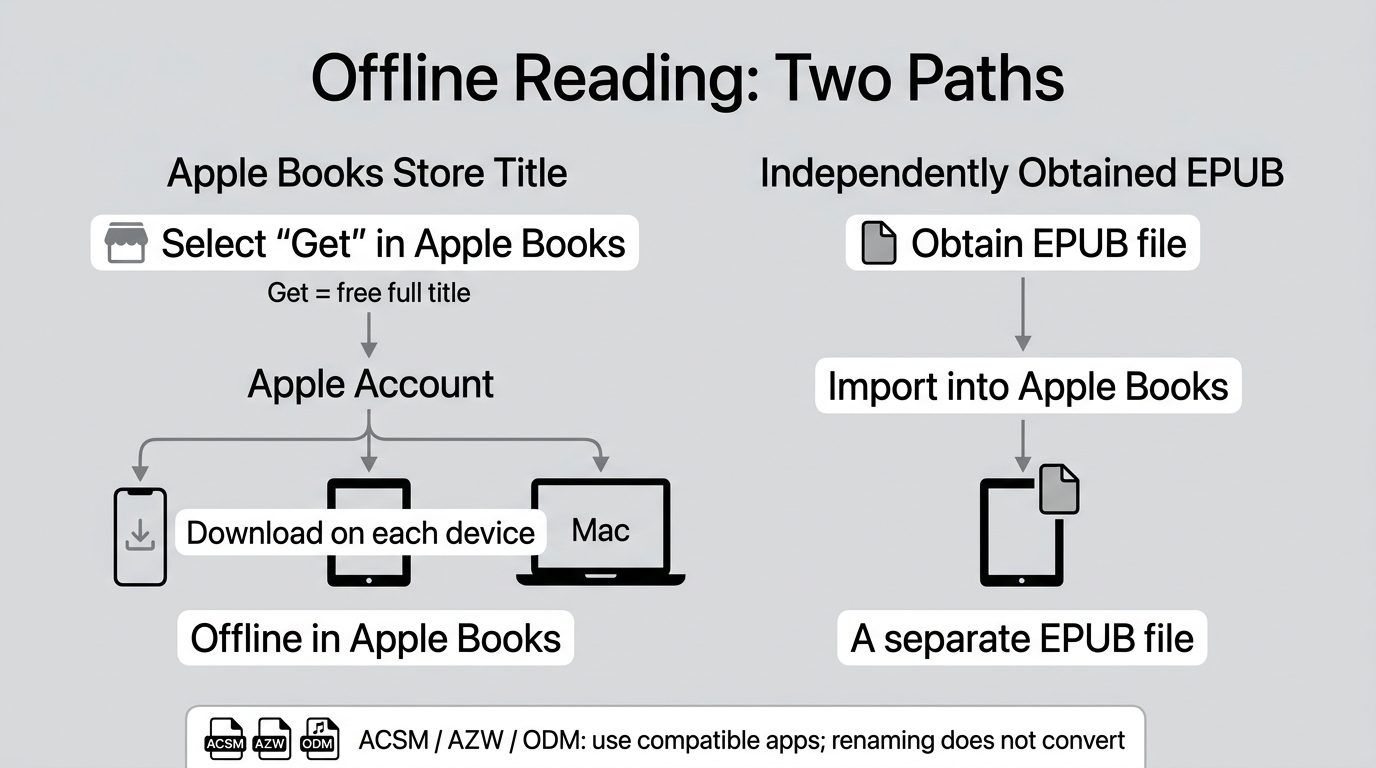
An Apple Books download gives you a local reading copy within its supported reading environment, not an automatic EPUB or PDF export. A compatible EPUB you obtained separately starts as a file; a store acquisition starts as access to a title associated with your account.
The distinction becomes visible when you leave Wi-Fi. One reader in r/ebooks wrote: “I want an app on ios to read epubs on other than apple books because for some reason my books sometimes can’t be read without wifi even though they’re still downloded on my phone.” That describes a reading problem, not a diagnosis of its cause. The offline chapter check above lets you find out whether your own copy is ready before a commute or trip.
A library entry is not an exportable file
A cover alone tells you too little about offline readiness. The book might be listed through your account while its contents still need downloading. Syncing a library, downloading a book, and opening its chapters are separate events. A title appearing on another device is therefore a reason to check that device’s reading copy, not evidence that the file has already arrived there.
Match the symptom to the task. A missing title points you toward the acquisition and account; a cloud status icon points toward the local download. A book that opens online but not offline calls for checking the download on that device. The first section contains those actions. Installing a converter does not complete an unfinished Apple Books download.
File portability is a different question. DRM, short for digital rights management, is protection that limits how digital content is used. With Apple Books, DRM and account conditions affect what you can do with a store title outside its intended reading environment. A free price does not tell you whether a book is protected or portable.
Nor does a familiar-looking extension settle the issue. Apple’s Mac import instructions distinguish readable EPUBs from files such as ACSM, AZW, and ODM that can require their associated applications. Renaming one of those files with an .epub ending does not turn it into an EPUB book. Obtain a compatible format from the provider when one is offered.
Moving a book to another reader also requires a compatible source file. The question of reading Apple Books content on Kindle begins with what kind of book file you have, rather than whether its price was free. A downloaded store title and an independently obtained EPUB do not establish the same transfer options.
For a personal file library, keep the original EPUB alongside clear title and author information. That copy gives you something concrete to locate later; a cover in an app is not a replacement for it. I would keep the source EPUB separate from the reading library so that reorganizing Books does not become my only record of where the book came from.
When BookFab Helps with Books from Other Stores
BookFab helps when a book from another supported source needs conversion before you import it into your reading library. BookFab All-In-One offers Windows and macOS ebook converters, including Kindle and Kobo modules with EPUB and PDF output, so you can select a reading format for an eligible source book.
For an EPUB that already opens in Apple Books, I would keep the file and import it directly. Conversion becomes useful when the source format is the obstacle. BookFab is a separate conversion tool relative to Apple’s built-in download and import features; its purpose here is to prepare a supported-source book for reading.
- Open the corresponding BookFab converter and select your book. Use the module for its source, such as Kindle or Kobo. On Windows, Kindle Converter also requires a supported Kindle App with the book downloaded.
- Select EPUB or PDF and an output folder, then convert. EPUB suits adjustable text where the book supports it; PDF keeps fixed page dimensions for page-based reading.
- Open the output in the intended reading app. For a compatible EPUB, use the Apple Books import steps above. Inspect the cover, title, author, chapter links, and illustrated pages before adding it to your main library.
The ebook converters aim to retain layout and major book information, so those details belong in your output check. A generated file still needs readable pages and usable navigation.
Apple Books store purchases are outside BookFab’s listed supported sources; for Kindle, Kobo, and other supported sources, free trials follow each included converter’s individual rules rather than a shared All-In-One quota. BookFab is paid software, not a way to make a paid book free.
Convert only content you are entitled to access, for personal use, in accordance with platform terms and local law; do not redistribute or resell the files.
The BookFab product page provides the Windows and Mac download entry points for the supported-source converters.
Frequently Asked Questions
Do I have to pay for the Apple Books app?
No. The Apple Books app is free to download; individual books and audiobooks have their own prices. An Apple Books app download therefore does not include every title in its store. You do not need a paid converter to obtain a complete book offered free through Get . If your search takes you to a different reading app, check its developer name rather than assuming a similar icon identifies Apple’s app.
ACan I redownload a free book if I delete it?
You can redownload previously acquired books when they remain available to your account. Use the Apple Account associated with the acquisition. Removing a local download is different from a title becoming unavailable from its source: Apple’s US terms say redownload availability can change. Keep a personal backup of an independently obtained EPUB rather than relying on being able to fetch that file again later.
AIs a free Apple Books download a PDF I can print?
No, selecting Get is not a PDF-export command. For printing, start with a provider that supplies a PDF and permits the intended use. A PDF keeps page dimensions, but having that format does not itself grant printing permission. On Mac, a PDF added through Books opens in Preview or your default PDF reader. That is separate from turning an Apple Books store title into a printable document.
ACan I read Apple Books ebooks on Windows or Android?
Apple does not offer an Apple Books ebook-reading app for Windows or Android. The PC instructions in Apple’s redownload help concern audiobooks in iTunes, not an ebook library for Windows. If you have an independently obtained, compatible EPUB, another reading app is a separate possibility; that does not make an Apple Books store download transferable. Identify the file you have before looking for an app to open it.
AIs it safe to sign in to a site promising paid Apple Books for free?
Do not give an unfamiliar free-book site your Apple Account password. A promise to supply a paid book at no charge is not a reason to hand over your credentials. Use Apple’s own sign-in when acquiring store titles. An established reading or conversion service should explain its account requirements; an unrelated page promising free paid books does not establish the same trust. Keep finding a legitimate book source separate from sharing account access.
A
 How to Add EPUB to Apple Books on iPhone, iPad, and MacBy Amber Collins - Oct 20, 2026
 how to download book in kobo: Official vs Local FilesBy Amber Collins - Sep 30, 2026
 6 calibre Alternatives: What Each Tool Can ReplaceBy Amber Collins - Sep 30, 2026
 How to Download Libby on Kindle: Books, Not the AppBy Amber Collins - Sep 30, 2026