DVDFab Detail Refiner AI
Intelligently remove mosaics and restore crystal-clear details with cloud-powered AI. Works seamlessly within DVD/Blu-ray/UHD Ripper and DVD/Blu-ray/UHD Creator module.
Detail Refiner AI follows a License + Credit model. Purchasing a license for this product or the DVDFab All-In-One grants access and includes complimentary FabCloud credits to start. Once used , additional credits are required for long-term use.
Detail Refiner AI follows a License + Credit model. Purchasing a license for this product or the DVDFab All-In-One grants access and includes complimentary FabCloud credits to start. Once used , additional credits are required for long-term use.
Last Update: Sep 22, 2026
100% Safe & Clean
4.8(65)

Jun 10, 2026
New: Detail Refiner AI Creator module integration is now live! Intelligently remove mosaics and restore crystal-clear video details with cloud-powered AI, then seamlessly burn enhanced videos to disc with Creator module integration. Complete your video enhancement workflow from ripping to disc creation.
Unlock Professional-Quality Video Enhancement with AI-Driven Mosaic Removal
Smart Processing
AI-Powered Intelligent Analysis & Adaptive Optimization
DVDFab Detail Refiner AI analyzes video frames to identify mosaic regions and automatically adjusts processing parameters for optimal results. The intelligent algorithm adapts to different video styles and content complexity; delivering professional-grade restoration regardless of the source material quality.

Detail Recovery
Intelligent Mosaic Removal with Clarity Restoration
This detail restoration tool leverages advanced AI to intelligently reconstruct fine textures; edges; and visual structures in mosaic regions. By analyzing surrounding pixels and learning video context; it restores crystal-clear details while maintaining natural appearance. The result is professional-quality video output suitable for archiving; playback; and content preservation—all without complex manual adjustments.

Speed & Efficiency
Cloud-Powered Lightning-Fast Processing
Eliminate expensive GPU hardware investments with DVDFab's cloud-powered AI infrastructure. Processing happens on optimized cloud servers; dramatically reducing conversion time compared to local processing. Whether you're enhancing a short clip or restoring an entire collection; cloud acceleration ensures professional results without hardware bottlenecks. The distributed computing approach guarantees consistent quality and remarkable processing speed.

Complete Workflow
Seamless Integration with DVDFab Ecosystem
Detail Refiner AI seamlessly integrates with both DVDFab Ripper and Creator modules, creating a unified video enhancement ecosystem. With Ripper, unlock a complete pipeline: decrypt disc → convert to video → remove mosaic → enhance details → save output. With Creator, enhance your source videos before burning to disc for superior quality output. No complex manual setup required—simply enable AI processing and let the integrated workflow handle everything from disc ripping to disc creation. This unified approach ensures consistent, professional-quality output across your entire video processing workflow with minimal user intervention.

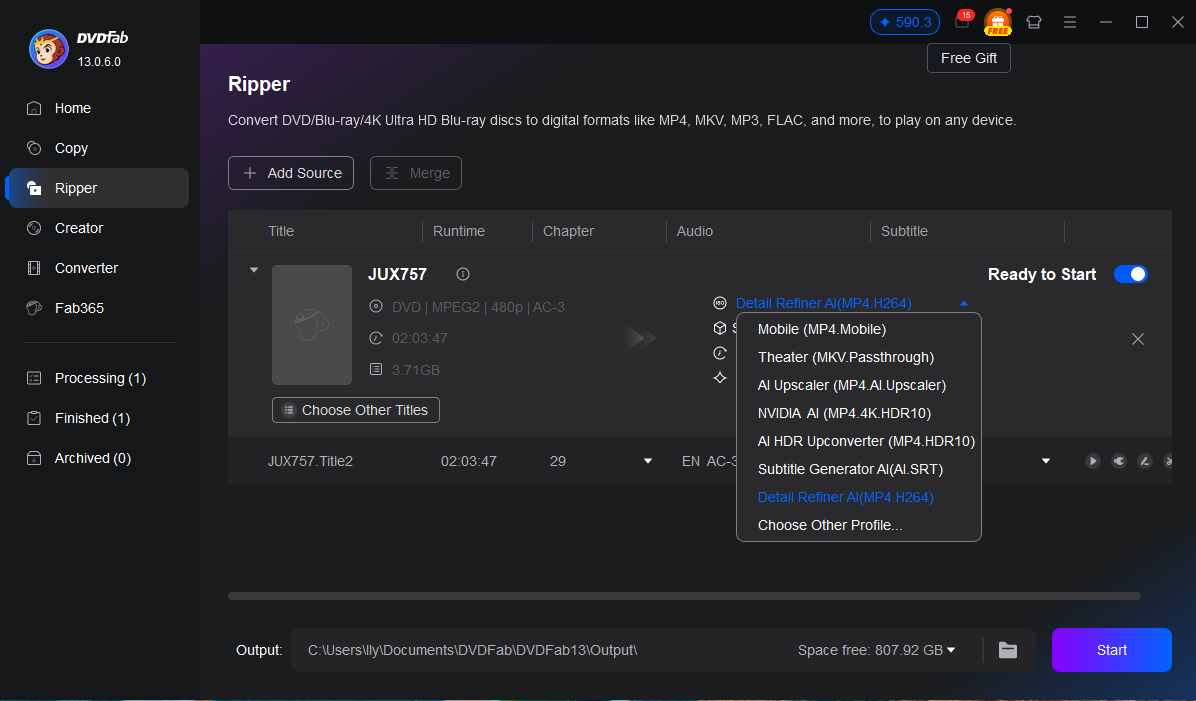
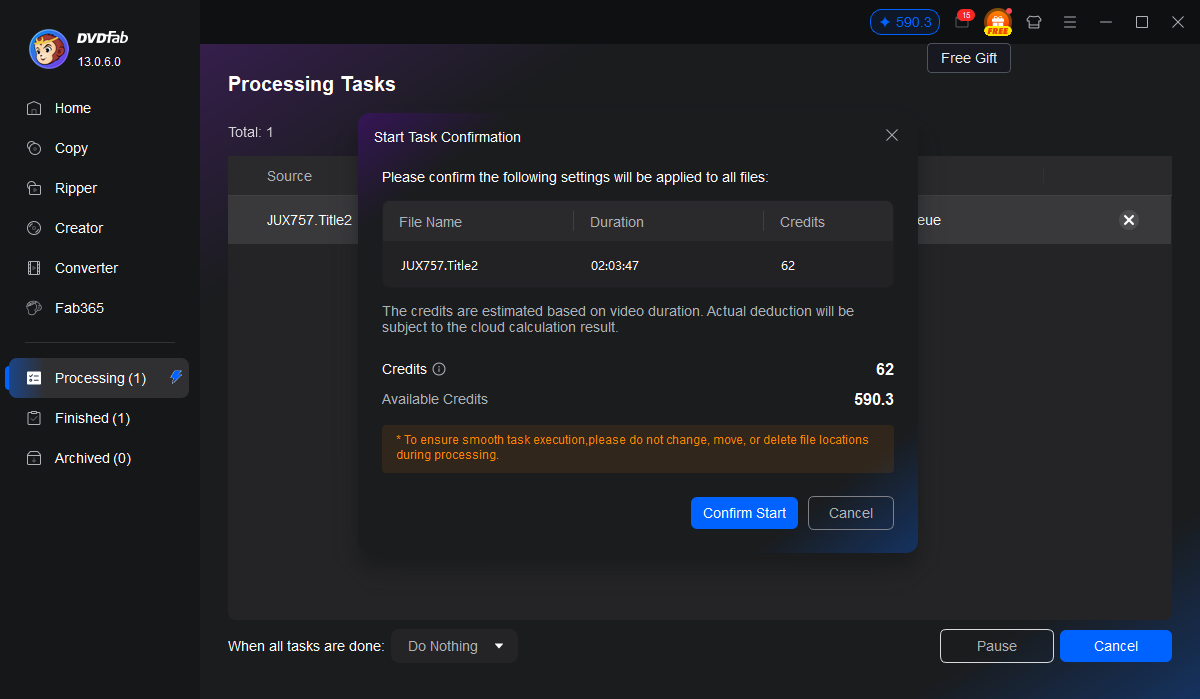
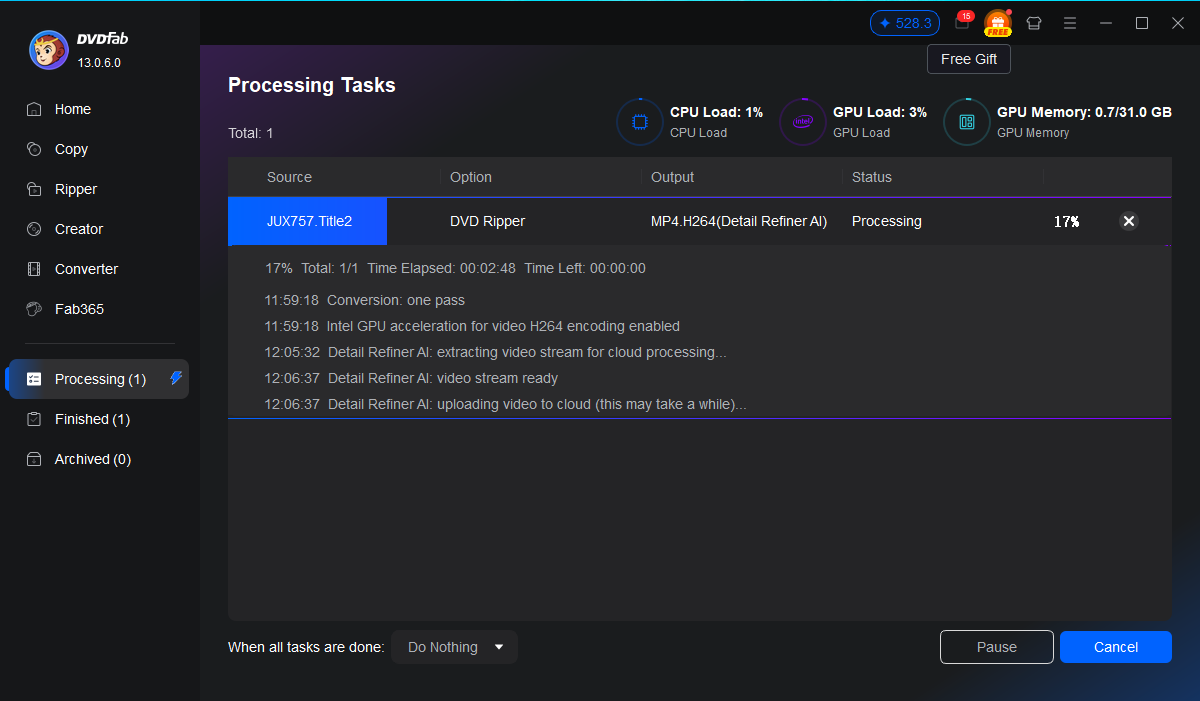
Step 1. Load Your Video Source into DVDFab Ripper
Open DVDFab and go to the Ripper module. Load your source—a DVD disc; ISO file; or folder containing video content. The program automatically detects the source and prepares it for processing. Choose your preferred output format and resolution settings. Everything is ready for the next step.
Step 2. Enable Detail Refiner AI and Configure Settings
After loading your source; locate the Profile menu and select Detail Refiner AI. Choose your preferred AI quality mode: Standard for faster processing or High Quality for enhanced restoration. The system displays estimated processing time and FabCloud credit consumption. Adjust settings based on your video complexity and quality requirements.
Step 3. Start Processing and Download Your Enhanced Video
Click the Start button to begin cloud processing. DVDFab handles everything: removing mosaics; restoring details; and merging audio with the enhanced video. Real-time progress shows conversion status. Once complete; your professional-quality video output is ready for download or archival. Enjoy crystal-clear video with all the fine details naturally restored.
Feedbacks on DVDFab Detail Refiner AI

J
John Smith
Professional Video EditorThis tool is a game-changer! It removed mosaics from my archive in hours instead of days. The quality restoration is outstanding and the cloud processing is incredibly fast.
M
Maria Rodriguez
Content CuratorFinally a solution that doesn't require expensive hardware! The integration with DVDFab Ripper makes the entire workflow seamless. I've restored hundreds of videos already.
D
David Thompson
Film ArchivistThe detail restoration quality is professional-grade. My restored archive now looks pristine and the mosaic removal is virtually undetectable. Highly recommended!
S
Sophie Laurent
Digital Restoration SpecialistI was skeptical about AI-powered restoration but this exceeded all my expectations. The results are comparable to expensive manual restoration techniques but at a fraction of the cost.
M
Michael Chen
Media ProducerThe AI quality mode produces stunning results with incredible detail preservation. Worth every credit spent. The free trial let me test before committing and I'm now a happy long-term user.
E
Emma Watson
Streaming Service ManagerPerfect for our massive video library restoration project. The batch processing capability and cloud infrastructure mean we can handle thousands of videos efficiently. Customer support is also excellent!
J
John Smith
Professional Video EditorThis tool is a game-changer! It removed mosaics from my archive in hours instead of days. The quality restoration is outstanding and the cloud processing is incredibly fast.
M
Maria Rodriguez
Content CuratorFinally a solution that doesn't require expensive hardware! The integration with DVDFab Ripper makes the entire workflow seamless. I've restored hundreds of videos already.
D
David Thompson
Film ArchivistThe detail restoration quality is professional-grade. My restored archive now looks pristine and the mosaic removal is virtually undetectable. Highly recommended!
S
Sophie Laurent
Digital Restoration SpecialistI was skeptical about AI-powered restoration but this exceeded all my expectations. The results are comparable to expensive manual restoration techniques but at a fraction of the cost.
M
Michael Chen
Media ProducerThe AI quality mode produces stunning results with incredible detail preservation. Worth every credit spent. The free trial let me test before committing and I'm now a happy long-term user.
E
Emma Watson
Streaming Service ManagerPerfect for our massive video library restoration project. The batch processing capability and cloud infrastructure mean we can handle thousands of videos efficiently. Customer support is also excellent!
System Requirements

Windows 11 / 10 (64-bit)
Intel i3 or equivalent processor
4GB RAM or above
20GB free hard disk space
Live Internet connection required
Frequently Asked Questions
- Does Detail Refiner AI work with all video formats?
- Is a free trial available?
- What is the difference between Standard and High Quality modes?
Fair Use Policy : DVDFab is intended for personal use only, and sharing copied content with any third party is strictly prohibited.
To ensure a stable user experience and prevent potential restrictions from disc publishers, each DVDFab licensed account has a quota of 100 disc copies per week. This quota will automatically reset at the start of a new weekly cycle.