How to Convert EPUB to Audiobook in 2026: 5 Top-rated Tools For You
Summary: This article presents a comprehensive guide to the top tools for converting EPUB into audiobooks. It covers various software options, including BookFab, Speechify, and Balabolka, highlighting their unique features, customization options, and limitations. With step-by-step instructions for each tool, you can easily transform your ePub into engaging audiobooks.
Table of Contents
Imagine listening to your favorite eBook during your commute or while doing household chores. Audiobooks make that possible, and the format has grown quickly in recent years. The Audio Publishers Association reports that U.S. audiobook sales reached $2 billion in 2023, up 9% from the previous year.
For content creators, this trend also opens a clear business opportunity. By converting written content into audiobooks and selling it on platforms like Audible, some report earning up to $4,500 per month, which shows how profitable this market can be.
This guide covers five top tools to convert EPUB eBooks to audiobooks. They help you turn text into audio with less effort and follow the growth of the audiobook market.
How to Choose the Best EPUB to Audiobook Converter
An ePub to audiobook converter is software that turns digital ePub files into audio formats such as MP3, M4B, WAV, or OPUS, so users can listen to eBooks instead of reading them. These converters usually rely on text-to-speech, which reads the content aloud with synthetic or more natural-sounding voices.
Choose EPUB to Audiobook Converter According to the Features
- Advanced AI-driven TTS engine should provide realistic human voice with clear articulation and natural intonation
- Save time by converting multiple EPUB files at once while supporting various formats (e.g. PDF, MOBI, TXT)
- Choose from a variety of voices, accents and languages for enhanced customization
- Ability to control the speed, pitch and tone of voice for a personalized listening experience
- Export to common audio formats such as MP3, M4B, or WAV for easy playback on different devices
- Automatic chapter recognition and bookmarking features help maintain the structure of the audiobooks
Choose EPUB to Audiobook Converter According to Output Files
Here's a concise summary covering the differences between all the mentioned audio formats: MP3, AAC, WAV, FLAC, OGG, WMA, M4A, and M4B.
| Format | Compression Type | Quality | File Size | Compatibility | Special Features | Typical Use |
| MP3 | Lossy | Good | Small | Universal | / | Music, general audio |
| AAC | Lossy | Better than MP3 | Small | Wide (Apple, streaming) | / | Music, streaming |
| WAV | Uncompressed | Excellent | Very large | High (esp. Windows) | / | Professional editing, archiving |
| FLAC | Lossless | Excellent | Medium | Good (not all devices) | / | Audiophiles, backup |
| OGG | Lossy | Good | Small | Limited (supported by some players) | / | Streaming, gaming |
| WMA | Lossy/Lossless | Varies | Varies | Best on Windows | / | Music, Windows platforms |
| M4A | Lossy (mostly AAC) | Good | Small | Modern devices, Apple | / | Music, general audio |
| M4B | Lossy (mostly AAC) | Good | Small | Apple, audiobook players | Bookmarks, chapters | Audiobooks, podcasts |
Some formats focus on compatibility (MP3, AAC), others on higher quality sound (WAV, FLAC), and some add features such as audiobook bookmarking (M4B). Your choice depends on whether you need broad device support, higher audio fidelity, or extra playback features.

- According to the audio formats listed above, M4B works well for audiobooks because it supports bookmarks and chapters, letting listeners pick up where they left off and move between sections with less effort. It also provides good quality in a compact file size and is supported by most audiobook players.
How to Convert EPUB to Audiobook Free: Top 5 Tools
BookFab AudioBook Creator: Convert EPUB to M4B
BookFab AudioBook Creator is an advanced text-to-speech software that provides high-quality voice conversion, ensuring a natural and realistic audiobook experience. With a broad selection of voices and customizable settings, users can effortlessly convert epub to M4B to meet their unique preferences.
- 20 distinct voices in each language; both male and female options are available.
- Customize the prosody, tone, and pacing to create an audiobook that matches your personal preferences.
- Utilize custom reading rules and aliases for a more precise and refined audio experience.
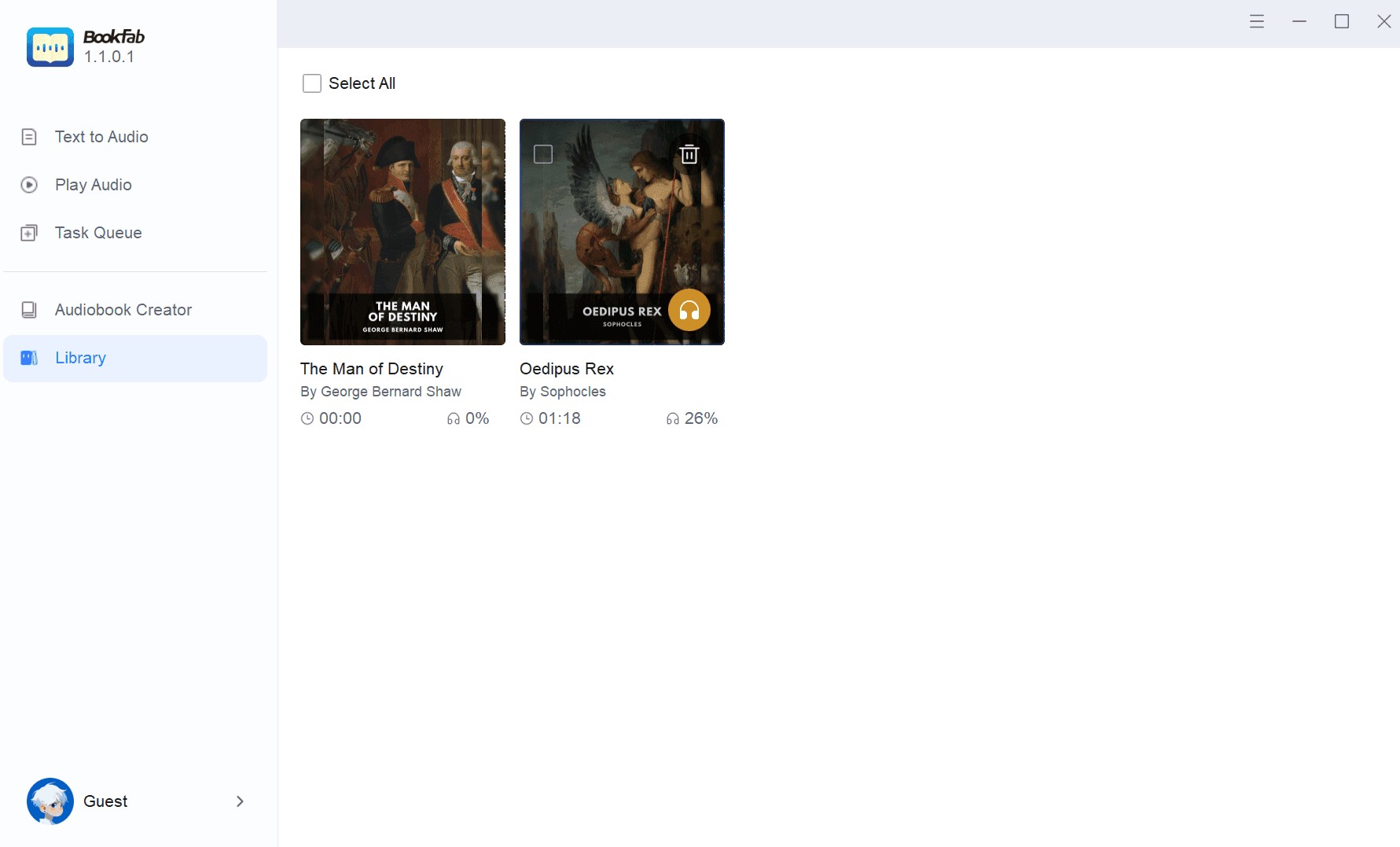
- Smart library organization and progress tracking to simplify the audiobook management.
- Text is highlighted as the words are read.
- The voice cloning feature is still under development and not yet fully available.
- Currently, only English and Japanese are supported for conversion.
Detailed Guide on How to Convert EPUB to Audiobook with BookFab
Step 1: Launch BookFab on your Windows PC and import a .epub file.
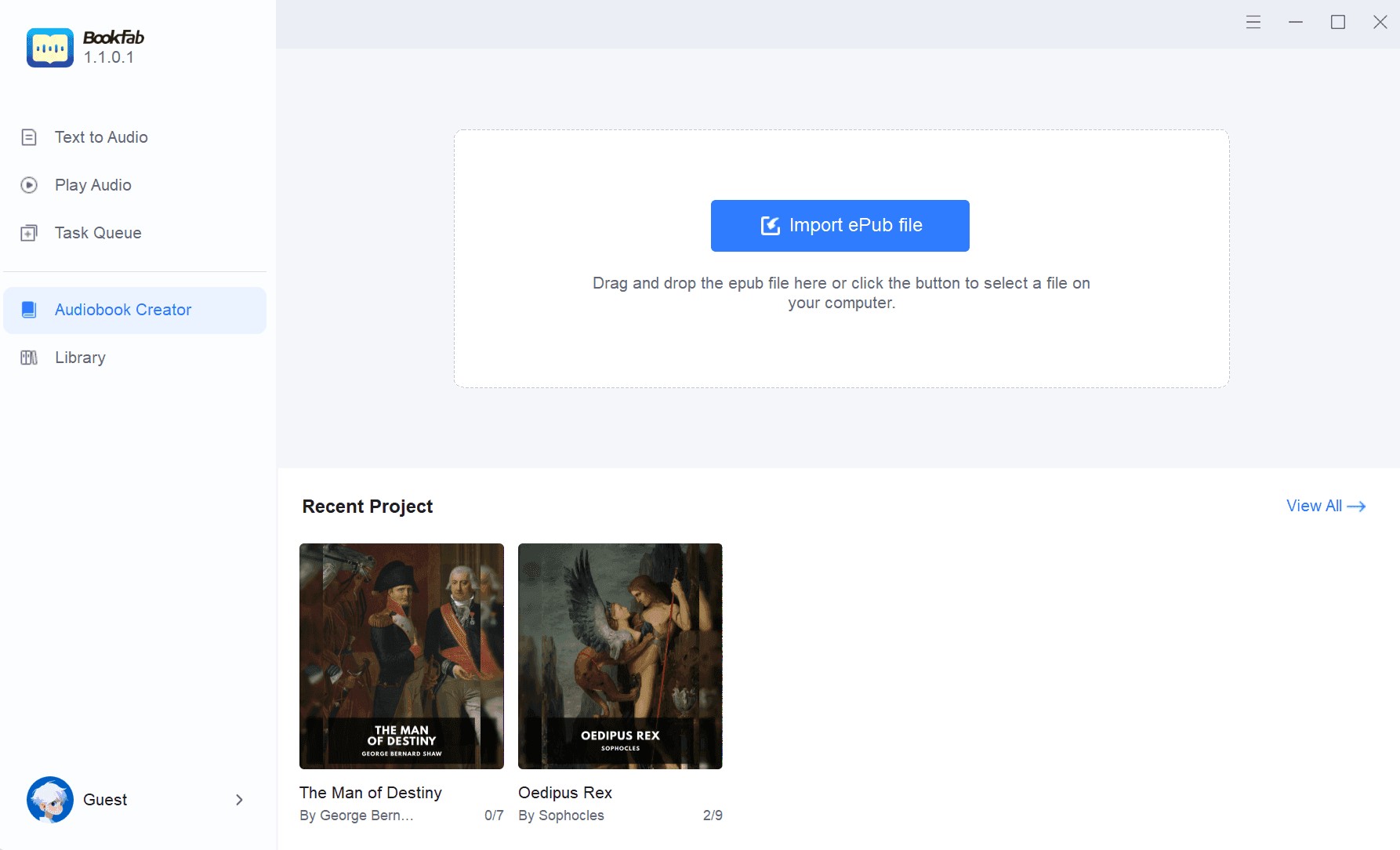
Step 2: Select the desired language and voice on the right side of the interface. You can also customize the speed, loudness, and emotional intensity settings to your liking.
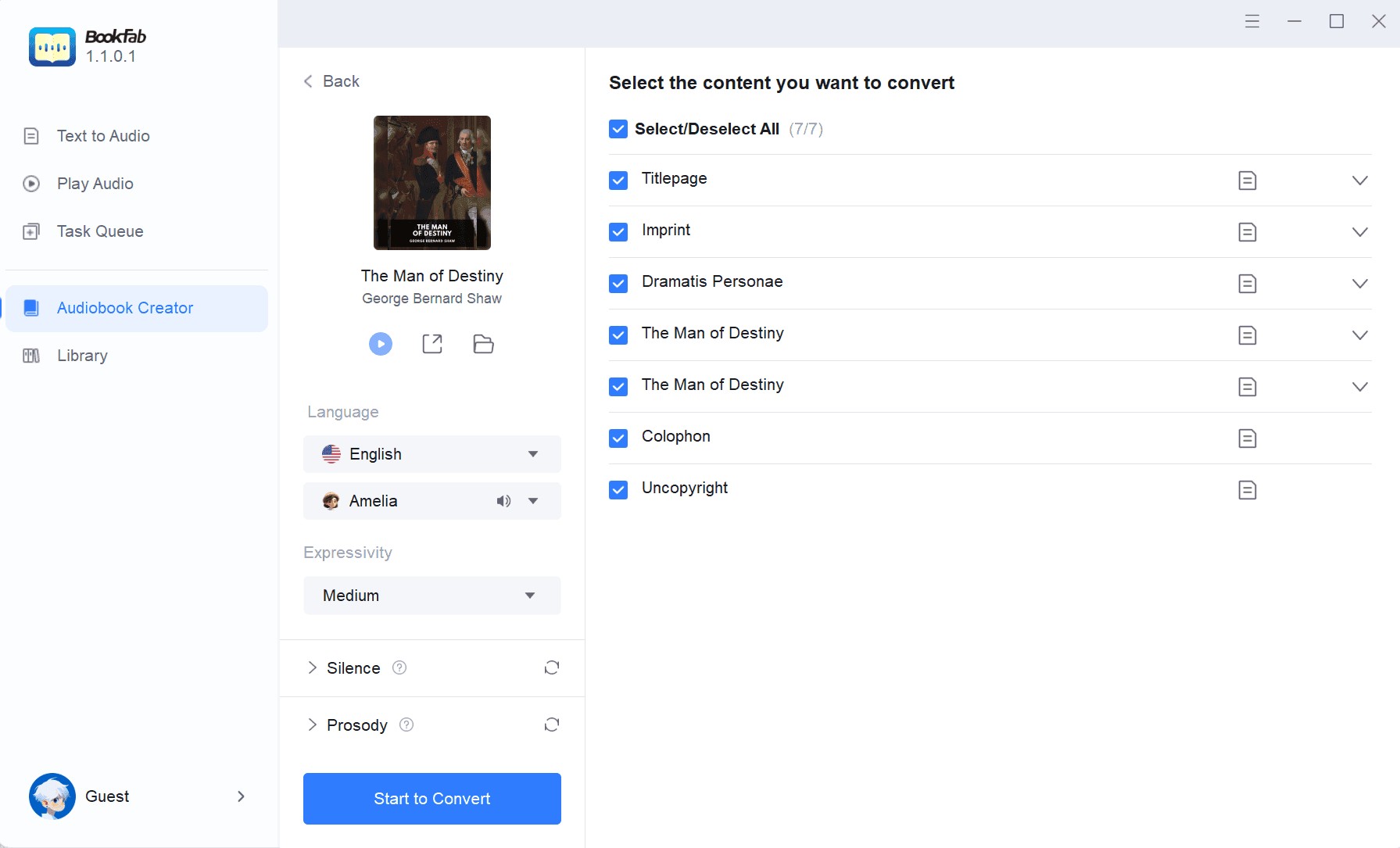
Step 3: After customizing the voice, you can click the Start to convert button. After the conversion is finished, you can play the voice online or view the downloaded audio file.

Speechify: Read an EPUB File Aloud
Speechify is another well-known text-to-speech (TTS) tool that turns written text into more natural-sounding audio. It uses artificial intelligence and supports over 60 languages and more than 200 voices, so students, professionals, and people with reading difficulties can convert ePub files to audio with less effort. It can speed up reading and also clone voices for convenience, which makes it useful for study, multitasking, and entertainment.
- Accessible on iOS, Android, Windows, Mac, and as extensions for Chrome and Microsoft Edge.
- Over 200 authentic AI voices across 60 languages.
- Translate content across languages.
- Create custom voices based on your own or other people's voices through its advanced voice generator.
- Take a picture of any page and Speechify will read it to you.
- Users have reported difficulties canceling subscriptions, with some encountering charges even during the trial period.
Detailed Guide to convert EPUB to Audiobook with Speechify
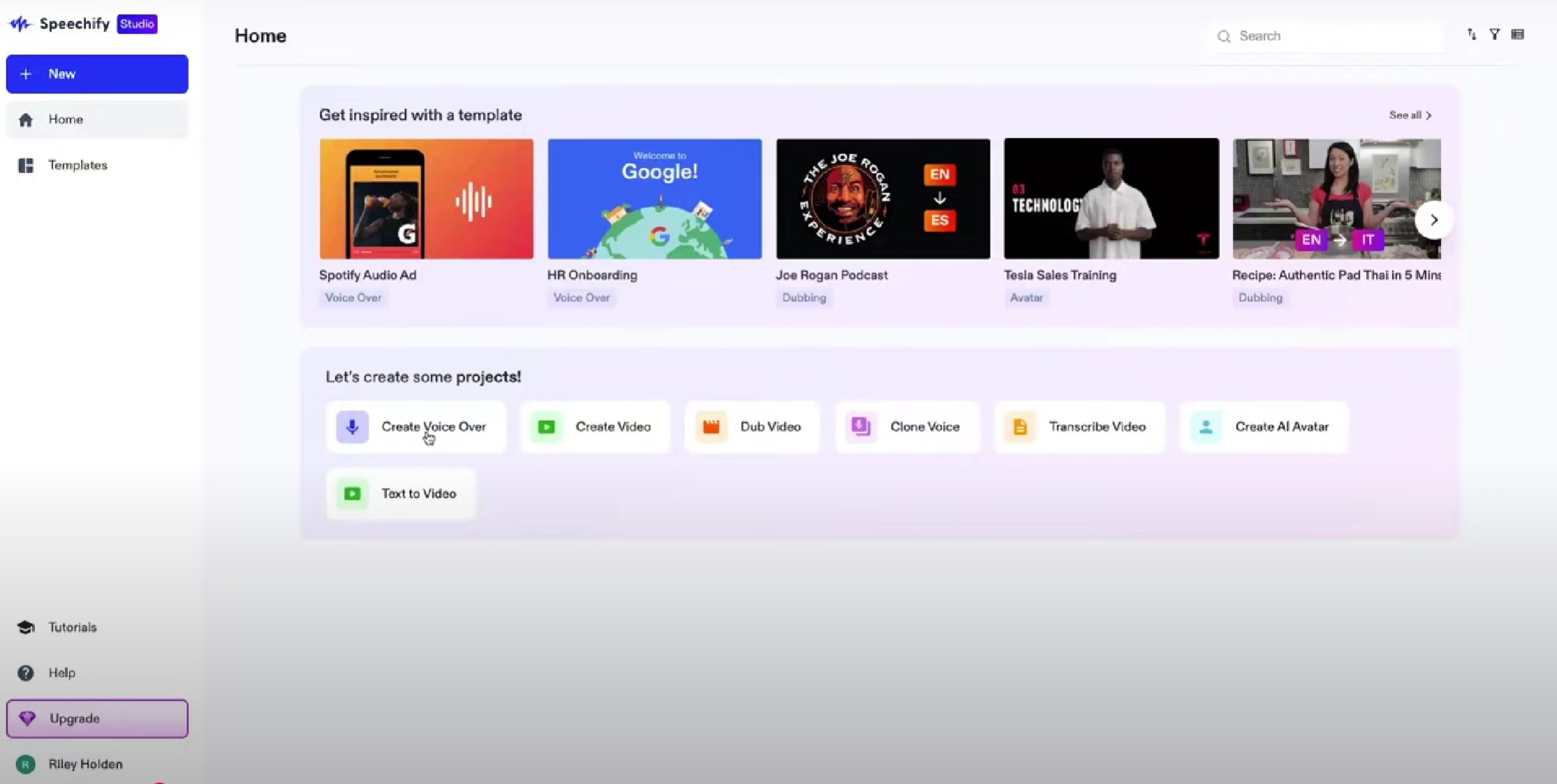
Step1: Download the Speechify app or browser extension, and sign up using email or social media accounts. Then click "create voice over" button to covert text to an audiobook.
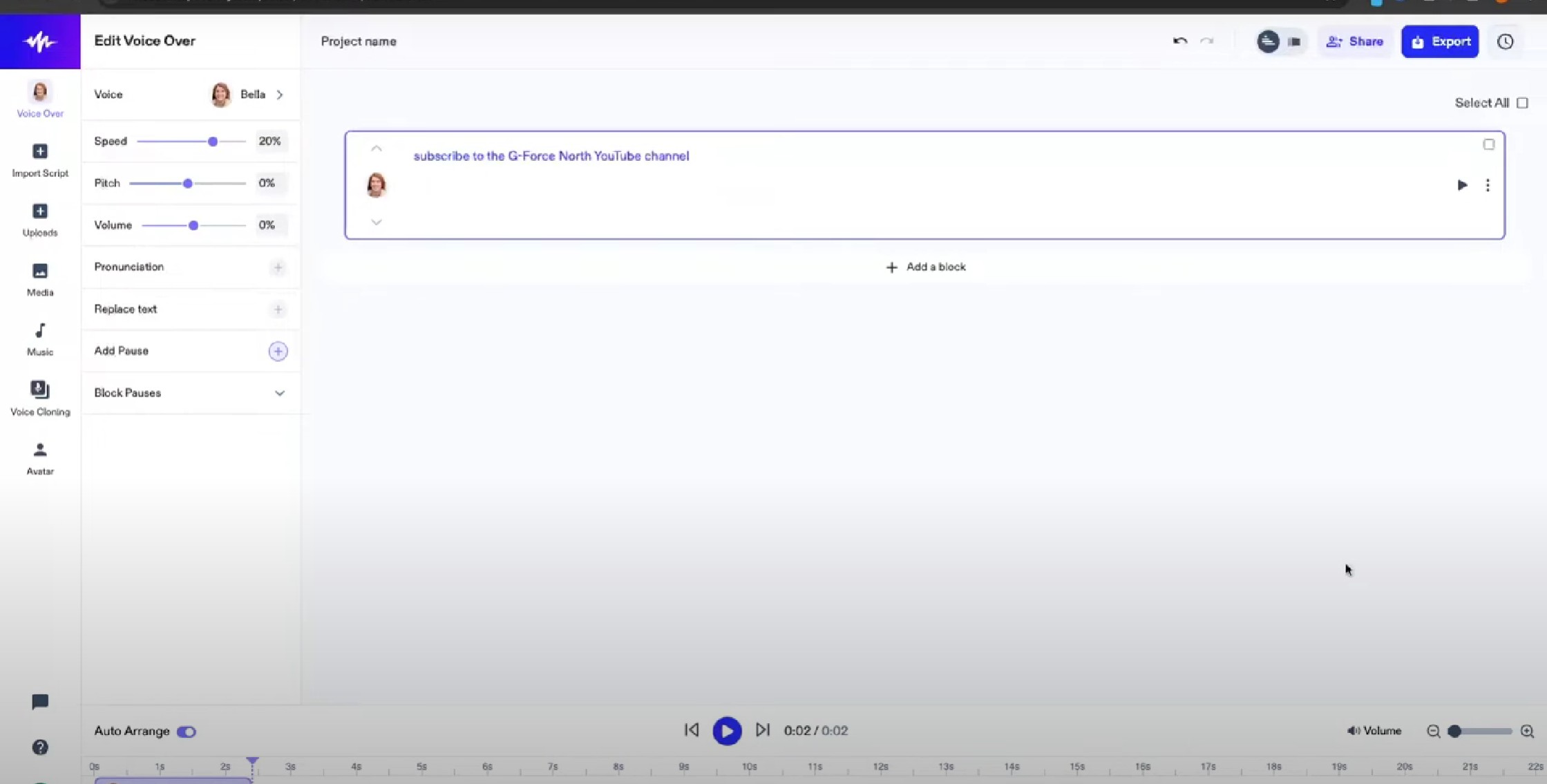
Step 2: Upload text, PDF, Word documents, or paste text directly. You can also use the camera to scan text with OCR technology. Then you can customize your voice.
Balabolka: Convert EPUB to MP3/M4B/OPUS/WAV/OGG
Balabolka is a free text-to-speech (TTS) software for Windows that converts text into spoken audio. It supports multiple file formats, including ePub, PDF, DOC, and TXT, etc., making it a versatile tool for reading various types of content aloud.
- Supports text file formats such as AZW, AZW3, CHM, DjVu, DOC, DOCX, EML, EPUB, FB2, FB3, HTML, LIT, MD, MOBI, ODP, ODS, ODT, PDB, PRC, PDF, PPT, PPTX, RTF, TCR, WPD, XLS, XLSX.
- Adjust the speech rate, pitch, and volume to suit your preferences.
- Automatically reads aloud text copied to the clipboard.
- Text is highlighted as the words are read.
- The user interface is somewhat dated and may feel less intuitive.
- Not available for macOS or mobile devices.
Step-by-step guide to convert EPUB to MP3 using Balabolka
Step 1: Get Balabolka from the official website and install it on your Windows device.
Step 2: Open a text file or paste text directly into the program.
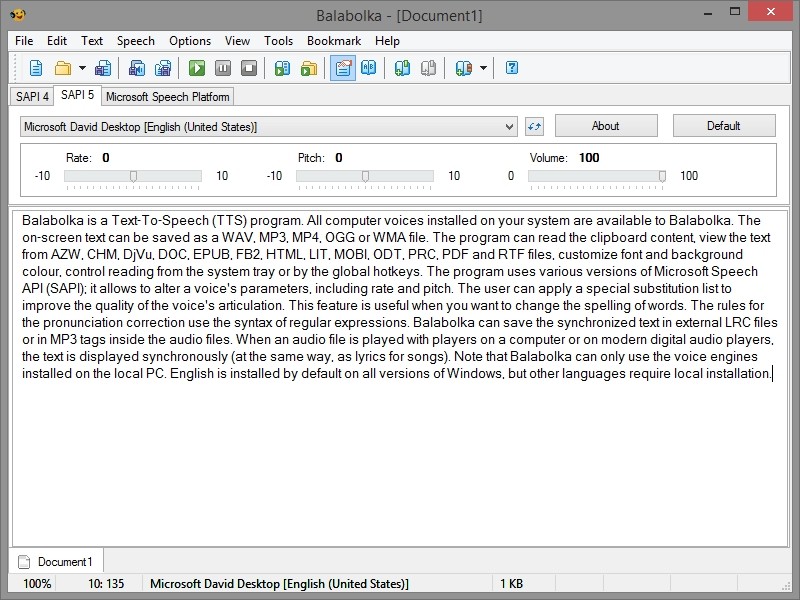
Step 3: Choose a compatible voice engine from your system or install new ones.
Step 4: Set the speech rate, pitch, and volume as desired according to your habits.
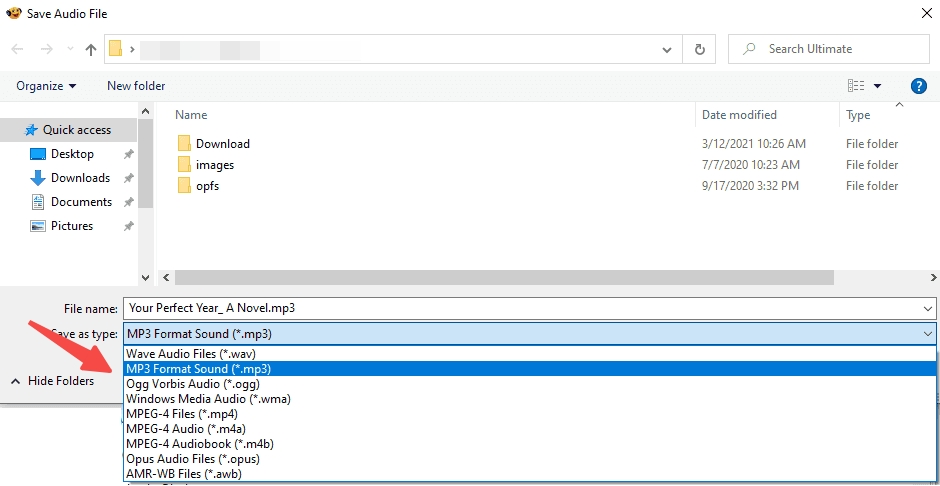
Step 5: Click "Play" to listen immediately or "Save Audio File" to export the text as an audio file.
Narakeet: Convert EPUB to MP3/WAV/M4A
Narakeet's text-to-speech feature lets users create audio files that sound more natural in a short time. It works well for marketing, education, and content creation because it supports many languages and voice styles. With support for 100 languages, users can choose the option that fits their text-to-speech needs.
- Narakeet supports 100 languages, allowing users to choose the suitable language for their TTS needs
- With 700 voices available, you can select from various vocal styles and tones to meet specific project requirements
- Simply input text, and Narakeet generates high-quality audio in just a few seconds, saving time
- Modifications to the script are easy; simply update the text, and Narakeet will automatically generate the updated audio without needing re-recording
- Supports export in various audio formats such as MP3, M4A, and WAV, making the output versatile for different use cases
- The quality and clarity of voices may vary, with some sounding less natural than others
Step-by-step guide to convert EPUB to Audiobook via Narakeet
Step 1: Prepare your EPUB files and go to Narakeet's official website.
Step 2: Click Upload File and select your EPUB eBook. Narakeet will process the content and extract the converted text.
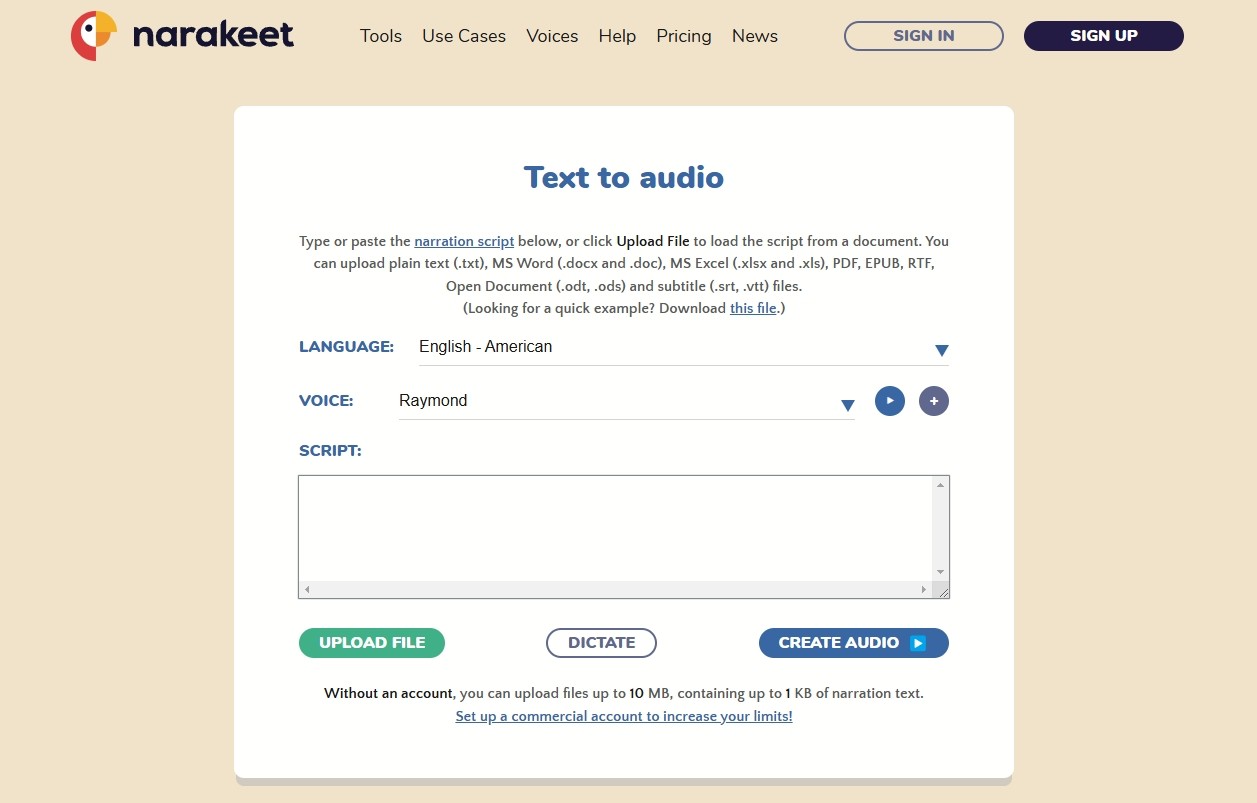
Step 3: First, select the correct language to match your text. Then, select a favorite AI voice (e.g., male or female, different accents) from Narakeet's list. Preview a few before continuing, as some voices sound more natural than others.
Step 4: Narakeet doesn't provide options like adding background music to tones, customizing narration, etc. Finally, simply click on Create Audio.
Speechelo: Convert EPUB to Audiobook
Speechelo is an advanced text-to-speech software that turns written content into realistic-sounding speech in just a few clicks. With a wide selection of voices and languages, it's an ideal tool for creating high-quality voiceovers for videos, presentations, and other content creation purposes.
- Speechelo supports over 23 languages, allowing users to easily convert text to speech in their desired language.
- It offers a variety of voices with different accents and tones, making the generated speech sound more human-like and natural.
- Users can adjust the pitch, speed, and emphasis of the voice to suit different content needs, giving them full control over the output.
- Choose from male and female voices in various accents and styles, ensuring that you find the perfect voice for your project.
- Compatible with Windows/Mac/Linux/Android
- The free version has limited features and voice options, and the full version requires a purchase.
How to convert EPUB to Audiobooks using Speechelo
Step 1: Since Speechelo cannot work directly with EPUB files, you need to extract the text first:
- Open the EPUB using Calibre or another eBook reader.
- Copy and paste the text into a text editor such as Notepad or Word.
Step 2: Visit Speechelo's official website and login. After that, open the text conversion interface.
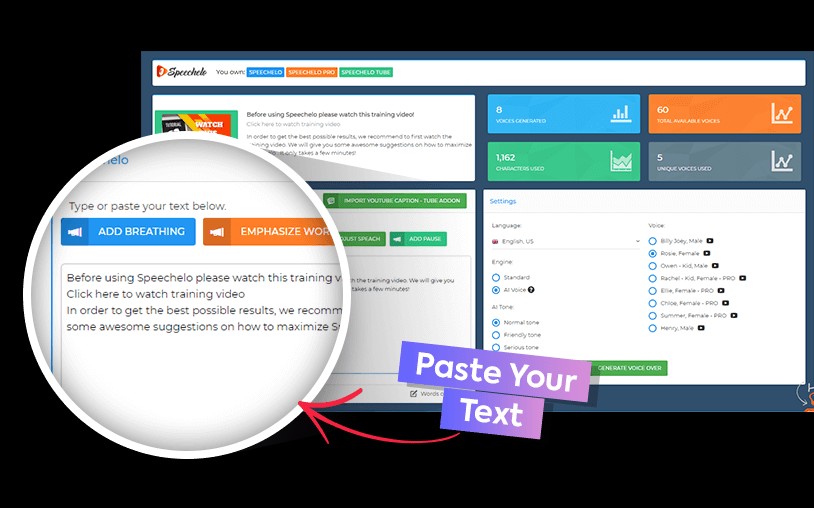
Step 3: Paste the copied content into Speechelo's text box. Select the correct language to match your text. After previewing the different voices, choose a favorite from the library. More voices and tones are available to Pro users.
Step 4: Speechelo allows customizing the narration for a more natural sound:
- Choose normal, upbeat or serious tones
- Slow down or speed up speech for better pacing
- Use punctuation or customizable pauses
Step 5: Finally, click Generate Voiceover to create the audio file.
FAQ
1. Can EPUB file be read aloud?
Absolutely! Using text-to-speech tools, you can convert EPUB ebook to audiobook effortlessly. This not only makes reading more accessible, but also provides a DRM-friendly way to enjoy your digital books.
2. Can you convert Kindle Books to audio?
Yes! With Audible narration, you can read and listen to your Kindle book at the same time with real-time text highlighting—just download the narration and tap play to get started. Or you can convert Kindle books to Audiobooks with some third-party software such as BookFab AudioBook Creator.
Conclusion
The EPUB to audiobook converter is changing how people experience books by making it possible to listen to any story. Whether you prefer a free text-to-speech tool or a paid service, this guide covers several solid options for turning EPUB files into audio. If you want a simple and convenient ePub-to-audio tool, BookFab AudioBook Creator is a practical pick. Give it a try and turn your ebook into audio.
 How to Listen to Kindle Books and Convert Them into AudiobooksBy Amber Collins - Mar 18, 2026
 6 Best Text To Speech Readers for EPUB FilesBy Amber Collins - Mar 9, 2026
 How to Convert eBooks to Audiobooks Easily with AI?By Amber Collins - Feb 24, 2026