MakeMKV Beta Key October 2026: Current Key & Purchase Status

Summary: MakeMKV's current beta key is valid until the end of October 2026, so free beta access is available again. However, permanent key purchases remain unavailable, while MakeMKV 2.0.0 is now the current Windows and Mac build. This page explains the current key status, purchase limits, safer workarounds, and when a MakeMKV alternative like DVDFab may be needed.

Table of Contents
If you tried to rip a Blu-ray with MakeMKV around the end of May 2026, you probably ran into more than one roadblock. The good news is that the official MakeMKV Beta Key has now been updated and is valid until the end of October 2026, so the free beta route is available again. [from MakeMKV Forum ]
However, the permanent licence purchase path is still unavailable, and that is where the real inconvenience begins:
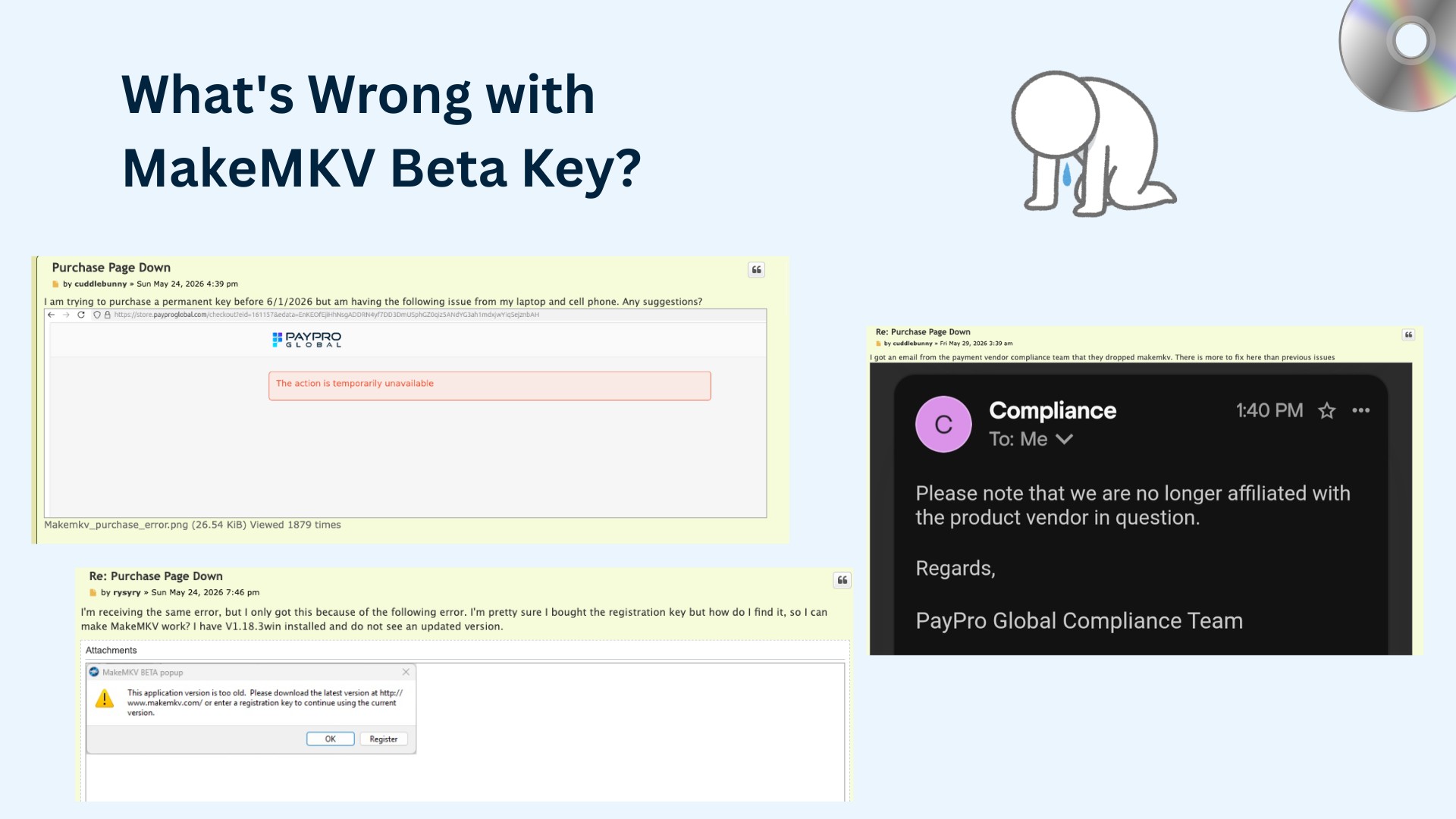
- May 24, 2026 ( Purchase Page Down ): A user found the MakeMKV purchase page failed on both laptop and mobile. Another user confirmed the issue, and a Netherlands-based VPN produced the same result.
- May 25, 2026 (PayPro Global Listing Issue): One user noted that searching for "MakeMKV" on the PayPro Global store did not return any result.
- May 29, 2026 (Payment Vendor Concern): The original poster said the vendor’s compliance team emailed that PayPro Global had dropped MakeMKV. The official purchase page now says MakeMKV cannot be purchased for the moment because of technical issues.
- June 2026 (Beta Key Updated, Purchase Still Unfixed): A new beta key is valid through July 2026. But users in the purchase thread still reported that the payment system was not working.
- June 16–17, 2026 (Temporary Site Access Issue): Reddit users reported temporary makemkv.com access problems, including slow loading and DNS/server errors. The site became accessible again on June 17, but the official purchase page still says MakeMKV cannot be purchased for the moment.
- August 2026 (Beta Key Updated, Purchase Still Unfixed): The current beta key is valid through September 2026. The official purchase page still says MakeMKV cannot be purchased for the moment, and Reddit users reported that makemkv.com was slow or unavailable again in early August while the forum remained accessible for some users.
- September 2, 2026 (Website Back Online, Purchase Still Unavailable): After several weeks of intermittent access problems, the official MakeMKV website came back online. Temporary download links shared on the MakeMKV forum were removed, but the permanent license purchase option remains unavailable. [from MakeMKV Forum ]
As of October 8, 2026, the previous beta key expired at the end of September, and the current key is valid through October 2026. MakeMKV 2.0.0 is now the current Windows and Mac build, while the permanent license purchase option remains unavailable. That is why this guide starts with a backup option, then explains the current beta key, registration steps, purchase status, and safer alternatives to cracked keys.
MakeMKV Beta Key Stops Working: Best Alternative
DVDFab All-In-One - Stable Alternative to MakeMKV
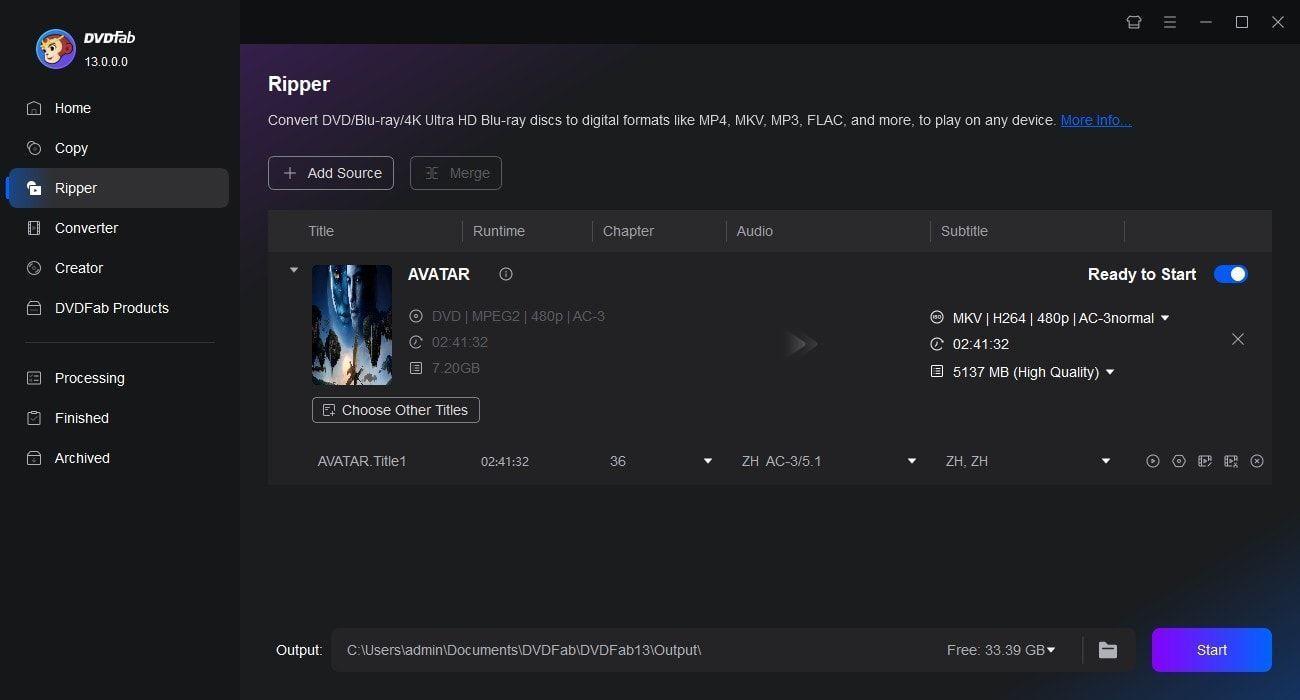
I've kept a DVDFab licence in my toolbox for years. The company debuted in 2003, and its performance and customer service have stayed rock-solid for more than two decades. The current DVDFab All-In-One includes 28 modules - ripper, copier, creator, Cinavia-removal and more - covering every DVD, Blu-ray and UHD task in a single interface.
💡If MakeMKV's single-purpose ripper is down or blocked by drive/key issues, DVDFab All-In-One meets the same core need - lossless disc-to-MKV extraction - and then goes much further.
- Remove modern DVD, Blu-ray and UHD copy protection (CSS, AACS, BD+ & more).
- Keep updates to support the newly released discs.
- 1:1 pass-through ripping DVD, Blu-ray or 4K UHD straight into MKV/MP4/M2TS.
- Rip discs to MKV, MP4, AVI, MP3,and other 1000+ video and audio formats.
- Copy disc-to-disc or save ISOs/folders straight to your hard drive.
- Burn 200 + video formats back to DVD, Blu-ray or UHD, ISO or folder.
- Convert freely between DVD, Blu-ray and UHD with one click.
- Back-up at up to 50× GPU-accelerated speed to save time on large disc sets.
- AI video enhancement & Cinavia removal for cleaner images and audio.
The biggest new advantage for UHD users is drive support. Pioneer drives have always been a hot topic in the MakeMKV community, especially when newer firmware limits LibreDrive or UHD access. DVDFab has now expanded UHD Drive Tool support for Pioneer drives : most supported models can work directly, while selected legacy Pioneer models can use UHD Drive Tool to downgrade or cross-flash compatible firmware, unlocking 4K UHD discs for UHD Copy and UHD Ripper.
Unlike MakeMKV, DVDFab ships monthly feature updates and sports a modern UI. A 30-day free-trial lets you test every module with virtually no functional limits before deciding whether to licence individual components or the complete suite.
💻For Windows:
💻For Mac:
Other Solutions from Reddit and MakeMKV Forums
💡System-Date Rollback Trick – how some users keep ripping while waiting
I keep this hack in my back pocket: set your system clock to a date when the expired key was still valid, start MakeMKV, then reset the clock. This may temporarily let MakeMKV accept an expired key, but results vary by version and setup. Free and simple, but it can confuse scheduled tasks or cloud log-ins, so treat it as a one-off workaround—don't leave your machine permanently back-dated.
💡Unofficial Mirrors for Older Keys – risks & legality caveats
Reddit links to older Beta Keys or pre-patched configs pop up fast, but they come from unknown uploaders and violate MakeMKV's EULA. Malware and DMCA headaches aren't worth the gamble, so I steer clear and recommend you do the same.
Free MakeMKV Beta Key Update for October 2026
A MakeMKV Beta Key allows users to access MakeMKV's full beta functionality for a limited period. The public beta key expires periodically, so you need to enter the most recent key from the official MakeMKV forum when the previous one stops working.
💡In general, users will visit the following forum to get the latest beta key.
https://forum.makemkv.com/forum/viewtopic.php?t=1053

The latest MakeMKV Beta Key for October 2026:
T-FhKUP7U0g2k9sVIdbNMVYG1CnQsSHopIqtD7azYy0rhS@NXEs2Y_WQ7@nqKZiIRkh7
This key is valid until the end of October 2026.
💡You can also browse this website to see if it has the information you need.
https://cable.ayra.ch/makemkv/
How to Register with the MakeMKV Beta Code
Follow these steps to register the MakeMKV with the acquired beta code.
Step 1: Download MakeMKV from the official website. The current Windows and Mac build listed on the download page is MakeMKV 2.0.0. [from MakeMKV Download Page ]
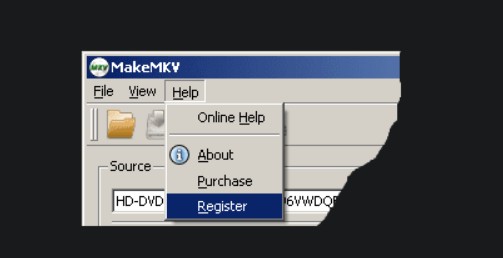
Step 2: Open the MakeMKV software, then select the "Register" button from the MakeMKV program "Help" menu and enter the registration code. Registration unlocks the features of MakeMKV.
What to Do When Your MakeMKV Beta Key Expires
If your MakeMKV beta key is no longer valid, the following methods can help you get the software working again.
- Check for the Latest Beta Key
MakeMKV beta keys are updated regularly. When the software reports that the key has expired, go to the official MakeMKV forum and look for the most recent code posted by the developer.
- Change Your System Date
A temporary workaround is to set your computer's date to a day before the key expired. This does not fix the issue permanently but can keep the program running long enough to finish a task.
- Reinstall the Program
Installing the newest version of MakeMKV usually refreshes the beta period. Remove your current installation, download the latest build, and activate it with the updated key.
- Purchase a Lifetime Key
If you want stable access without dealing with expiring beta codes, consider purchasing the full registration key once MakeMKV restores its official purchase option.
Permanent Paid MakeMKV Registration Code
MakeMKV allows free DVD conversions without time limits, while Blu-ray ripping is shareware functionality that requires either an active trial, the current beta key, or a paid registration key. A paid MakeMKV registration key does not expire and has no subscription fee. However, the official purchase page currently says MakeMKV cannot be purchased for the moment because of technical issues.
However, the official purchase option is still unavailable in October 2026. Because of that, the purchase steps below should be read as the normal process when the official order page is available, not as a guarantee that checkout will work every time.
How to Buy & Activate MakeMKV Registration Key
Step 1: Purchase the License
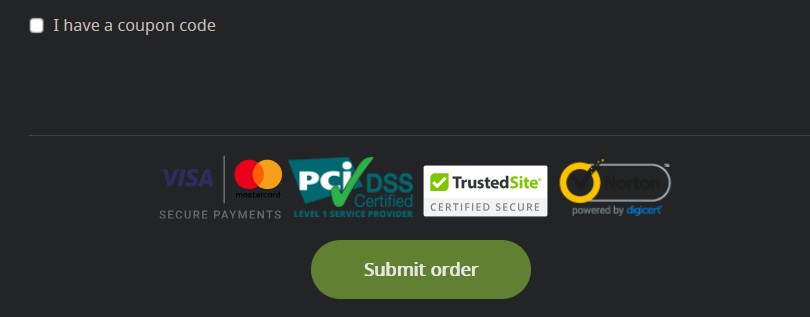
Visit the MakeMKV purchase page and follow the link to the order form. Fill in the required details. If you have a valid discount code, enter it in the coupon field and apply it before submitting the order.
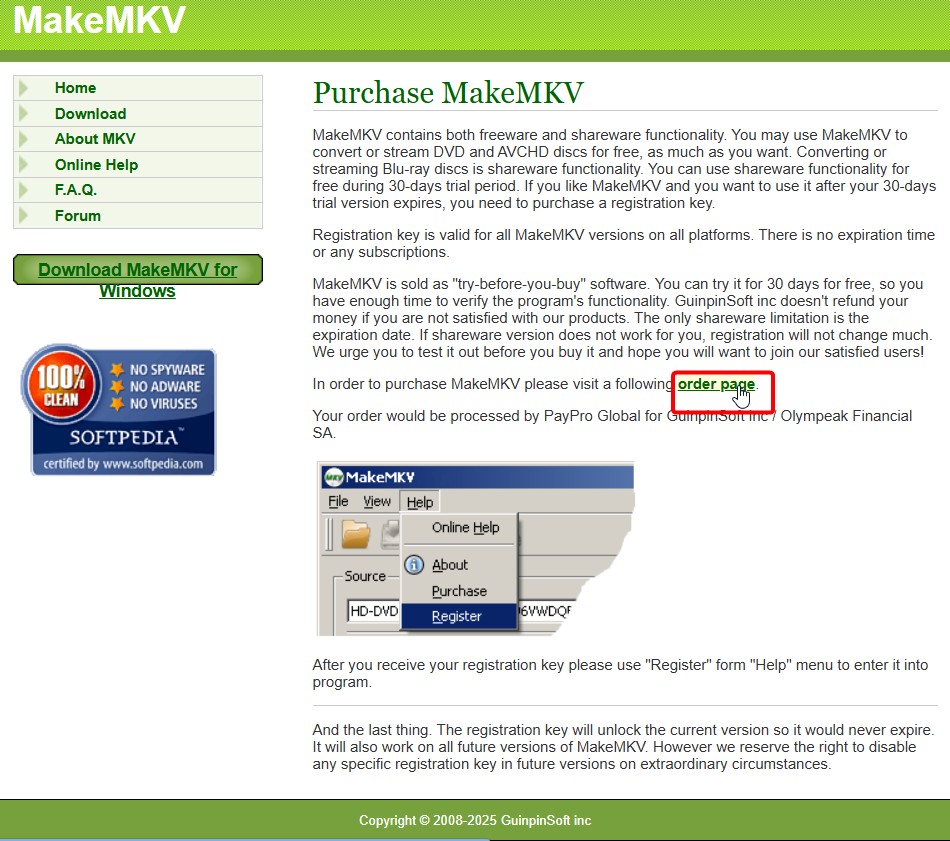
After payment is completed, MakeMKV sends the registration key to the email address you provided. Keep this email because the key is required for activation and future reinstalls.
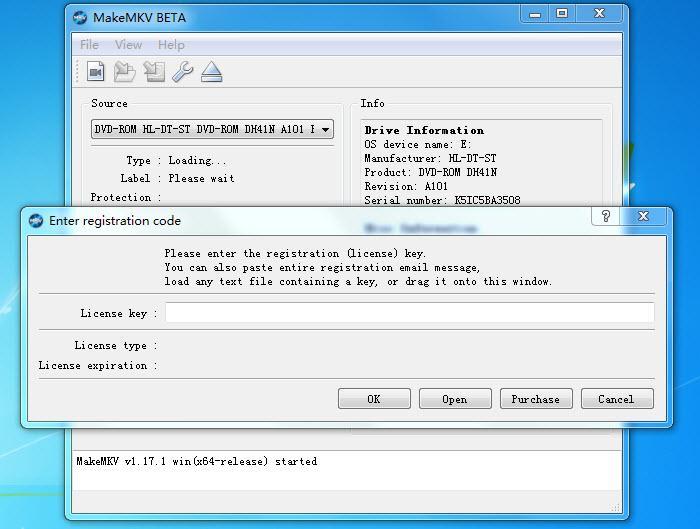
Step 2: Activate MakeMKV
Launch the software on your computer. Click the "Help" button in the top menu, then select "Register" from the drop-down list. Then, enter your MakeMKV license key in the designated field and click "OK". The software switches to the full version and Blu-ray ripping remains available without further time limits.
Fixing MakeMKV Registration Key Issues
💡If you are facing issues when registering MakeMKV with the registration key, try the solutions below.
- Remove hidden spaces. Paste the key into a plain-text editor first, then copy it into MakeMKV again.
- Use the right key type. A beta key and a paid registration key are entered in the same registration window, but they are not the same thing.
- Check the software version. If the program says the version is too old, install the current MakeMKV build and try again.
- Search the original order email. If a paid key was already purchased, search for the PayPro Global or MakeMKV order email before buying again.
- Be careful with purchase-page errors. The official MakeMKV purchase page currently says new purchases are unavailable because of technical issues, so a failed checkout does not always mean the computer or card is the problem. [from MakeMKV Forum ]
- Use a temporary alternative if the job cannot wait. If the official purchase path is unavailable and the beta key does not work for the setup, a stable alternative like DVDFab can keep the disc task moving.
Should You Use MakeMKV Crack Registration Keys
No. MakeMKV crack registration keys, patched installers, and key lists copied from unknown pages are not worth using. They are not needed while the official beta key is available, and they add risks such as old keys, malware, modified installers, broken updates, and possible system problems.
There are safer ways to handle the same need:
- Use the current beta key from the official MakeMKV forum.
- Buy a paid registration key when the official order page is working.
- Use DVDFab or another legitimate tool if MakeMKV does not meet the output or timing needed.
- Use a converter such as HandBrake after MakeMKV if the only problem is changing MKV to MP4.
Safer Alternatives to Crack Keys
If MakeMKV cannot be activated, cracks should still be avoided. The safer order is: official beta key first, paid MakeMKV key when checkout works, and a clean alternative tool if neither path fits the job.
For example, DVDFab is a better fit when the task requires ripping a disc to MP4, saving an ISO or folder, compressing a large Blu-ray, or processing several discs with more output control. That is a cleaner path than trusting a random serial number.
How to Use MakeMKV After Registration
MakeMKV requires very little setup. After activating your license, you can follow these steps to begin ripping discs.
Step 1: Load the Disc
Insert a DVD, Blu-ray, or UHD disc into your optical drive. Open MakeMKV and wait for the software to read the disc. When the disc is recognized, the main window will show available titles, along with their audio and subtitle tracks. If nothing appears, closing and reopening the program usually forces a new scan.
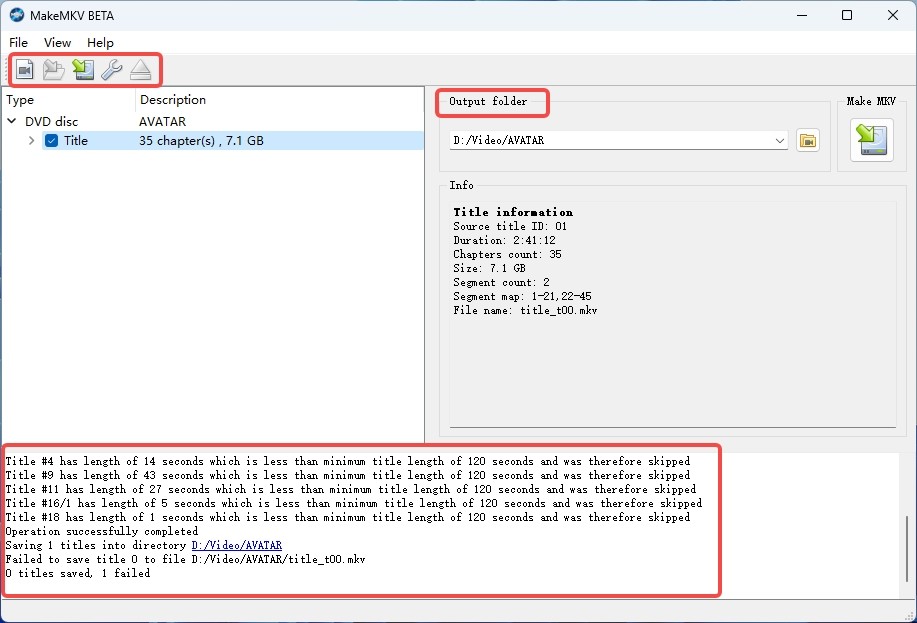
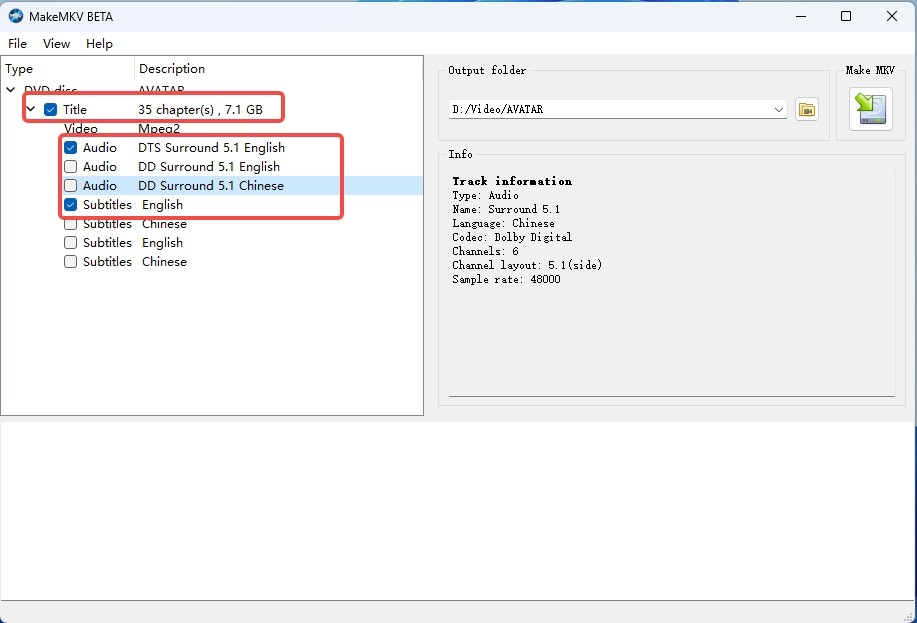
Step 2: Select Titles and Set Output
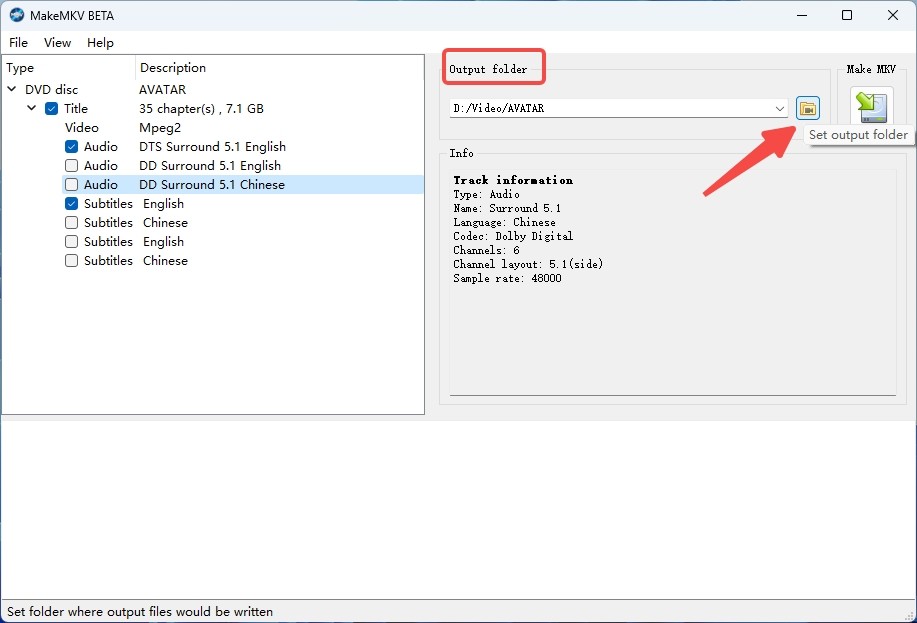
Select the titles and tracks you want to rip, and uncheck any extraneous items to conserve space. To specify the location where the ripped files should be saved, click the folder icon.
Step 3: Start Ripping
Click the "Make MKV" button to begin the ripping process. Ripping speed depends on the disc type and the drive’s read rate. A full-length Blu-ray typically takes longer than a standard DVD.
- Only MKV output is supported. If you need MP4 or another format, you must use a second tool such as HandBrake.
- Title detection is not always accurate. Some discs, including TV seasons and certain Blu-ray releases, use playlist obfuscation, so you may need to identify the main title manually.
- Registration issues can occur. When the license is not accepted or expires unexpectedly, Blu-ray ripping becomes unavailable until the key is updated or replaced.
FAQs
Is makemkv.com down on June 16, 2026?
Is MakeMKV down? It was unavailable or unstable for many users on June 16, 2026. Reddit users reported slow loading, DNS errors, “server can’t be found” messages, and domain-resolution problems, while some users in other locations could still reach the site. Users reported that the site was accessible again on June 17, so the incident appears to have been temporary rather than a confirmed shutdown. After another period of intermittent access in July and August, the official website came back online again on September 2, 2026.
Is the MakeMKV Beta Key updated for October 2026?
Yes. The current MakeMKV Beta Key is valid until the end of October 2026. Check the official MakeMKV key thread before using an older code.
Are old MakeMKV beta keys from August 2025 or early 2026 still valid?
Expired MakeMKV beta keys are no longer valid and should be replaced with the current key from the official forum. A legitimate paid MakeMKV registration key is different: the official purchase page says paid registration keys do not expire.
How much does MakeMKV cost in 2026?
MakeMKV's paid registration key is a lifetime license rather than a subscription. Forum guidance in May 2026 described the price as generally equivalent to USD 60 plus applicable taxes, but the official purchase page currently says MakeMKV cannot be purchased, so a live checkout price cannot be confirmed.
Is there a working MakeMKV coupon code?
There is no reliable MakeMKV coupon path while official purchases are unavailable. Be careful with third-party coupon pages or key sellers, because they cannot confirm a valid official checkout while MakeMKV itself is not accepting purchases.
Can I still buy a MakeMKV permanent key?
No, not through the official purchase page at the moment. MakeMKV currently says purchases are temporarily unavailable because of technical issues and directs users to the current beta key instead.
Why does the PayPro Global checkout fail?
MakeMKV has not published a detailed explanation for the checkout problem. The official purchase page says purchases are temporarily unavailable because of technical issues, while forum users reported PayPro Global checkout and listing problems in late May 2026. Until official sales resume, use the current beta key.
Conclusion
MakeMKV is still usable when the official beta key is valid, and the current key is valid until the end of October 2026. Start with the official key thread, the latest MakeMKV 2.0.0 download, and the normal registration window before trying anything else.
The weak spot right now is the permanent purchase option. The official MakeMKV website came back online on September 2 after several weeks of intermittent access problems, but users still cannot buy a new permanent license through the normal purchase flow. If MakeMKV works for an MKV backup task, there is no need to switch. If the task needs MP4, compression, ISO/folder output, batch processing, or a cleaner paid path, DVDFab is a practical alternative to keep ready.