
Is MakeMKV Down? Intermittent Site Access, Buying Still Unavailable [October 2026]

Summary: MakeMKV went through several access problems between June and August 2026, but the official website came back online on September 2. The official download page currently provides MakeMKV 2.0.0, and the current beta key is valid until the end of October 2026, while permanent license purchases remain unavailable. Use official MakeMKV sources when accessible and avoid unverified sellers, mirrors, or payment pages.
Table of Contents
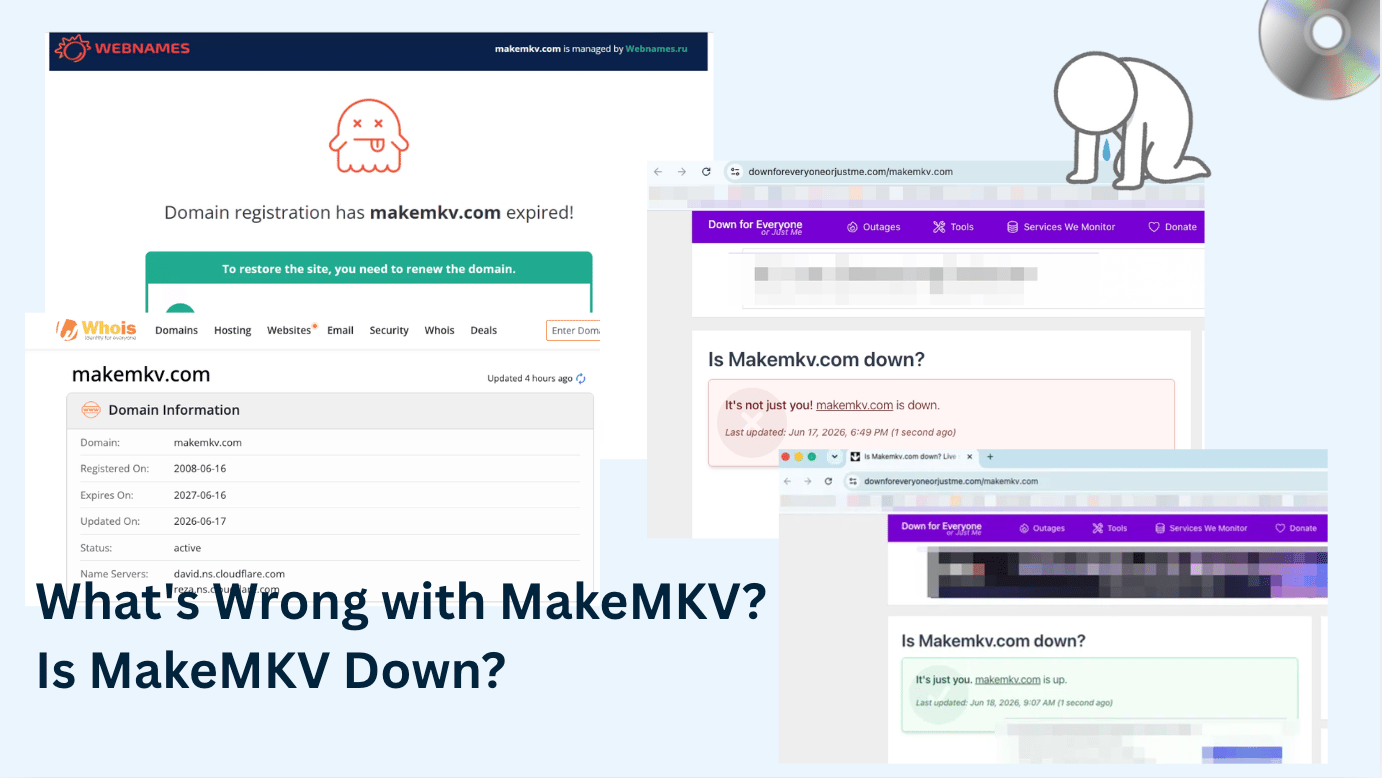
I have used MakeMKV for years, so this was not just a random status check for me. When I tried to open makemkv.com on June 16, 2026, Chrome returned DNS_PROBE_FINISHED_NXDOMAIN for this domain. Reddit users were also discussing a WHOIS style record showing MAKEMKV.COM with a Registry Expiry Date of 2026-06-16.
After several rounds of access problems between June and August 2026, MakeMKV's website returned in September, but access can still vary by page. The official download page currently provides MakeMKV 2.0.0, while the permanent purchase option remains unavailable. The current MakeMKV beta key is valid until the end of October 2026. The update below keeps the earlier outages as historical context and reflects the latest site, version, key, and purchase status.
Is MakeMKV Down Right Now? Latest Site, Forum, and Purchase Status
No. MakeMKV is back online as of October 2026. The June 16–17 domain/DNS issue was followed by another period of unstable access in July and August, but the official website returned on September 2. The main unresolved issue is the purchase option: the official purchase page is accessible, but users still cannot buy a new MakeMKV registration key as of October 2026.
Author's Check: What I Saw on June 17, 2026
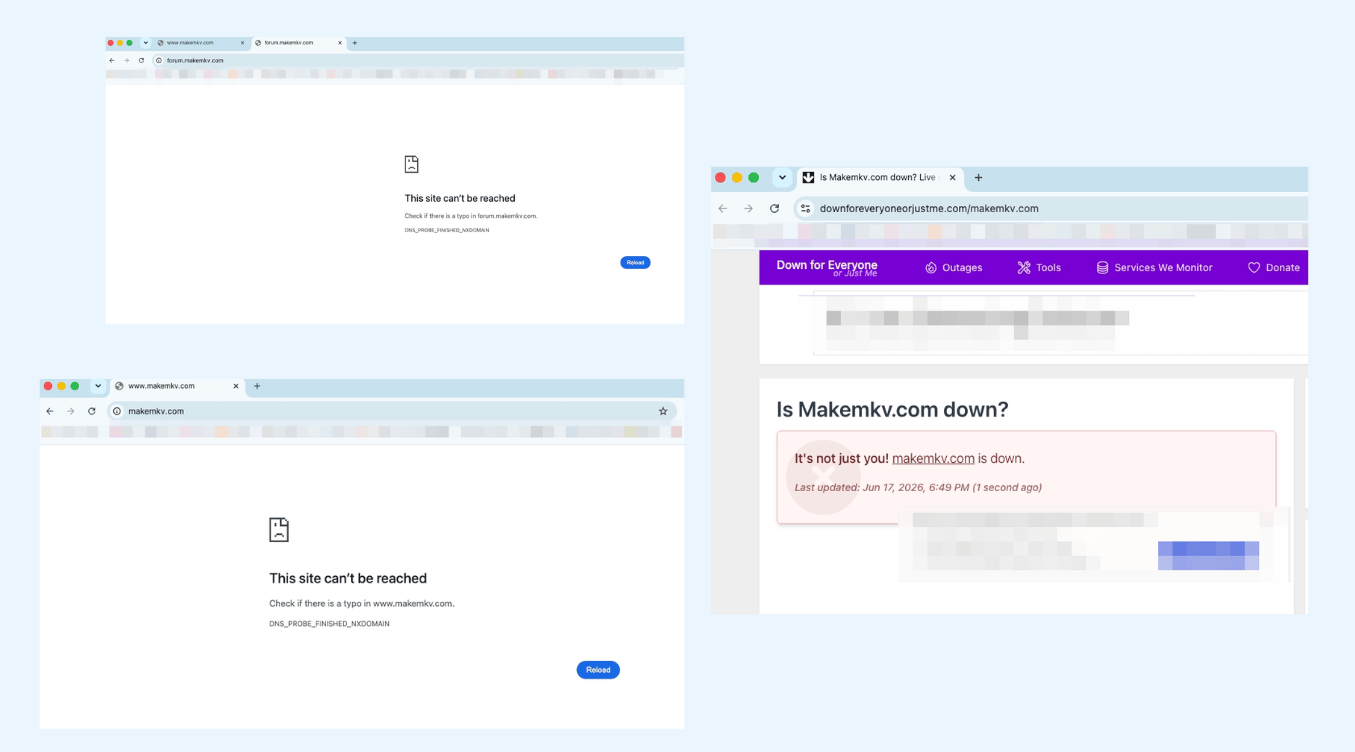
During my own check on June 17, 2026, both the official website and the forum failed to resolve in Chrome:
| Page I tested | Result I saw | What it suggests |
|---|---|---|
| www.makemkv.com | DNS_PROBE_FINISHED_NXDOMAIN | The domain did not resolve from my connection |
| forum.makemkv.com | DNS_PROBE_FINISHED_NXDOMAIN | The forum was also unreachable from my connection |
| Down for Everyone or Just Me | Screenshot showed "It's not just you! makemkv.com is down" | At least one external status checker also saw a failure in my screenshot |
This is my access result and one status-check screenshot, not a permanent global verdict. DNS cache, region, VPN, ISP routing, and domain-renewal propagation can make one user see NXDOMAIN while another user still reaches a cached or working route.
What Has Recovered and What Still Has Not
The current status is more stable than it was during the July and August outages. In late July and early August 2026, Reddit users again reported that the main site was unavailable or very slow, while the forum or download route could still work for some users at different times. On September 2, 2026, the official website and download page are back online. As of October 8, the official download page currently works and lists MakeMKV 2.0.0 for Windows and Mac. The remaining problem is the purchase option: the official purchase page is accessible but still says new registrations cannot be purchased for the moment. The current beta key remains available for temporary access.
| Page checked | Latest result in August | Latest result in October | What to note |
|---|---|---|---|
| makemkv.com | Intermittent / recently reported down | Back online | The official homepage returned on September 2 after the extended access problems. |
| makemkv.com/download/ | Availability varies | Loads | The official page currently lists MakeMKV 2.0.0 for Windows and Mac. |
| forum.makemkv.com | Availability varies | Accessible | The forum may remain reachable when the main site is unavailable and is still used for beta keys, Linux information, and support posts. |
| makemkv.com/buy/ | Purchase unavailable | Loads, but purchase is unavailable | The page is accessible, but new registration keys still cannot be purchased. |
What Reddit Users Reported and Worried About
The most direct Reddit thread began with a user trying to access the official MakeMKV site to get the latest build, only to find that the page would not load. The same thread quickly shifted from a simple "is it down?" question to bigger concerns about takedown risk, slow access, DNS failures, and domain-expiry behavior. [from Reddit: Is makemkv.com down for anyone else?]
- September 30–October 1, 2026 — September Beta Key Expired / October Key Released: The September beta key expired at the end of the month. The current key now runs through the end of October 2026, while users still report that a permanent key cannot be purchased.
- September 2, 2026 — Website Back Online: The official MakeMKV website returned after the extended outage. The temporary download links shared on the MakeMKV forum were removed, and users were directed back to the official site. The permanent license purchase option, however, remained unavailable.
- Late July–early August recurrence: Users again reported makemkv.com as unavailable, very slow, or repeatedly going up and down. On August 8, a new user still described the main site as down while looking for a reliable installer source. [from Reddit: MakeMKV Website and Reddit: Can I Download/Install MakeMKV?]
- Domain expiry: Reddit users discussed a WHOIS-style record showing Registry Expiry Date: 2026-06-16 for MAKEMKV.COM. [from Reddit: Oh noes]
- Possible takedown: Some users worried that the official site might have been removed, but no official shutdown notice was available in the discussions I reviewed.
- makemkv.info: Some comments mentioned a possible redirect or new domain, but this should be treated as unconfirmed unless MakeMKV verifies it.
- Forum access: The forum matters because users rely on it for the beta key, Linux build information, UHD/LibreDrive posts, and disc-specific support.
- Purchase access: The official purchase flow remains unavailable. MakeMKV's purchase notice says users cannot purchase MakeMKV for the moment and should use the current beta key instead. [from MakeMKV Purchase Page]
- Download trust: Users asked whether Archive uploads, torrents, Linux packages, AUR/Flatpak builds, or other mirrors could be verified.
In the same Reddit site-down thread, users reported different results: some saw very slow loading, some saw "server can't be found," and some said the site worked for them. One user also reported seeing a Russian domain-expired page and connected it to the June 16, 2026 domain date. [from Reddit site-down discussion]
A later July 28 discussion showed that the access problem had returned: users described the site as completely down for several days, very slow, or intermittently available. On August 2 and August 8, users were still asking how to download MakeMKV while the main site was down, which indicates the problem was recurring rather than limited to the June incident. [from Reddit: MakeMKV Website and Reddit: Can I Download/Install MakeMKV?]
The MakeMKV torrent discussion added another angle. Users were not only asking for a random torrent file; the stronger concern was whether a backup download could be developer-endorsed, community-seeded, and hash-verifiable. [from Reddit: MakeMKV torrent]

MakeMKV Review: Is It Still Worth Using in 2026?
MakeMKV is still worth using when the official download path and beta key access are working, especially if your goal is to create MKV backups from discs you own or have permission to copy. The June 2026 access problem does not erase what MakeMKV does well, but it does expose the weak parts around download access, forum dependence, beta keys, purchase availability, and source verification.
What I Still Like About MakeMKV
Many MakeMKV users still choose it because it turns DVDs and Blu-rays into MKV files without forcing a full re-encode. For my own discs, its appeal is simple: it creates MKV backups that are easy to store, organize, and play in a local media library.
- It creates MKV files that work well for local media libraries such as Plex or Jellyfin.
- It can preserve multiple video, audio, subtitle, and chapter tracks.
- It is direct when the official download page and beta key route are available.
- Its forum has years of disc, drive, UHD, and LibreDrive discussions.
The official download page currently lists MakeMKV 2.0.0 for Windows and Mac, Linux availability through the forum page, hash-file checking, and beta-version restrictions. MakeMKV 2.0.0 was released on September 20, 2026, with a version bump, small improvements, and bug fixes. [from MakeMKV Download Page]
MakeMKV Alternatives While Waiting for an Official Response
Now the weak point is not only the MakeMKV app. The weak point is the setup chain around it: the official site, forum, beta key page, download availability, purchase availability, and the trust problem that appears when users start searching for mirrors.
While waiting for the purchase flow to recover, I suggest trying alternative tools such as HandBrake and DVDFab if you urgently need to back up your discs. HandBrake is familiar to many users and can rip disc sources without copy protection into MP4 and MKV formats. I used it often to compress the large MKV files generated by MakeMKV.
DVDFab is also a tool I use frequently, especially for disc sources with the latest copy protection that MakeMKV cannot handle, or when I need more output formats and personalized settings. Its Ripper module can convert DVDs, Blu-rays, and 4K discs to formats such as MP4, MKV, AVI, MP3, WAV, and FLAC, with profile and advanced settings for format, codec, resolution, quality, and subtitles. In addition to disc ripping, DVDFab also includes multiple modules for disc copying, disc burning, 4K backup, 4K drive downgrading, and other related tasks. These features cover many of the same core use cases as MakeMKV while offering more output control. I like DVDFab not only for its rich features and stable performance, but also because it has been updated for over 20 years and offers a professional support team, which gives me more confidence when handling important disc backup tasks.
💡MakeMKV vs HandBrake & MakeMKV vs DVDFab:
| Need | MakeMKV | HandBrake | DVDFab DVD/Blu-ray Ripper |
|---|---|---|---|
| Main role | Disc to MKV backup | Video transcoding | Disc ripping and conversion |
| Main output | MKV | MP4, MKV, WebM | MP4, MKV, and other video/audio formats |
| Forum or beta-key dependence | MakeMKV users may need the forum for beta key, Linux, and disc-specific help | No MakeMKV beta key needed | Does not rely on the MakeMKV forum or MakeMKV beta key |
| Purchase path | Buying is currently unavailable through the official purchase flow | Not a MakeMKV purchase path | Separate paid product path |
| File size control | Limited unless you use another tool after ripping | Stronger for transcoding existing videos | Built-in format and compression choices |
| Protected disc handling | Support some basic copy protection | NO | Support most old and new DVD/Blu-ray copy protection |
| Better fit for | Users who want MKV backups and can manage beta keys | Users who already have a video file and need MP4/MKV/WebM output | Users who need decryption. ripping, conversion, compression, or a professional support path |
Should You Download MakeMKV from a Torrent, Archive, or Mirror?
No, not as your first choice. The official MakeMKV download page is currently available and should remain the first choice for MakeMKV 2.0.0. Other parts of the site may still be intermittently unavailable, but that does not make random torrents, repacks, or mirrors safer.
Why Users Are Asking for a MakeMKV Torrent
Users are asking about torrents and mirrors because the official download route may be unreachable during a DNS or domain problem. In one Reddit discussion about a MakeMKV torrent, the real issue was not only file availability. Users wanted to know whether a backup download could be developer-endorsed, community-seeded, and hash-verifiable. [from Reddit: MakeMKV torrent]
A safer backup download would need to be tied to the developer's release, checked against a hash, and clearly separated by platform. A random torrent, repack, portable build, crack, or keygen does not meet that standard.
Safer Download Order
| Source | Recommendation | Notes |
|---|---|---|
| Official MakeMKV download page | First choice | Use when reachable; the page also references hash-file checking. |
| Official MakeMKV forum links | First choice when reachable | Important for beta key, Linux builds, and support posts. |
| Official MakeMKV purchase page | Check, but do not force purchase | When reachable, the page says purchase is unavailable and points users to the current beta key. |
| Wayback snapshot of an official MakeMKV URL | Temporary option | Verify the exact original URL, version, and platform. |
| Trusted software directory | Caution | Check version, source, file integrity, and installer behavior. |
| User-uploaded Archive.org file | Caution | Check uploader identity, version, file type, and hash if available. |
| Random torrent, repack, portable build, crack, or keygen | Avoid | Hard to verify and may contain unwanted modifications. |
| Third-party seller or unofficial payment page | Avoid | Wait for the official purchase flow to recover instead of buying a key from an unverified source. |
How to Verify a MakeMKV Installer
- Check whether the URL points to makemkv.com/download/ or an archived copy of that exact official URL.
- Check whether the version matches the official release history.
- Look for a hash file or another integrity check.
- Check whether the uploader is identifiable.
- Make sure the file is the original installer, not a repack, portable build, crack, or keygen.
- Avoid downloads that ask you to disable antivirus, run extra scripts, or install unrelated tools.
- Keep Windows, Mac, and Linux packages separate. Do not mix platform-specific files.
I would rather wait for official access than run an unverified MakeMKV installer. Since the purchase flow is still unavailable, I would also avoid third-party sellers or unofficial payment pages. During an outage, a fake download or payment page can look like a fast shortcut, but it creates a file-integrity and account-safety problem that is harder to check later.
FAQs
Did the MakeMKV domain expire on June 16, 2026?
Reddit users discussed a WHOIS-style record showing Registry Expiry Date: 2026-06-16 for MAKEMKV.COM. The site became reachable again on June 17, and community comments linked the recovery to a domain renewal, but MakeMKV did not publish a detailed official explanation.
Can I buy MakeMKV right now?
No, not through the normal official purchase flow. Permanent MakeMKV registrations remain unavailable, so users still rely on the current beta key. The current beta key is valid until the end of October 2026.
Why are the MakeMKV forums down or so slow?
MakeMKV experienced repeated website and forum access problems between June and August 2026, but the main website came back online on September 2 and the forum is accessible as of October 2026. The forum remains important for beta keys, Linux information, UHD/LibreDrive discussions, and disc-specific support.
Did MakeMKV move to makemkv.info?
Some community comments mentioned makemkv.info or possible redirect behavior, but that should not be treated as an official move unless MakeMKV confirms it. Do not enter a license key, beta key, or payment information on a new domain unless it is verified.
Can I download MakeMKV from a torrent?
Avoid random MakeMKV torrents, repacks, cracks, and keygens. The official MakeMKV download page is back online, so use it as the primary source and verify file integrity with the hash information provided there. A torrent should only be considered if it is officially published and clearly tied to the developer's release.
Conclusion
MakeMKV does not appear to be permanently down. The June domain/DNS problem and the later July–August access issues were temporary outages, and the official website and download page returned on September 2, 2026. The remaining unresolved issue is purchasing: new permanent registration keys are still unavailable, while the current beta key remains available for temporary access until the end of October 2026.
For now, the safest path is to use the official MakeMKV download page and forum when they are available, wait for the official purchase flow to recover if you want a paid key, and avoid random torrents, repacks, new domains, or unofficial payment pages. If you need other formats or a different disc workflow, use a reliable alternative like HandBrake or DVDFab.