DVDFab Blu-ray Copy Review 2026: Decryption Tests, User Feedback, and Fixes

Summary: DVDFab Blu-ray Copy is a Windows and Mac tool for backing up Blu-ray discs to ISO, folder, or disc, using Cloud Decryption Service and BluPath to handle current encryption and fake titles. Copying finished in under ten minutes with GPU acceleration, and the five copy modes range from a full 1:1 backup to a compressed BD50-to-BD25 transfer. The software does not cover 4K UHD Blu-ray, which needs a separate UHD Copy module.
Table of Contents
Blu-ray discs do not stay perfect forever. Scratches build up with handling, and every new release ships with updated encryption that older ripping tools cannot touch. Before trusting a paid tool with an irreplaceable disc, the real question is whether DVDFab Blu-ray Copy can actually decrypt it and produce a copy that plays back cleanly.
This review answers that with two hands-on tests, one on an encrypted disc with fake titles and one on a scratched disc, plus what long-term users say about relying on it for years.
Overview
DVDFab Blu-ray Copy is a dedicated Blu-ray backup module within the DVDFab software, specifically designed for Blu-ray video discs. It can process commercial Blu-ray movies or homemade discs, and supports both digital backup (outputting ISO or folder) and physical backup (burning to a blank BD disc). It offers 5 Blu-ray copy modes, with copy content ranging from fully automatic to customized, allowing users to retain chapters, audio tracks, subtitle, and menus.
The standout feature of this Blu-ray Copy software is that it can remove common Blu-ray protections, including AACS, BD+, BD-J, region codes, country codes, and more. It supports 1:1 lossless copy (preserving original HD audio and 1080p video quality) and compression copying (BD50 to BD25). It also enables users to copy 3D discs, preserving the visual effect.
DVDFab Blu-ray Copy: History and Breakthroughs
As one of DVDFab's earliest products, Blu-ray Copy has become one of its most mature and feature-complete modules. Over the 17 years since its birth, driven by real user feedback, DVDFab Blu-ray Copy has gone through multiple functional upgrades to keep pace with new disc protections and hardware.
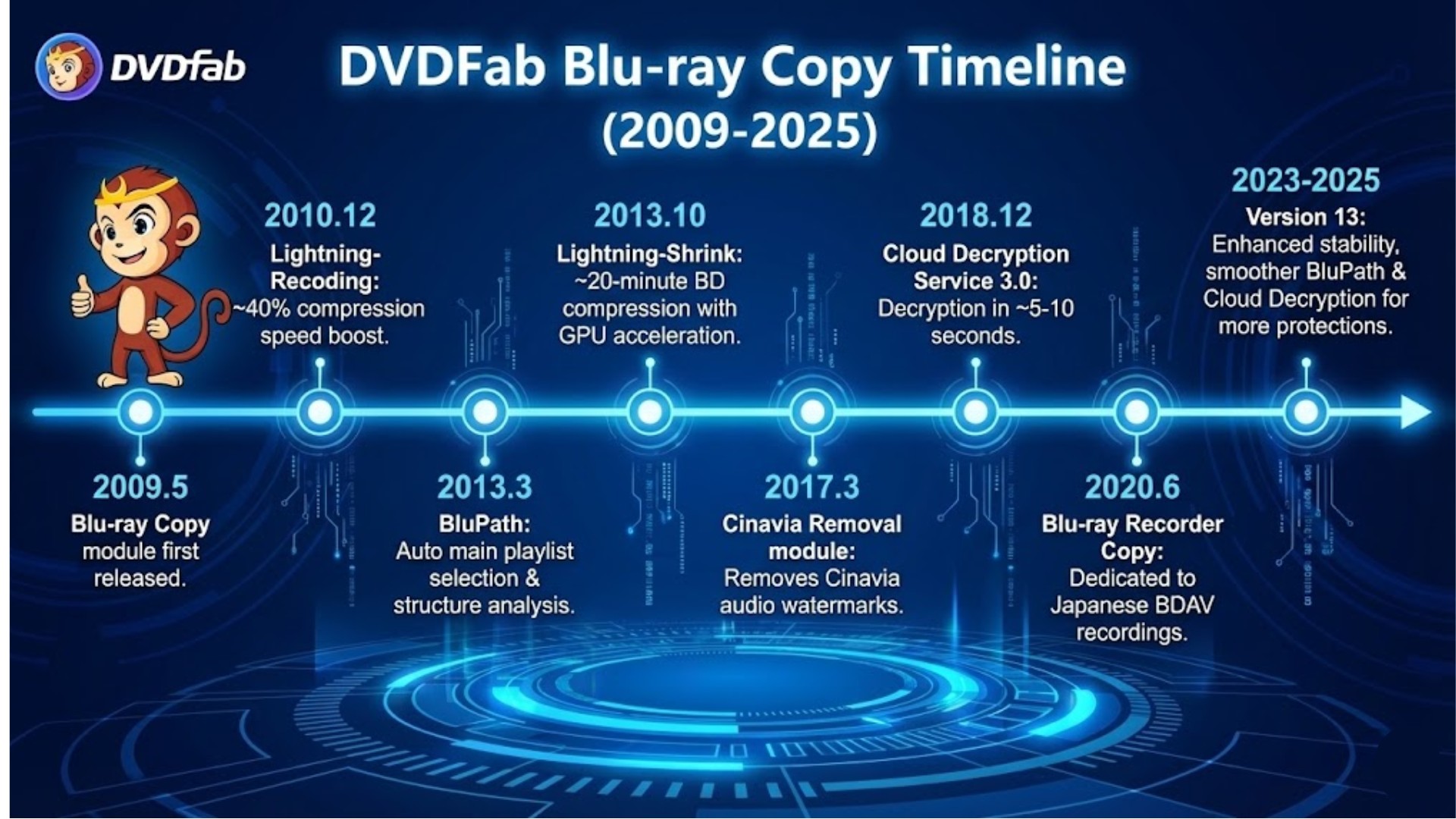
- 2009.5: DVDFab Blu-ray Copy module is first released.
- 2013.3: BluPath goes live, giving Blu-ray Copy a dedicated Blu-ray structure analysis engine that automatically selects the main playlist and works together with the decryption engine.
- 2013.10: Lightning-Shrink technology is added, bringing BD compression time down to around the 20-minute range on capable hardware.
- 2017.3: The DVDFab Blu-ray Cinavia Removal module is released to work alongside DVDFab Blu-ray Copy, removing Cinavia audio watermarks from protected Blu-ray soundtracks.
- 2018.12: Cloud Decryption Service 3.0 is released, reducing Blu-ray decryption time from about 30–40 seconds to roughly 5–10 seconds, making disc opening much faster whether the disc is new or old, well-kept or slightly damaged.
- 2023–2025: DVDFab has now reached DVDFab 13, with improved stability, stronger decryption capabilities, and the ability to complete a copy within 15 minutes.
- 2026.5–6: DVDFab adds official support for 12 Pioneer Blu-ray drive models and introduces the UHD Drive Tool for one-click firmware management, reaching version 13.0.6.2.
Free Trial and Policies of DVDFab Blu-ray Copy
| Free Trial Policy | 30-day free trial |
| Can copy three discs | |
| No restriction on disc length | |
| All features are fully accessible during the trial period | |
| After the trial ends, the program reverts to the free version (DVDFab HD Decrypter) | |
| Refund Policy | 14-day money back guarantee |
| Customer Service | Emails written in English, French, German, and Japanese will receive a reply within 48 hours. |

DVDFab Blu-ray Copy Features: What Makes It Lead?
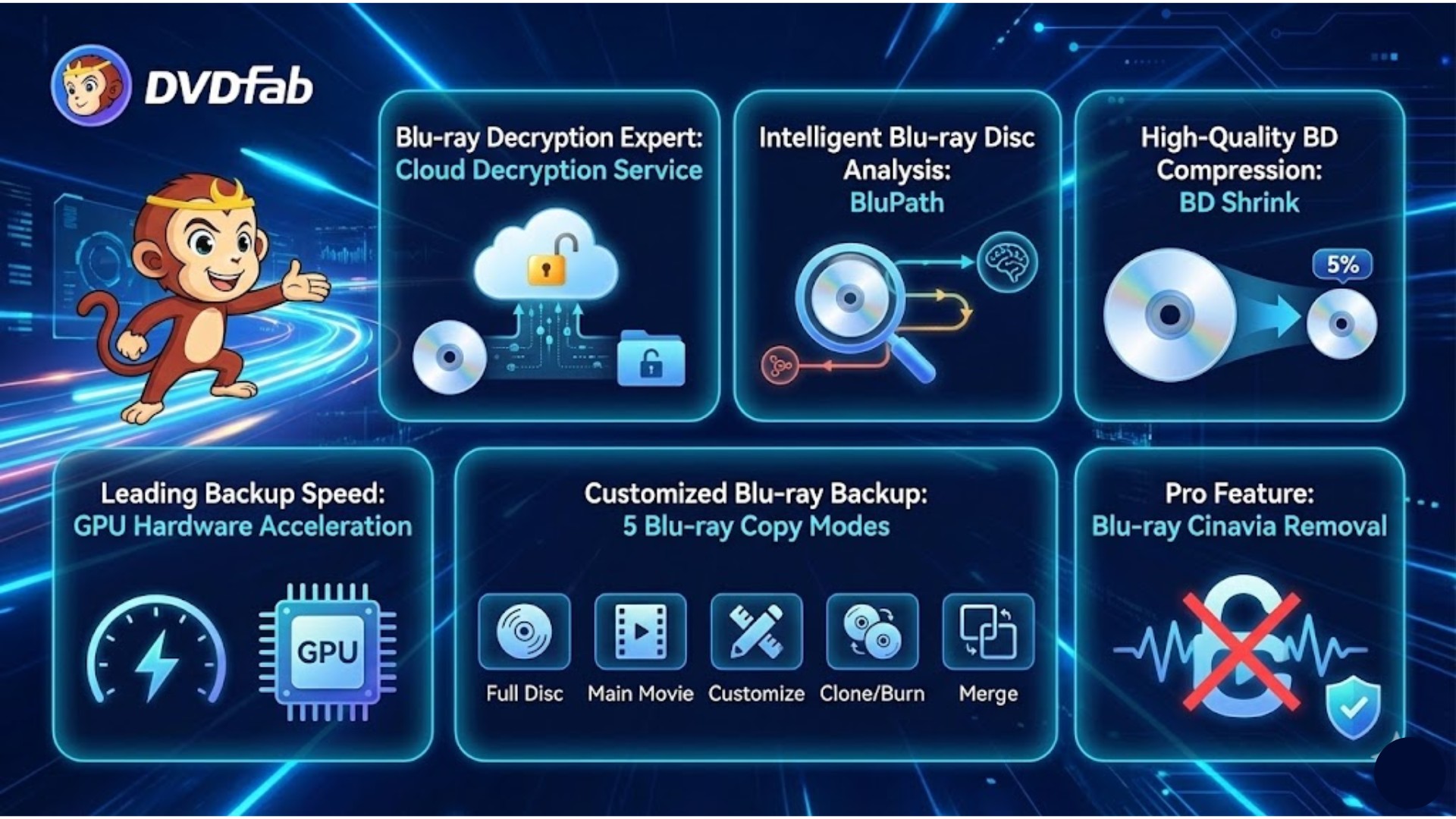
Blu-ray Decryption Expert: Cloud Decryption Service
In the past, when I inserted a newly released Blu-ray box set into my computer, the software would always prompt "unrecognizable disc." I would then have to wait for the software developer to release a new version, which could take a few days or even several weeks.
DVDFab Blu-ray Copy completely solves this industry problem with its Cloud Decryption Service, achieving Real-Time Decryption:
- When I insert a disc with the latest encryption (such as a brand-new AACS protection), the DVDFab software immediately recognizes that it is an unknown encryption.
- It doesn't leave me waiting. It uploads the disc's encryption features (no content or personal information is included) to DVDFab's cloud servers. The cloud server instantly analyzes the features and finds the latest decryption key.
- Within a few seconds, the latest decryption information is automatically sent back to the software on my computer. The program can then successfully recognize the disc and begin the copy process.
This cloud-based mechanism ensures DVDFab Blu-ray Copy users get support for backing up any new movie right away.
Intelligent Blu-ray Disc Analysis: BluPath
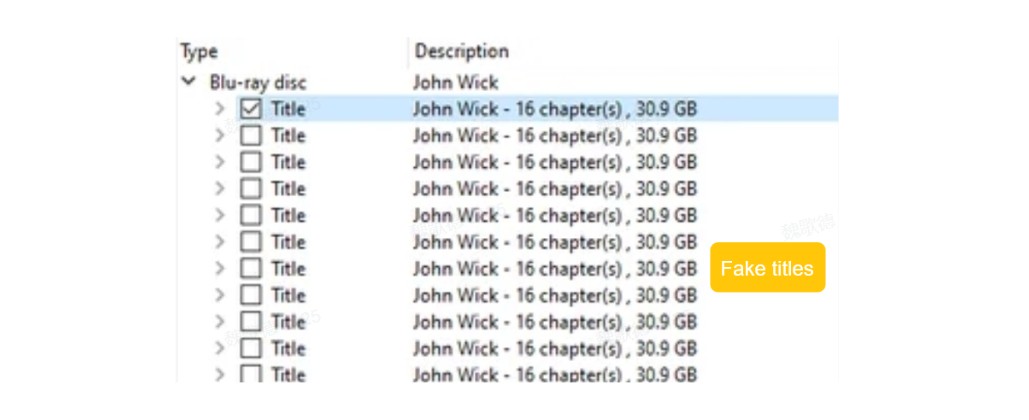
As movie enthusiasts, we know that Blu-ray discs are complicated. Beyond the main film, they often contain hidden anti-copying techniques like redundant chapters and fake titles.
BluPath is the solution designed to overcome this complexity. It penetrates complex structures and dummy files to confuse copiers, identifying the genuine Main Movie playlist. Therefore, whether you choose the Full Disc, Main Movie or Customize copy mode, what you get is a Blu-ray backup with the correct chapter order and no redundant, fake titles.
High-Quality BD Compression: BD Shrink
BD Shrink is a sophisticated set of compression algorithms and re-encoding techniques. It's specifically optimized for the characteristics of Blu-ray video and audio, aiming to achieve the goal of minimizing size while maximizing picture quality. With BD Shrink technology, DVDFab Blu-ray Copy is exactly what helps users with overly large collections to compress and back up their Blu-ray collections with exceptional quality.
Leading Backup Speed: GPU Hardware Acceleration
DVDFab Blu-ray Copy does not rely on the CPU alone for data processing. It offloads computational tasks to more specialized processing units, which keeps CPU utilization low while speeding up the whole backup.
On Windows, it can use Multi-Core CPUs, NVIDIA CUDA, AMD VCE/VCN, or Intel Quick Sync (IQS) for backup processing. On Mac, it relies on VideoToolbox. Offloading the work this way cuts total backup time noticeably compared with software-only encoding, especially on compression jobs.
With GPU acceleration enabled, even compressed copying from BD50 to BD25 (the most time-consuming operation) can finish in under 15 minutes. Worth noting: GPU decoding is hardware-dependent, so if a specific disc stalls on "Processing" or shows visual artifacts during a compressed copy, switching decoding and encoding to Software mode is the standard fix, as covered in the troubleshooting section below.
Customized Blu-ray Backup: 5 Blu-ray Copy Modes
DVDFab Blu-ray Copy software ensures all user requirements are met by offering five core copy modes. These copy modes enable flexible conversion ranging from lossless to compressed, and from full disc to customized content.
| Mode | Input Format | Output Format | Feature |
| Full Disc | BD/ISO/BDMV folder | BD/ISO/BDMV folder | Can be lossless or compressed; copies all content on the disc. |
| Main Movie | BD/ISO/BDMV folder | BD/ISO/BDMV folder | Quick extraction of the main movie, saving space. |
| Clone/Burn | BD/ISO | BD/ISO | Lossless clone, ensuring data integrity. |
| Merge | Multiple BD/ISO/BDMV folder | BD/ISO/BDMV folder | Consolidate movie series or compress and merge BD50 onto BD25 to maximize space utilization. |
| Customize | BD/ISO/BDMV folder | BD/ISO/BDMV folder | Personalized backup; freely select content and output size. |
Pro Feature: Blu-ray Cinavia Removal
Before I started using DVDFab Blu-ray Copy, there was one insoluble problem with my Blu-ray backups: Cinavia. Cinavia is an audio watermark embedded in the soundtrack, which causes a seemingly successful disc backup to be muted during playback on a player.
DVDFab developed the exclusive Blu-ray Cinavia Removal module to assist DVDFab Blu-ray Copy in solving this issue. During the copying process, it replaces the original audio with a high-quality, watermark-free track, ensuring the backup disc plays normally and is completely free from Cinavia interference.
DVDFab Blu-ray Copy Review: Hands-On Test Results
To see how DVDFab Blu-ray Copy performs in practice, I downloaded DVDFab 13.0.5.2 (the newest build at the time of testing) and ran two extreme tests on its Blu-ray copy capability. DVDFab has since moved on to version 13.0.6.2, released in June 2026, which adds official support for more Blu-ray drive models and other refinements, but the core copy and decryption workflow described below has not changed.
Test 1: Can Main Movie Mode copy an encrypted BD with fake titles?
| Test Environment and Disc | |
| Operating System | Windows 11 |
| Graphics Card | NVIDIA GeForce RTX 3070 |
| Optical Drive | LG BP50NB40 External Blu-ray Burner |
| Test Title | John Wick |
| Disc Type/Size | BD50 |
| Encrypted? | Yes, Sony DADC, BD+ |
| Contains Fake Titles? | Yes (contains fake titles; standard copy and ripping software cannot automatically extract the main title) |
Test Procedure
1. Installed and opened DVDFab 13.0.5.2. Selected Copy in the left navigation panel, then chose the Main Movie mode (used for automatic main title identification).
2. Clicked Add Source to load the test disc. Analysis was completed in approximately 2 seconds. I clicked the "i" icon next to the disc name to view the disc metadata and decryption information (such as runtime, encryption type, bad sector handling, BluPath analysis results, etc.). This test showed that both DADC and BD+ were successfully decrypted, and DVDFab Blu-ray Copy successfully processed and locked the main movie title 00000.mpls.
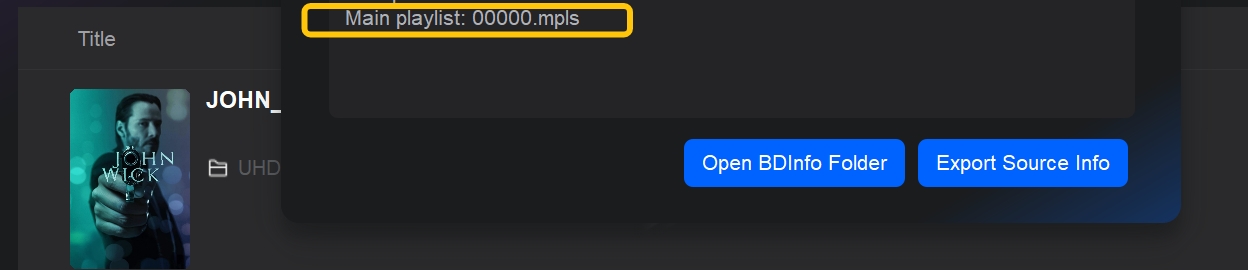
3. I selected one audio track and one subtitle track. In Advanced Settings, I set the output size to BD50.
4. In the Save to area, I clicked the ISO icon and selected the save path, then clicked Start to begin copying. DVDFab Blu-ray Copy automatically enabled GPU acceleration. The copy to ISO was completed in 6 minutes and 36 seconds. The final ISO size was close to the BD50 capacity limit, as BD50 was selected as the target.
Test Results
I tested the playback of the copied ISO file in VLC Media Player, with the following results:
- Decryption Effectiveness: Successfully played in VLC. (VLC cannot handle encrypted discs on its own.)
- Main Movie Identification: The entire playback contained no fake copyright titles or redundant segments; only the main movie was preserved, excluding extras.
- Image Quality Retention: Subjectively, there was no noticeable difference compared to direct playback from the original disc.
- Conclusion: Under the dual challenge of Blu-ray encryption and fake titles, DVDFab Blu-ray Copy was able to quickly decrypt and accurately select the main playlist. The copy to ISO was completed in 6 minutes and 36 seconds. The process was stable, and the output quality was indistinguishable from the original disc.
Test 2: Can a slightly scratched disc be successfully read and copied to another disc?
| Test Environment and Disc | |
| Operating System | macOS 14 Sonoma |
| Graphics Card | Apple Silicon M1 |
| Optical Drive | LG BP50NB40 External Blu-ray Burner |
| Test Title | Pacific Rim Uprising |
| Disc Type/Size | BD25, 40.6 GB |
| Encrypted? | Yes, BD+ |
| Video/Audio Spec | 1080p; TrueHD 7.1 |
Test Procedure
1. Installed and opened DVDFab 13.0.5.2. Selected Copy in the navigation panel, then chose the Clone/Burn mode to perform a 1:1 copy of the content onto another blank disc.
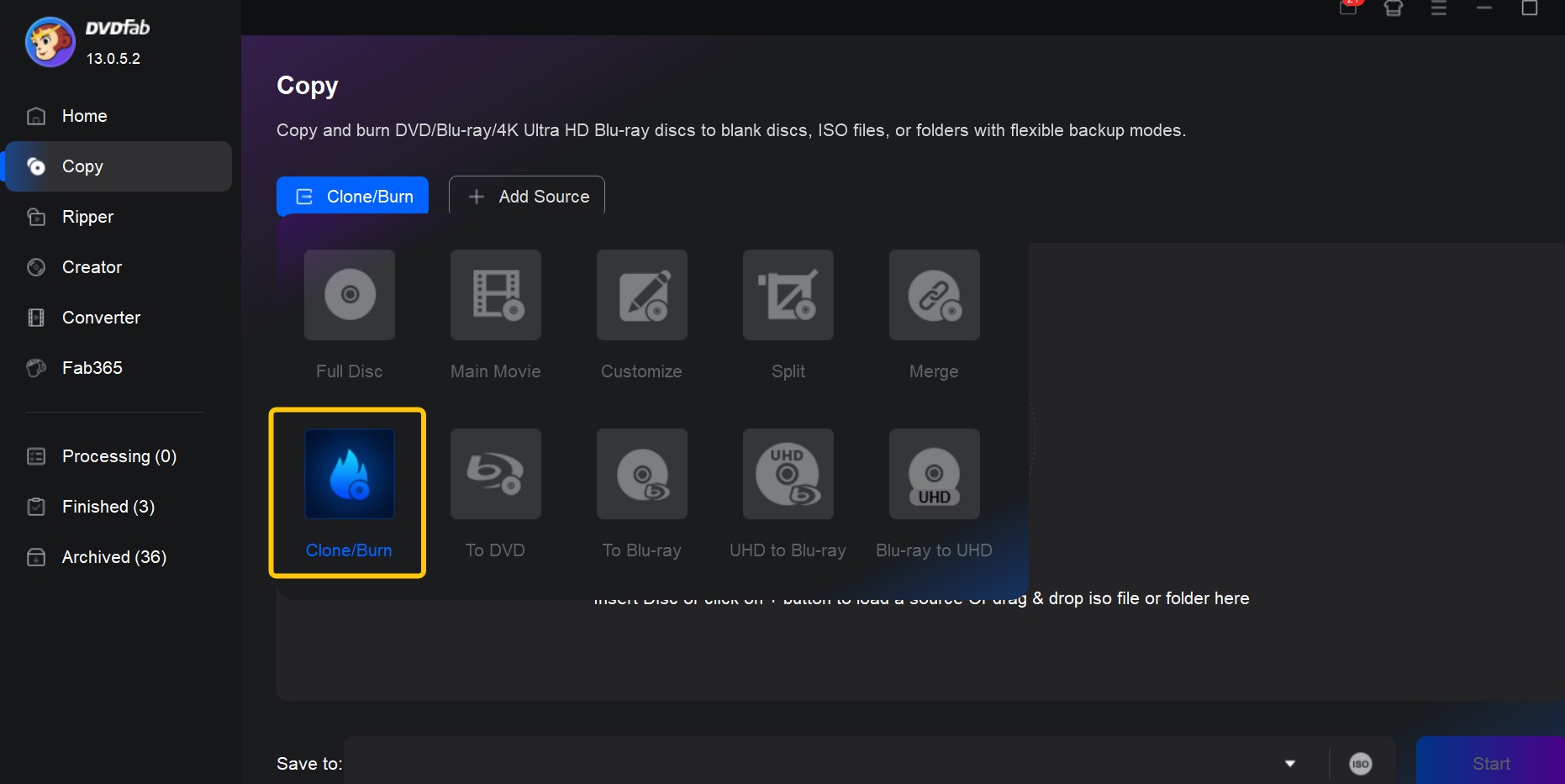
2. Inserted the source disc into the drive. Clicked Add Source to load the test disc. Analysis completed in approximately 3 seconds. The resulting information showed that the bad sectors had been successfully read and analyzed.
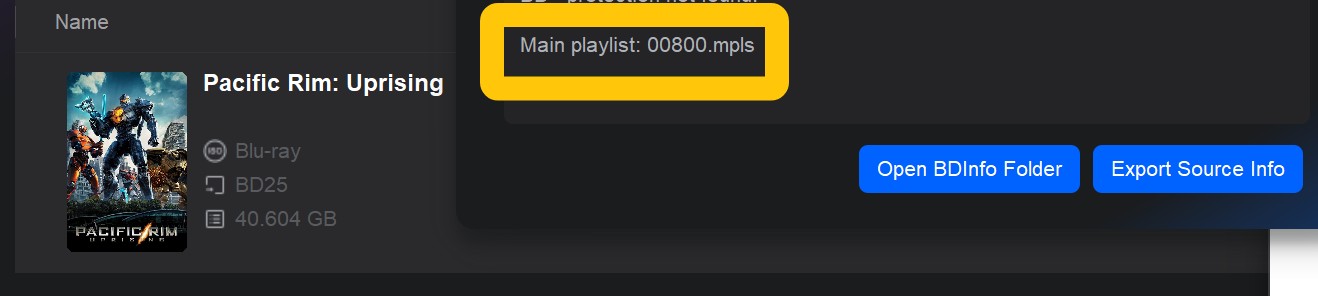
3. Ejected the source disc and inserted a blank BD50 disc. Selected the optical drive containing the blank disc from the Save to dropdown menu, then clicked Start to begin the copy. The physical backup of the original disc was completed in 9 minutes and 17 seconds.
Test Results
I played the newly burned Blu-ray disc on a dedicated Sony UBP-X700 Blu-ray player for the entire duration. The test results are as follows:
- Stability: The entire movie played without stuttering, pixelation, or audio/video synchronization issues.
- Menu and Navigation: The main menu structure was identical to the original disc, and navigation for chapters, titles, and subtitle tracks could be called up normally. Chapter jumps were smooth, with no audio/video desync during the transition.
- Quality Retention: The original 1080p video and the Dolby TrueHD / Atmos audio track were retained 1:1.
- Conclusion: Discs with minor scratches can be analyzed normally. The copied disc performed identically to the original in terms of video quality and audio specifications, and its functionality (menus, chapters, subtitles) also matched the original disc.
DVDFab Blu-ray Copy Review: Real User Shares Feedback
DVDFab, as an all-in-one disc solution operating for over 20 years, is highly favored by disc enthusiasts. It has garnered over 600 authentic user reviews on Trustpilot, achieving an average score of 4.5, which exceeds the 4.0 average for disc backup software.
Two themes come up again and again in those Trustpilot reviews: protecting a physical disc collection without wearing it out, and backups that keep working reliably over years of regular use.
On the collection side, a 12-year user explained why ISO backups became their standard routine:
"I've used DVDFab for 12 years, mainly to back up my discs as ISOs. I know it sounds a bit obsessive, but when I buy a Blu-ray I like to keep it in the case as part of my collection. I don't want to keep loading it to watch, and I don't want it to wear out. So I move all my discs onto my computer. My ideal setup is a 1:1 backup: a full-disc ISO with the menu and extras preserved. That's why I chose DVDFab's DVD Copy and Blu-ray Copy. The software can also customize content, burn to physical discs, and output to folders, but ISO is what I use."
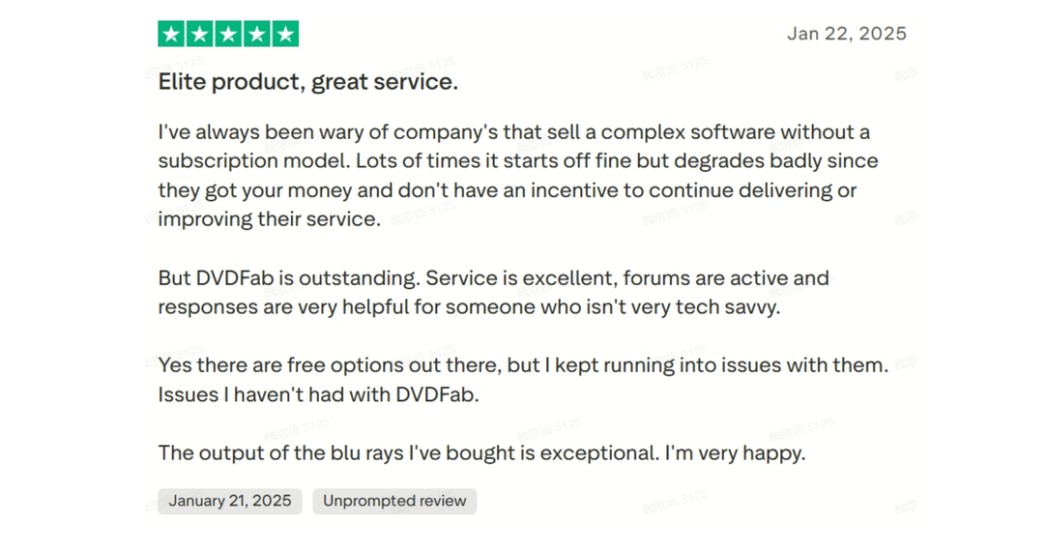
On the reliability side, an 8-year user who previously relied on free tools described what changed after switching, and Trustpilot reviews for the software also frequently cite responsive customer service as part of that long-term experience:
"Before DVDFab, the free tools I used resulted in stuttering output or complex, multi-step processes. Switching to DVDFab made the Blu-ray backup process stable, reliable, and entirely hassle-free. I've successfully backed up all my discs, even scratched ones, with menus, chapters, and audio tracks perfectly identical to the originals—they genuinely look and play like new."
Troubleshooting: Common Issues and Fixes
Blu-ray Copy keeps getting stuck on reading/processing.
Solution 1: Try a disc that you have successfully copied before. This helps confirm whether the problem disc is scratched, damaged, or has overly complex protection.
Solution 2: In Common Settings, under A/V Codec, set both decoding and encoding to Software, and disable CUDA/Quick Sync/Lightning-Shrink. Then try again. This mirrors a pattern reported across Blu-ray backup communities: GPU-accelerated encoding (particularly CUDA) can stall on "Processing" or introduce green banding on certain GPU and driver combinations, while the same disc completes cleanly once decoding and encoding are both set to Software.
Solution 3: Update to the latest official version, or roll back to a previous version that worked fine for you. A lot of "stuck" issues come from a specific program version paired with a specific disc.
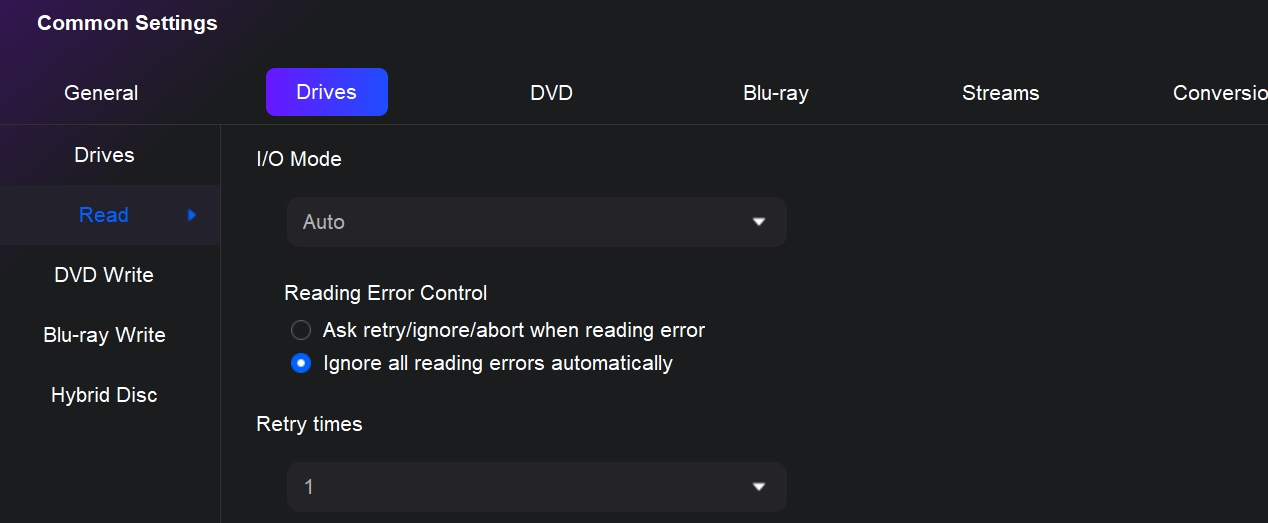
Solution 4: In Common Settings, under Drives, then Read, switch the read mode and tick "Ignore all read errors automatically" so that minor bad sectors can be skipped automatically.
Solution 5: First use Clone/Full Disc to copy the disc to an ISO on your hard drive, then use that ISO as the source to do compression or Main Movie copy. This can greatly reduce the chances of getting stuck at "Reading."
How do I compress a BD50 to BD25? What if it still won't fit on the disc?
How to compress:
Load the BD50 disc, then in the Copy module click Advanced Settings. Change the output size from BD50 to BD25. Only then will DVDFab actually compress the content to BD25 size.
What if it still won't fit?
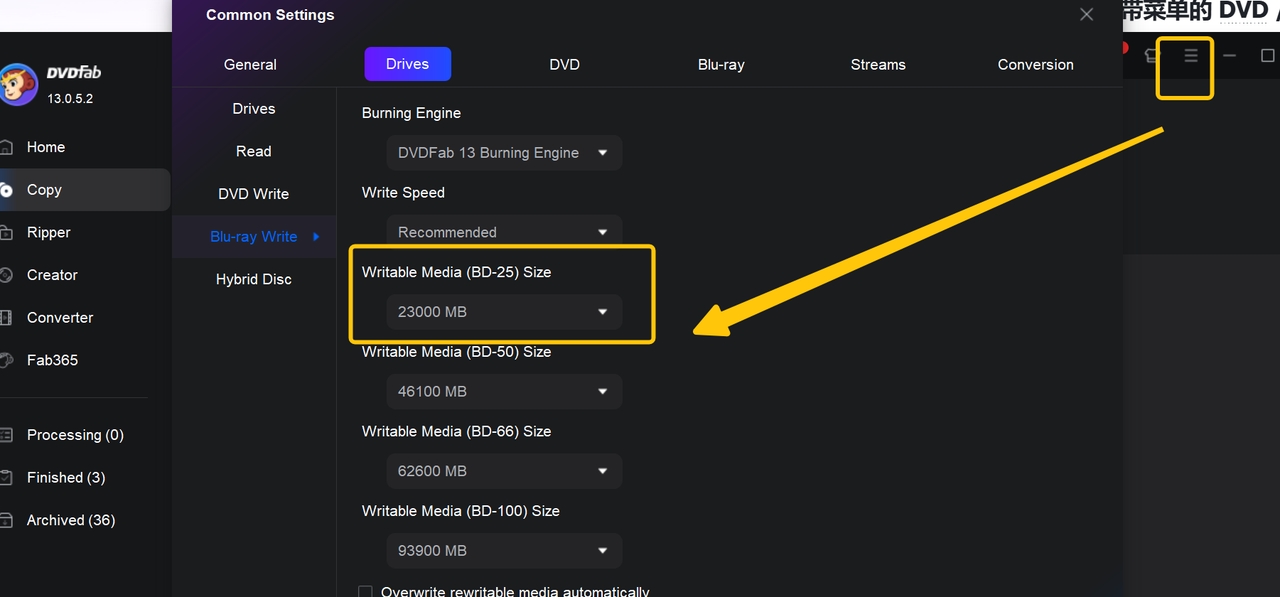
If the original BD50 is almost completely full, the default BD25 target size (about 23000 MB) may still be a bit too large for your blank disc. In that case, go to Settings, under Drives, then Blu-ray Write, and manually lower the target size for 25GB discs, then try again.
FAQs
Does DVDFab Blu-ray Copy work with 4K UHD Blu-ray discs?
No. DVDFab Blu-ray Copy is built for standard Blu-ray discs (BD25/BD50, 1080p), while 4K UHD Blu-ray discs (66GB-100GB, 2160p with HDR10, Dolby Vision, or HDR10+) use a different disc format, stronger AACS 2/2.1 encryption, and require a UHD-capable optical drive that most standard Blu-ray drives cannot read. For 4K UHD discs, DVDFab offers a separate module, UHD Copy, built specifically to preserve HDR and the higher resolution during backup.
Why does GPU acceleration sometimes cause stuttering or artifacts during a Blu-ray copy?
GPU acceleration (CUDA, AMD VCE/VCN, Intel Quick Sync) offloads encoding from the CPU, but its behavior depends on the GPU model and driver version installed. On some hardware combinations, compressed copies (such as BD50 to BD25) can stall at "Processing" or show green banding in the output. Switching decoding and encoding to Software mode in Common Settings removes the dependency on the GPU driver and typically resolves the issue, at the cost of a longer backup time.
Conclusion
Across both test discs, encrypted and scratched, DVDFab Blu-ray Copy decrypted the source, identified the correct main movie, and reproduced the original video and audio without noticeable quality loss. The parts of the workflow that matter most for a home Blu-ray collection, such as fast decryption of new releases and GPU-accelerated compression, held up in testing and in feedback from users who have relied on the software for years. It is worth remembering that Blu-ray Copy only covers standard 1080p discs; anyone backing up 4K UHD Blu-rays will need the separate UHD Copy module instead. If backing up a large disc collection is the goal, the 30-day free trial with a 3-disc allowance is enough to test the decryption and compression speed on your own discs before deciding whether to buy.

![6 Best Blu-ray Copy Software for Windows & Mac [2026 Tested & Ranked]](https://r5.dvdfab.cn/upload/resource/top-blu-ray-copy-software-programs-yuzM.jpeg) 6 Best Blu-ray Copy Software for Windows & Mac [2026 Tested & Ranked]By Diana Smith - Sep 3, 2026
6 Best Blu-ray Copy Software for Windows & Mac [2026 Tested & Ranked]By Diana Smith - Sep 3, 2026 2026 Tested Ways to Rip Blu-ray to ISO on Mac & Windows: 1:1 Backup & DecryptionBy Wenny Yan - Jul 16, 2026
![How to Copy Blu-ray Discs to Hard Drive, PC, and DVD [2026, Tested]](https://r5.dvdfab.cn/upload/resource/en/how-to-copy-blu-ray-discs-LDqW.jpg) How to Copy Blu-ray Discs to Hard Drive, PC, and DVD [2026, Tested]By Diana Smith - Jul 15, 2026
How to Copy Blu-ray Discs to Hard Drive, PC, and DVD [2026, Tested]By Diana Smith - Jul 15, 2026