Does PS4 Play Blu-ray? Yes, All Models - Not 4K UHD

Summary: Yes, every PS4 model, including the original PS4, PS4 Slim, and PS4 Pro, can play standard 1080p Blu-ray discs and DVDs. The first time you play a Blu-ray or DVD, your PS4 must connect to the internet once to enable disc playback. No PS4 model can play 4K Ultra HD Blu-ray discs, although PS4 Pro can upscale standard Blu-ray video for a 4K TV.
Table of Contents
The PlayStation 4 is equipped with a built-in Blu-ray drive, which means it can do more than run games. Many users still have questions about which Blu-ray and DVD discs the console can read, and whether different PS4 models handle formats such as 4K or 3D any differently. This guide explains what each PS4 model supports, what you need for the first Blu-ray setup, and why PS4 games use Blu-ray discs but do not follow the same region rules as Blu-ray movies.

Does PS4 Play Blu-ray? Quick Answer by Model
Yes. You can play standard Blu-ray movies on every PS4 model, including the original PS4, PS4 Slim, and PS4 Pro. You can also play standard DVD movie discs.
| PS4 model | Standard Blu-ray | DVD | 3D Blu-ray | 4K UHD Blu-ray | 4K upscaling | First-time online activation |
|---|---|---|---|---|---|---|
| Original PS4 | Yes | Yes | Yes | No | No | Yes, once |
| PS4 Slim | Yes | Yes | Yes | No | No | Yes, once |
| PS4 Pro | Yes | Yes | Yes | No | Yes | Yes, once |
You must connect the PS4 to the internet once before the first disc playback. This one-time activation enables the Blu-ray and DVD playback keys. After activation, the PS4 can play supported discs offline.
PS4 does not support 4K UHD Blu-ray discs. This applies to the original PS4, PS4 Slim, and PS4 Pro. If you insert a 4K UHD Blu-ray disc, the console may show an “unrecognized disc” message. PS4 Pro can upscale video output to 4K, but it does not play true 4K UHD Blu-ray discs.
Blu-ray movies and DVDs are region-locked on PS4. PS4 games are region-free, but movie discs follow the region of the console’s sales area. Blu-ray regions include A, B, and C. DVD regions include 1 for North America, 2 for Europe, and 4 for Australia. Region Free or All Regions discs can play on compatible PS4 consoles.
PS4 game discs are Blu-ray BD-ROM discs. However, PS4 game discs being Blu-ray does not mean Blu-ray movies are region-free.
How to Play a Blu-ray on PS4
First-Time Setup
Follow these steps before playing a Blu-ray disc on PS4 for the first time:
- Connect your PS4 to the internet.
- Go to Settings > System Software Update and install the latest available system software.
- Insert a standard Blu-ray disc or DVD into the disc slot.
- Wait for the PS4 to show the disc playback prompt.
- Confirm the prompt to enable Blu-ray and DVD playback.
- After activation, the Disc Player icon appears on the Home screen.
The PS4 only needs internet access for the first disc playback activation. If the console has never completed this step, offline playback may stop at the activation prompt. Once activation is complete, supported Blu-ray and DVD discs can play without staying online.
Required Connections
- Use an HDMI cable to connect the PS4 directly to a TV or through an AV receiver.
- The display must support HDCP 1.4 or higher for Blu-ray playback.
- If HDCP is not supported or the HDMI chain has a problem, you may see a black screen or a playback error.
- For audio, you can use HDMI through the TV or receiver.
- You can also use optical audio on PS4 models that include the optical output.
- If your setup uses a TV and soundbar, HDMI ARC may also carry the audio signal, depending on your TV and sound system.
Navigating Playback
Insert the Blu-ray disc and go to the Home screen. Select the disc icon on the far left, then press X to start playback.
During playback, you can use the controller to pause, fast-forward, rewind, skip chapters, change subtitles, and switch audio tracks. Use the d-pad to move through Blu-ray menus, press X to confirm, and press O to go back.
PS4-Supported Discs and Digital Formats

PS4 can play standard Blu-ray movies and DVD videos with its built-in optical drive. This applies to the original PS4, PS4 Slim, and PS4 Pro.
Disc playback still depends on disc type, region code, and display connection. A PS4 also needs HDMI output to a display that supports HDCP 1.4 or higher.
Supported Disc Formats
| Disc format | PS4 support | Notes |
|---|---|---|
| Blu-ray BD-ROM | ✔ | Standard Blu-ray movie discs are supported. PS4 game discs are also Blu-ray BD-ROM, but PS4 games being region-free does not mean movie Blu-ray discs are region-free. |
| Blu-ray 3D | ✔ | Requires a 3D TV and compatible 3D glasses. |
| DVD-ROM / DVD video | ✔ | Standard DVD video discs are supported. DVD region rules still apply. |
| CD audio / CD-ROM data | ✗ | PS4 does not play audio CDs or CD-ROM data discs. |
| Ultra HD Blu-ray / 4K UHD | ✗ | Not supported on any PS4 model, including PS4 Pro. |
| Dual Layer Blu-ray | ✔ | Supported when it uses a standard Blu-ray video structure. |
NOTE: PS4 does not support audio CDs or CD-ROM data discs.
Recordable Blu-ray or DVD discs may play, but playback is not guaranteed. They usually need to use a standard video disc structure rather than a data-only layout.
Supported Digital Video & Audio Formats
PS4 can also play digital media through the Media Player app from a USB drive or over a network. This is separate from Blu-ray disc playback.
| Media type | Supported formats |
|---|---|
| Video | MKV, MP4, MPEG-2 TS, AVI, AVCHD |
| Audio | MP3, AAC, M4A |
| Image | JPEG, BMP, PNG |
For USB playback, place the files in a folder that the PS4 Media Player app can detect. For network playback, use a compatible media server on the same network.
How to Play Blu-ray Content on PS4 from USB or Media Server
For normal movie discs, use the PS4 disc drive first. It is the official path for standard Blu-ray and DVD playback.
A USB or media-server path is only relevant in a different situation: you already have a video file that is compatible with PS4, or you own a Blu-ray/DVD and have permission to convert it to a digital file where local rules allow. This does not make a PS4 play 4K Ultra HD Blu-ray discs directly, and it should not be treated as a way to copy discs you do not own or cannot legally copy.
PS4 can play video files from a USB drive through Media Player. For USB playback, create a folder on the USB drive, place the video files in that folder, connect the drive to the PS4, open Media Player, select USB, and choose the file. The USB drive should use exFAT or FAT32. For PS4 playback, MP4 or MKV with H.264 video is usually a practical target. PS4 Pro supports some higher H.264 profile playback than the standard PS4, so choose conservative output settings if the file needs to work across PS4, PS4 Slim, and PS4 Pro.
Convert Blu-rays for PS4 Playback with DVDFab Blu-ray Ripper
DVDFab Blu-ray Ripper is a professional Blu-ray to PS4 converter that can handle the region code and other BD copy protections completely and rip Blu-rays to PS4 supported video formats like MP4, AVI, MKV, and more with high quality. It can even output video files which share the same quality with the genuine Blu-ray movies. Simply load your Blu-ray to DVDFab, choose an output format such as MP4 or MKV, select audio and subtitle tracks if needed, start conversion and copy the finished file to a PS4-compatible USB drive.
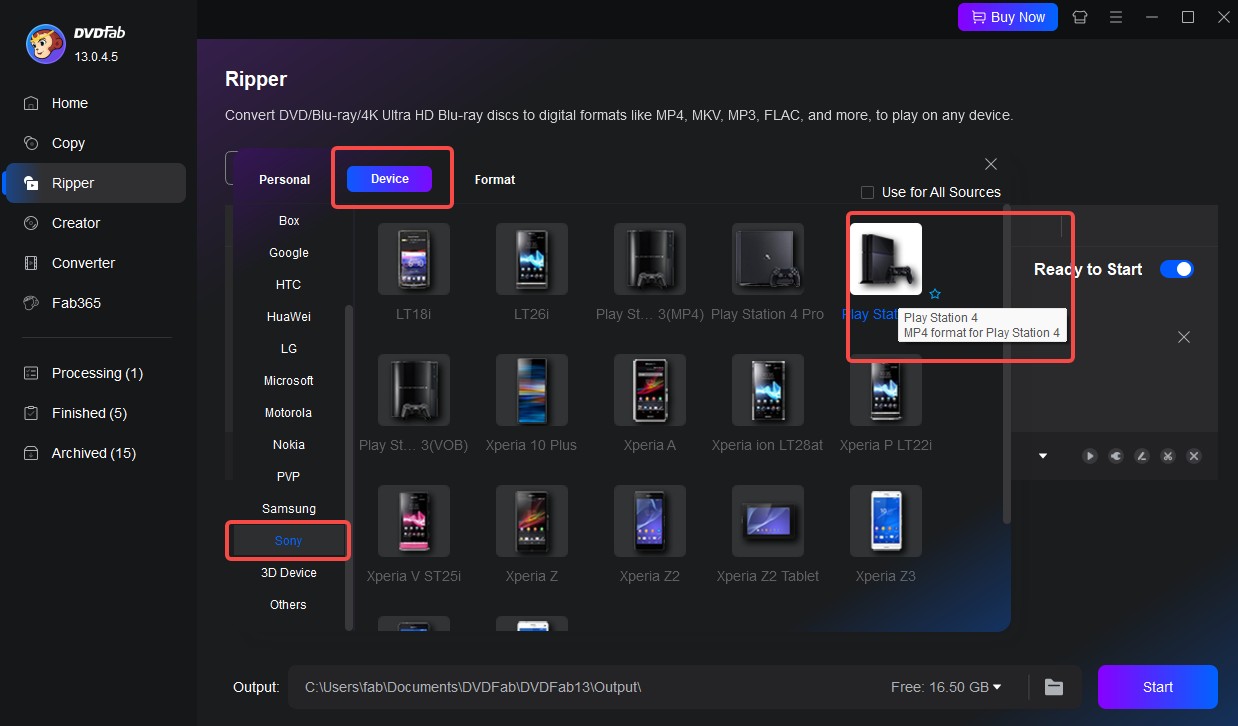
Compatible System:
- Converts Blu-ray content to PS4-playable video formats, such as MP4 and MKV.
- Reads Blu-ray discs, ISO files, and Blu-ray folders.
- Process Blu-ray discs with region codes and copy protection.
- Provides 1000+ output formats and preset device profiles, including console-friendly options.
- Allows adjustment of codec, resolution, bitrate, frame rate, audio track, and subtitles.
- Includes basic editing tools such as trimming, cropping, and subtitle settings.
Can PS4 Play 4K UHD and 3D Blu-ray?
PS4 does not play 4K UHD Blu-ray discs, including on PS4 Pro, but all PS4 models can play standard Blu-ray and 3D Blu-ray discs.

| Feature | Original PS4 | PS4 Slim | PS4 Pro |
|---|---|---|---|
| Standard Blu-ray | ✔ | ✔ | ✔ |
| 4K UHD Blu-ray | ✗ | ✗ | ✗ |
| 4K upscaling | ✗ | ✗ | ✔ |
| 3D Blu-ray | ✔ | ✔ | ✔ |
| Maximum output resolution | 1080p | 1080p | Up to 4K output / upscaling |
4K / Ultra HD Blu-ray
No PS4 model has a 4K UHD Blu-ray drive. The original PS4, PS4 Slim, and PS4 Pro all use a standard Blu-ray drive.
When you insert a 4K UHD Blu-ray disc into a PS4, the console may show it as an unrecognized disc. This is expected because Ultra HD Blu-ray uses a different disc format from standard Blu-ray.
PS4 Pro can upscale supported video output to 4K on a 4K TV, but this is not the same as playing a true 4K UHD Blu-ray disc. A 4K PS4 Slim setup also does not make the Slim a UHD Blu-ray player, because PS4 Slim is limited to 1080p output.
To play 4K UHD Blu-ray discs, use a PS5 model with a disc drive or a standalone Ultra HD Blu-ray player.
3D Blu-ray
All PS4 models support 3D Blu-ray playback. You need a 3D-capable TV and compatible 3D glasses.
When the setup is compatible, PS4 can recognize the 3D Blu-ray disc and output the movie in 3D. If the TV does not support 3D, the disc may not play in 3D mode.
Model Differences

The Blu-ray movie playback ability is mostly the same across the three PS4 models:
- Original PS4, released in 2013: plays standard Blu-ray, Blu-ray 3D, and DVD video. It does not play 4K UHD Blu-ray. Maximum output is 1080p.
- PS4 Slim, released in 2016: plays the same standard Blu-ray, Blu-ray 3D, and DVD video discs. It is smaller and more power-efficient than the original model, but it removed the optical audio port. Maximum output is 1080p.
- PS4 Pro: plays the same standard Blu-ray, Blu-ray 3D, and DVD video discs. It adds 4K output/upscaling and HDR-capable output for supported content, but it still does not play 4K UHD Blu-ray discs.
What to expect by disc type:
- Standard Blu-ray: plays on all PS4 models after the one-time disc playback activation.
- 3D Blu-ray: plays on all PS4 models with a 3D TV and glasses.
- Imported region-locked Blu-ray: may show a region error if the disc region does not match the console region.
- Recordable Blu-ray or DVD: may play only when it follows a standard video disc structure.
- 4K UHD Blu-ray: is not supported and may appear as an unrecognized disc.
Why Won't My PS4 Play a Blu-ray? (Troubleshooting)
A PS4 Blu-ray error usually comes from activation, region code, disc type, HDMI/HDCP, or disc condition. Use the table below to match the symptom with the likely cause and fix.
| Symptom | Possible Cause | Solution |
|---|---|---|
| The PS4 asks for an internet connection before Blu-ray playback | The Blu-ray/DVD playback feature has not been activated yet. PS4 needs a one-time online activation for AACS/DRM keys before the first disc movie playback. | Connect the PS4 to the internet once, sign in if needed, and start the disc again. After activation, standard Blu-ray and DVD playback can work offline. |
| Blu-ray playback fails or the disc player behaves oddly | The PS4 system software may be outdated. | Update the PS4 system software, restart the console, and try the disc again. |
| An imported Blu-ray shows a region error or will not play | The movie disc region does not match the PS4’s sales region. For example, a Region B or Region C Blu-ray may not play on a Region A console. | Use a Blu-ray disc that matches your PS4 region, or use a Region Free / All Regions disc. PS4 games are region-free, but movie Blu-ray discs are not. |
| A DVD from another country will not play | DVD discs are also region locked. PS4 allows DVD region changes only a limited number of times, then the setting locks. | Use a DVD that matches the console’s DVD region, or use a Region Free DVD. Avoid changing the DVD region unless necessary. |
| The PS4 shows “unrecognized disc” when a 4K disc is inserted | The disc is a 4K UHD Blu-ray. No PS4 model, including PS4 Pro, supports 4K UHD Blu-ray discs. | Use a standard Blu-ray disc instead. For 4K UHD Blu-ray playback, use a PS5 with a disc drive or a dedicated UHD Blu-ray player. |
| A music CD or CD-ROM will not play | PS4 does not support audio CDs or CD-ROM data discs. | Use supported Blu-ray/DVD movie discs, PS4 game discs, or supported digital files through the Media Player app. |
| The screen is black, or the TV shows an HDMI/HDCP error | The display, HDMI cable, adapter, capture card, or splitter may not support HDCP 1.4 or higher. | Connect the PS4 directly to an HDCP-compatible TV or monitor with an HDMI cable. Remove adapters or splitters and try another HDMI port or cable. |
| The disc spins but skips, freezes, or fails to load | The disc may be dirty, scratched, or damaged. | Clean the disc from the center outward with a soft cloth. Try another standard Blu-ray disc to check whether the issue is the disc or the console. |
| A burned Blu-ray or burned DVD will not play | Recordable Blu-ray/DVD discs are not guaranteed to work on PS4, especially if they do not use a standard video structure. | Use a commercially pressed disc or a properly authored standard video disc. For personal files, use the PS4 Media Player app with supported formats such as MP4, MKV, MPEG-2 TS, AVI, or AVCHD. |
FAQ
Can PS4 play Blu-ray without internet?
Your PS4 needs an internet connection once to enable Blu-ray and DVD playback. After that one-time activation, it usually does not need to stay online to play BD/DVD discs.
Can PS4 play Blu-ray discs from any region?
No. Movie Blu-ray and DVD discs can be region-limited. A disc from another region may not play on your PS4 unless the disc is region-free or matches the console's region.
Can PS4 Pro play regular Blu-ray movies in better quality?
Yes, the PS4 Pro provides upscaling for standard Blu-ray movies. When connected to a 4K TV, you'll observe that images appear sharper and more detailed than on the original PS4 or Slim. Additionally, the Pro model supports HDR (High Dynamic Range) if both your TV and selected movie are compatible, leading to richer colors and contrast. However, keep in mind that this is upscaling—your discs remain standard 1080p Blu-rays, not native 4K.
What happens if you put a PS4 game disc in a Blu-ray player?
A normal Blu-ray player cannot run a PS4 game disc. PS4 game discs are made for PlayStation consoles, not for movie playback on a standalone Blu-ray player.
Does PS5 play Blu-ray?
The PS5 disc edition can play Blu-ray discs and Ultra HD Blu-ray discs. PS5 Digital Edition models without a disc drive cannot play physical media unless they are models that support an add-on disc drive.
Can the PlayStation 3 (PS3) play Blu-ray discs?
Yes. All PS3 models can play Blu-ray discs. All models of the PS3, including various iterations like the original, Slim, and Super Slim, include a built-in Blu-ray disc drive. For details, see does PS3 Play Blu-ray.
Conclusion
The PS4 can play most standard Blu-ray movies, whether you own the original model, the Slim, or the Pro. It doesn't handle Ultra HD or 4K Blu-ray discs, and it won't play audio CDs, but it works well for regular 1080p titles and supports 3D Blu-ray when used with the right display. On a 4K TV, the PS4 Pro can upscale movies for a slightly sharper image, though it still isn't true 4K playback. With the setup steps and troubleshooting checks covered earlier, you can avoid common reading problems and watch discs on the PS4 without much hassle.

 How to Convert 2D Blu-ray to 3D Video with DVDFab Blu-ray RipperBy Diana Smith - Jul 7, 2026
 How to Rip Blu-ray for Plex: 3 Best Ways with Guide & ComparisonBy Wenny Yan - Jul 6, 2026
![Top 5 Free Blu-ray Decrypters for Legal Use [2026 Test]](https://r1.dvdfab.cn/upload/resource/how-to-decrypt-blu-ray-Row0.jpeg) Top 5 Free Blu-ray Decrypters for Legal Use [2026 Test]By Wenny Yan - Jun 26, 2026
Top 5 Free Blu-ray Decrypters for Legal Use [2026 Test]By Wenny Yan - Jun 26, 2026 Best Free Blu-ray Rippers in 2026: Tested Tools and Guide to Rip Blu-raysBy Wenny Yan - Jun 12, 2026