DVDFab DVD Copy Review: Why I Choose This DVD Copy Software

Summary: This DVDFab DVD Copy review covers the software's powerful features: 6 copy modes, decryption, lossless/compressed backups, and high-speed copying. It also explains unique technologies this DVD Copy tool uses, real user stories, and a step-by-step tutorial.
Table of Contents
Physical lifespan of DVDs is unpredictable: scratches, aging, and read errors can happen at any time. What makes backing up discs more urgent lately is that optical drives themselves are getting harder to source. Production has slowed at several manufacturers, and threads on r/makemkv have discussed which brands still make reliable replacement drives. For movie lovers with a physical disc collection, a capable DVD copy software is no longer optional, and DVDFab DVD Copy is one of the established options in this field.
So, is DVDFab DVD Copy really as capable as other users claim? What technologies make it stand out? Can it handle and remove the protections found on commercial movie discs? In this DVDFab DVD Copy review, I tested the software's core features and walk through what it does well, where its limits are, and how to use it step by step.
What Is DVDFab DVD Copy

- 6 Copy Modes: Full Disc, Main Movie, Customize, Split, Merge, Clone/Burn.
- Decrypts All: Removes CSS, RC, APS, Sony DADC, etc.
- Flexible Backup: Lossless (DVD-9) or Compressed (DVD-5).
- Up-to-Date: Supports the latest releases.
- Flexible Output: Burn to disc or save as ISO/folder.
- High Speed: Lightning-fast batch copying.
- 30-Day Full-Featured Trial: Experience all copy capabilities risk-free.
DVDFab DVD Copy is a DVD backup program built into the main DVDFab software suite, covering both digital and physical disc backup. It first debuted in September 2003, making it the starting point of the entire DVDFab product line. After competitors like AnyDVD and CloneDVD faded out over the years, DVDFab kept iterating: the current release is DVDFab 13 (13.0.6.2, updated in June 2026), with recent updates adding AI-based video enhancement in the Creator module, official support for Pioneer Blu-ray drives, and smarter read-error handling for scratched or aging discs.
That update cadence is the main reason DVDFab DVD Copy has stayed relevant for over two decades: each new disc protection scheme or hardware change tends to get addressed within a few release cycles instead of leaving the software to fall behind, which matters for anyone relying on it as a long-term backup tool.
The Evolution of DVDFab DVD Copy Software
September 2003: DVDFab launched its inaugural product, DVD Copy. Over the following decade, DVDFab introduced the sister applications Blu-ray Copy and UHD Copy. The Copy software lineup further expanded with 4K Recorder Copy and Blu-ray Recorder Copy, catering to enthusiasts with different needs.
September 2007: DVDFab Version 3 saw the DVD Copy module incorporate the entirely new PathPlayer technology. This innovation was designed for more effective handling of the latest DVD copy protections.
October 2016: Starting with the DVDFab 10 generation, the software integrated the exclusive Cloud Decryption Service. This service speeds up the process of DVD analysis and decryption, enabling better adaptation to complex and frequently changing DVD protection schemes.
March 2017: DVDFab 10 released the DVD Cinavia Removal product. Once purchased and activated, it functions as a critical add-on within the DVD Copy module. Its primary purpose is to resolve issues associated with Cinavia-protected DVDs, such as muting, warning messages, or forced mid-playback stops on compatible players.
Beyond visible feature updates, DVDFab DVD Copy continuously tracks support for more complex protection mechanisms, such as ARccOS, RipGuard, and Disney fake titles. It also consistently optimizes stability, processing speed, integration with AI technology, and overall user interface experience.
DVDFab DVD Copy Review: Technical Breakdown of Key Features
The technologies behind DVDFab DVD Copy explain why many users treat it as their default disc backup tool. This section breaks down the four components doing most of the work: cloud-based decryption, disc scanning, Cinavia removal, and the copy engine itself.
1. Exclusive Disc Decryption Technology: Cloud Decryption Service
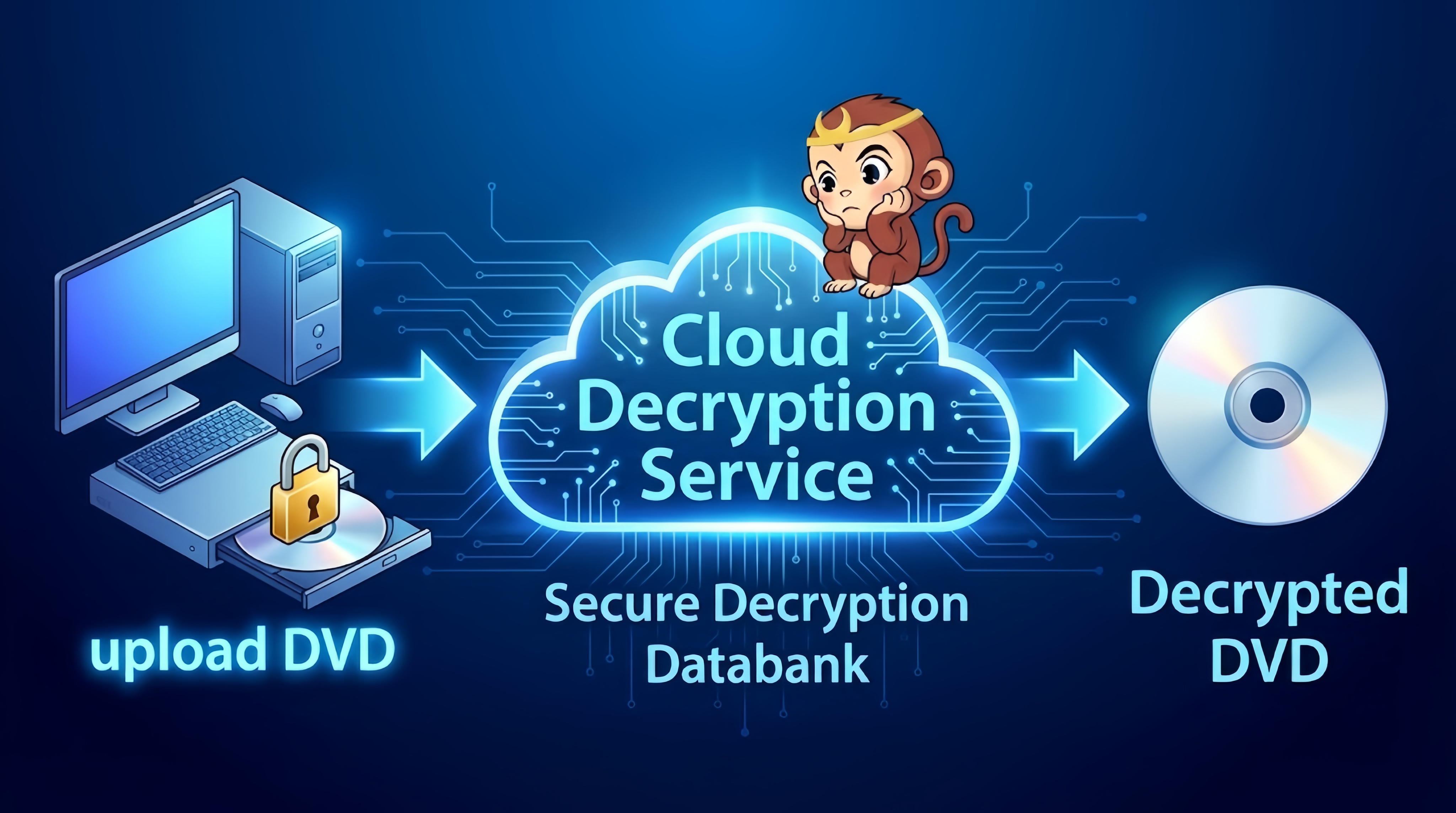
When backing up optical discs, movie disc encryption is an issue that absolutely cannot be overlooked. Most DVD backup software embeds the decryption rules directly into the local program. When a new protection scheme appears, users must wait for a software update. DVDFab DVD Copy, however, takes a completely different path: it moves the decryption center to the cloud, forming what is now known as the Cloud Decryption Service (CDS).
Its operating principle is as follows: Decryption rules are no longer hard-coded on the client side; they are centrally stored on the server. When a new disc is inserted, the software analyzes and uploads the protection data to the cloud. The CDS processes the decryption decision on the server and returns the result to the local application. To put it simply, the first user to encounter a new protection scheme submits a sample to the CDS. Decryption for subsequent discs of the same encryption is then completed within ten seconds, making it significantly faster than waiting for a traditional version update.
In terms of supported protection types, DVDFab DVD Copy's capabilities cover virtually all mainstream DVD protections, such as CSS, RC / RCE, APS, UOPs, Structured protections like ARccOS and RipGuard, etc.
In my actual experience, my feeling is this: if DVDFab cannot decrypt a certain disc, there is a nine-out-of-ten chance that my other DVD Copy tools will also be useless.
2. Disc Scanning Technology: PathPlayer
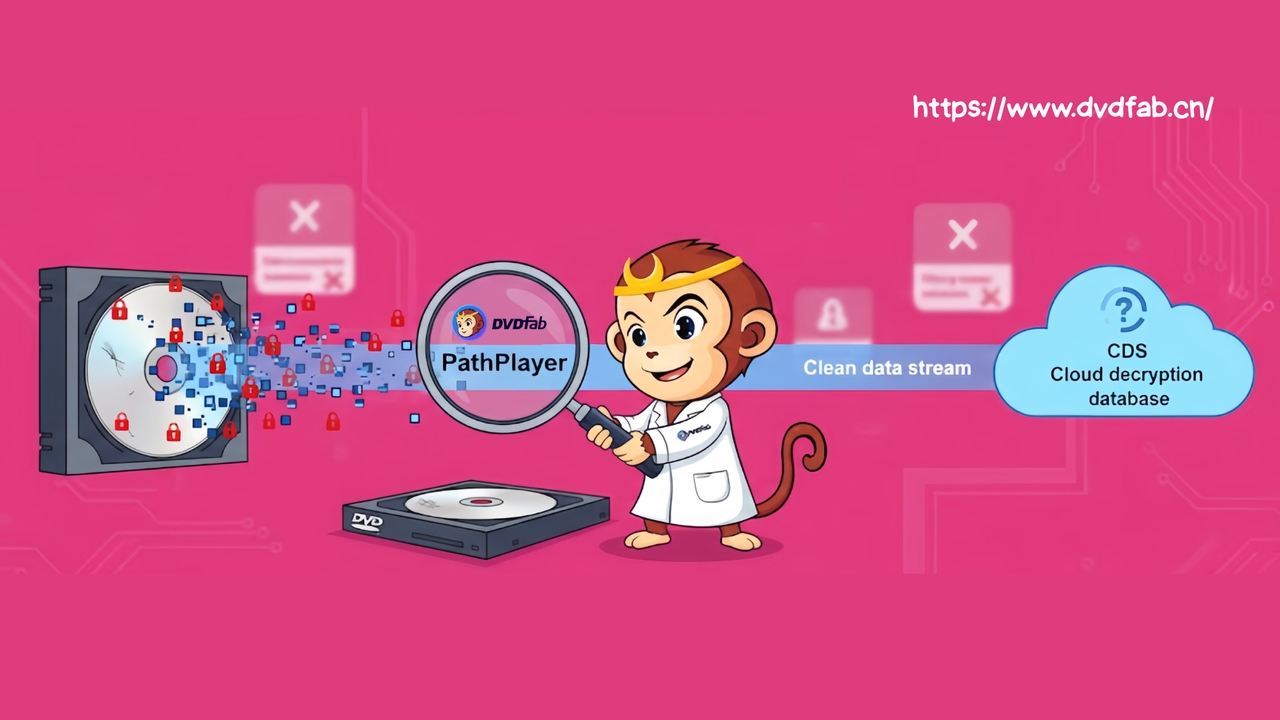
If CDS acts as the "decryption brain," then PathPlayer is more like the "forward scout" inserted between your optical drive and the cloud. PathPlayer technology differs significantly from the brute-force reading methods employed by standard software. So, what exactly is its advantage?
- Simulating a Physical Player: PathPlayer simulates a physical player by traversing chapter-by-chapter and playlist-by-playlist, rather than sequentially reading VOB files. This process identifies genuine playable content, such as main features, extras, and menus.
- Filtering of Bad Sectors and Fake Structure: Many protected discs (like ARccOS/Disney) inject bad sectors or false titles that cause traditional software to fail immediately. PathPlayer intelligently ignores all non-playable sectors and fake structures.
- Gathering Intelligence for CDS: When PathPlayer encounters new protection types or structural anomalies, it uploads the disc structure and protection information to the CDS cloud database. It ensures DVDFab maintains its long-term ability to keep up with the latest movie protections.
You can understand PathPlayer as a critical component: it isolates the "clean" content. It filters out the unreadable or junk structures that would never appear on your television, delivering only the genuine movie content to the CDS for decryption and transcoding.
3. Advanced Cinavia Removal Feature
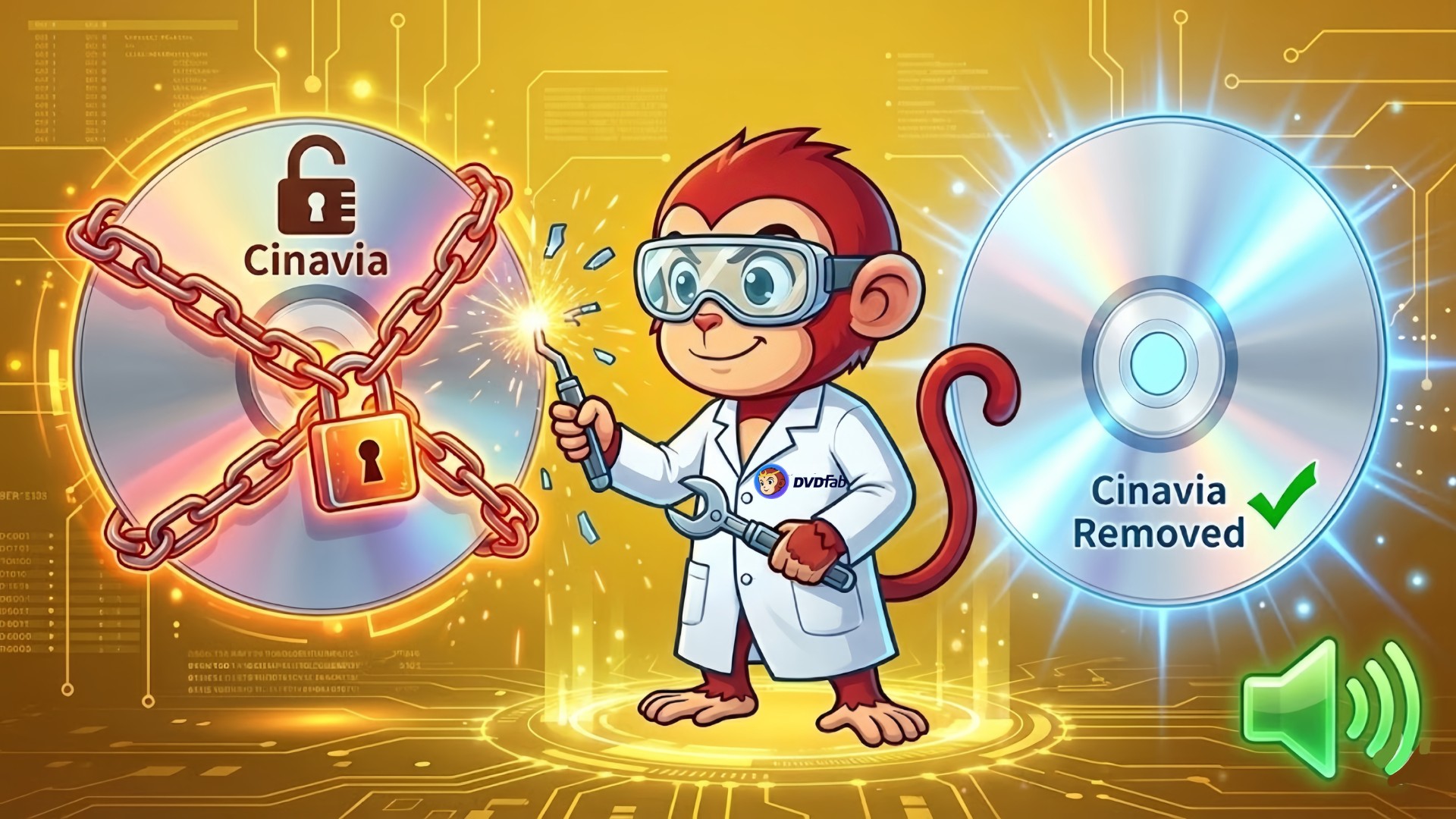
Unlike CSS, region codes, or structural protections you can "see", Cinavia is an entirely different type of copy protection that is embedded within the audio stream. Traditional copying doesn't touch the audio itself, so even if you've removed protections, your burned backup can still be muted by Cinavia.
DVDFab DVD Copy introduced the world's first Cinavia removal solution: DVDFab DVD Cinavia Removal. Once you purchase and activate it, you can use it inside the DVDFab DVD Copy module. While reading and decrypting the disc, the software scans the audio tracks for Cinavia, strips out the watermark-related information, and reconstructs the track. The output is a new audio track without Cinavia (usually AC3 or PCM), so your backup disc will no longer trigger muting or Cinavia warnings on players that support Cinavia detection.
4. Lossless and Compressed Backups
The two most common disc capacities are DVD-5 at about 4.7 GB and DVD-9 at about 8.5 GB. DVDFab DVD Copy software supports 1:1 lossless copying, for example DVD-9 to DVD-9 or DVD-5 to DVD-5, where the original video and audio streams are copied almost bit-for-bit. This is more than enough for "collection-grade" backups.
At the same time, it also supports compressing DVD-9 to DVD-5, either by shrinking one DVD-9 onto a single DVD-5, or by using the Split mode to split one DVD-9 into two DVD-5 discs for lossless disc-to-disc backup. This greatly improves the flexibility of your DVD backup strategy.
5. 6 Intelligent Copy Modes
DVDFab DVD Copy software offers six copy modes. These aren't just "different ranges of content to copy." They actually work to intelligently distinguish between junk and truly playable content.
In Full Disc mode, this DVD copy software figures out which playlist is the real main feature, so you don't get lost in dozens of fake playlists. In Main Movie and Customize modes, it only lists titles that are genuinely playable and accessible from the menu, leaving those deliberately inserted fake titles and bad sectors on the original disc instead of carrying them over into your backup.
| 6 Copy Modes of DVDFab DVD Copy | ||
| Copy Mode | Key Features | Applicable Scenarios |
| Full Disc | Copies everything: menus, main movie, and all extras; lossless or compressed. | Want a complete collection backup with full menu navigation. |
| Main Movie | Keeps only the longest title (main feature); omits menus and warnings. | Only interested in the main film content; space saving. |
| Customize | Manual selection of specific titles, audio tracks, and subtitles. | Need a highly specific, stripped-down backup. |
| Split | Splits one DVD-9 into two DVD-5s with no compression. | Prioritizing maximum video quality when only DVD-5 blanks are available. |
| Merge | Combines content from multiple source DVDs onto a single disc. | Creating custom compilation or "themed" discs. |
| Clone/Burn | A true 1:1 bit-by-bit copy. | Want 1:1 clone backup; require maximum compatibility for DVD players. |
Real User Stories: Challenges DVDFab DVD Copy Has Conquered
DVDFab has built a track record spanning more than two decades, drawing coverage from outlets like TechRadar and Softpedia alongside user reviews on Trustpilot. Beyond that coverage, similar concerns show up in disc-collecting communities too: threads on r/DataHoarder about archiving decades of DVDs, Blu-rays, and UHDs consistently return to the same worry, aging media that needs to be backed up before it degrades further. The two stories below, drawn from DVDFab's official forums, show how that plays out for actual users.
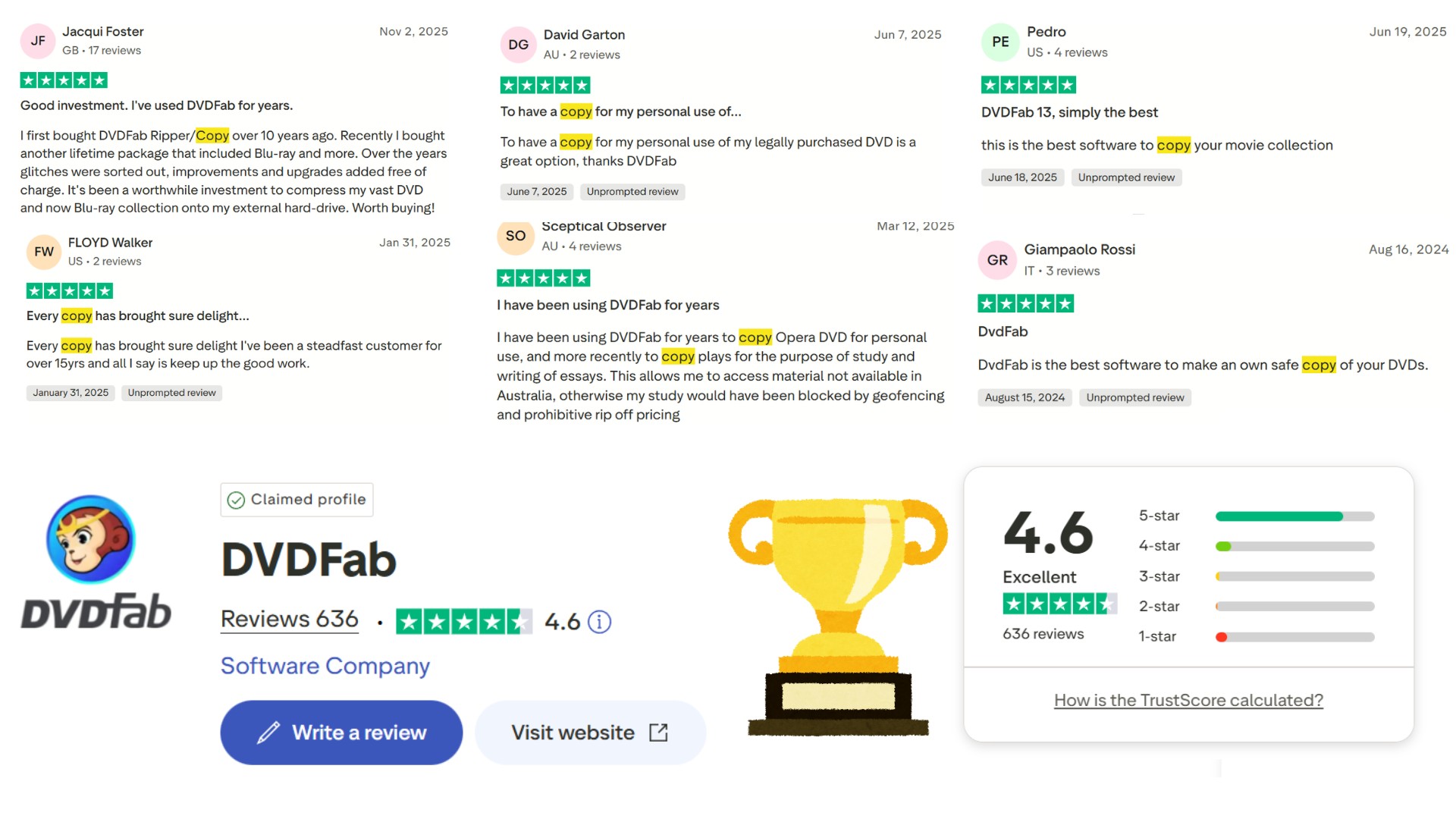
Mark, a movie enthusiast and father, has a vast DVD collection. Seeing the discs age, he realized backup was critical. He calls DVDFab DVD Copy his "DVD lifesaver." "It has never failed to decrypt a disc," he says, noting its perfect record with both old and new releases. He loves its compatibility: it handles both digital backup (ISO/folder) and physical backup (burning to a blank disc). Mark no longer worries about scratches. Using the Cinavia Removal module also solved his audio issues. "It's really simple; my eight-year-old son can use it by himself now."
The utility of DVDFab DVD Copy extends far beyond cloning DVD movies. David, an opera enthusiast from Australia, has used DVDFab for years to copy opera DVDs for personal viewing. More recently, he has also utilized it to duplicate theatre works for study and thesis writing. He stated: "This allows me to access material not available in Australia, otherwise my study would have been blocked by geofencing and prohibitive rip off pricing."
DVDFab DVD Copy Review: Hands-on Experience and Tutorial
Here's how the backup process actually works in DVDFab DVD Copy, using a movie DVD roughly 2 hours long as an example, tested end to end on Windows 11 with rough time estimates for each stage.
Step 1: Download, and Launch DVDFab 13
DVDFab DVD Copy is a module within the DVDFab software suite, so you must first install the main DVDFab program on your computer. You can download the installation package from the official website and follow the wizard step-by-step to complete the installation. The entire process takes approximately 4 minutes. Once the installation is complete, double-click the DVDFab icon on your desktop to launch the program.
Step 2: Enter the Copy Module and Select a Copy Mode
Click the Copy module in the left navigation bar of the main interface to enter the DVD Copy workspace.
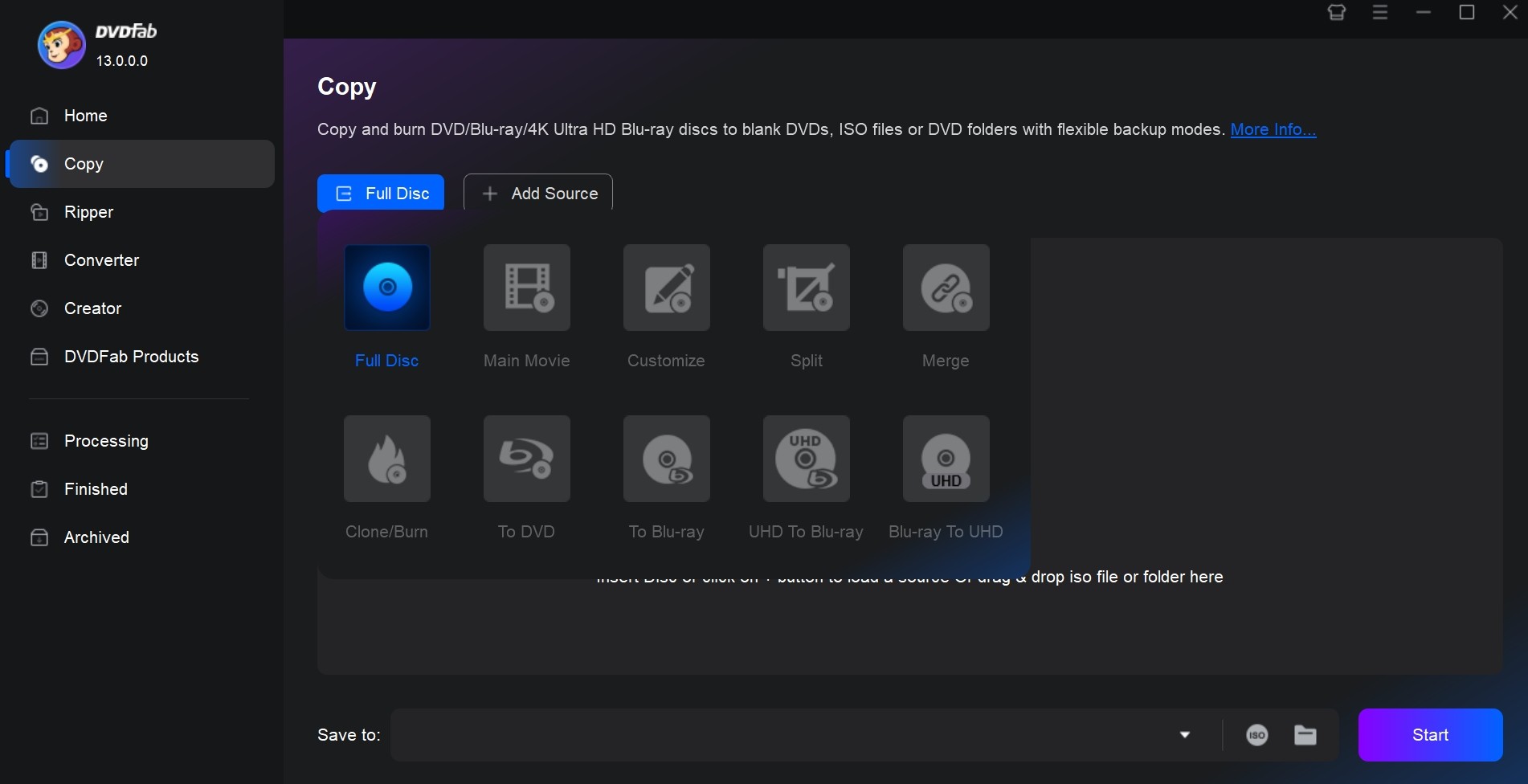
Next, select a suitable Copy Mode. You can refer to the simple table below for the supported input and output formats for different modes:
| Copy Mode | Supported Input Formats | Supported Output Formats |
| Full Disc | DVD disc / ISO image / DVD folder | DVD disc / ISO image / DVD folder |
| Main Movie | DVD disc / ISO image / DVD folder | DVD disc / ISO image / DVD folder |
| Customize | DVD disc / ISO image / DVD folder | Two DVD discs / ISO images / DVD folders |
| Split | DVD disc / ISO image / DVD folder | DVD disc / ISO image / DVD folder |
| Merge | Multiple DVD discs / ISO images / DVD folders | DVD disc / ISO image / DVD folder |
| Clone/Burn | DVD disc / ISO image / DVD folder | DVD disc / ISO image |
Clone/Burn is the only mode limited to disc or ISO output since it mirrors the source exactly; every other mode can also output to a DVD folder for direct playback from a hard drive or NAS.
Step 3: Import the DVD Source
Click Add Source at the top of the interface, or the plus icon in the central area, to select the DVD resource you want to back up. If the source is an ISO or a Folder, you can also drag and drop it directly from the File Explorer into the DVDFab window; the software will load it automatically.
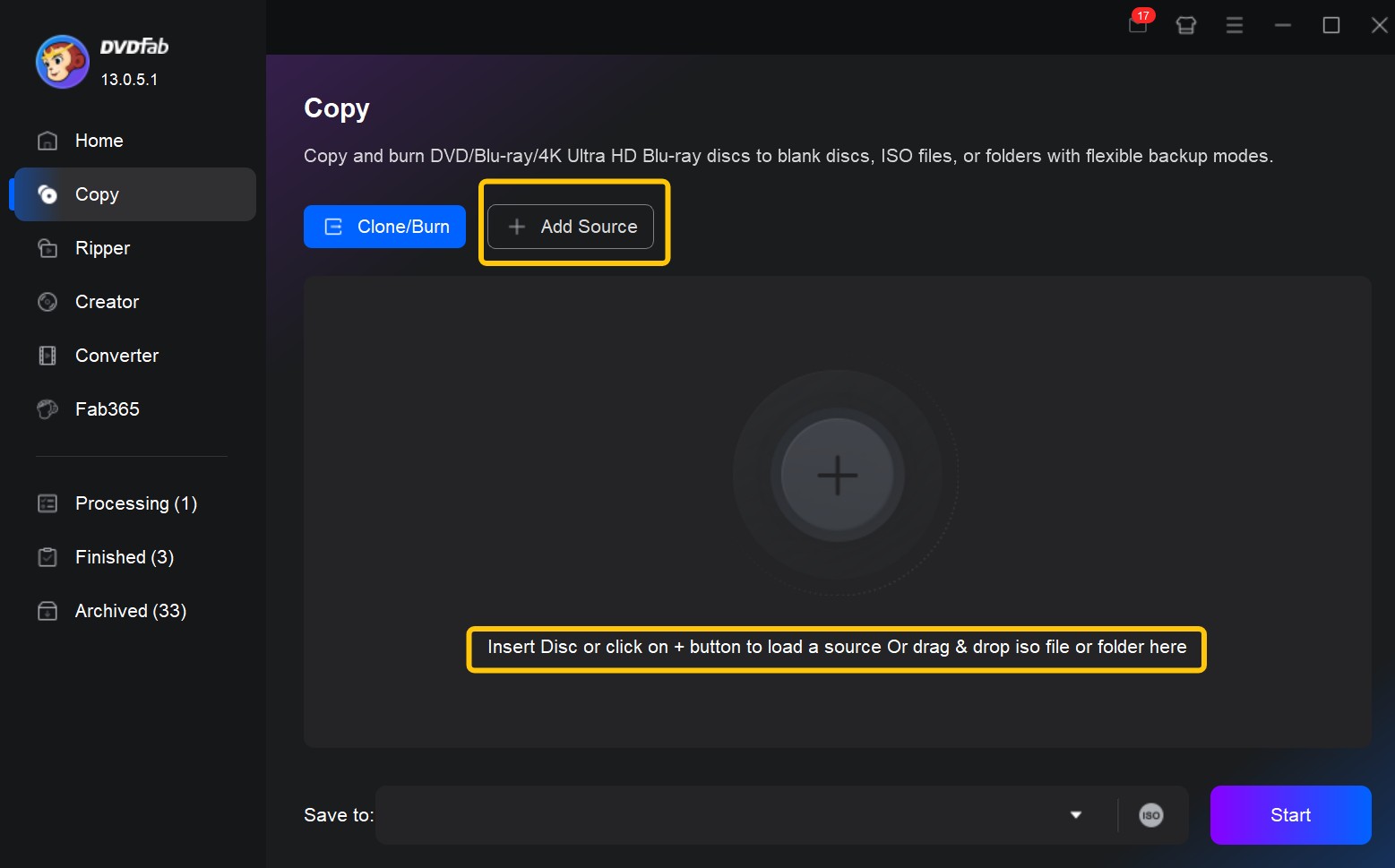
After uploading, DVDFab quickly scans and analyzes the entire DVD's information in about 5 seconds. Then, you can click the "i" icon on the interface to view detailed information, such as the file format, encryption type, and how bad sectors are being handled.
Step 4: Adjust Output Settings
Except for the Clone/Burn mode, which is a one-to-one copy and requires almost no setup, the other five copy modes allow for varying degrees of customization. You can adjust the settings in the following order:
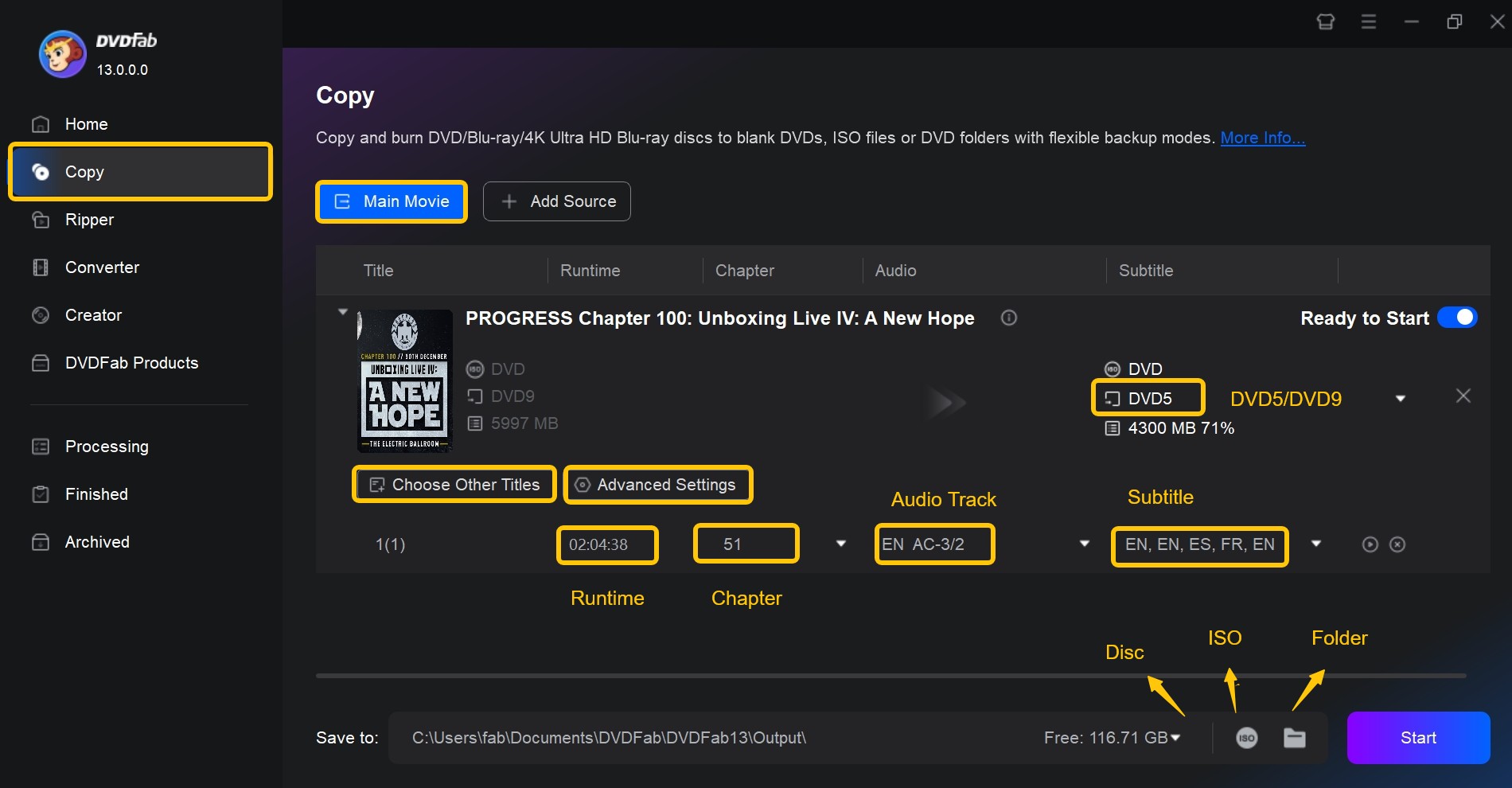
Click Advanced Settings to set the Volume Label, select the output size (e.g., DVD-5 / DVD-9), decide whether to keep the DVD menu, and choose whether to copy non-DVD standard files.
Click Choose Other Titles to manually select the Titles you need to back up. In Main Movie mode, DVDFab automatically identifies and selects the main feature, which saves time and effort.
On the main interface, you can further set the Chapter Range, preview the estimated output size, select the subtitles and audio tracks to keep, and use the Preview button to verify the content is correct.
Step 5: Select Backup Format and Start Copying
Once all parameters are confirmed, select the target backup format and saving location in the Save to area at the bottom of the main interface.
- For cloning to a physical disc: Insert a blank DVD, select the corresponding optical drive from the Save to dropdown menu. DVDFab will then clone or compress and burn the data to the new disc.
- For performing a digital backup: Click the ISO icon to output an ISO image or click the Folder icon to output a DVD folder (VIDEO_TS). This allows you to save the file to your local hard drive or NAS, making it convenient to play directly in players like VLC and facilitating long-term storage.
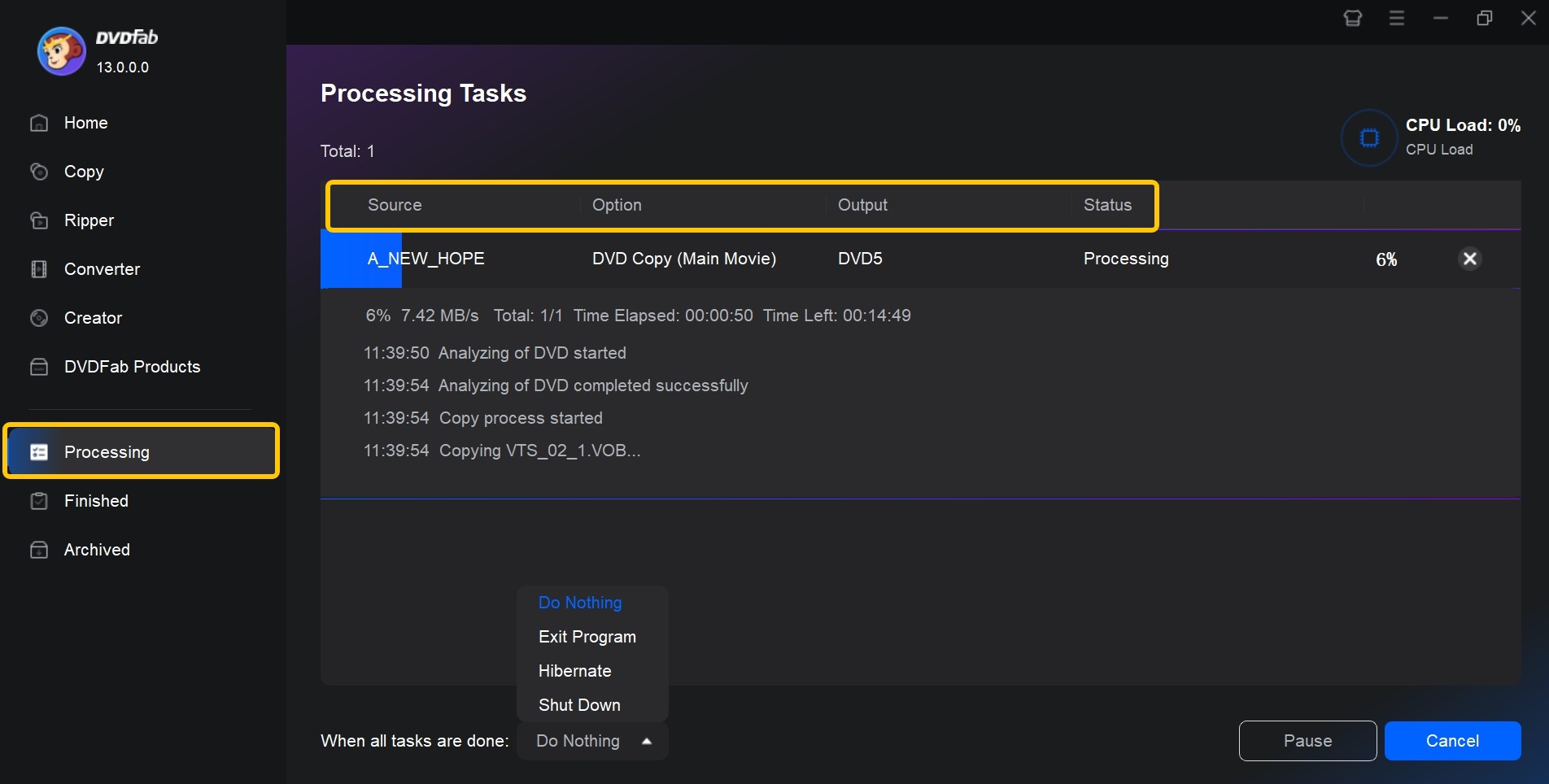
After setup is complete, click the Start button in the bottom right corner. DVDFab will begin the copying task. The bottom of the interface will display the real-time progress, remaining time, and the current processing stage. For this test with the 2-hour movie disc, the backup was successfully completed in just 4 minutes and 36 seconds.
FAQ about DVDFab DVD Copy
Is it legal to use DVD copy software?
Whether copying a DVD is legal depends heavily on your country. In the United States, if you copy a copyrighted DVD for distribution or sale, this infringes upon the owner's copyright and is strictly prohibited by law. However, under the doctrine of fair use, copying may be permitted in some regions if it is for purposes like personal backup, education, or research. In summary, before copying, please carefully read the regulations in your area to ensure all your actions comply with local laws.
What is the difference between DVDFab DVD Copy and DVD Ripper?
DVD Copy is responsible for duplicating the entire DVD structure. It copies the disc content exactly (or compressed) into a new DVD, an ISO image, or a VIDEO_TS folder. DVD Ripper, on the other hand, re-encodes the movies from the DVD into common video files, such as MP4 or MKV. This makes them easy to play on computers, mobile phones, or tablets.
So, which one should you use?
- Use DVD Copy if you want to create "another disc that can be played in a standalone DVD player" or if you want to retain DVD features like menus, chapters, and extras.
- Use DVD Ripper if you want to "put the movie onto a hard drive/mobile device to watch anytime, just like a regular video file."
What is the difference between DVDFab DVD Copy and DVDFab HD Decrypter?
DVDFab HD Decrypter is the free version of DVDFab. After downloading DVDFab, you can try the full range of features for the first 30 days. Once the trial period ends, the software automatically converts to DVDFab HD Decrypter. Below are the differences between DVDFab DVD Copy and DVDFab HD Decrypter:
| Feature | DVDFab DVD Copy | DVDFab HD Decrypter |
| Supported Copy Protection | Supports copy protection on the latest released DVDs. | Only supports DVD/Blu-ray released more than one year ago. |
| Cloud Decryption Service | ✅ | ❌ |
| Output Format | DVD/Folder/ISO Image File | DVD/BD/Folder/ISO Image File; MKV/MP4 |
| Allow to Compress Disc | ✅ | ❌ |
| Output Video Resolution | Lossless | Lossless |
| Supported Copy Modes | Full Disc, Main Movie, Customize, Clone/Burn, Split, Merge | Full Disc, Main Movie |
| Burn ISO to Disc | ✅ Built-in burner | Must use the ImgBurn engine |
Can I copy a DVD across regions? What is the region code of the backup copy?
Yes. DVDFab can remove region codes. The resulting backed-up DVD is region-free, meaning it has no regional code restrictions, and your player can play it directly.
Why is copying some DVDs particularly slow, or why does the process seem stuck at analyzing source?
If you encounter slow speeds, it might be due to the following reasons:
- The Disc's Protection or Structure Is Too Complex. When encountering a disc with new encryption, DVDFab uses PathPlayer plus the Cloud Decryption Service to perform an in-depth analysis of the entire disc. This process can appear quite slow during the "Opening Source" stage.
- The Disc or the Optical Drive Is in Poor Condition. Scratches, stains, or oxidation on the disc surface can lead to repeated read retries. Similarly, an aging or low-quality external optical drive can significantly drag down the entire analysis process. First, try cleaning the disc surface, switching to a different optical drive, or lowering the reading speed to see if it improves.
- System and Software Conflicts. Running other resident decryption tools, certain virtual drives, or older burning software at the same time can slow things down. The same applies if antivirus software intercepts DVDFab's read process, which can cause the "Analyzing" stage to run far longer than normal. Try updating to the latest DVDFab version and closing any other similar software.
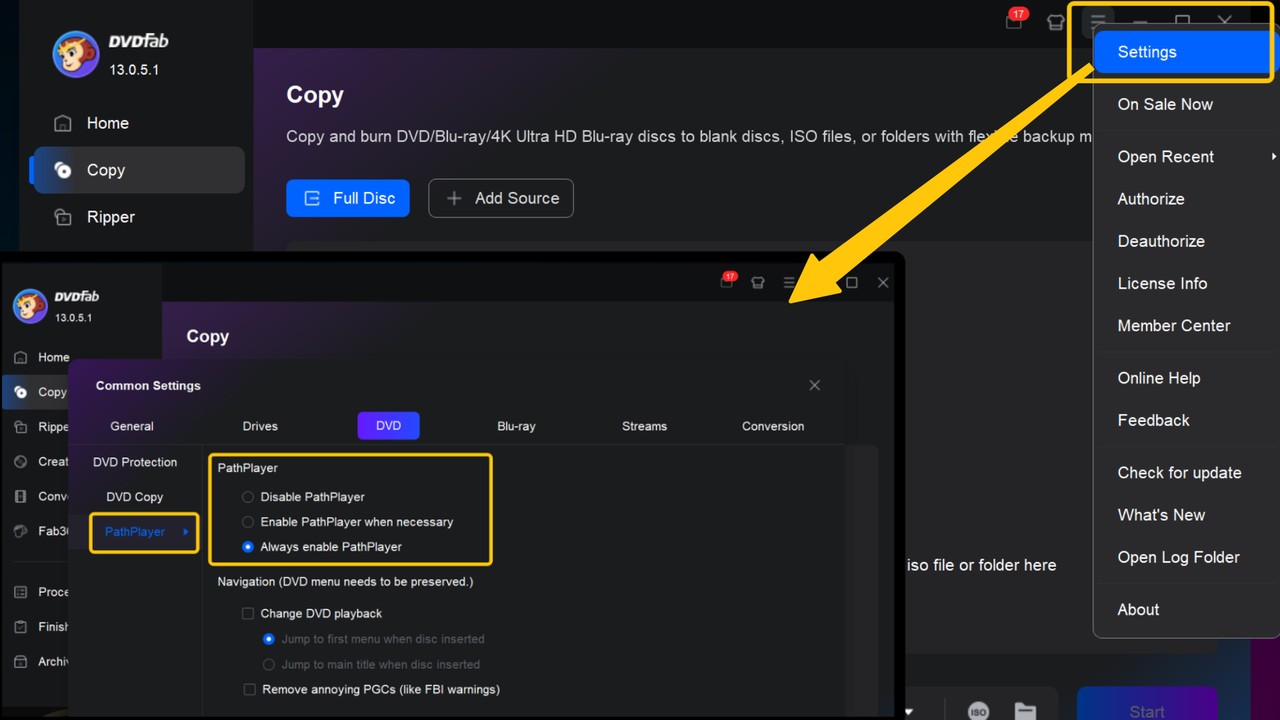
If the disc and drive are fine but the disc still fails to load, you can try changing the PathPlayer settings under Settings > DVD > PathPlayer within DVDFab, attempting to disable or enable the feature.
Is DVDFab safe to download and use?
Yes, as long as you download it from the source. DVDFab's installer is digitally signed and does not bundle unrelated third-party adware, but third-party mirror sites sometimes repackage installers with extra software attached, so download only from dvdfab.cn or an official app store listing. The 30-day full-featured trial also lets you verify the software's behavior yourself, including checking what it installs, before paying for a license.
How much does DVDFab DVD Copy cost?
DVDFab DVD Copy is sold on a subscription basis, with monthly, yearly, and lifetime plans available, and pricing varies by region and ongoing promotions, so this review will not quote a specific figure that could be outdated by the time you read it. Every plan is preceded by the 30-day full-featured trial, which is enough time to test decryption success and copy speed on your own discs before deciding if a license fits your use case. Check DVDFab's official store for the current rate in your region.
What if my DVD is too scratched or damaged to read?
Severe scratches can stop any DVD copy software from reading a disc, DVDFab included. Start by cleaning the disc surface (wipe from center to edge, not in circles) and trying a different optical drive, since aging drives tend to handle read errors worse than newer ones. If a healthy drive still cannot get past a specific point, PathPlayer's per-title scanning can sometimes work around the damaged sector, though a disc with damage across the main title may not be fully recoverable. With new optical drives getting harder to find as some manufacturers slow production, backing up borderline discs sooner rather than later is worth it.
The Final Verdict
DVDFab DVD Copy's core strength is decryption reliability: the Cloud Decryption Service and PathPlayer combination keeps it current against new disc protections without waiting on manual software updates, and the six copy modes cover most collection and archiving scenarios in one tool. That breadth comes with trade-offs. The interface has enough options to create a mild learning curve for first-time users, and the module is not the cheapest path if you only rip discs occasionally.
If you only need to back up a handful of older discs from time to time, the free DVDFab HD Decrypter covers that case. If you regularly buy new releases, want to preserve menus and full disc structure, or need to remove Cinavia protection, DVDFab DVD Copy is built for that workload. Either way, the 30-day full-featured trial is the fastest way to confirm decryption success on your own discs before committing to a license.

 How to Rip DVD to ISO on Windows 10/11 and Mac in 2026By Wenny Yan - Oct 12, 2026
![11 Best ISO Creators to Create ISO File on Windows & Mac [2026 Updated]](https://images.dvdfab.cn/artifact/2026/10/09/DVxGGdRFZrckamUXZ3-uk9NfbC6bsZr3/feature_cover.jpg) 11 Best ISO Creators to Create ISO File on Windows & Mac [2026 Updated]By Wenny Yan - Oct 9, 2026
11 Best ISO Creators to Create ISO File on Windows & Mac [2026 Updated]By Wenny Yan - Oct 9, 2026 8 Best Free ISO Burners for Windows and Mac in 2026: Tested PicksBy Diana Smith - Sep 16, 2026
![How to Remove DVD Copy Protection: 6 Software Options [2026]](https://images.dvdfab.cn/media/How_to_Remove_Copy_Protection_from_DVD_upluh5.png/public) How to Remove DVD Copy Protection: 6 Software Options [2026]By Diana Smith - Sep 10, 2026
How to Remove DVD Copy Protection: 6 Software Options [2026]By Diana Smith - Sep 10, 2026