Where Can I Sell DVDs for Cash: Best Places Near Me & Online [2026]

Summary: To sell DVDs for cash, the fastest option for a large box of ordinary Hollywood DVDs is a barcode-scanning buyback service such as World of Books or EagleSaver, which offers instant quotes and free prepaid shipping. For rare titles, box sets, SteelBooks, and Criterion Collection discs, eBay will usually get you the highest price. Whichever option you choose, make a digital backup with DVDFab first if you still want to watch the movies.
Table of Contents
A few months ago, I finally got around to cleaning out a box of old DVDs that had been sitting in my closet for a long time. I wanted to make room, but I didn't want to get rid of them because some of them were old favorites and others were sentimental. That's when I started wondering, "Where can I sell my DVDs for cash nearby?"
I'm not the only one asking this question. Many people are thinking about shrinking their physical collections, making extra money, or simply seeking for locations that still sell DVDs. In this tutorial, I'll show you the best venues to sell DVDs near you, how to make money from local buyers or internet platforms, and even how to preserve the material before selling.
Why Sell Used DVDs for Cash
Physical DVDs are increasingly collecting dust as streaming sites such as Netflix, HBO Max, and Hulu become the default way to watch movies and TV episodes. Thousands of individuals are looking for ways to get rid of old CDs and get anything in exchange.
Selling your used DVDs is a wise decision for various reasons:
- Selling your DVDs frees up shelf and closet space at home.
- It's a simple way to recover a bit of money. Be realistic: common Hollywood titles typically pay $0.25-$3 each, so a big bin of ordinary discs adds up slowly. The real value sits in box sets, steelbooks, anime, Criterion and out-of-print titles.
- Passing discs to buyers who still enjoy physical media is more sustainable than throwing them in the bin.
My rule of thumb: if you have fewer than 20 common discs, the shipping and listing time will probably eat the payout — donate them instead. Selling is worth the effort when you have either bulk (a full shelf or two) or clearly collectible titles worth listing individually.
The good news is that there are many reliable channels, both online and offline, that can help you cash in on your old DVDs. I will next go into further depth about these channels.
Online retailers are a great option if you want to get rid of DVDs and find someone to buy them. But selling it to a nearby retailer is always an alternative. One way to get rid of the collection and make money faster is to sell DVDs in person. It saves you the trouble of facing a bad customer experience which may happen a lot regarding online stores.
In addition, you don't have to worry about delivery costs, which boosts your profit margin. You may be able to find local buyers if you've thrown out your DVD cases and are putting them in a binder.
| Selling Method | Typical payout per common DVD | Best for | Pros | Cons |
| Pawn Shops | $0.25-$2 per disc; higher only for clear rarities | Fast cash today, small stack | Same-day cash, no shipping | Lowball offers; you have to negotiate |
| Local Used Media Stores | $0.50-$3 cash, more in store credit | Mixed collections with a few TV sets | Fair pricing at independents; trade-in credit | Store availability varies by city |
| Facebook Marketplace | $5-$25 for a lot; single common discs rarely sell | Selling the whole collection as one lot | No fees; local pickup, no shipping | No-shows and lowball messages are common |
| Used Bookstores | $0.25-$2 per disc, if accepted | Small side stack alongside books | Easy drop-off if you're already selling books | Many don't take DVDs at all |
| GameStop / trade-in chains | Store-dependent; often games only | Trading in with games and consoles | Convenient if you're already trading games | Movie trade-in is limited and inconsistent |
1. Pawn Shops
If you want to sell your used DVDs, Pawn Shop is typically the first and best alternative. Pawn Shops were created to offer loans in exchange for collateral. Anything valuable can be used as collateral to get cash. Most people would go to a pawn shop with an antique or costly ring and get paid according to the item's value.
Set expectations before you walk in: pawnbrokers price to resell, so common discs get pennies and only clear collectibles (box sets, steelbooks, sealed rarities) move the needle. To get the best deal you can:
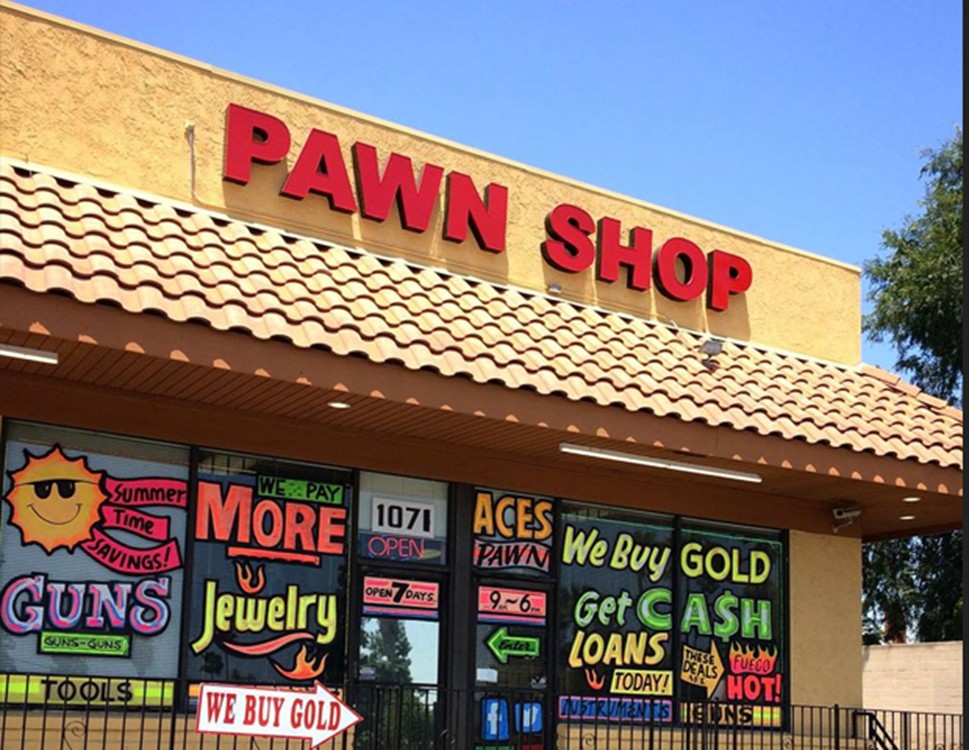
- Find the best pawn shop and someone who provides better rates. To ensure this, you may visit three to four shops and look for the one who provides the best rates to buy used DVDs.
- Another crucial step that you must take is negotiation. Negotiation is something that some people want to avoid, yet there is nothing to be afraid of.
- You should be ready to prove your claims about the product at any time.
- PawnGuru is an app that can be used to create an ad that can provide better rates.
2. Local Used Media Stores
Local secondhand media stores are one of the more reliable local routes. These stores specialize in used books, movies, music and games, and value DVDs by condition, demand and rarity. Many accept trade-ins — I usually take store credit here rather than cash, because the credit rate is meaningfully better and it turns a shelf of common discs into something I'd actually watch.
Popular chains such as Half Price Books, 2nd & Charles, and Bull Moose have many locations and are well-known for their reasonable prices. Furthermore, independent stores may offer better prices and more customized service.
3. Facebook Marketplace
Facebook Marketplace works well for one specific scenario: selling the entire collection as a single lot to a local buyer, cash on pickup. Individual common discs almost never move here — the effort per sale doesn't pay. But bundle 200 DVDs into one $40 listing and you'll usually get a taker within a week. You deal at your own risk, so meet in a public place. To find local buyers:
- Simply type your city's name and "buy-sell group" into the search engine at the top of the Facebook page to find local buying and selling groups.
- The Facebook Marketplace may be found near the top of the website's left-hand navigation menu.
- If you're using the app, tap the hamburger icon (the three-line icon) in the lower right corner of the screen to launch a menu that provides links to the Marketplace.
4. Used Bookstores
Some used bookstores buy DVDs, but many don't. Call ahead to ask about their buying policy before you haul a box across town. Target stores that also stock CDs, vinyl or general secondhand media — a pure literary bookshop rarely wants your movies. Payouts tend to be on the low side, especially for common titles, so I treat this as a convenient drop-off when I'm already selling books there rather than a destination trip.
5. GameStop and Trade-In Chains
GameStop's trade-in program is built around games and consoles; DVD and Blu-ray trade-in is limited and varies store by store, so call your local shop before driving over. If your box is mostly movies, a buyback app or a local media store will almost always give you a better result. Where GameStop does help: if you're already trading in games and consoles, tossing a few movies onto the pile is a small credit bump rather than a separate trip.
Where to Sell Used DVDs for Cash Online
Selling online lets you skip the local haggle and reach buyers who actually want the specific title you're holding. The trade-off: you'll wait for shipping, and fees eat into the payout. One habit that consistently earns me more: before I ship anything, I get quotes from two different buyback services for the same batch — payouts on the same title can differ by two or three times, and comparing offers is how you actually sell for the most money.
| Selling Platform | Typical payout per common DVD | Best for | Pros | Cons |
| eBay | $3-$15 for common, $20-$100+ for collectibles | Rare titles, steelbooks, box sets | Highest ceiling for collectibles; auctions surface fair value | Listing time; ~10-13% seller fees; you ship each item |
| World of Books / Eagle Saver | $0.25-$3 per accepted disc | Bulk common DVDs, fast payout | Barcode-scan instant quotes; free prepaid shipping | Rejects visibly damaged or unlisted titles |
| Amazon | $3-$10 per disc (Individual plan) | Discs already ranked in Amazon's catalog | Huge buyer pool; buyers pay shipping | ~15% referral fee; Professional plan has a monthly cost |
1. eBay
eBay is an E-commerce platform used to perform business-to-customer or customer-to-customer sales. eBay might be your best bet if you want to sell your complete DVD collection online in one easy step instead of shipping each one separately. If you list 50 or fewer pieces per month, listing your collection is free. If your collection does sell, eBay will retain a 10% portion.
eBay allows you to sell almost anything, but you need to have patience and put some effort into it. You'll need to write an ad and take images of the products in their current state. After that, you'll have to ship the item to the buyer. You can always offer a "buy it now" price to make the transaction easier.
2. World of Books and Eagle Saver
Quick note on Decluttr: it shut down in 2025. Its parent, musicMagpie, still operates in the UK, but US sellers looking for the same barcode-scan workflow now use World of Books or Eagle Saver.
Both work the same way that made Decluttr popular. Scan a barcode (or type the UPC) to get an instant per-disc quote, add discs until you hit the minimum, and ship the whole box free with a prepaid label. Payment lands after they verify the discs — usually within a week of delivery. Rejections happen for visibly damaged discs or titles they don't currently accept, so the payout you see on screen is a ceiling, not a guarantee.
This is the route I'd use for a bulk box of common Hollywood titles. It's not the highest per-disc payout, but it's the fastest and it clears the shelf in one shipment. Before I commit, I quote the same batch on both sites and go with whichever gives the higher total — the gap can be surprising.
3. Amazon
Amazon might not be the best option to sell DVDs online, but it is a viable choice. Now, most platforms demand you to have a perfect DVD to sell. However, in the case of DVDs, it is nearly impossible to avoid scratches. If you are trying to sell used DVDs, there is a strong chance that it has scratches.
Unlike most platforms, Amazon can be used to sell such products. Amazon charges 15% of the exchange, but on the plus side, the shipping charges are paid by the customer. So, you should not worry yourself about that. Furthermore, Amazon requires monthly charges, so you should not choose Amazon if you have only a few products.
Rip Discs to PC Before Selling DVDs for Cash
Once a disc leaves your hands, the movie leaves with it. Before I ship a box, I rip the titles I actually rewatch — for discs I'm authorized to copy, where permitted by applicable law — so I keep a personal offline copy on my drive. There are a few tools that handle this; I use DVDFab DVD Ripper because it fits the two save-format cases most people run into.
- Best for phones and streaming: MP4. Ripping to MP4 (H.264 or H.265) gives you a single file that plays on iPhone, Android, Apple TV, smart TVs and any Plex or Jellyfin setup. It's my default for anything I want on my phone during flights.
- Best for a lossless archive: MKV. Ripping to MKV preserves the original video quality along with multiple audio tracks, chapters and subtitle streams. Choose this for box sets or Criterion discs you want to keep the way the disc had them.
Supported OS:
Free Download Windows 11/10/8.1/8/7
Free Download macOS 10.13 - 15.x
- Saves a local personal copy of discs you're authorized to copy.
- Handle most complex DVD copy protections.
- Outputs MP4 for phones and streaming, or MKV for a lossless archive.
- Preserves picture quality at a smaller file size.
- Built-in editor for trim, crop, subtitles and watermarks.
- GPU-accelerated batch ripping for full box sets.
Tutorial: How to Rip DVDs with DVDFab DVD Ripper
Step 1: Load the DVD source into DVDFab program
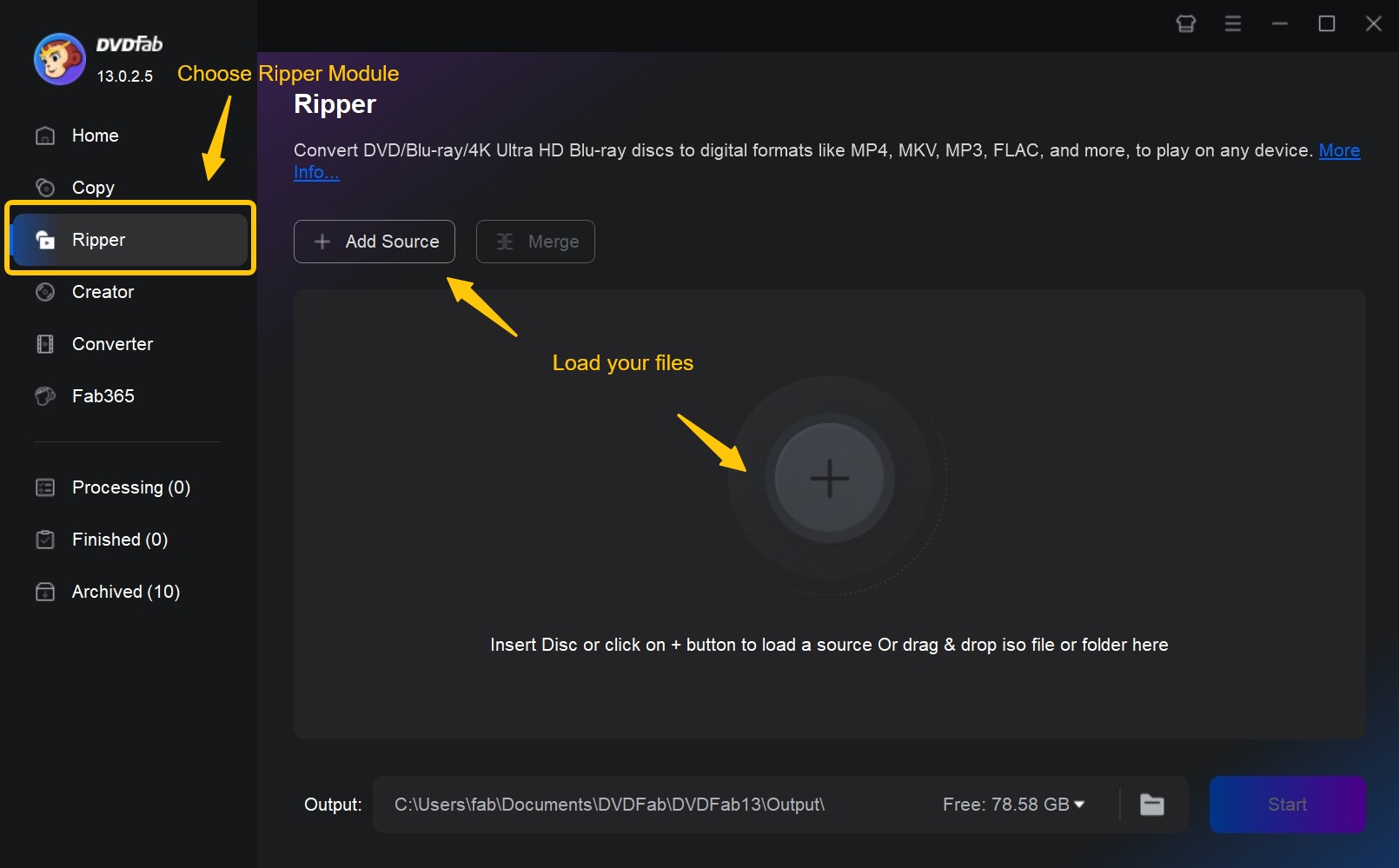
Free download this DVD ripper and select the "Ripper" module. If your DVD disc is already in the optical drive, click the "Add" button to load it. If the source is an ISO file or folder, simply drag and drop it into the main interface.
Step 2: Customize the output videos
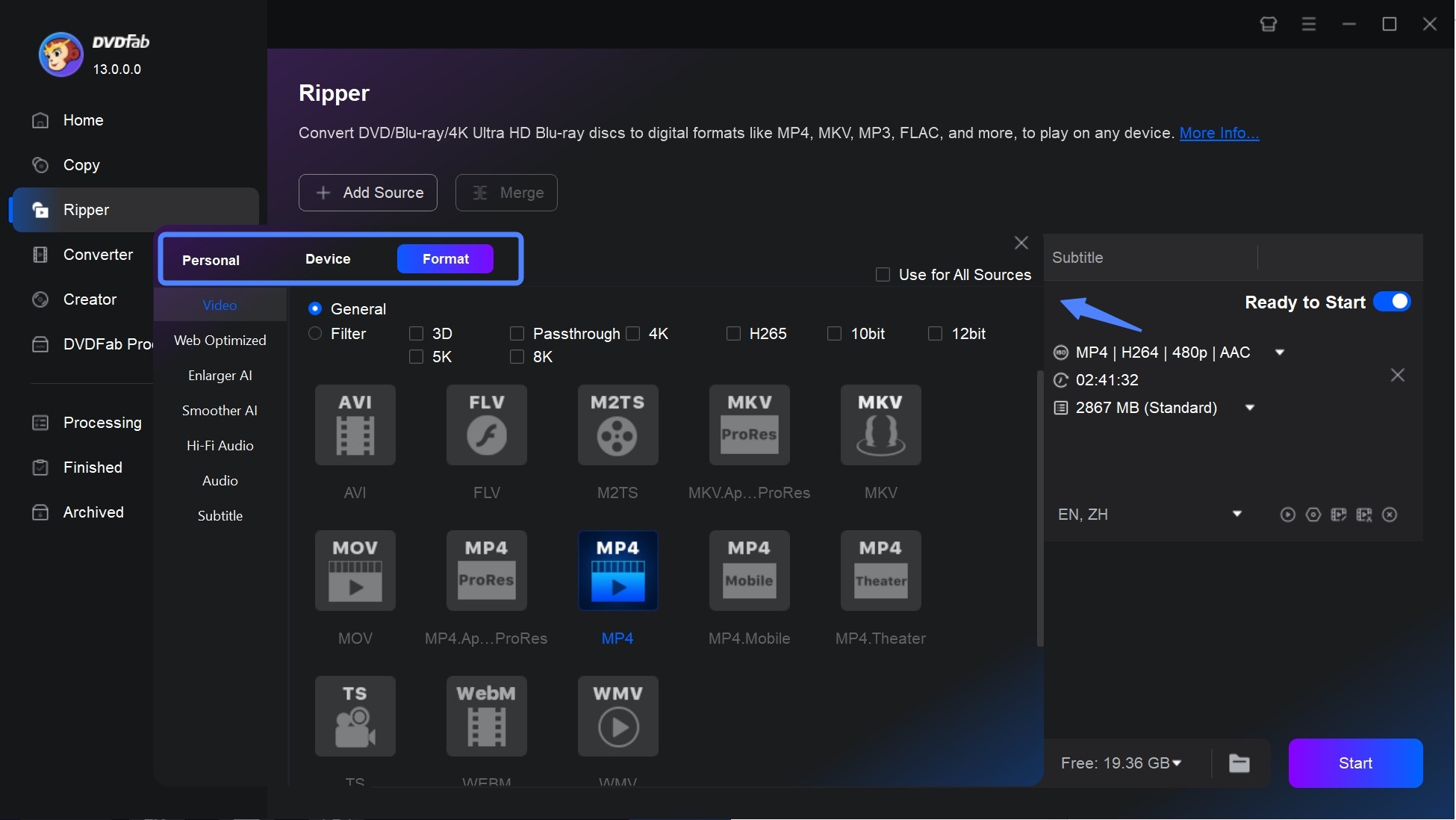
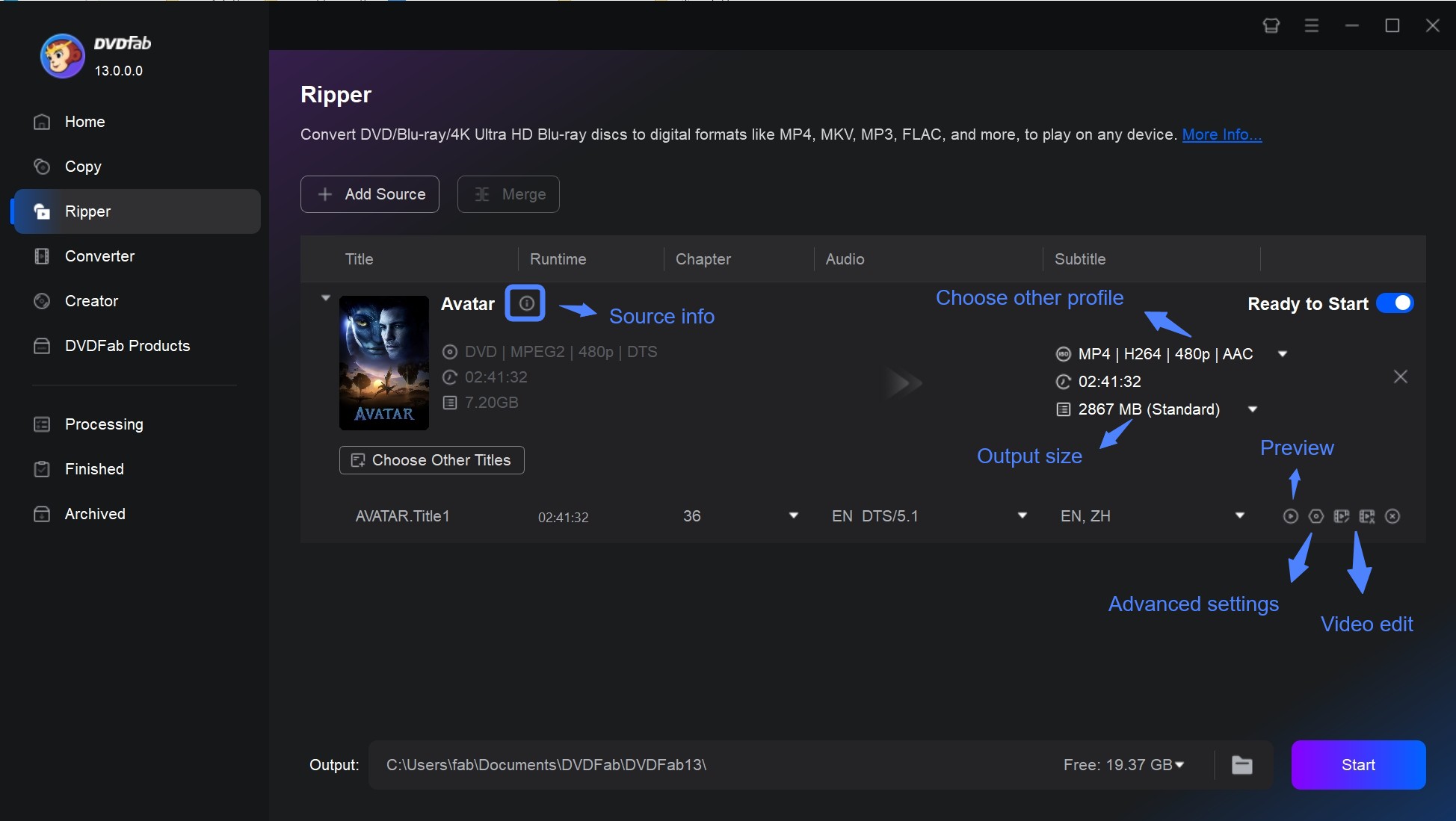
Then, it's time to customize the output videos as you desire. Click "Choose Other Profile">"Format">"Video" to convert your DVD to MP4, MKV, MOV, AVI, or other digital formats. There are also options for selecting audio tracks/languages, converting DVD subtitles to SRT format, adding external subtitles, and other advanced settings.
By clicking the "Video Edit" button, you can also crop, trim, merge, add watermarks and subtitles, and even change the color of the video.
Step 3: Start the ripping process
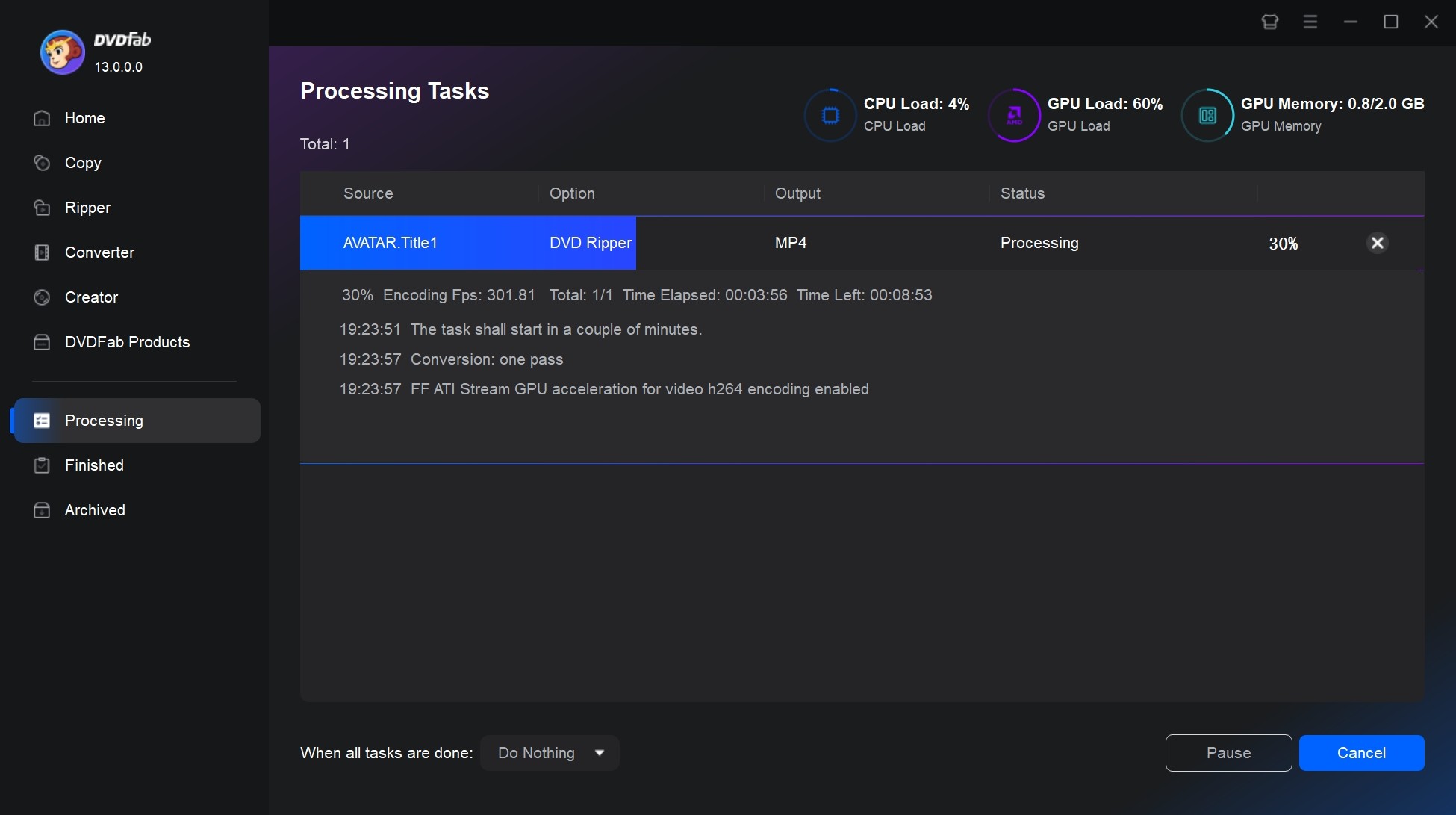
Finally, click the "Start" button to start the ripping process. You can add multiple ripping tasks to the Task Queue, and then they will be batch handled one after another.
FAQs
Q
Does GameStop buy used DVDs?
GameStop's trade-in program is built around games and consoles. Movie trade-in exists but is limited and varies by store, so call your local shop before you drive over. For a box of DVDs, a buyback app or a local media store will almost always beat what GameStop offers.
A
Q
Is Decluttr still around?
No, Decluttr closed in 2025. Its parent brand musicMagpie continues in the UK. In the US, World of Books and Eagle Saver offer the same barcode-scan quote plus free prepaid shipping workflow.
A
Q
Who pays the most for used DVDs?
For rare titles, box sets and steelbooks, eBay pays the most — buyers compete on price and auctions surface real market value. For common discs, no venue pays much, so the winning move is to quote the same batch on two buyback services and pick the higher total.
A
Q
Can I keep a digital copy before selling my DVDs?
Yes. For discs you're authorized to copy, rip to MP4 for phones and streaming, or to MKV for a lossless archive that preserves audio tracks and subtitles. Do this before you drop the box in the mail — once the disc ships, the file is your only copy.
A
Final Thoughts
My honest verdict after doing this myself: triage the collection first. Pull out anything that looks like a limited edition, a full-series box set, a steelbook or a Criterion release, and list those individually on eBay — that's where the real money is. Bag the rest as bulk and send it to whichever buyback service (World of Books or Eagle Saver) quoted you the higher total. If you'd rather cash out today with no shipping, take the box to a local media store and take the store credit over the cash offer.
And before any of it leaves the house: rip the titles you actually rewatch. Ten minutes on the couch now saves you buying the movie back on streaming next month.

 4 Free DVD Rippers for Windows 10/11: Best Tools & Step-by-Step GuideBy Diana Smith - Oct 13, 2026
![How to Convert DVD to AVI Free: 3 Current Options [2026]](https://images.dvdfab.cn/artifact/2026/09/17/2HqH4KgGwIXxwkHdUUZtp0D98DCpL4gS/feature_cover.jpg) How to Convert DVD to AVI Free: 3 Current Options [2026]By Diana Smith - Oct 12, 2026
How to Convert DVD to AVI Free: 3 Current Options [2026]By Diana Smith - Oct 12, 2026 How to Copy DVD to Computer on Windows & Mac: Rip and Direct CopyBy Wenny Yan - Oct 12, 2026
 Free DVD Decoder for Windows XP and Windows 11: 3 Ways to Play DVDsBy Diana Smith - Sep 23, 2026