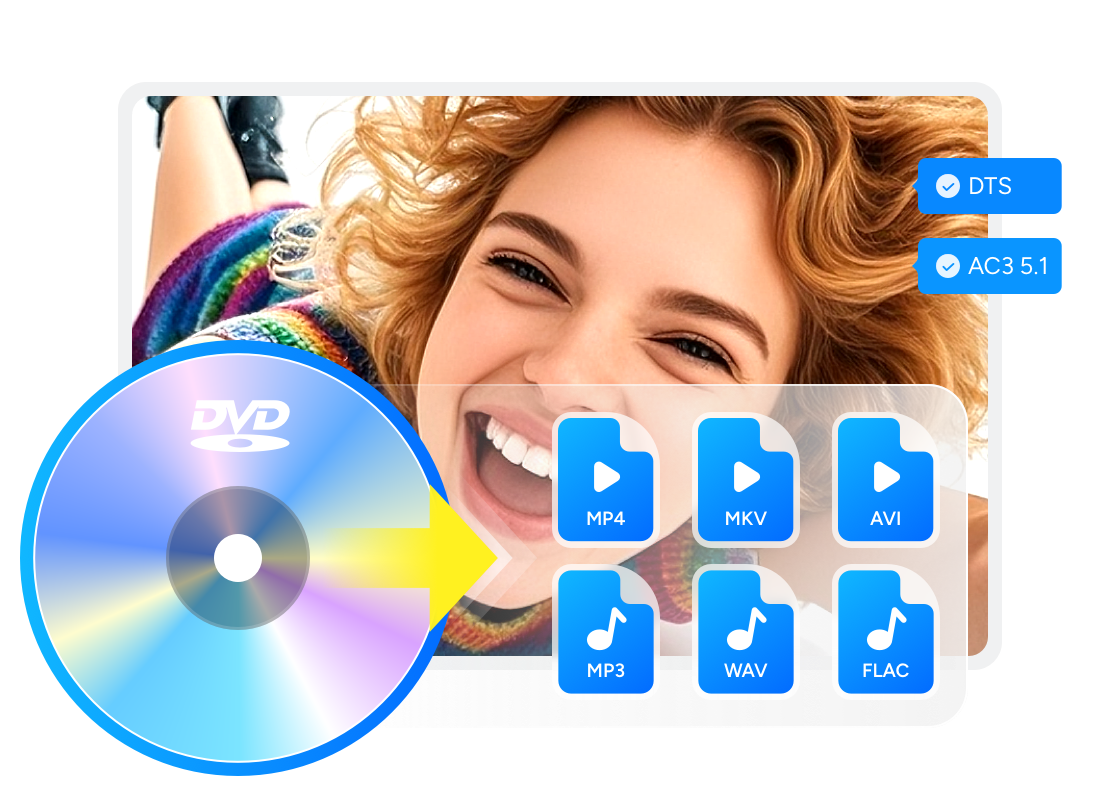
Best Free DVD Ripper for Mac in 2026: Tested Tools to Rip DVD on Mac Easily

Summary: The best DVD ripper for Mac depends on your disc type and output goal. DVDFab DVD Ripper for Mac is the best tool for commercial protected DVDs and flexible MP4, MKV, and MOV output. HandBrake works well for transcoding unencrypted DVD sources, while MakeMKV is good for creating a 1:1 MKV backup while keeping the original tracks. To rip your DVD, connect an external DVD drive to your Mac, such as an Apple USB SuperDrive, since modern Macs do not have built-in optical drives.
Table of Contents
Necessity & Tips for Using Mac DVD Ripper
With Apple phasing out optical drives from modern MacBook Air, MacBook Pro, and iMac models, playing a physical disc has become a hardware challenge. Beyond the lack of hardware support, digitizing your DVD on Mac offers the critical advantages:
- The flexibility of multi-device playback eliminates the need for physical discs or compatible drives. Some Mac users want to watch their collections on Samsung TVs using apps like Apple TV.
- Ripping DVDs to digital formats like MP4 or ISO creates a permanent, lossless backup on your HDD or Cloud.
- Advanced rippers also allow you to remove forced ads, merge titles, or upscale old SD resolution (480p) to fit modern Retina displays.
So, if you've got stacks of DVD movies that want to convert DVD to digital formats on your MacBook, looking for the best free DVD ripper for Mac is what you need to do.
How to Test and Choose the Best DVD Ripper for Mac
To choose the best DVD Ripper that is compatible and runs smoothly on your Macbook or iMac, you need to take following factors into consideration:
- Remove copy protection: Reliable DVD copy software should handle copy protections, including CSS, Cinavia, and advanced encryption.
- DVD ripping speed: Different DVD rippers vary in ripping speed. The time required can range from a few minutes to several hours. Generally, free tools are slower, and paid ones are faster. If it's equipped with GPU hardware acceleration, it can balance speed and stability.
- Output quality and formats: A good DVD ripper should keep the original DVD's video and audio quality in the ripped videos. Plus, the variety of output formats are also important so ripped files play well and smoothly on different devices.
- Customize your video: Some DVD rippers include a video editor, so you can handle basic trimming, cropping and image processing without other editing software, which lets you tweak frame size and color to better suit your playback device's screen.
- Mac compatibility: Check whether the tool supports your macOS version and whether it works on Intel or Apple Silicon Macs.

Based on these factors, our team spent a week testing DVD Rippers for Macs currently on the market. The testing environment was macOS 14 (Sonoma) with an external optical drive LG BP50NB40. After the testing, I picked out several DVD Ripping software titles that offered fast ripping speeds, high success rates, and good video and audio quality. Furthermore, all of them are either completely free or offer a free version.
| Software | Mac | Input | Output | DVD Decryption | Video Editing | GPU Acceleration | Best For |
| DVDFab DVD Ripper | macOS 10.13 - 15.x | DVD, ISO, VIDEO_TS | MP4, MKV, MOV, M4V, MP3, FLAC, and more | Supports most old and new DVD protections | Yes | Yes | Commercial DVDs and flexible output |
| MakeMKV | macOS 10.7+ | DVD, Blu-ray | MKV | Basic | No | No | 1:1 MKV backup |
| HandBrake | macOS, Windows, Linux | Unencrypted DVD, VIDEO_TS | MP4, MKV, WebM | Not built in | No | Yes | Free transcoding |
| MacX DVD Ripper Pro | Check current support | DVD, ISO, folder | MP4, MOV, M4V | Basic | Yes | Yes | Mac device profiles |
| Mac DVDRipper Pro | macOS 11+ | DVD disc | DVD archive, Apple formats | Basic | No | No | Mac-native paid ripping |
| Aimersoft DVD Ripper | Check current support | DVD sources | MP4, AVI, MKV, MOV | Basic | Yes | Yes | Legacy alternative |
| Cisdem Video Converter | macOS 10.15+ | Video files, DVD | Common video/audio formats | Basic | Yes | Yes | Multi-purpose conversion |
The best macOS DVD ripper software varies depending on your needs. In general, you are concerned with a DVD ripper's decryption capability, ripping speed, and output quality. Taking all these factors into consideration, I recommend you try DVDFab DVD Ripper, which is a pionner in this field. Plus, if you are looking for a free program that can decrypt some basic encryptions, I recommend MakeMKV.
Top 7 Best Free DVD Ripper Software for Mac
For the best DVD ripping software for Macintosh that I tested above, I have also written detailed reviews, pros and pitfalls, and usage tutorials. Please read on to find the best macOS DVD converter that meets your needs.
DVDFab DVD Ripper for Mac – Best Overall
📌Why I pick it: Fastest decryption speed with native Apple Silicon (M3) support.
📢User Feedback: "Ripped over 500 discs… interface is incredibly easy to use." — Trustpilot
DVDFab DVD Ripper is a top-rated tool for macOS users who need to digitize commercial discs without technical hassles. It supports macOS Sequoia, runs natively on ARM64 chips, including M1, M2, M3, and M4, and also supports Intel-based Macs. It stands out by automatically handling advanced copy protections such as Disney X-project, region codes, and Sony ARccOS through its Cloud Decryption Service. It also uses Apple’s VideoToolbox framework for GPU acceleration, making it faster than non-optimized tools in compatible Mac workflows.
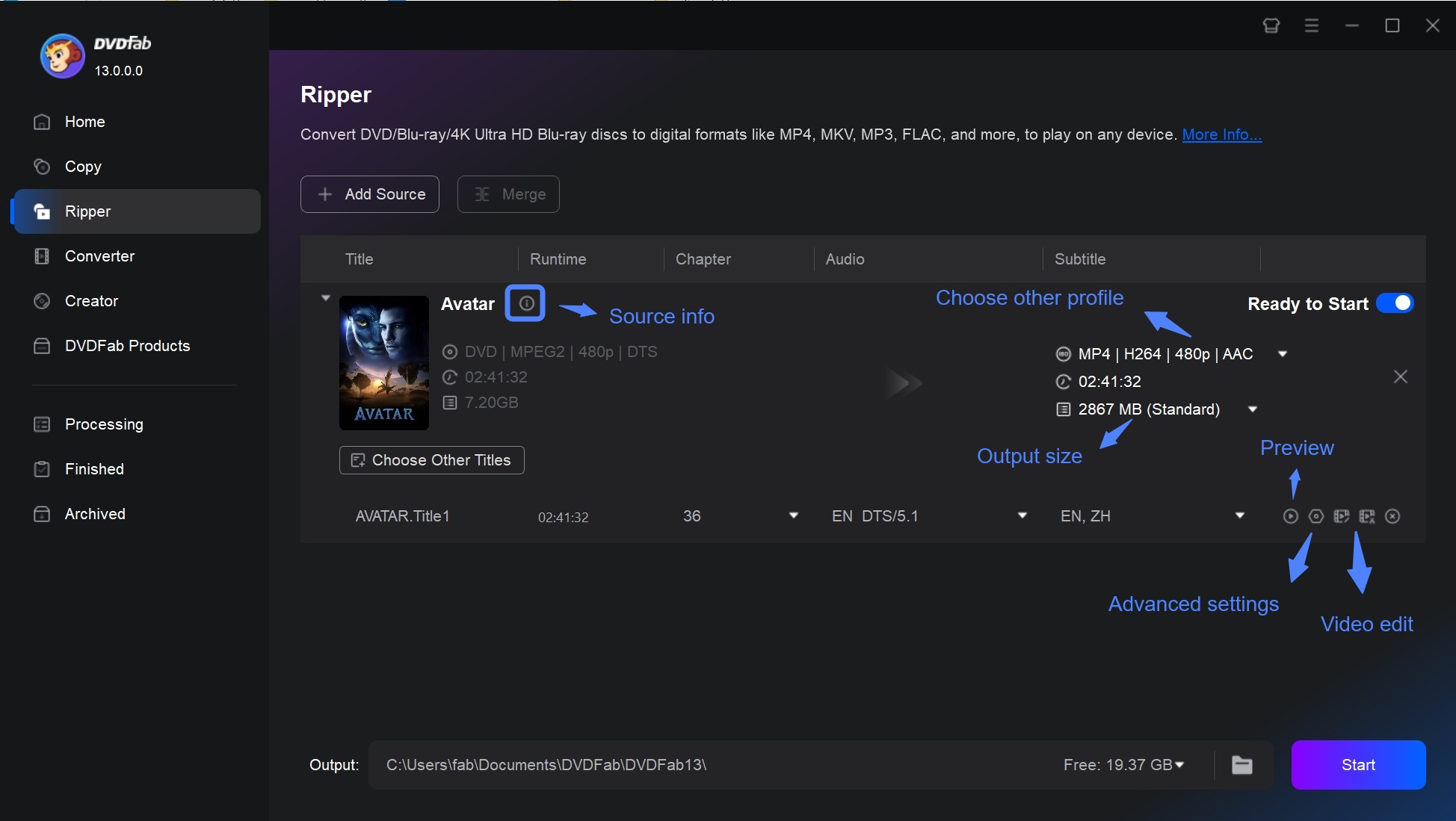
In my test, DVDFab DVD Ripper for Mac (v13.0.5.8, released on June 10, 2026) was the easiest option when I needed MP4 or MKV output instead of a full DVD folder. After loading the disc, I could choose a device profile, select subtitles and audio tracks, and adjust quality settings before starting the conversion. Ripping a two-hour DVD movie to MP4 on my Mac took only about five minutes.
DVDFab DVD Ripper provides a free trial for 30 days, after which it seamlessly transitions to its entirely free and simple version, DVDFab HD Decrypter. This free version also works as the best DVD ripping software for Mac, allowing conversion of most encrypted DVDs and Blu-rays to MP4 or MKV formats. Both versions are in one package, DVDFab 13, for your convenience.
MakeMKV – Best For 1:1 Backup
📌Why I pick it: Free tool that bypasses protection to create lossless copies.
📢User Feedback: "Use MakeMKV for ripping and HandBrake for transcoding. That's convenient!" — MacRumors
MakeMKV for Mac is a 1:1 MKV backup tool that reads DVD and Blu-ray discs and saves selected titles as MKV files. It can keep the original video, audio tracks, subtitles, chapters, and metadata without requiring users to choose a compressed MP4 profile.
MakeMKV 1.18.4, released on June 15, 2026, includes updated LibreDrive and AACS runtime support, which may help it read some encrypted DVDs and Blu-rays. In my test workflow, MakeMKV was straightforward when I wanted a large MKV backup. After scanning the disc, I selected the main title and saved it as MKV. The output preserved the original tracks, but the file size was much larger than a compressed MP4, so it is better for archiving or media servers than for phones with limited storage. It is best used with a compressor like HandBrake when you need to reduce the size of the large MKV output.
How to rip a DVD on Mac with MakeMKV DVD Ripper?
Step 1: Download and Bypass Gatekeeper Download MakeMKV v1.18.4 from the official site.
Since MakeMKV is not signed by Apple, you may see a Malicious Software or Unidentified Developer warning. To fix this: Right-click the installer icon and select "Open", then click "Open" again in the pop-up dialog. This whitelist the app safely.
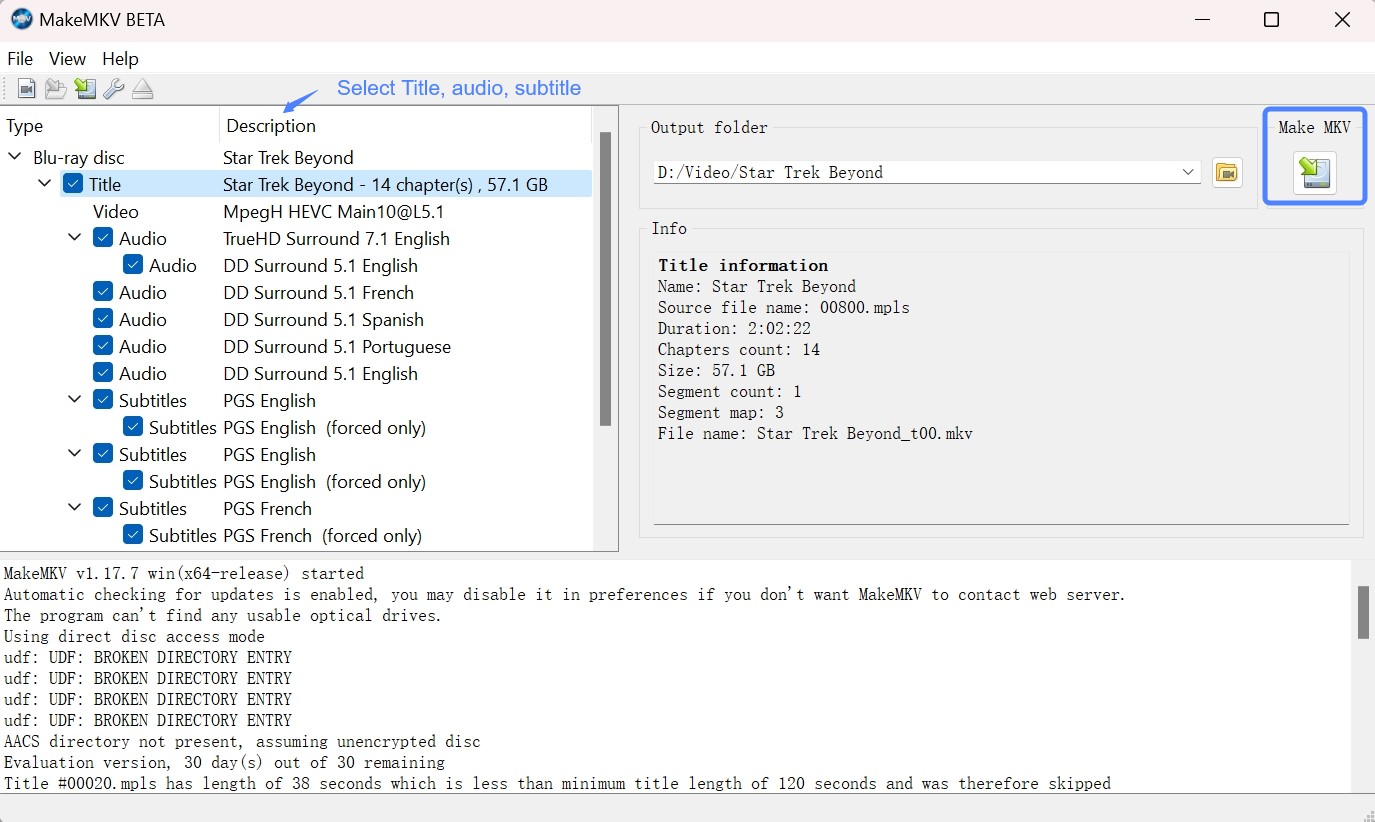
Step 2: Click on the File menu. From the drop-down menu, select Open Disc. MakeMKV will scan the DVD and display a list of all the titles available on the disc. After the analyzing process, select the titles, videos, audios and subtitles you want to rip.
Step 3: Click the "Make MKV" button on the right. Then MakeMKV will start to convert DVD to MKV on your Mac.
HandBrake – Best for Tech-Savvy Users
📌Why I pick it: Free transcoder supporting MP4/MKV/WebM with granular control.
📢User Feedback: "Free… excellent format support"— TechRadar
HandBrake is an open-source video transcoder for Mac, Windows and Linux. It excels at converting unencrypted media into modern formats like MP4, MKV, and WebM with advanced compression efficiency. It offers extensive presets for Apple devices (iPhone, Apple TV) and supports the latest AV1 codec for high-quality streaming.
In my test, HandBrake worked well once the DVD source was already accessible. I could choose a preset, adjust the resolution and bitrate, and export a smaller MP4 file for playback on a Mac, iPhone, or TV. However, unlike DVDFab, HandBrake cannot rip copy-protected DVDs natively. If you try to rip a commercial Disney or Sony disc, it may fail to scan the source, crash, or show a “No Valid Source Found” error unless you manually install a third-party library such as libdvdcss.
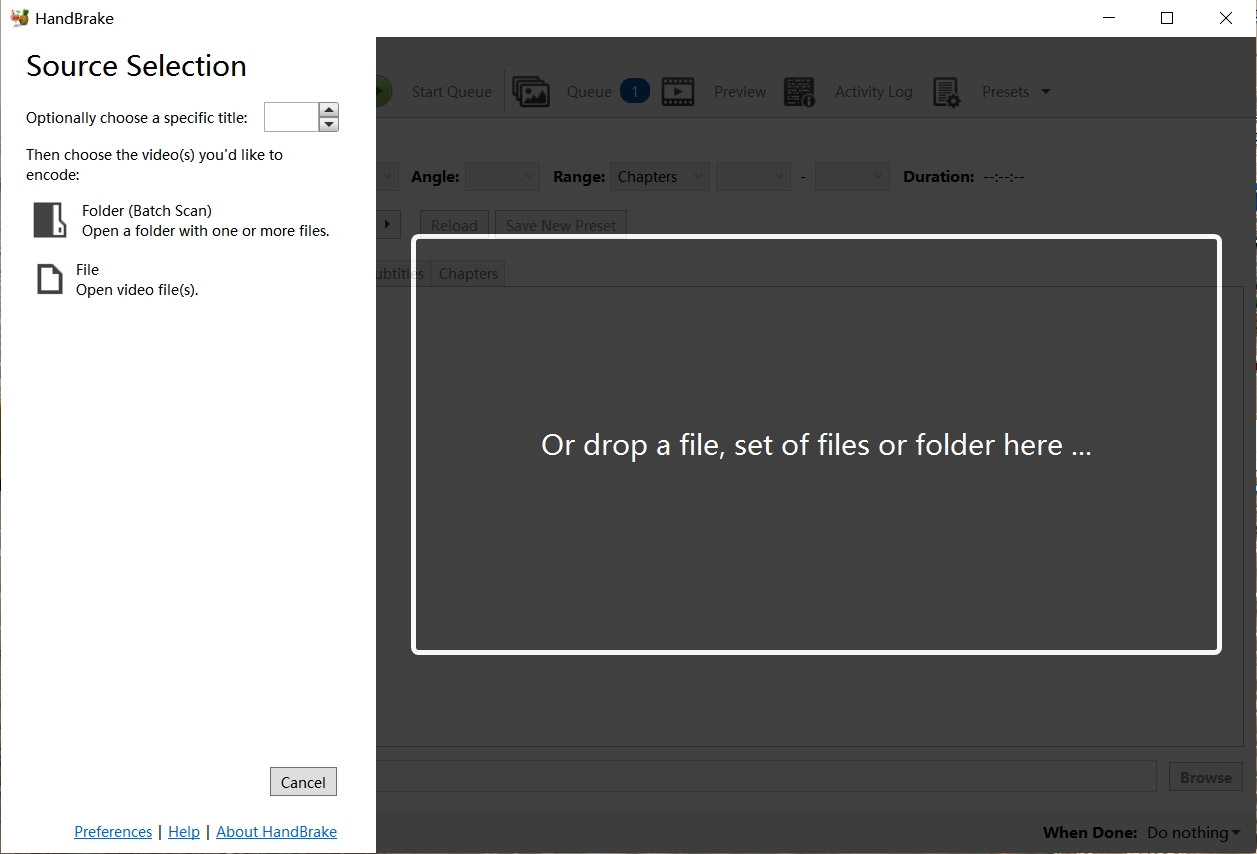
How to rip DVD on Mac with HandBrake?
Step 1: Download the latest HandBrake 1.11.1 (universal binary for Intel/Apple Silicon). To rip store-bought DVDs, you must install libdvdcss. The easiest way is via Terminal using Homebrew. Open Terminal and type: brew install libdvdcss.
Step 2: Insert the DVD into your disc drive. In the Source Selection menu, choose the DVD you inserted. HandBrake will then scan the DVD for available titles.
Step 3: Once the scanning is complete, select the title and chapters. You can also customize settings such as choosing a preset and format. Adjusting video and audio parameters if needed.
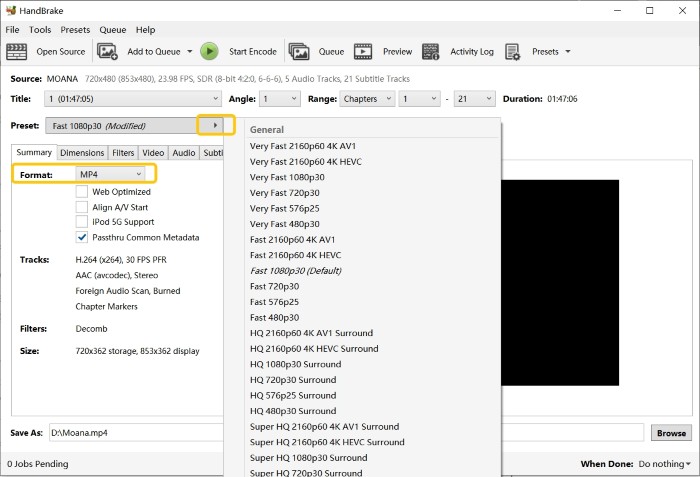
Step 4: Click on the Browse button to select the destination folder and name the output file. Then simply click on the Start button.
MacX DVD Ripper – Best for macOS Optimization
📌Why I pick it: Fast Mac-first workflow and device profiles.
📢User Feedback: MacXDVD is easy to use and offers good customer support, but some users report occasional crashes. From Trustpilot
MacX DVD Ripper is paid DVD ripping software for Mac. It can rip DVDs to Mac friendly formats such as MOV, M4V, and H.264, as well as formats optimized for devices such as iPhone, iPad, Android devices, and more. It can also process some encrypted commercial DVDs.
In my workflow check, MacX DVD Ripper Pro was useful for device profile output. The preset list made it easier to choose an iPhone or Apple TV format without manually adjusting every codec setting. However, the trial version can rip only the first five minutes of any DVD, and the Trim function is unavailable until you purchase the full version. Some Trustpilot users also complained that the software crashed, locked up, or stayed at the same ripping percentage for more than a day without completing the task, so it is better to test it with your own discs before paying.
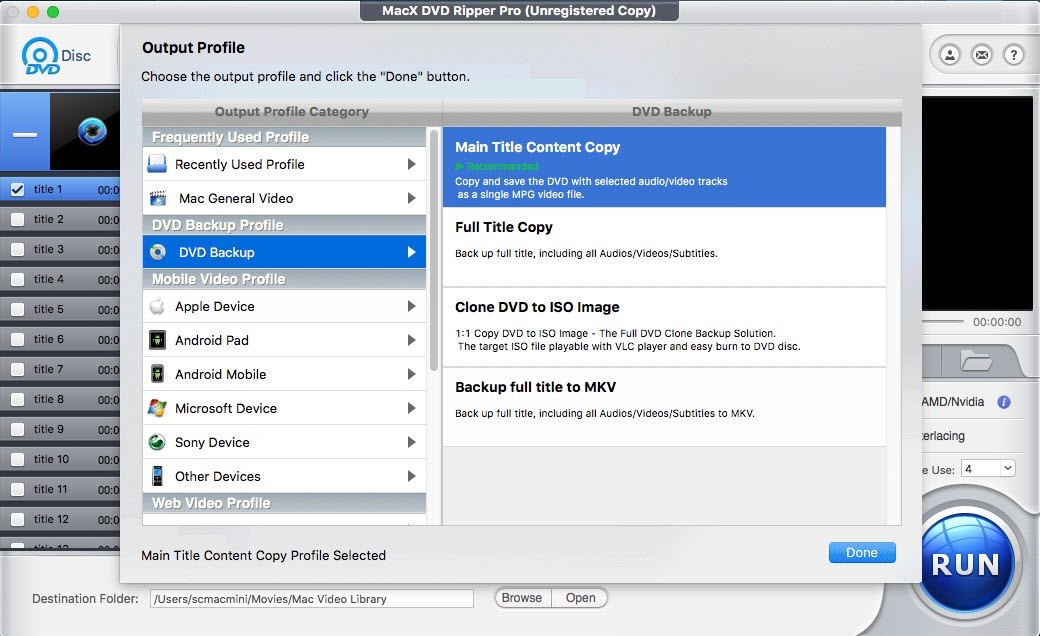
How to rip DVD on macOS with MacX DVD Ripper?
Step 1: Begin by launching the MacX DVD Ripper. Insert the DVD on your Mac and then click on the "DVD Disc" button to import the DVD.
Step 2: Select the output format you want for the ripped DVD from the profiles list. You can also customize the video, such as cropping, merging, rotating, and adjusting parameters.
Step 3: Choose the destination folder where you want the ripped DVD file to be saved. Finally, click on the "RUN" button to start ripping DVD on Macintosh.
Mac DVDRipper Pro
📌Why I pick it: Unique AI tools designed to restore grainy DVDs and VHS transfers.
📢User Feedback: Seasoned Mac users recommend it for big projects. — MacRumors
Mac DVDRipper Pro is a paid native Mac DVD ripper for users who prefer a dedicated macOS app. The latest version is Mac DVDRipper Pro 14.2.1, released on April 26, 2026, and it requires Mac OS X 11.0 or higher. It can convert DVDs to MP4 and M4V, create DVD archives, and prepare videos for devices such as iPhones, MacBooks, and Sony TVs. It supports homemade DVDs as well as some encrypted commercial discs.
In my test workflow, Mac DVDRipper Pro felt more like a dedicated Mac app than a conversion suite for multiple systems. Its AI subtitle, denoising, color correction, and upscaling features are more useful for old homemade DVDs or VHS to DVD transfers than for standard disc copying. However, the free trial offers unlimited 15 minute previews and 5 full rips.
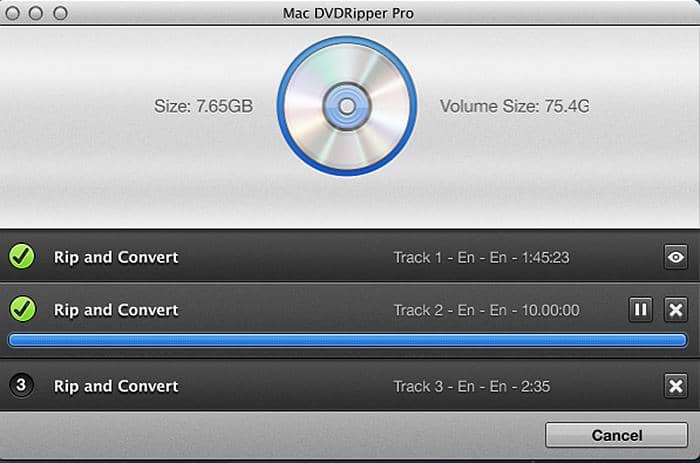
How to rip DVD on Mac with MacX DVD Ripper?
Step 1: Insert the DVD into your optical drive. Then, open Mac DVDRipper Pro, click the drop-down menu, and select the DVD source.
Step 2: Next, choose the output format, such as MP4.
Step 3: Finally, select a save path for the ripped files, click the "Rip" button, and you are all set.
Aimersoft DVD Ripper for Mac
📌Why I pick it: Easy edits (trim/crop/subs) with broad format exports.
📢User Feedback: "Simple to use; encoding can be slow." — Softonic
Aimersoft DVD Ripper for Mac is designed to rip and convert DVDs into Flash video, SD and HD video, and other common audio and video formats. It supports more than 100 portable devices, tablets, and mobile phones, and may process some older or basic copy protected DVDs.
In my workflow check, Aimersoft was less compelling than the tools above because its current macOS compatibility, update status, and support for newer DVD protections are not clearly verified. It may still be useful for basic DVD conversion and device preset output, but I would not place it ahead of DVDFab, HandBrake, MakeMKV, or Mac DVDRipper Pro for 2026 users. Treat it as a legacy or limited alternative, and test it with your own discs before relying on it.
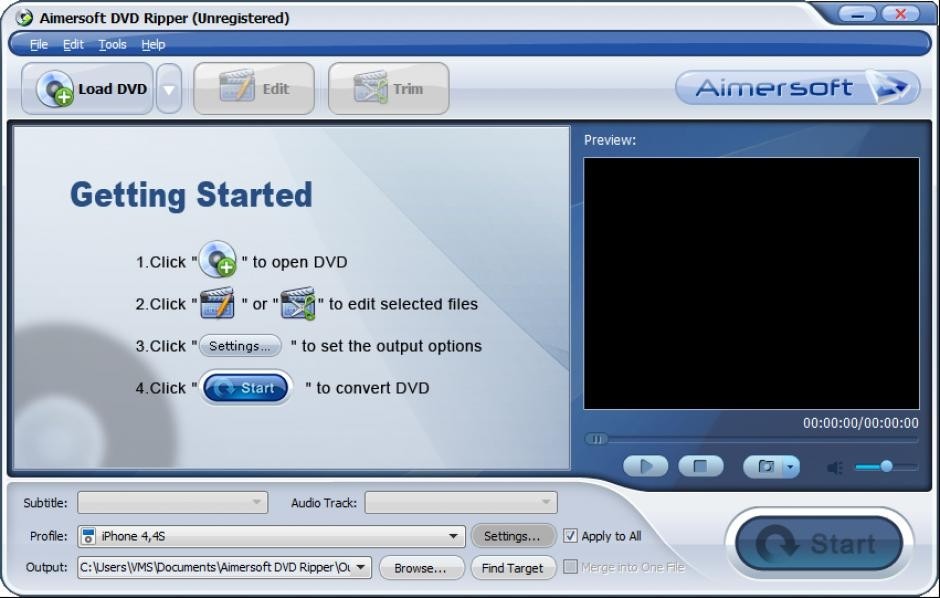
How to rip DVD to Mac with Aimersoft DVD Ripper?
Step 1: First install and open this DVD ripping software for macs. Then navigate to the Files tab and select Load DVD Files to bring in the specific DVD movies you desire.
Step 2: Once the files have been imported, you can preview them as desired. Additionally, you can customize the movie further by utilizing the Edit or Trim button, which offers editing features.
Step 3: Next, you can choose the format and destination folder for the output. Options for video formats include M4V, MP4, and MOV. If you don’t have a designated folder yet, go ahead and create one for easy access.
Cisdem Video Converter
📌Why I pick it: Multi-purpose rip/convert/edit + web download in one app.
📢User Feedback: "customer support handled my questions about a reinstall promptly." — Trustpilot
Cisdem Video Converter is a multi-purpose Mac video converter that also includes DVD conversion features. It is useful if you need DVD ripping together with video conversion, compression, online video handling, or format conversion in one app.
In my test, Cisdem was more useful as a general video conversion suite than a dedicated DVD backup tool. It is a good option if you frequently convert videos between formats and only occasionally need DVD conversion. If your main goal is commercial DVD ripping or full DVD backup, DVDFab or MakeMKV may be more focused choices.
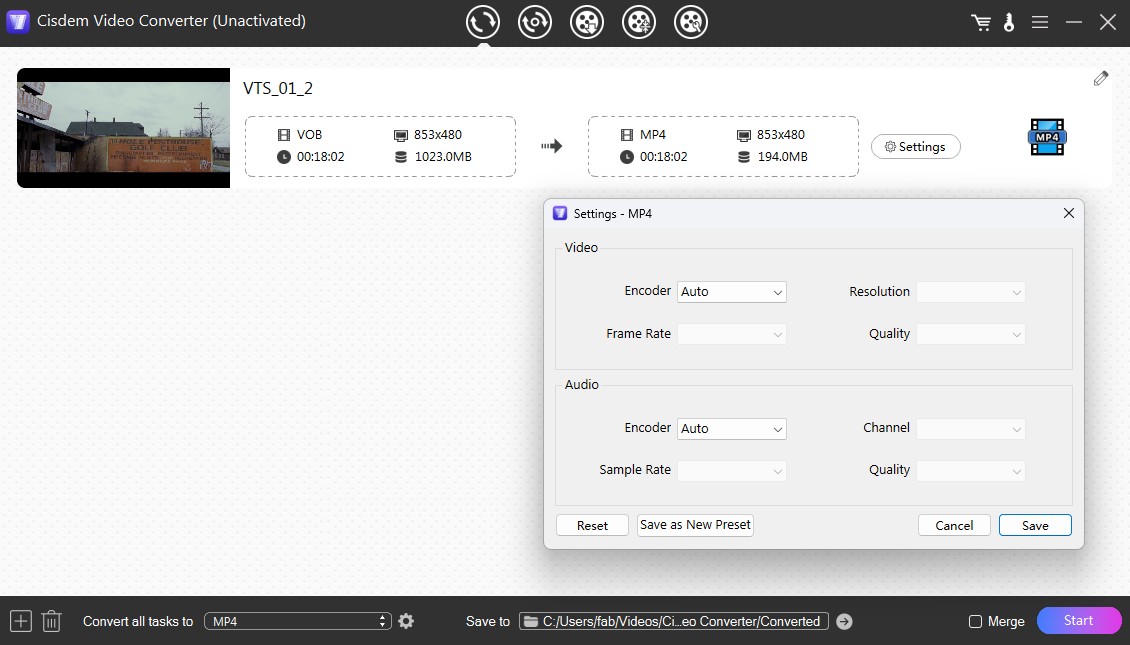
How to Use Cisdem Video Converter for Mac
Step 1: Download and launch the Cisdem DVD Ripper on your Mac. Then, go to the ripping interface and drag-drop the copy-protected DVD disc or VIDEO_TS folder.
Step 2: Use the "✓" checkbox to select the main title. Next, choose subtitles and soundtracks in your preferred languages.
Step 3: Click the format icon to access extensive output format options categorized by terminal devices for selection.
Step 4: After configuring settings, initiate encrypted DVD video ripping by clicking the conversion icon at the bottom right.
How to Rip DVDs with the Best DVD Ripper for Mac
Now, I will take DVDFab DVD Ripper as an example to show you how to rip a DVD on Mac even if the DVD is copy-protected.
Step 1: Download and install this Mac DVD ripper
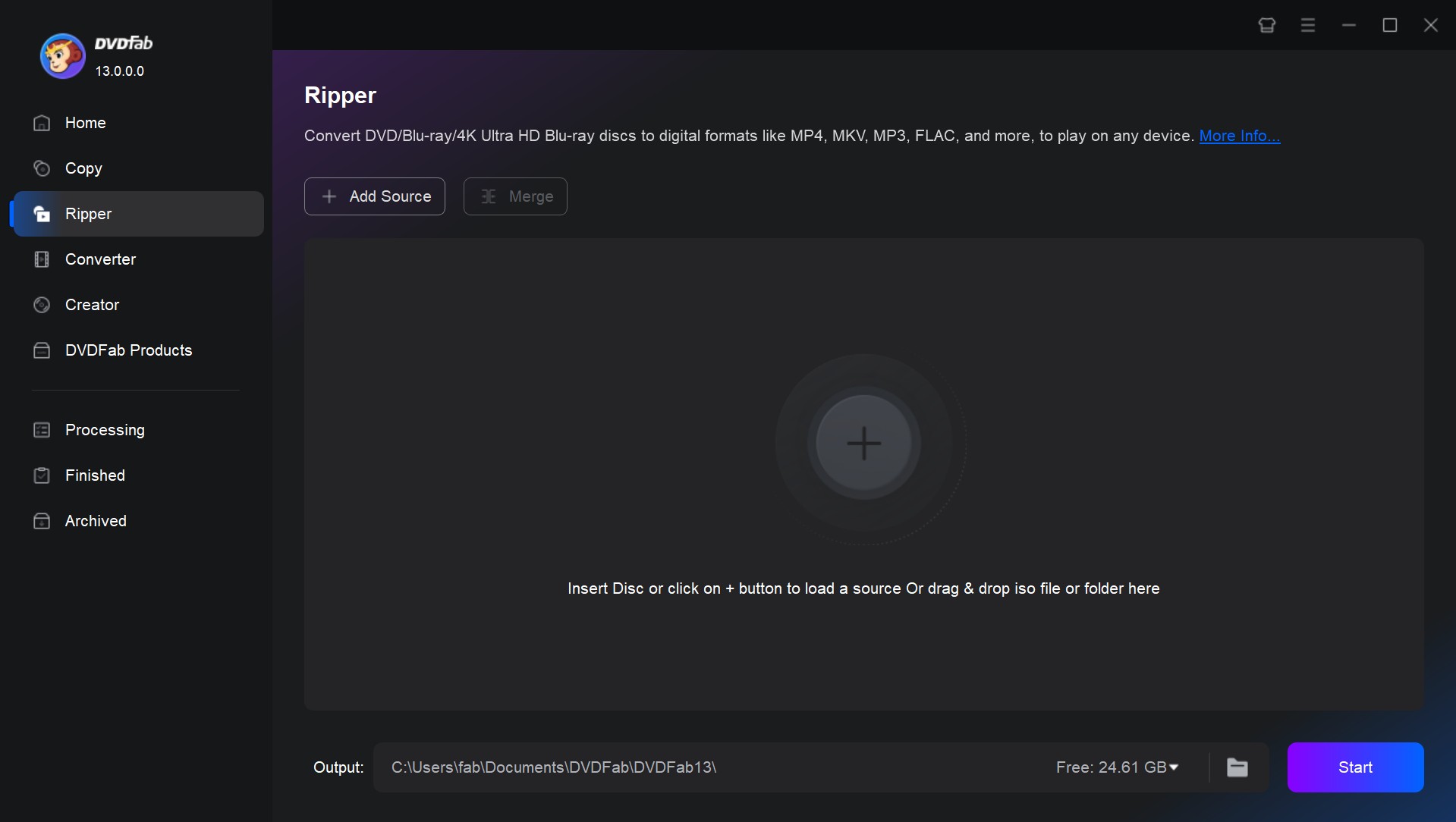
Step 2: Load your DVD and Select the 'Ripper' module
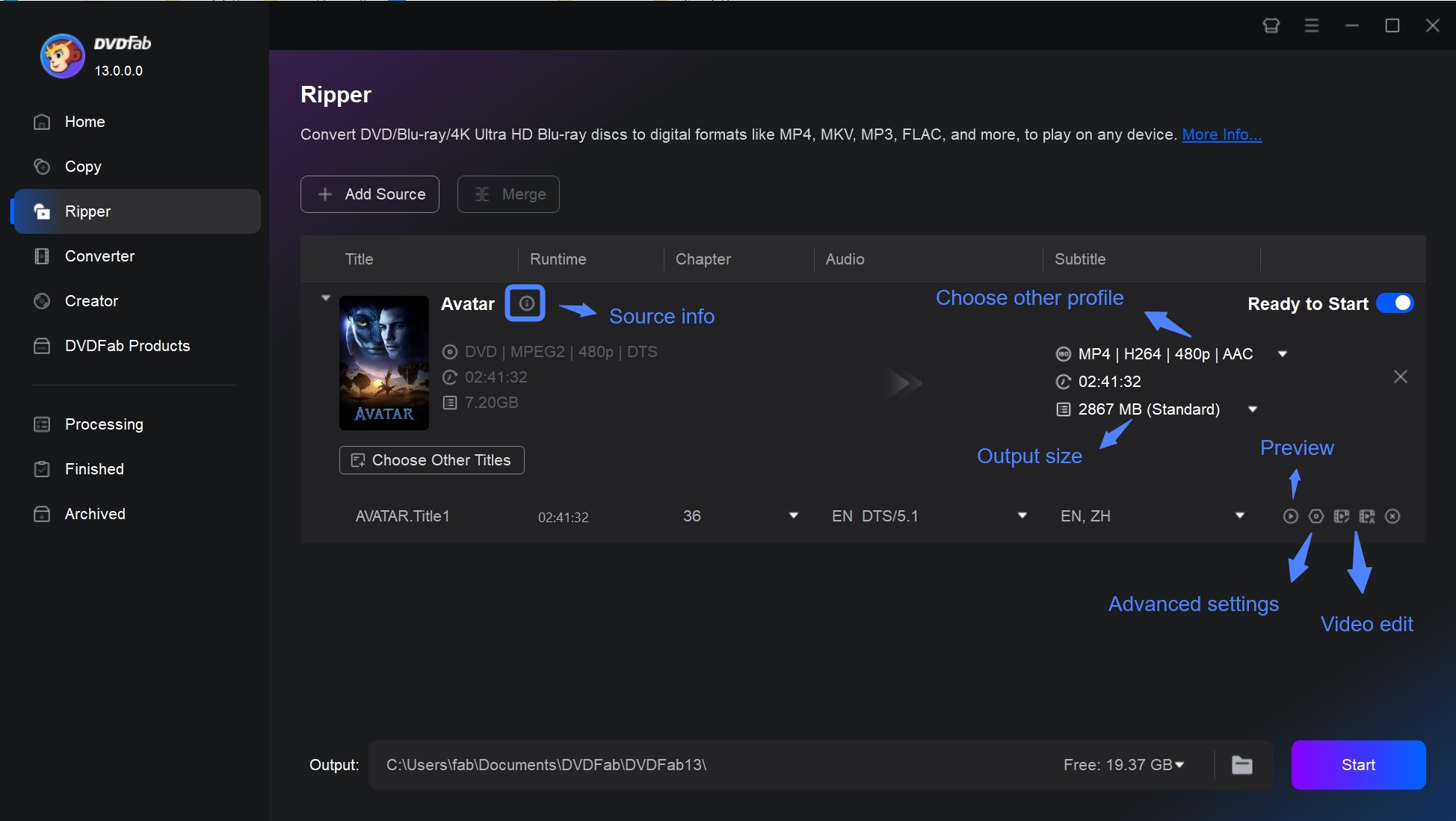
Insert the DVD you want to rip into your computer's optical drive, or use the Add button on the main page. If you have an ISO file or a folder instead, you can easily drag and drop it onto the main page.
DVDFab will automatically analyze the disc, remove copy protections, and intelligently select the "Main Movie" title so you don't have to manually filter through hundreds of fake titles.
Step 3: Set the output format and Edit DVD
Click the "Choose Other Profile" button (or the profile icon) to open the format library. You can choose MP4 for the best playback compatibility on iPhone, iPad, and Android, or select MKV Passthrough to keep lossless video quality. The software also supports converting DVDs to formats like MOV, FLV, WMV, or extracting audio as MP3.
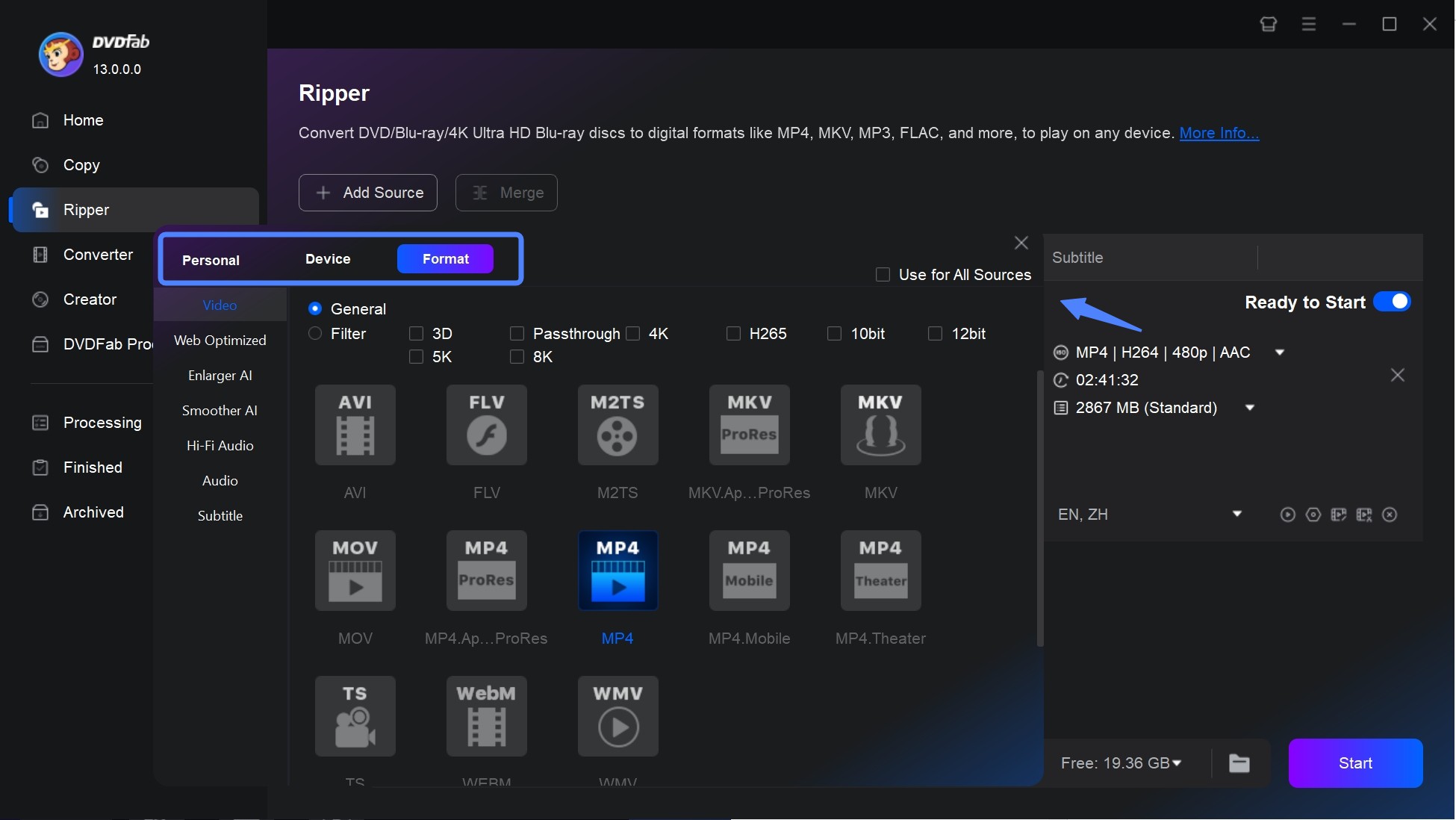
Before ripping, you can fine-tune your video using the toolbar icons:
- Advanced Settings: Click this to adjust technical parameters such as video resolution, frame rate, bitrate, and audio channels.
- Video Edit: Open the built-in editor to crop black bars, trim unwanted clips, rotate the video, or add text and images.
Step 4: Set the output and start to rip DVD on Mac
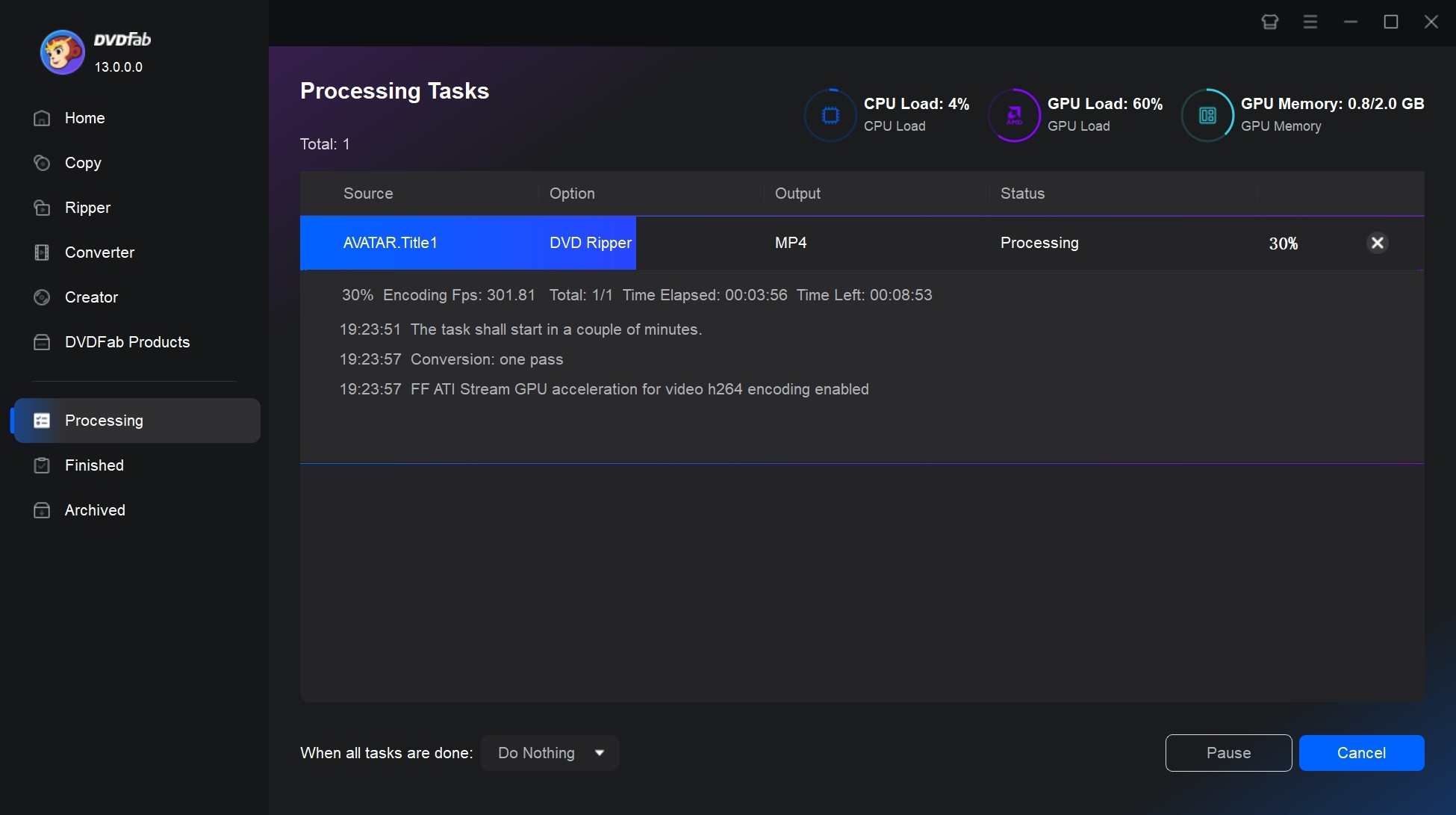
You are given the choice to either store the video files on your hard drive or mobile device. Ensure the GPU Hardware Acceleration is active (powered by Apple VideoToolbox) for faster processing. Click the "Start" button and DVDFab will begin to convert DVD to MP4 on Mac.
FAQs
Is it legal to rip a DVD on Mac?
It is generally considered legal to make backup copies of your beloved DVDs for personal use. However, making copies of commercial DVDs may be illegal in some places. Please use any free DVD rippers mentioned responsibly and in accordance with your local laws.
Is there a free DVD ripper for Mac that works with encrypted discs?
Yes, but free DVD rippers for Mac that handle encrypted discs are increasingly limited, especially with the advancement of DVD copy protections. Here are the most recommended options based on performance:
- DVDFab offers a free DVD ripper for Mac in the form of HD Decrypter. It can decrypt and rip DVDs released 1 year ago to MP4 or MKV formats. However, newer discs with advanced DRM (such as Cinavia) may require the full paid version.
- MakeMKV is also one of the reliable tools that can decrypt commercial DVDs on Mac for free. It bypasses the most common protections such as CSS and region codes. However, it tends to output larger MKV files and lacks editing options.
What is the best format to rip a DVD on Mac?
MP4 is widely used on all kinds of portable devices like PS4, Xbox One, etc. MKV is well-known for its container format for keeping multiple videos, audios, images and subtitles. And AVI is also be frequently used when converting DVD to digital.
How to rip DVDs on Mac with VLC?
VLC is a multi-platform compatible player. Although it is capable of converting video formats and even ripping DVDs, the process can be complicated and may result in quality degradation, not to mention its inability to handle any DRM-protected DVDs. If you insist on using it, here's how you can rip a DVD using VLC on your Mac:
- Open VLC media player on your Mac. Go to the "File" menu and select "Open Disc".
- In the "Open Media" window, select the "Disc" tab.
- Check the box next to "DVD" and select the DVD drive from the dropdown menu.
- The DVD menu option doesn't work well on VLC. But you can choose audio and subtitles.
- While the DVD is playing, go to the "Playback" menu and select "Convert/Save".
- In the "Convert" window, under the "Profile" dropdown menu, select the format you want to convert the DVD to (e.g. MP4).
- Choose the destination folder where you want the ripped files to be saved. Click on the "Start" button to begin ripping the DVD.
What is the best DVD ripper software for Mac?
The best choice I recommend in 2026 is DVDFab DVD Ripper. It is fast, lightweight, and optimized for ripping DVDs to iPhone, iPad, Apple TV formats, and supports almost all known DVD protections. DVDFab is ideal for users creating high-quality digital backups.
Conclusion
The best free DVD ripper for Mac depends on your disc type and output needs. For commercial DVDs, DVD ISO files, or VIDEO_TS folders, DVDFab DVD Ripper for Mac is the main tool I recommend because it combines disc analysis, output profiles, subtitle and audio control, and batch conversion in one workflow.
For a free workflow, use HandBrake when the DVD source is unencrypted or already accessible. If you want to keep the original DVD tracks, use MakeMKV to save the disc as an MKV file, then use HandBrake to create a smaller MP4 or device friendly version. HandBrake and MakeMKV are better for free manual workflows, while DVDFab is more suitable for users who want one Mac DVD ripping solution.

 Free DVD Decoder for Windows XP and Windows 11: 3 Ways to Play DVDsBy Diana Smith - Sep 23, 2026
 How to Compress ISO Files: 4 Methods for Storage, Playback, and ArchivesBy Diana Smith - Sep 16, 2026
 How to Rip DVD to Facebook and Upload the Video in 2026By Diana Smith - Sep 15, 2026
![How to Rip DVDs for Plex: Guide to Formats, Tools, and Library Setup [2026]](https://images.dvdfab.cn/media/Screenshot_2026-09-08_at_18.53.34_j36v3l.png/public) How to Rip DVDs for Plex: Guide to Formats, Tools, and Library Setup [2026]By Diana Smith - Sep 8, 2026
How to Rip DVDs for Plex: Guide to Formats, Tools, and Library Setup [2026]By Diana Smith - Sep 8, 2026