
What Is Blu-ray? How It Works, Formats, and Playback

Summary: Blu-ray, also called Blu-ray Disc or BD, is an optical disc format for high-definition video and large data storage. It uses a blue-violet laser to store more data than DVD in the same disc size, so a standard Blu-ray can play 1080p Full HD video with better audio support, while 4K Ultra HD Blu-ray is made for 2160p, HDR, and higher-end playback. To watch it, you need a Blu-ray player, a compatible game console, or a Blu-ray drive with playback software on a computer.
Table of Contents
What is Blu-ray? Blu-ray, also called BD for Blu-ray Disc, is a high-capacity optical disc format designed for HD video and data. Its Blu-ray meaning is simple: it stores more data than DVD, usually supports 1080p video, and needs a compatible player or drive.
What Is Blu-ray?
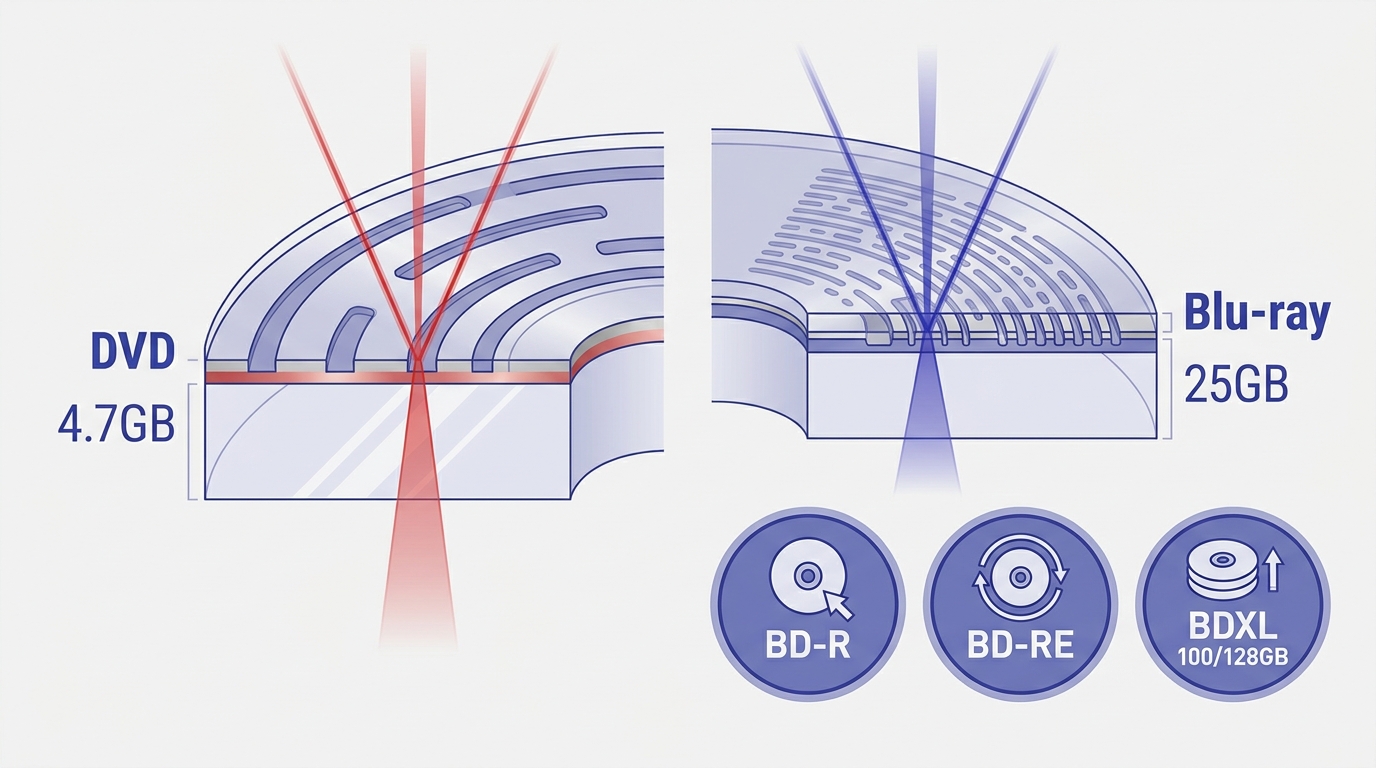
Blu-ray Disc, often shortened to Blu-ray or BD, is a type of optical disc made for high-definition video and data storage. Unlike standard DVDs which use a red laser, Blu-ray uses a blue-violet laser with a shorter wavelength. This allows Blu-ray discs to store significantly more data, with a single layer holding up to 25GB compared to a standard DVD's 4.7GB capacity. This increased storage capacity, along with advanced video and audio codecs, provides a superior HD experience.
The Blu-ray format was created by the Blu-ray Disc Association, a coalition of major tech and media companies, to address the rising demand for clearer and more detailed home video. Although it officially launched in 2006, its development is rooted in earlier optical storage advances. Blu-ray quickly became favored for Hollywood films, gaming, and professional data archiving. Today, it supports everything from standard films to 3D and ultra-high-definition (UHD) content, making it a versatile option for those seeking excellent visual and audio quality.
Key Features of Blu-ray
How Blu-ray Works

Blu-ray uses a 405 nm blue-violet laser, while DVDs use a 650 nm red laser. The shorter wavelength can focus on smaller data features, which increases storage density on a disc. That storage advantage, not the color in the name, is why Blu-ray can carry higher-quality video and audio than DVD.
Blu-ray is useful because it combines larger storage, HD video, and stronger audio support in one disc format. For viewers, this means a more stable movie experience than many compressed digital files. For collectors, it means a physical copy that does not depend on a streaming library or internet connection.
Blu-ray Resolution
A standard Blu-ray disc usually supports 1080p Full HD video at 1920×1080 pixels. This is sharper than DVD and still looks good on many modern TVs. Ultra HD Blu-ray goes further with 3840×2160 resolution, which is commonly called 4K. It also supports HDR, a wider color range, and higher frame rates when the disc, player, and TV all support them.
Blu-ray Disc Types
Blu-ray technology supports several disc types, each serving a unique purpose:
- BD-ROM (Blu-ray Disc Read-Only Memory): These are the pre-recorded Blu-rays you buy in stores, such as movies, TV shows, or game Blu-rays. Content is permanently burned in at the factory, and the disc cannot be written or erased by consumers.
- BD-R (Blu-ray Disc Recordable): These recordable discs let users burn data or video onto them once, similar to a DVD-R. Once the data is written, it cannot be erased or overwritten.
- BD-RE (Blu-ray Disc Rewritable): BD-RE discs offer the flexibility to write, erase, and re-record data multiple times, much like a DVD-RW.
| Blu-ray Type | Recordable? | Rewritable? | Typical Use |
| BD-ROM | No | No | Commercial movies, games, pre-recorded content |
| BD-R | Yes | No | Data backup, home video recording |
| BD-RE | Yes | Yes | Frequent data changes, test recordings |
In addition to these, there are specialized formats that tailor to specific needs:
- BDXL: These high-capacity discs can hold 100GB (triple-layer) or even 128GB (quad-layer), often used for professional data backup or archival needs.
- 3D Blu-ray: Enables playback of stereoscopic 3D video content, provided you have the compatible player and display.
- 4K Ultra HD Blu-ray: The premium format for movies, supporting 4K resolution and advanced features like HDR and wider color gamuts; requires a compatible player and display.
Blu-ray Storage Capacity
A key factor behind Blu-ray's storage advantage is its use of multiple data layers. Each layer increases the disc's total capacity, enabling it to store more high-resolution video or data without changing the disc's physical size. Here's a quick look at how layering works across different Blu-ray disc types:
| Layers | Capacity per Blu-ray Disc | Disc Type |
| Single Layer | 25 GB | BD-ROM, BD-R, BD-RE |
| Dual Layer | 50 GB | |
| Triple Layer | 100 GB | BDXL |
| Quad Layer | 128 GB |
Standard Blu-ray discs (BD-ROM, BD-R, BD-RE) hold up to 25GB on a single layer, while dual-layer versions can store up to 50GB. This is sufficient for hours of high-bitrate HD video or extensive game data. BDXL discs, with their triple- and quad-layer designs, are ideal for professionals or users needing large storage capacity, such as for native 4K content, substantial data backups, or extensive video archives.
When it comes to storing BDs of various capacities, all Blu-ray discs are the same physical size, regardless of the number of layers or storage size. Therefore, standard Blu-ray cases are suitable for storing any of them. If you're concerned about damage caused by improper storage, you can look up guides on how to rip Blu-ray discs to convert them into digital files and store them on your hard drive for backup.
Blu-ray, DVD, and 4K UHD Compared
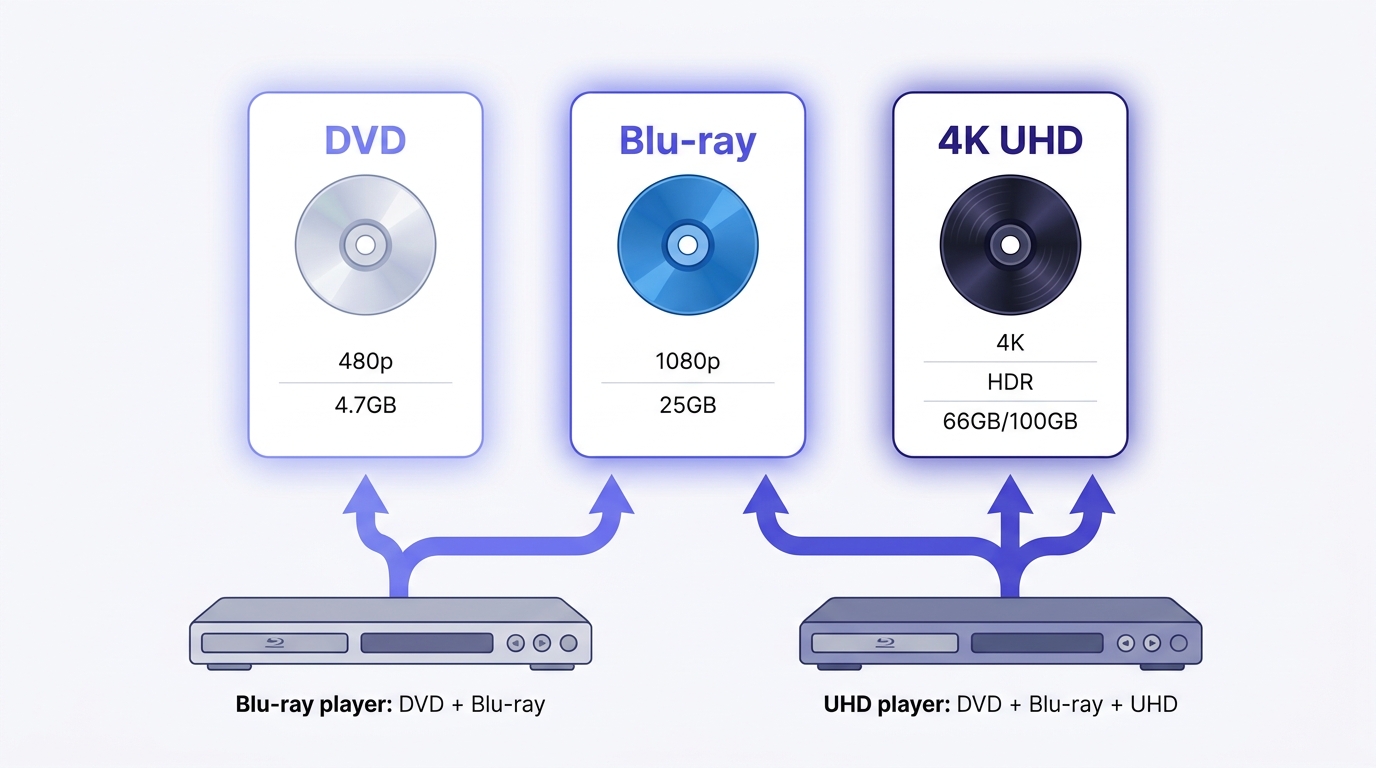
BD means Blu-ray Disc. Blu-ray players usually read DVDs, but standard DVD players cannot read Blu-ray discs. DVD, Blu-ray, and 4K Ultra HD Blu-ray are related, but they are not the same.
📀 DVD is an older format made for standard-definition video. It is still useful for older players and basic playback, but it does not provide HD resolution.
💿 Blu-ray is the next step up. It usually stores 1080p Full HD video and has much more room for higher bitrate video and better audio. This is why a Blu-ray movie often looks cleaner and sounds fuller than the same movie on DVD, especially on a large TV.
💿 4K Ultra HD Blu-ray is a newer format built for 4K TVs and home theater setups. It supports 3840×2160 resolution, HDR, wider color, and advanced audio formats. However, it also requires a compatible player and TV, which is the central distinction in a Blu-ray vs. 4K comparison. A regular Blu-ray player cannot play 4K Ultra HD Blu-ray discs unless it supports the Ultra HD Blu-ray format.
| DVD vs Blu-ray vs 4K | |||
| Feature | DVD | Blu-ray | 4K UHD Blu-ray |
| Max Resolution | 720 × 480 (480p SD) | 1920 × 1080 (1080p Full HD) | 3840 × 2160 (2160p 4K UHD) |
| Color Gamut | BT.601 | BT.709 | BT.2020 |
| Dynamic Range | Standard Dynamic Range (SDR) | ~100 nit | 1,000 - 10,000 nit (HDR) |
| Bit Depth | 8-bit | 8-bit | 10-bit |
| Peak Video Bitrate | ~11.08 Mbps | 40 Mbps | 100 Mbps |
| Max Capacity per Disc | 4.7GB (single layer) | 25GB (single) / 50GB (dual) | 66GB (dual) / 100GB (triple) |
| Audio Capability | Dolby Digital, basic PCM | Dolby TrueHD, DTS-HD MA | Dolby Atmos, DTS:X |
For most users, DVD is enough for older equipment, while Blu-ray is a sensible step up for 1080p movies. I would pay more for 4K UHD Blu-ray only when the TV, player, and sound system can show the difference.
Blu-ray vs. Streaming: Is It Worth It?
Streaming is easier for daily viewing because it works on phones, TVs, tablets, and computers without a disc. You can start a movie quickly and do not need to store physical media at home. For many viewers, this convenience is the main reason streaming has become the default choice.
Blu-ray still has value when you care about stable quality, ownership, and special features. A disc does not depend on internet speed, subscription changes, or a movie staying in a streaming library. 4K Ultra HD Blu-ray can also offer higher bitrates and stronger audio than streaming, which matters more with a capable TV and sound system.
The tradeoff is clear: discs require compatible hardware, physical storage, and a separate purchase for each title. Blu-ray suits collectors, offline viewing, and quality-focused home theaters. Streaming remains the simpler option for viewers who want instant access with minimal hardware.
Blu-ray Playback and Compatibility
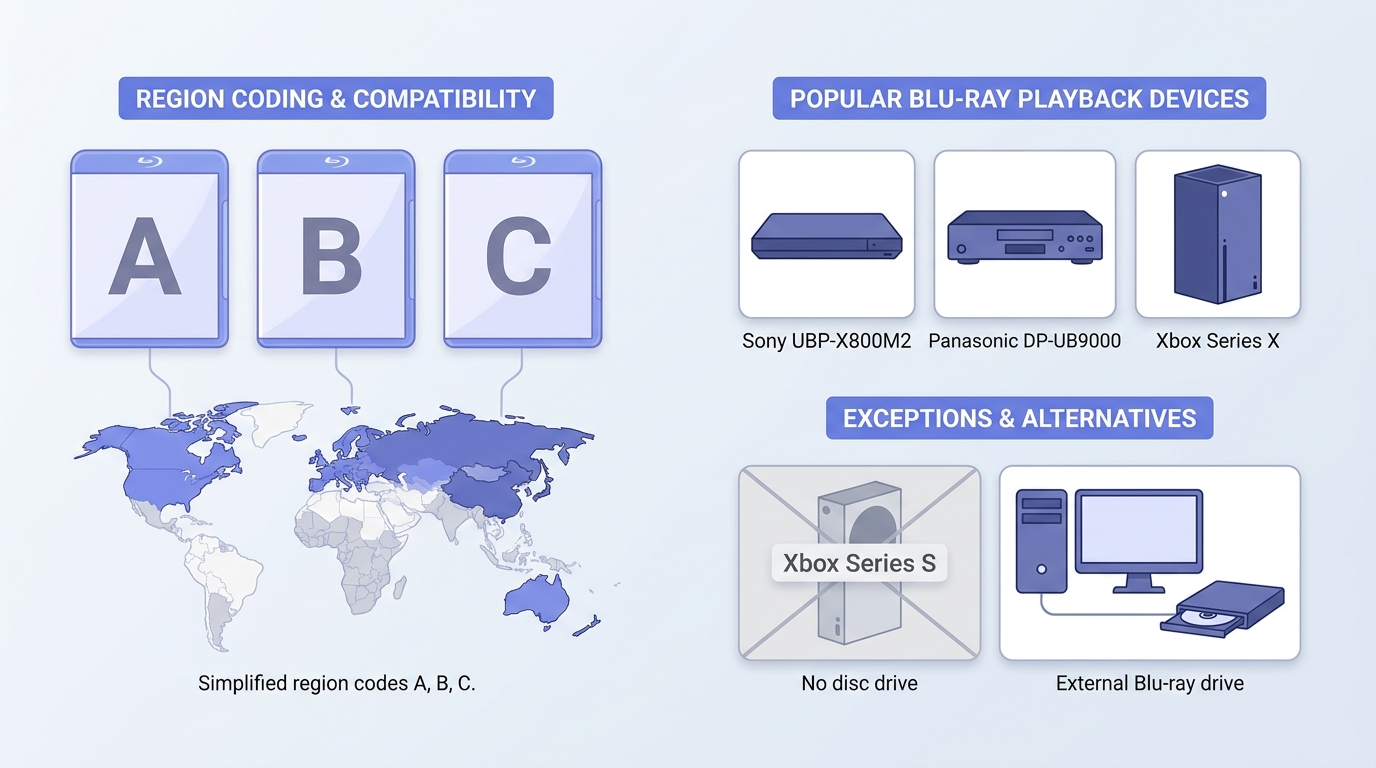
To watch a Blu-ray disc, you need a compatible standalone player, game console with a disc drive, or computer Blu-ray drive paired with playback software. Region coding and the disc format can also affect whether a particular setup works.
Blu-ray Region Codes
Region codes are restrictions set by studios and manufacturers to control where a Blu-ray disc can be played. Blu-ray uses three regions, A, B, and C, shown in the table below. Not every Blu-ray disc is region-coded; some are labeled "region free." Check the labels on both the disc and player, and do not confuse Blu-ray regions with the separate region system used for DVDs.
| Region Code | Covered Areas |
| Region A | Americas (North, Central & South America), East Asia (Japan, Korea, etc), Southeast Asia |
| Region B | Europe, Africa, Middle East, Australia, New Zealand, and their dependencies |
| Region C | China, India, Russia, Central Asia, Mongolia, South Asia, Belarus, Ukraine, Kazakhstan, Moldova, and nearby regions |
Hardware Blu-ray Players
A standalone Blu-ray player is designed to read Blu-ray discs. Basic 1080p viewers do not need the same features as a 4K HDR home theater, where HDR support, audio connections, build quality, and disc compatibility can justify a higher-priced player. Examples of premium models include the Panasonic DP-UB9000 and Sony UBP-X800M2.
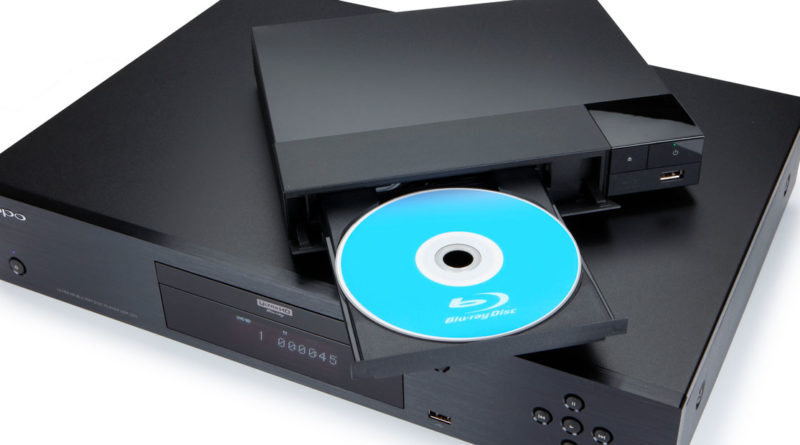
Console owners should also check the specific model. Xbox Series X has a disc drive and can play supported Blu-ray discs, while Xbox Series S is an all-digital console without a disc drive and cannot play Blu-ray discs. Questions about PS3 Blu-ray playback depend on that console's supported disc formats.

For gaming enthusiasts, you might wonder whether your game console can play Blu-ray discs. Nintendo users may wonder: does Wii play Blu-ray? Console Blu-ray support depends on the model and whether it has a disc drive. Xbox Series X can play supported Blu-ray discs, while Xbox Series S cannot because it has no disc drive.
Computer Blu-ray Playback
Computer Blu-ray playback requires two separate parts: a compatible internal or external Blu-ray drive and software that supports the disc format. Software does not replace the drive. A computer can be useful when you also manage local media files, but a standalone player is often more convenient for watching discs on a TV.
Blu-ray Backups and Digital File Formats
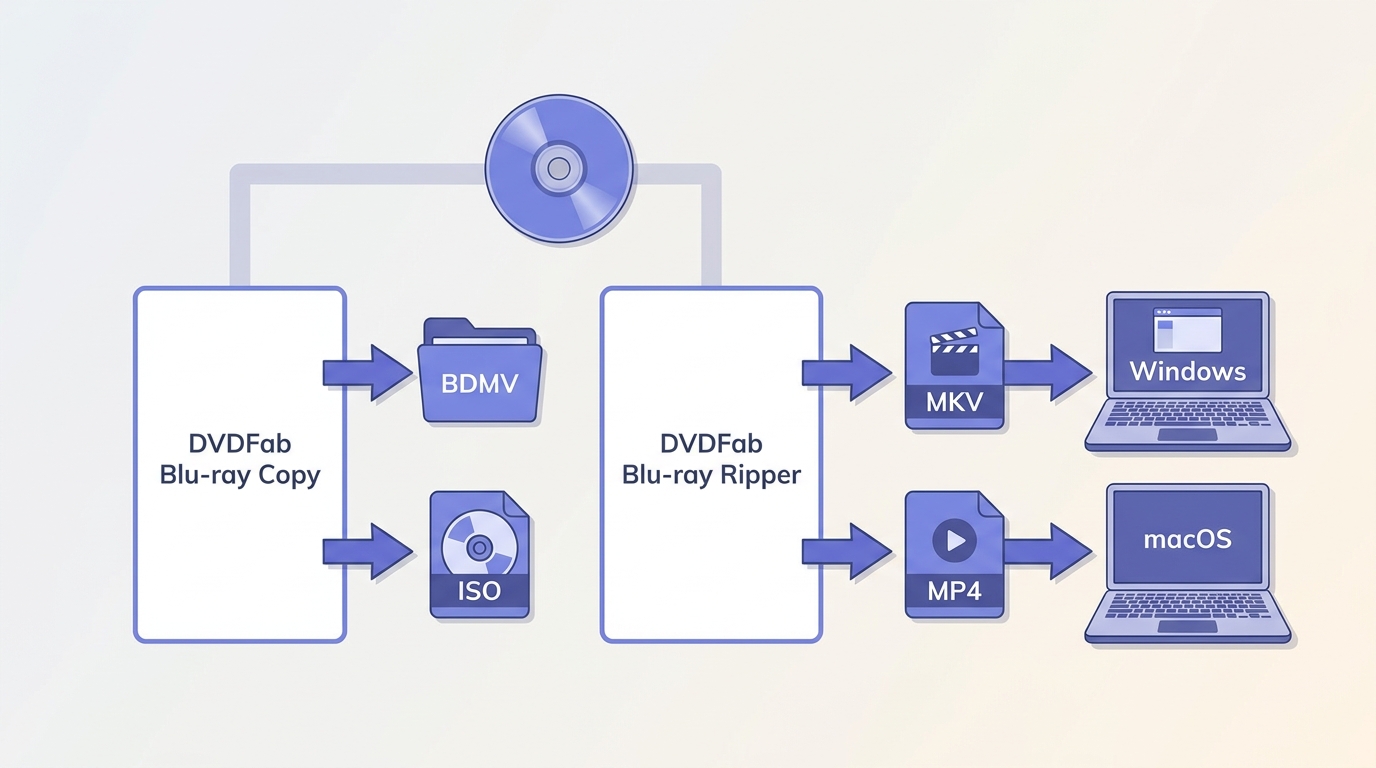
For disc collectors, a local backup can preserve a personally owned Blu-ray for offline playback, where permitted by applicable law. A full-disc copy keeps the disc structure, while a converted video file is intended for playback from local storage. Use either option only for discs you legally own or are authorized to process, and follow applicable local law.
For discs you legally own and are authorized to process, DVDFab Blu-ray Copy is intended for preserving a disc, ISO image, or folder structure. DVDFab Blu-ray Ripper is intended for local MKV or MP4 files. Blu-ray Ripper supports Windows 11/10/8.1/8/7 and macOS 10.13 through 15.x, with Direct Copy and Passthrough options that keep the original audio and video streams without re-encoding. Neither choice is necessary if you simply want to watch an intact disc in a compatible player.
Frequently Asked Questions
Can a Region B Blu-ray disc play in the United States?
The United States uses Region A for region-coded Blu-ray discs. A Region B disc normally needs a compatible region-free player to play in the US. Blu-ray regions are separate from DVD region codes, so check the disc and player labels rather than assuming the systems match.
What is multi-format Blu-ray?
A multi-format Blu-ray bundle may include the movie on Blu-ray plus another format, such as a DVD or a digital redemption code. In other words, Blu-ray + Digital usually describes the contents of the package, not one disc that changes formats.
What does BD mean on a movie case?
BD stands for Blu-ray Disc. On a movie case, it identifies the disc format and distinguishes it from DVD. It does not refer to the discontinued HD DVD format; readers comparing the two can see how HD DVD differs from Blu-ray .
Does Blu-ray require an internet connection?
Ordinary Blu-ray disc playback does not require an internet connection. Internet access may be needed for player updates, streaming apps, digital-copy redemption, or some interactive features, but the disc itself can be watched offline in a compatible player.
Why do Blu-ray players vary so much in price?
Price differences usually reflect features such as 4K Ultra HD support, HDR formats, audio outputs, build quality, disc compatibility, and streaming functions. A basic 1080p setup may need little more than reliable Blu-ray playback, while a home-theater system can benefit from more advanced video and audio support.
Conclusion
Blu-ray makes the most sense for collectors, offline viewing, and home theaters where stable picture and audio quality matter. Streaming is better for viewers who prioritize instant access and minimal hardware. Before buying a disc or player, check the disc format, region code, and playback compatibility.
If you also need a local copy of a personally owned disc, use a Copy or Ripper tool only where permitted by applicable law and select the output based on how you plan to play it. For most people, the decision comes down to whether physical ownership and dependable offline playback are worth the extra hardware and storage.

![6 Best Blu-ray Copy Software for Windows & Mac [2026 Tested & Ranked]](https://r5.dvdfab.cn/upload/resource/top-blu-ray-copy-software-programs-yuzM.jpeg) 6 Best Blu-ray Copy Software for Windows & Mac [2026 Tested & Ranked]By Diana Smith - Sep 3, 2026
6 Best Blu-ray Copy Software for Windows & Mac [2026 Tested & Ranked]By Diana Smith - Sep 3, 2026 2026 Tested Ways to Rip Blu-ray to ISO on Mac & Windows: 1:1 Backup & DecryptionBy Wenny Yan - Jul 16, 2026
![How to Copy Blu-ray Discs to Hard Drive, PC, and DVD [2026, Tested]](https://r5.dvdfab.cn/upload/resource/en/how-to-copy-blu-ray-discs-LDqW.jpg) How to Copy Blu-ray Discs to Hard Drive, PC, and DVD [2026, Tested]By Diana Smith - Jul 15, 2026
How to Copy Blu-ray Discs to Hard Drive, PC, and DVD [2026, Tested]By Diana Smith - Jul 15, 2026