Top 9 Free DVD Burners for Mac in 2026: Tested & Reviewed

Summary: The best DVD burning software for Mac depends on what you want to create. If you want to burn videos to playable DVD discs, ISO files, or folders with menu templates, premium software like DVDFab DVD Creator is a strong option for both Apple silicon and Intel Mac users. For standard data burning, use macOS’s built-in Finder or a free utility like Burn.
In Apple community discussions, many Mac users are not just looking for another DVD burner. They are trying to solve practical problems: Finder can burn files, but the disc may only work as a data DVD; iDVD is no longer a modern option for creating movie-style DVDs with menus; and newer Macs usually require an external optical drive before any disc-burning workflow can begin.
That is why I do not treat every Mac DVD burning tool as the same type of software. Some tools are better for data discs and backups, while others are built for DVD authoring with menus. In this article, I tested and reviewed the tools below on my MacBook Air, then grouped them by the task they handle best.
My Top Picks: 3 Best DVD Burning Software for Mac by Use Case
Before choosing a Mac DVD burner, first decide whether you need a playable video DVD, a free data/audio disc burner, or an all-in-one video converter with DVD burning. These three use cases require different tools.
| Use Case | Recommended Tool | Why I Recommend It |
| Video Authoring & Menus Create playable video DVDs with menus, chapters, subtitles, ISO, or DVD folder output | DVDFab DVD Creator | DVDFab is the best fit if your goal is to convert videos such as MP4, MKV, MOV, or AVI into playable DVDs with menu templates and fast burning speed. |
| Free & Open Source Burning Burn files, documents, audio, photos, or simple backup discs | Burn | It is free, lightweight, and suitable for data, audio, and basic video disc tasks without turning the workflow into a paid media suite. |
| All-in-One Media Conversion Convert videos first, then burn them to DVD | Wondershare UniConverter | It is more suitable when video conversion and DVD burning are all part of the same workflow, though it may be too much for a specific video burning task. |
How I Tested These Mac DVD Burners
I tested the main DVD burning software on my M4 MacBook Air running macOS Tahoe 26.2 (25C56) with an external LG WH16NS60 optical drive. The test covered three common tasks: burning files to a data DVD, creating a playable DVD-Video disc from an MKV/MP4 source, and saving the output as an ISO or DVD folder before burning.
I focused on whether each tool could complete the task successfully, whether the resulting disc played in a standalone DVD player, and how easy it was to control menus, subtitles, output size, burn speed, and disc structure.
Best Free DVD Burning Software for Mac with Menus
1. DVDFab DVD Creator
Work on: macOS 10.13 - 15.x & Windows 11/10/8.1/8/7
DVDFab DVD Creator is premium DVD burning software for Mac that can burn various videos to standard DVD discs playable on most DVD players, including videos downloaded from websites or recorded with professional devices.
It can also author videos in various formats to DVD folders or ISO files, which can be stored on your hard drive. One of its key features is DVD menu customization. You can use the built-in templates and adjust the font, frame, layout, background, and other menu elements.
I tested the latest version of DVDFab DVD Creator for Mac, v13.0.5.8, on my MacBook Air M4. After enabling VideoToolbox hardware acceleration, burning an MKV video of about 2 hours to a DVD-5 disc took only 15 minutes and 25 seconds, which was the fastest result in all my tests. DVDFab did not require me to export an ISO first; it could burn a disc directly from a video file, and the success rate was very high.
The menu and subtitle options are comprehensive and more than enough for my needs. I used it to make my wedding DVD, selected a themed menu, and set my own photo as the background. The newly updated built-in video editing tool is also easy to use. I could trim unwanted segments, adjust brightness and color for dark scenes, and insert chapters when needed.

- Create DVD/ISO/Folder from 200+ video formats
- Provide various free and stylish menu templates
- Select audio tracks, subtitles, or add external subtitle
- Create high-quality DVD discs at GPU Hardware-accelerated speed

- No Linux version.
How to Use the Best DVDFab DVD Burner for Mac?
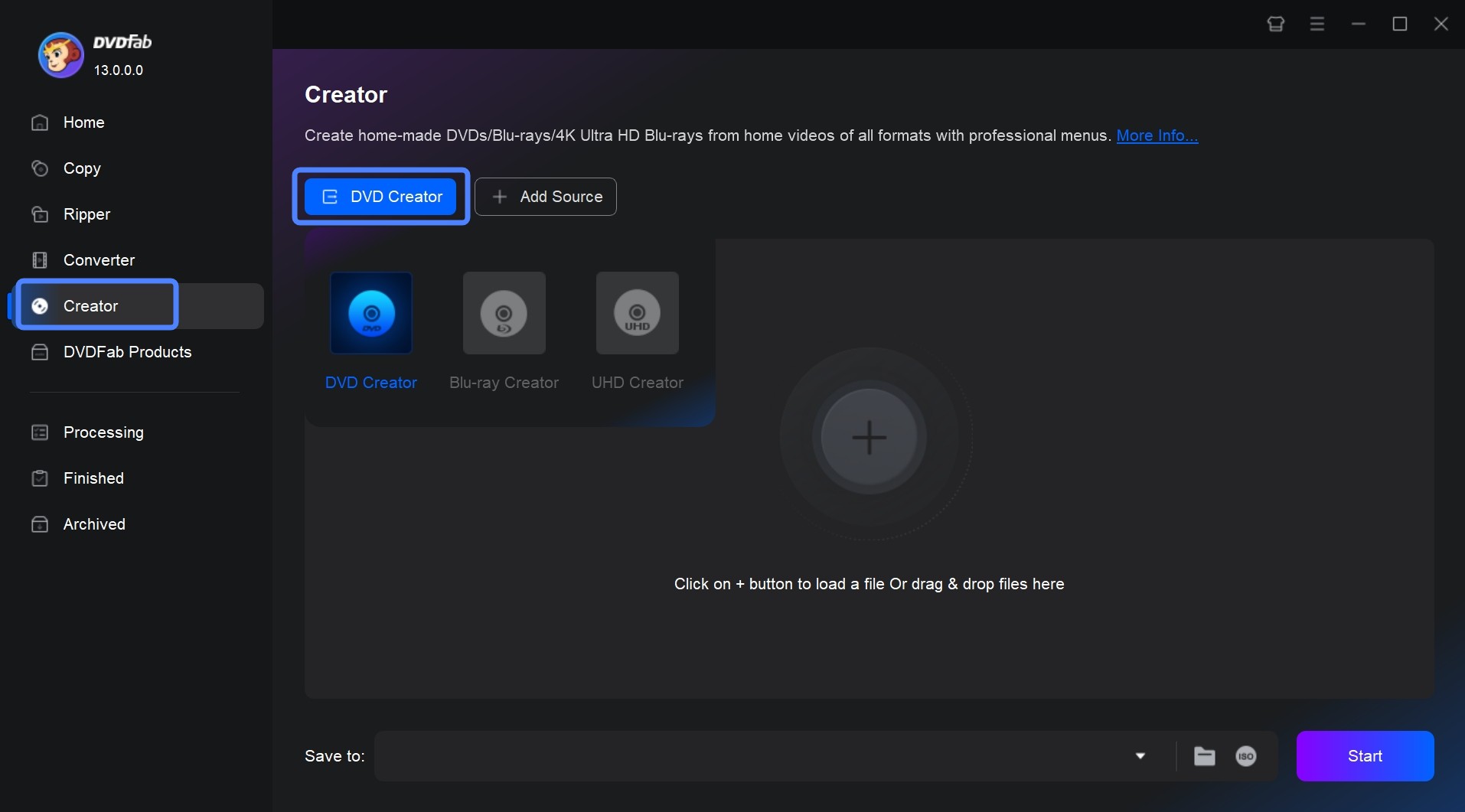
Step 1: Launch DVDFab DVD Creator for Mac and load your source video.
Free download and run DVDFab 13 on your Mac system. Open the software and select the "Creator" module. Load your video with the Add button on the main page or by simply dragging and dropping the file onto the main page.
Free Download Windows 11/10/8.1/8/7
Free Download macOS 10.13 - 15.x
Step 2: Customize your DVD and create a DVD menu.
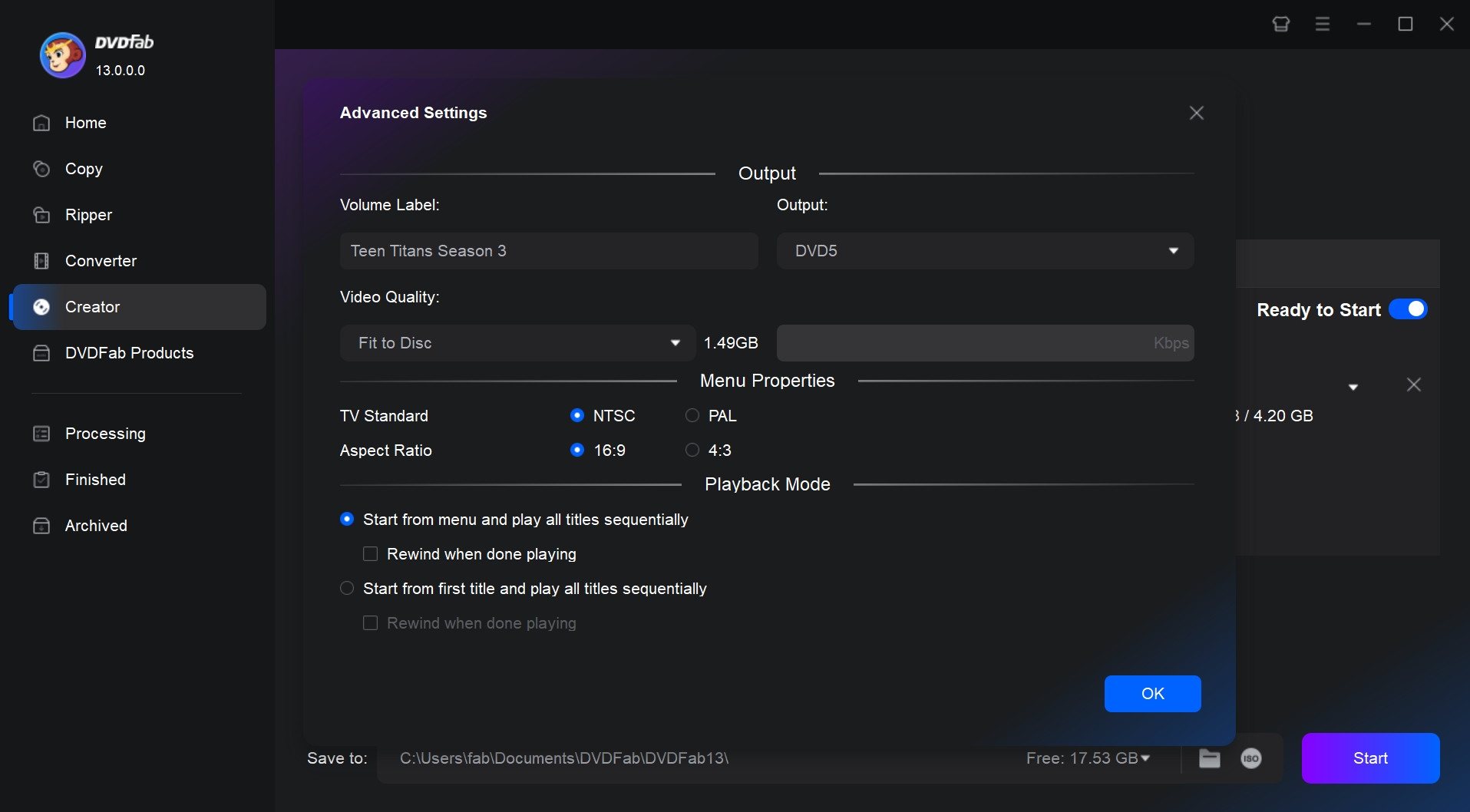
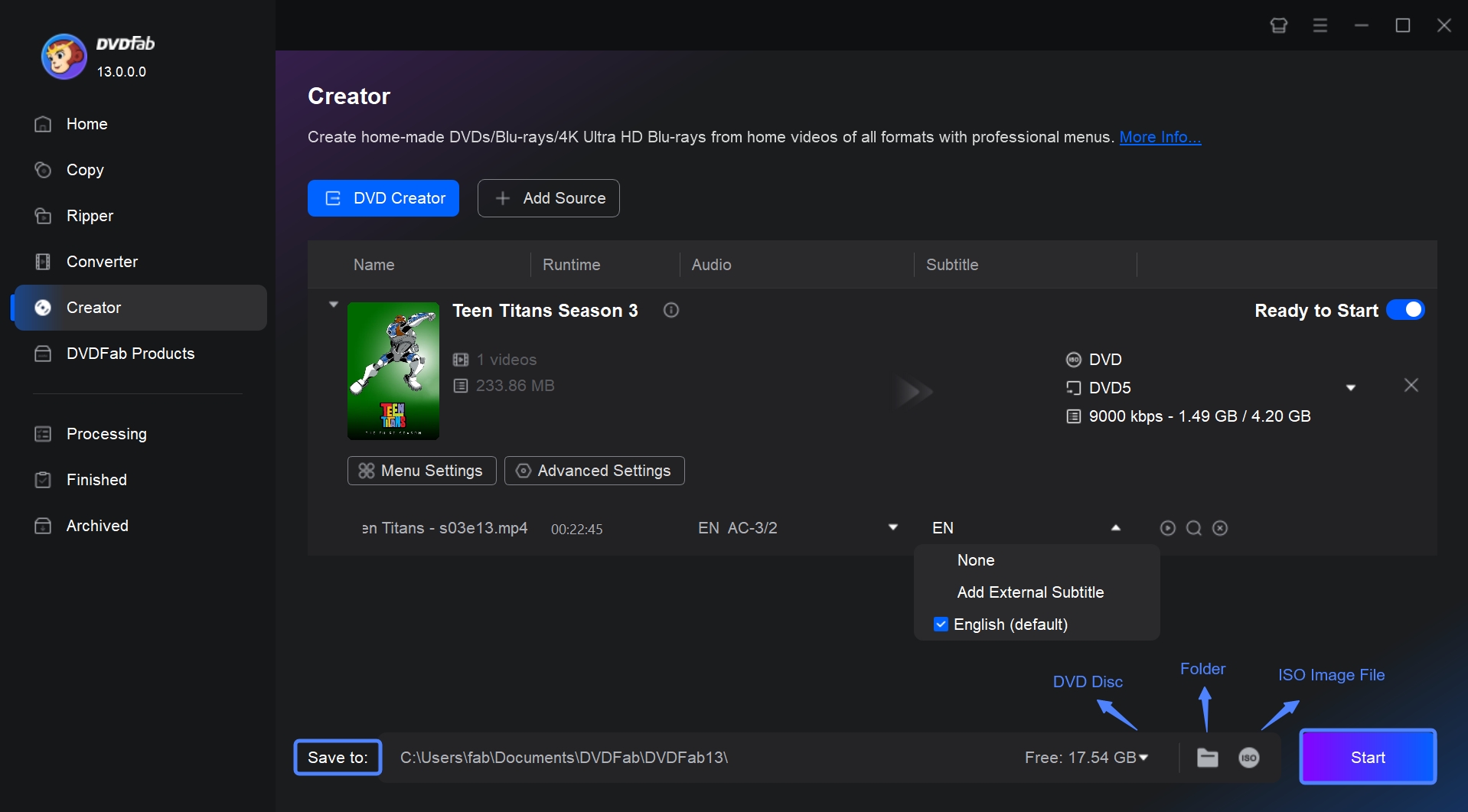
After loading the source video, you can select audio tracks, output size, subtitles, or add external subtitles.
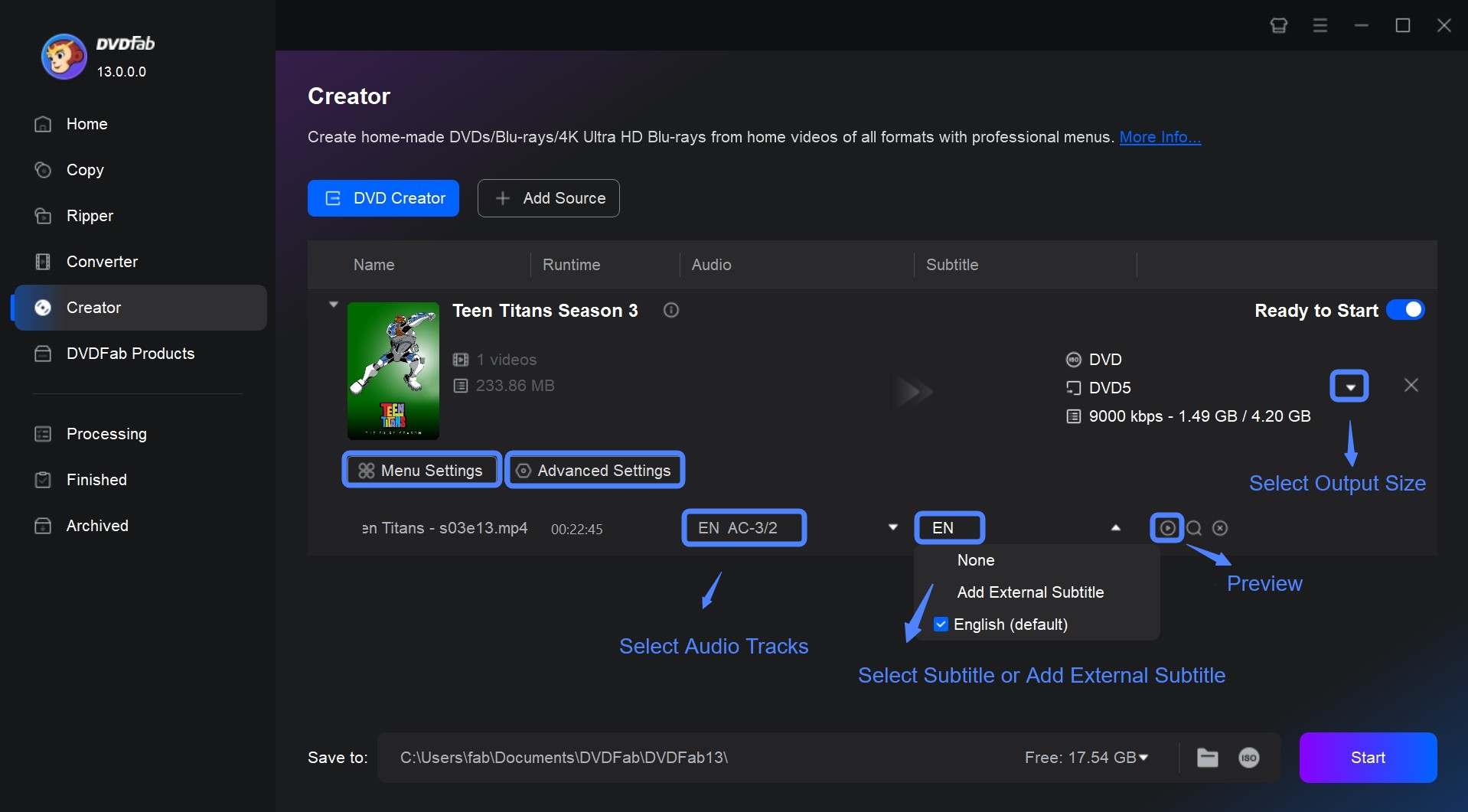
Click Advanced Settings and choose the output size and quality you prefer.
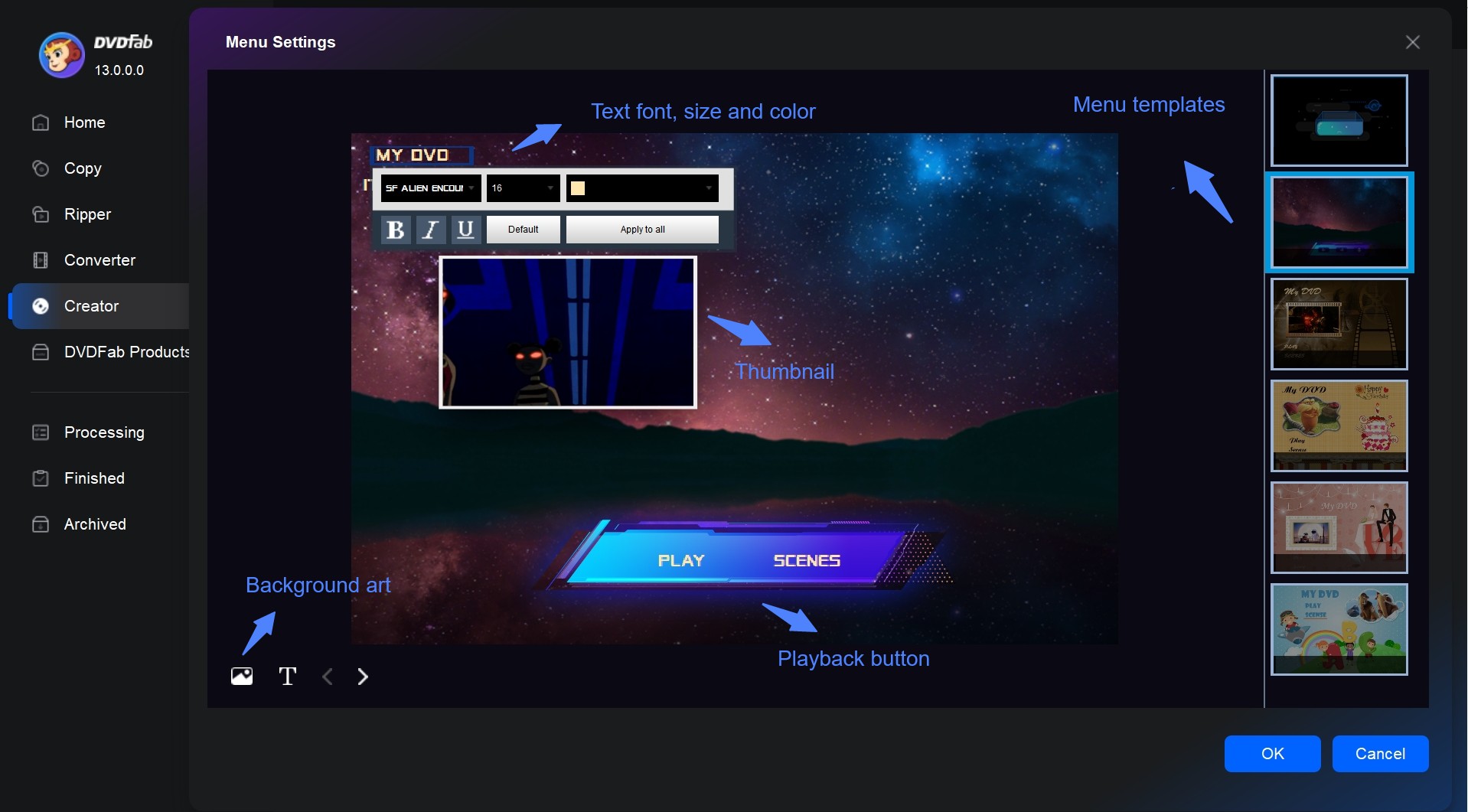
You can also use the built-in DVD menu maker to choose free menu template and customize it. You can adjust the background art, thumbnails, text font, color, and size, as well as playback buttons such as Play/Pause and Previous/Next.
Step 3: Start burning your DVD on Mac free and fast.
Select the output directory in Save to Part, and click the Start button to begin creating your DVD. DVDFab will provide detailed progress information throughout the process.
2. DVDStyler
Work on: macOS, Windows, and Linux
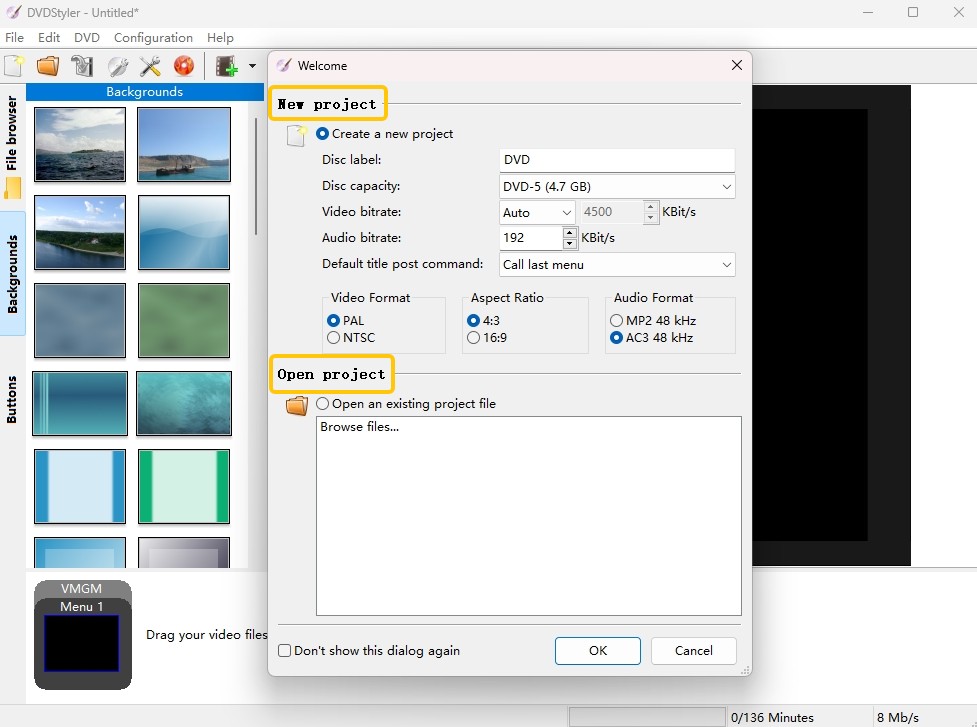
DVDStyler is a free DVD authoring application for Mac users who want to create playable DVDs with interactive menus. It supports custom menus, buttons, multiple audio and subtitle tracks, photo slideshows, and many video formats.
In my test, I could build a menu, arrange titles, and prepare a DVD project. It gives me more menu control than a basic burner, but the interface is outdated, and the process felt more manual than DVDFab. It is a good free choice for if you already understand basic DVD authoring and do not mind spending extra time on menu and output settings.
One thing to note is that DVDStyler has not had a major stable release listed on its official news page since version 3.2.1 in 2021, although the Mac installer file was updated later on SourceForge. Its official download page lists support for OS X 10.15 Catalina or later, but compatibility with newer macOS versions should still be checked before using it.
- Free and open-source DVD authoring tool
- Supports multiple audio tracks and subtitles
- Allows custom menu backgrounds, buttons, text, and navigation
- Workflow is less polished than paid DVD creator software
- Requires more manual setup for menus and DVD structure
- Not ideal if you want a guided beginner-friendly interface
3. Roxio Toast Titanium/Pro
Work on: macOS 10.14 or later
Roxio Toast Titanium and Toast Pro can burn CDs and DVDs, author DVD movies, convert media files, record the screen, edit video, and copy unprotected discs. When creating a video DVD, it also lets you customize menus, chapters, buttons, backgrounds, and music with themed templates.
In my test, the burned DVD played smoothly, with no audio and video sync issues. However, Toast feels more like a full Mac media suite than a lightweight DVD burning tool, so it may be more than necessary if you only need simple disc burning. The current product line is Toast 20 Titanium and Toast 20 Pro. Toast Pro includes Blu-ray disc burning, while Toast Titanium requires a separate Blu-ray plug-in for that feature.
Another thing to note is that Toast has specific system requirements. It requires macOS 10.14 or later, an Apple M1 or Intel Mac, internet access for installation, registration, and updates, and product registration before use. If you run into setup problems, check your Mac version, permissions, network connection, and security prompts first. In my test, performance was less stable when converting large files, so I would not choose it for long conversion sessions or heavy batch burning.
- More bonus function like editing and converting videos
- Able to create DVD menu and chapter
- Less cost-effective compared to other software
- Often require frequent restarts for disc burning
- Menu link testing can be frustrating
- Occasionally suffers from performance issues
Best Open-source and Built-in DVD Burning Software for Mac
Open source DVD burners and built in macOS disc tools are useful for data DVDs, audio discs, backups, and simple file burning. They work well when you only need to write files to a disc, but they are usually not ideal for creating polished DVD videos with menus.
4. Burn
Work on: Mac OS X 10.9 and up
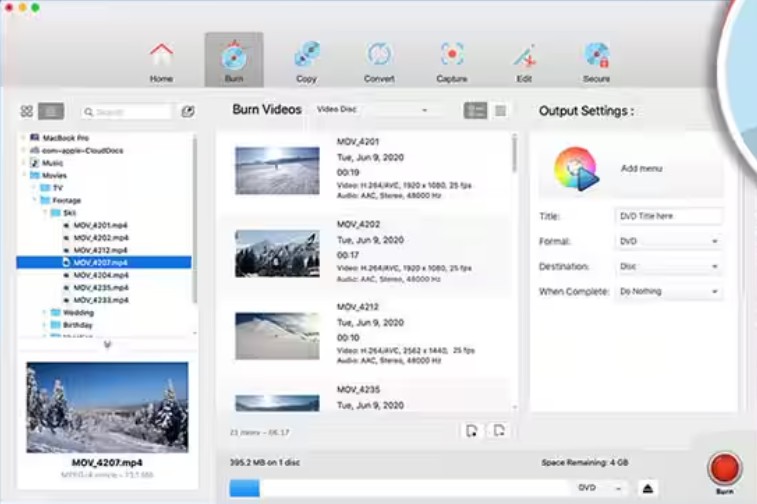
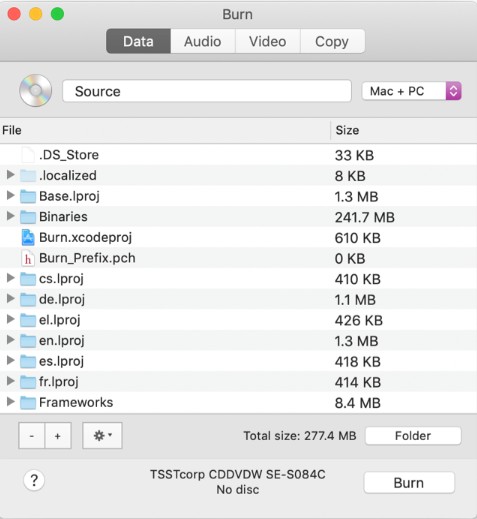
Burn is a free open source DVD burner for Mac. It is lightweight, easy to install, and suitable for creating data, audio, and video discs. The interface is divided into four modules: Data, Audio, Video, and Copy, so users can choose the task they need without a complex setup.
Burn supports DVDs, DVD disc images, CDs, VCDs, SVCDs, cue/bin images, and more. In the Copy module, it can make a simple copy of a data disc, but it cannot handle encrypted commercial video DVDs because it does not include a decrypter.
In my test, Burn worked well as a simple disc burning tool for small home projects. I used it to create a VIDEO_TS folder, check the menus and chapters, and then choose whether to burn directly or create an ISO backup first. The downside is speed and control. When I burned a two-hour wedding video, the process took about 43 minutes, and the menu options were much more limited than a dedicated DVD authoring tool.
- Freely available and open-source
- Able to share filesystems across different operating systems
- Support creating standard Audio-CDs
- No advanced customized options
- Lack instruction and technical support
- No updates for a long time
5. Finder
Work on: All macOS versions with optical drive support
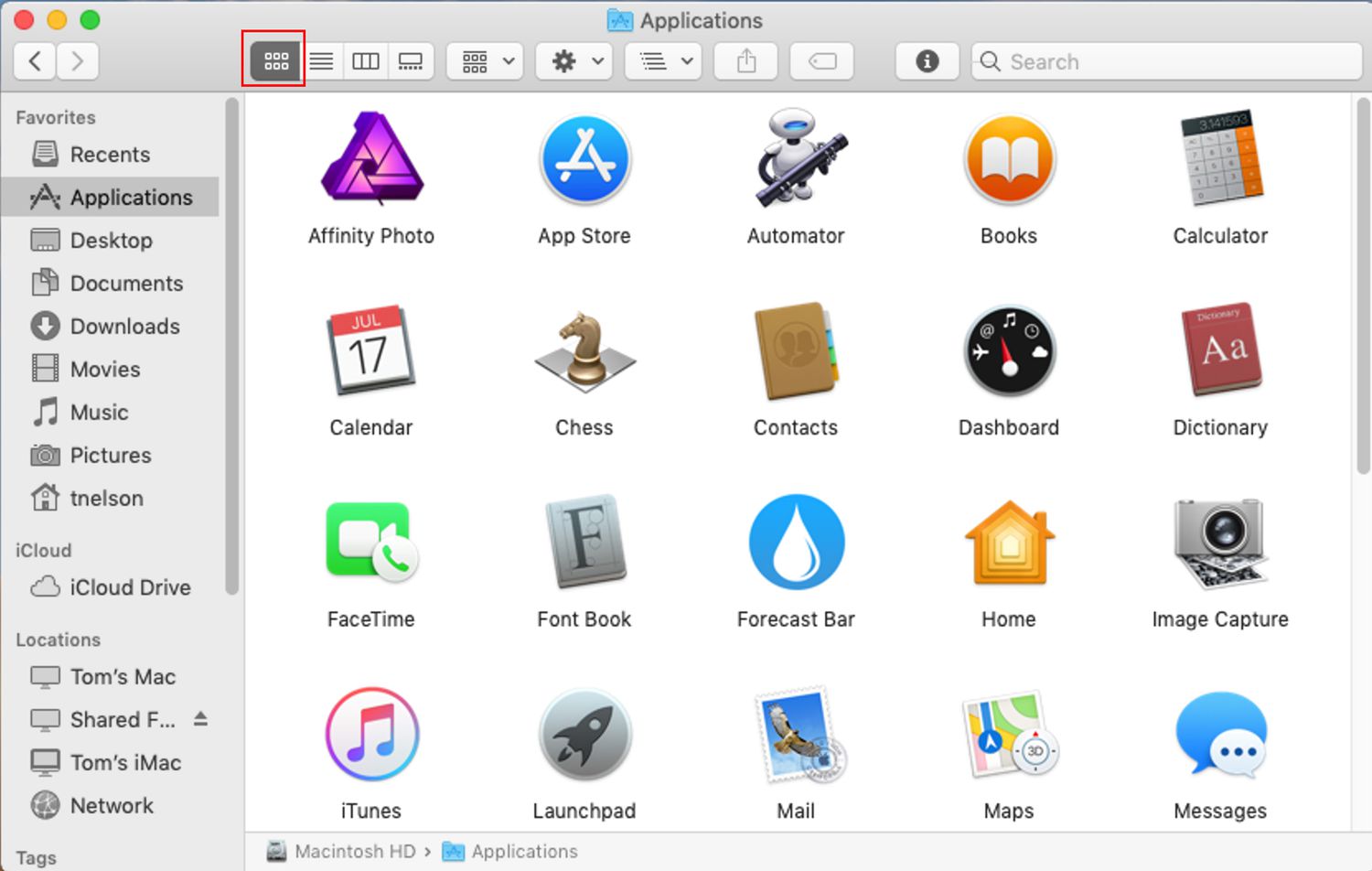
Finder is a default file manager used on all Macintosh operating systems. It can burn data discs without downloading an additional program. It enables you to browse your apps, disks, files, and folders in a number of ways and assists you in navigating all of the files and folders on your Mac.
To use this built-in Mac DVD burner, you just need to insert a blank disc into a writable optical drive and select Open Finder from the pop-up screen. Then, open the disc window and drag files that you want to burn.
When I use this tool to burn DVD on mac, I don't have to worry about security risks, since it's a built-in macOS tool. I only use it for data disc backups, though. I also tried burning an ISO that already had a DVD-Video structure, but the resulting disc still wouldn't play in any DVD player. If you want a disc that plays like a movie, it's better to use one of the professional and safe third-party tools I've recommended.
- No need to download any other apps
- Easy to use for beginners
- Suitable for files, documents, photos, and simple backups
- Only support data DVD burning
- No video editing and menu creation functions
Best All-in-One Media Converters with DVD Burning for Mac
Choose these video converters if DVD burning is only one part of your media workflow. They are better when you also need video conversion or format preparation before creating a DVD.
6. Wondershare UniConverter
Work on: For macOS 10.13 or later (including macOS 26 Tahoe)
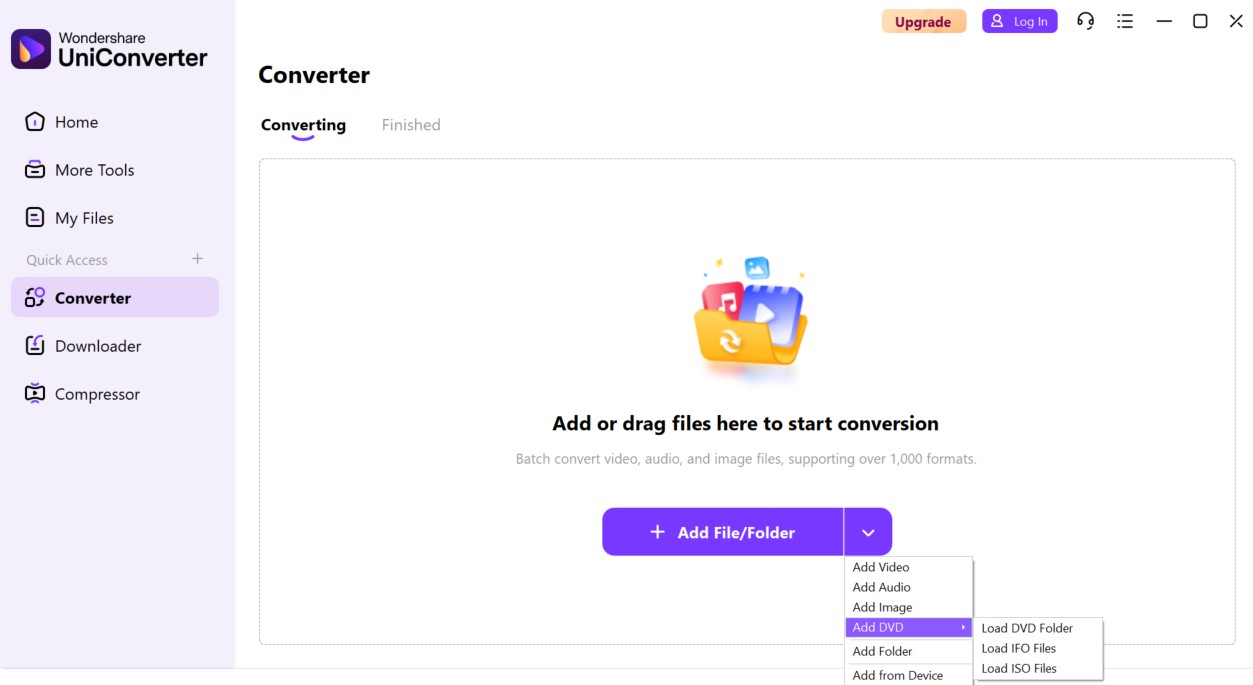
Wondershare UniConverter is an all in one media toolkit for users who need video conversion, compression, enhancer, basic editing, and DVD burning in the same program. It is useful when your source videos are in mixed formats and you want to convert or trim them before creating a DVD.
In my test, burning the same MKV video to DVD took about 30 minutes, making UniConverter slower than the stronger DVD burning tools I tested. The trial output may also include a large watermark, which can affect the viewing experience. Although UniConverter includes video editing features, the editing step is less direct than in a dedicated DVD creator because I had to edit and save the video before burning it.
I would recommend Wondershare UniConverter if you often convert or compress videos before burning them. Otherwise, it may be more than needed for simple data or video DVD burning. The last update was on October 20, 2025.
- Modern interface with clearly labeled tools
- Support a vast array of video and audio formats
- Easier for users who want one broad media toolkit
- The free version limits conversions to only one third of the video's length and severely restricts advanced features.
- It is a heavy, purely desktop-based software
Other Simple or Legacy DVD Burners for Mac
The following tools can still be mentioned for completeness, but they should not be treated as primary recommendations for modern macOS DVD authoring. They are better framed as simple or legacy options.
7. Express Burn
Work on: Mac OS X 10.5 and later
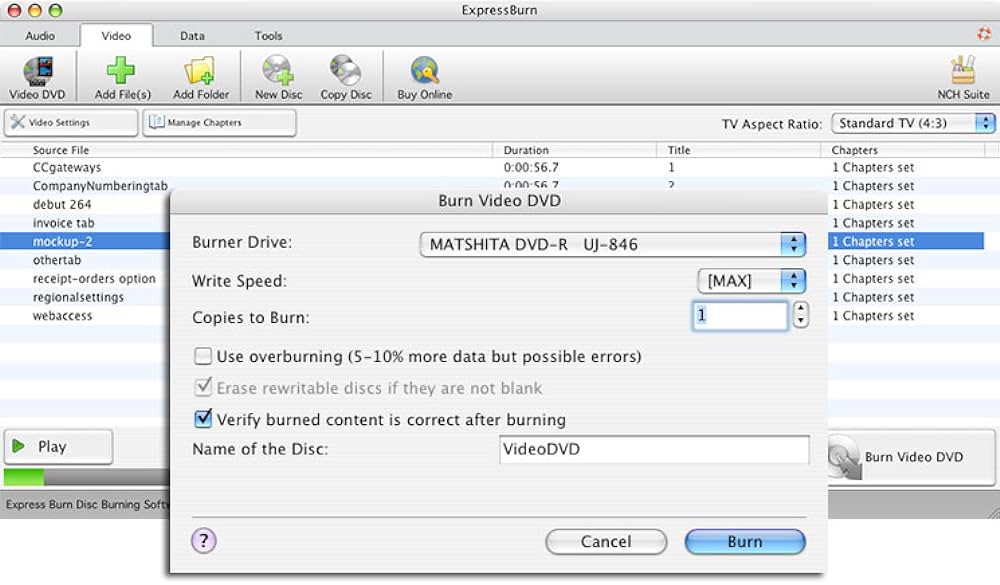
Express Burn is a DVD burning software for Macintosh that can burn audio, video or files to CD/DVD/Blu-ray and duplicate homemade DVDs. For video burning, it supports many common video formats, and it also contains template menu screens and buttons for users to create DVD menus.
Its copy function is a thing that deserved to be mentioned. It features a fast copy/burning speed. It can copy and burn MP4 to DVD, but it lacks the ability to decrypt commercial DVD, which means it should be used only with discs and files you own or have permission to copy.
Express Burn is faster than other free Mac burning tools in my use. Another advantage is that it handles both DVD copying and burning in a single app, although it can't copy discs with copy protection. The free trial is limited, allowing you to only burn three DVDs. Also note that the version tiers are overly complicated. If you buy a lower-tier edition, you may find it doesn't include Blu-ray support and you'll need to pay extra to upgrade.
- User-friendly interface
- Support creating and organizing chapter
- Able to record CDs or DVDs and burn Blu-ray
- Comes with pre-designed menu buttons and screens
- Able to generate images from system data or a CD
- Unable to remove DVD copy protection
- Compression process results in lower-quality output
- Only burn 3 DVDs in free trial version
8. Disco
Work on: Mac OS X 10.4.3 and later
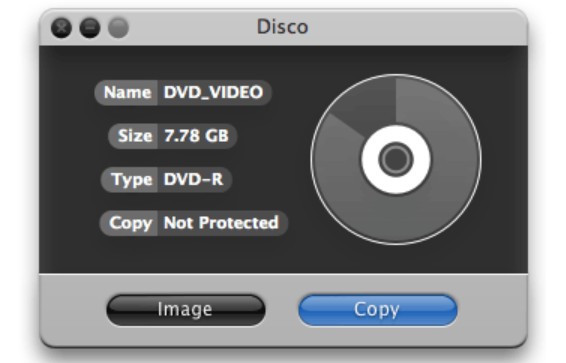
Disco is a free Mac CD/DVD burner. You can burn your files to single or dual-layer DVDs based on the file systems like Hybrid, HFS+, UDF, PC Joliet, and ISO 9660. It also supports DVD-ReWritable disc burning and erasing.
This DVD writers for Macs also has the ability to create ISO and DMG images from files and discs. Its "Discography" option lets you instantly search previously created disc information like the file name, disc name, file path and more. Its disc-spanning feature can detect the files you are burning and divide the big files into multiple discs.
This one really has that "old Mac" vibe. I actually enjoy using it to write data discs on an old machine—the smoke animation is charmingly retro and great for nostalgic users. But it stopped getting updates back in 2011, and the official site even released free serial numbers at the time. So I only use it on older systems for simple backups. Its compatibility with newer systems is poor, and it won't run on my Macbook Air M4.
- Be free for users to use
- Enable you to browse all previously burnt files
- Discontinued legacy software
- No advanced menu creation functions
- Poor fit for modern macOS workflows
9. LiquidCD
Work on: Mac OS X 10.5 and later
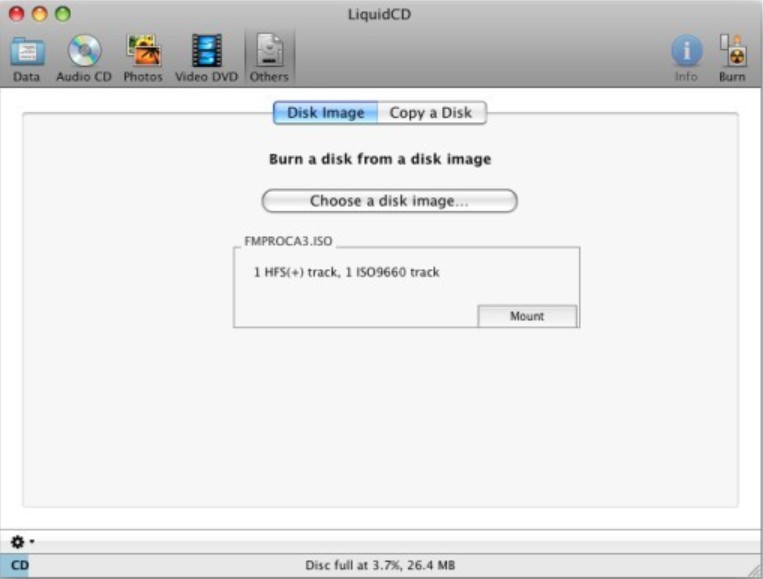
LiquidCD is a DVD and Blu-ray burning software for Mac that is simple to follow and use and also allows you to burn data, audio, photos, and video files to a DVD. This software supports many special file formats, such as MDF, MDS, DAA, and GBI. The key feature of this DVD burning software for Mac is that it helps you to burn custom hybrid discs or Cue/Bin files.
You can tell from the interface that this Mac DVD burner hasn't been updated in a long time. It is mainly aimed at older systems and even has compatibility issues with macOS Snow Leopard. When I tested it on macOS Ventura, it kept crashing. Some users have also reported that its integration with iTunes is poor and that it is extremely slow when processing images. For general data, the program is fairly reliable; however, for very specialized disc types, it is better to use another program.
- Capable of creating discs in various formats at no cost
- Provide a discussion platform to resolve user queries
- May encounter operational glitches that disrupt use
- Occasional software instability can hinder your burning task
- No advanced features
Comparison Table: Best DVD Burning Software for Mac
Whether you need to back up your data, create a playable DVD movie, or keep a physical copy of your favorite video clips, a competent Mac DVD burner can make your task easier. Considering different preferences and needs, I tested and reviewed the following 8 best DVD burning software for Mac based on their features, reliability, ease of use, update status, and user ratings from Softpedia, Softonic, SourceForge, or official product pages. Now, let's have a quick overview of these programs:
- DVDFab DVD Creator - Versatile, high-quality output, fast burning speed, advanced DVD menu customization.
- DVDStyler - Free DVD authoring tool, custom menus, multiple subtitles and audio tracks.
- Roxio Toast Titanium/Pro - Feature-rich Mac media suite, DVD/Blu-ray burning, video conversion, menu creation.
- Burn - Free, lightweight, open-source, suitable for data, audio, and basic video disc tasks.
- Finder - Free, built-in, simple, ideal for basic data disc burning and backups.
- Wondershare UniConverter - All-in-one media toolkit, useful for video conversion before DVD burning.
- Express Burn - Simple cross-platform disc burner, supports audio, video, data discs, and Blu-ray burning.
- Disco - Legacy Mac burner with one-click burning, disc labeling, and automatic file splitting.
| Mac DVD Burners | OS | Input | Output | Menu Creation | User Rating | Latest Update |
|---|---|---|---|---|---|---|
| DVDFab DVD Creator | macOS 10.13 - 15.x & Windows | 200+ video formats | video DVD disc, ISO, Folder | stylish templates & customization | 4.5/5 | v13.0.5.8, updated on Jun 10, 2026 |
| DVDStyler | macOS, Windows, Linux | AVI, MOV, MP4, MPEG, OGG, WMV, and more | DVD-Video, DVD disc | interactive menus & custom buttons | 4.0/5 | v3.2.1, updated on Aug 6, 2024 |
| Roxio Toast Titanium/Pro | macOS 10.14 or later | video, music, data | CD, video DVD, Blu-ray, ISO | preset templates & customization | 3.0/5 | v20 Pro, no public update date |
| Burn | Mac OS X 10.9 and up | video, music, data | DVD video/audio disc, CD | basic theme | 3.2/5 | v3.1.9, updated on Feb 27, 2026 |
| Finder | All macOS versions with optical drive support | files, folders, disk images | data DVD, burned disk image | NO | / | / |
| Wondershare UniConverter | macOS 10.13 or later | common video and audio formats | DVD disc, DVD folder, ISO | template-based | N/A | v7, updated on Oct 20, 2025 |
| Express Burn | Mac OS X 10.5 and later | video, audio, file | CD, video DVD, Blu-ray | few templates | 3.6/5 | v12.00, updated on Jul 15, 2023 |
| Disco | Mac OS X 10.4.3 and later | video, audio, data | CD, video DVD, data disc | NO | 3.5/5 | v1.0.3, updated on Feb 28, 2008 |
FAQs
How to choose the best DVD burner software for mac?
If you want to find a DVD burner that fits your workflow on macOS, consider the following:
What are you burning? Decide whether you're making a data disc or a video DVD. For the former, Finder is usually enough, so you don't need to make a decision. But if you want a video DVD that plays on set-top DVD players, the following factors matter:
- Compatibility: There are many free DVD burners for Mac, but I recommend prioritizing software that clearly supports Apple M1, M2, M3, and M4 chips, Intel Macs, and the latest macOS versions.
- Authoring ability: If you're turning digital video like MP4 into a DVD-Video, your burner must include authoring features — in other words, it has to structure the video into proper disc folders so players can recognize and play it normally.
- Speed: Burn speed matters. Too fast can increase failure rates; too slow wastes time. Look for a Mac DVD burner that lets you adjust write speed or supports GPU/hardware acceleration — both tend to improve reliability.
What is the best DVD burning software for Mac?
DVDFab DVD Creator is the best DVD burning software for Mac that lets you burn playable video DVDs with menus, subtitles, ISO output, and DVD folder output. Burn is better for free basic burning, while Finder is good for simple data discs.
Are there any external DVD burners for Macs?
Yes, there are several external DVD burners available for Macs you can use to burn DVDs. Some of the top rated ones include ASUS ZenDrive Ultra Slim USB 2.0 External DVD Optical Drive, VersionTECH USB C Type-c Ultra Slim External DVD Drive, LG Electronics 8X USB 2.0 Super Multi Ultra Slim Portable DVD Writer Drive, etc. Remember to check for your Mac compatibility before purchasing.
Can iMovie burn DVDs?
No. Modern iMovie can edit and export videos, but it does not burn DVDs or create DVD menus. In the past, Mac users often used iMovie together with iDVD, but iDVD is no longer a modern DVD authoring option. To burn an iMovie export to DVD, first export the video file, then import it into DVD burning software such as DVDFab DVD Creator.
Can you burn DVDs with iTunes?
iTunes was mainly used for music and media library management, and on older Macs it could burn audio CDs or data discs in certain workflows. It is not a DVD authoring tool and cannot create a playable movie DVD with menus. On modern macOS, use Finder for data discs or dedicated DVD burning software for video DVDs
Can I use VLC to burn DVDs on Mac?
VLC is mainly a media player and converter, not a dedicated DVD burning or DVD authoring program. It can play many DVD and video formats, but it is not the right tool if you need to burn a video to a playable DVD with menus. For that task, use DVDFab DVD Creator, DVDStyler, or another DVD authoring tool.
Does Adobe have a DVD Burner for Mac?
Adobe Encore is a DVD burner for Mac that was bundled with Adobe Premiere Pro. You could use it to create DVDs and design menus from Photoshop documents. It was available up until Adobe Premiere Pro CS6. However, since Adobe discontinued Creative Suite 6 in 2015, Adobe Encore was discontinued as well.
Why won't my Mac let me burn CDs?
A Mac may fail to burn CDs or DVDs if it has no writable optical drive, the external drive is not connected properly, the blank disc is incompatible, the disc is already finalized, or Finder does not have a writable destination available. Newer Macs usually need an external CD/DVD burner before any disc-burning workflow can begin.
Conclusion
Choosing the right DVD burning software for Mac can make video backup and playback much easier. Based on my hands-on tests, DVDFab DVD Creator is one of the strongest options covered in this post because it offers rich DVD authoring features, menu customization, stable burning performance, and support for different DVD output needs. Use the comparison above to choose the tool that fits your needs and start creating DVDs on your Mac more easily.

 How to Convert MKV to DVD: 4 Tested Tools for Playable Discs (2026)By Wenny Yan - Oct 12, 2026
 How to Transfer and Burn iPhone Videos to DVD on Windows & MacBy Diana Smith - Oct 10, 2026
 How to Burn a DVD on Mac in 2026: Video, Data, Photos & ISOBy Diana Smith - Sep 28, 2026
 How to Convert WMV to DVD: 3 Methods for Windows and MacBy Wenny Yan - Sep 16, 2026