7 Best & Free DVD Menu Creators: How to Make DVD Menu on Windows & Mac

Summary: We tested 7 top DVD menu creators for Windows, Mac, and Linux to find the best tool for turning video files into professional discs. DVDFab DVD Creator is our top pick for its advanced customization features, effectively filling the gap left by discontinued software like Adobe Encore. This guide provides a full comparison of these tools and a tutorial on how to make a custom DVD menu.
Table of Contents
In a world dominated by streaming, burning a disc is a deliberate choice. It isn't just about storage; it is about the experience. I recently came across a discussion on the r/dvd community that captured this perfectly: "Menus are the soul of physical media." This observation highlights the real problem with most free tools. You spend weeks editing a treasured wedding video, only to have the final disc load a generic, pixelated interface. A proper, customized menu is what transforms that raw footage into an official release.
This post will introduce the best and free DVD burning software that can create a professional DVD with customized features, as well as a step-by-step tutorial on how to make a DVD menu.
How We Tested & Chose the Best DVD Menu Maker
To find the true best DVD menu creator, we didn't just read feature lists. We conducted a testing process on a Windows 1 (Intel i7, 32GB RAM) and a MacBook Pro M2. We burned the video files using 7 different tools to evaluate their real-world performance.
Based on our test results and survey data from forum users, here are the 4 critical criteria that matter most:
1. Template Quality & Flexibility (Weighted: 40%)
92% of users want a custom DVD menu maker that balances speed with creativity.
Our Standard: A qualified tool must offer at least 30+ pre-installed templates (Wedding, Travel, Holiday). Crucially, it must support dynamic customization, allowing you to change background, adjust thumbnail frames, and edit text fonts, rather than just swapping static images.
2. Deep Customization Features (Weighted: 30%)
For a professional finish, "drag-and-drop" isn't enough.
Our Standard: We looked for software with video editor that allows you to crop, trim, and enhance your footage. Furthermore, it must allow you to visualize the IFO/VOB structure, ensuring the final disc is navigable on standard DVD players.
3. Format Compatibility (important to 63% of participants)
63% of users reported burn failures due to unsupported input formats.
Our Standard: On the input side, it must support diverse formats. Equally important is flexible output: the software should not only burn directly to blank discs (DVD-5/DVD-9) but also allow you to save as ISO files or DVD Folders.
4. Burning Speed & Stability (Weighted: 10%)
Transcoding is resource-intensive.
Our Standard: We measured the time from Start to Eject. Tools supporting GPU Acceleration were significantly faster. For example, our top pick compressed a 2-hour movie in under 15 minutes, while older software without acceleration took over an hour.
Based on the four criteria, you can choose the DVD Menu Creator that best suits your needs. We'll also use these criteria to rate and review seven tools in the following section.
Top Pick of DVD Menu Creators for Windows & Mac
After testing popular tools against the criteria above, one contender stood out as the definitive winner. Here is the top-rated DVD menu maker from our test, along with a tutorial on how to burn your videos to DVD with menu.
DVDFab DVD Creator (Best DVD Menu Maker For Windows & Mac)
DVDFab DVD Creator is top recommended for a professional DVD menu maker, for a simple reason: beyond burning DVDs, it also offers powerful menu tools. It lets you navigate and control DVD playback smoothly, including returning to the main menu and switching audio and subtitle tracks, so you can author multi-language discs. This DVD menu maker is beginner friendly as well, with a range of ready-made themed templates. It also allows you to customize the menu by editing text, setting your own background, and changing button styles and positions.
Apart from menu authoring, it is a professional-grade DVD burner. It can convert various videos into standard DVD discs, ISO files, or folders, and it supports a wide range of input formats, including AVI, MP4, MKV, M2TS, FLV, MOV, VOB, and TS, so you do not have to worry about a DVD menu maker failing to handle your files.
In our tests, we found the menu editor in this custom DVD maker to be very smooth. For a birthday DVD, we chose a matching template and set the background to a group photo of our friends, which made the disc more memorable. From version 13.0.4.5 in 2025, DVDFab DVD Creator has added a video editor that lets you crop, trim, apply filters, adjust tone and color, and create custom chapters, so we did not need a separate editor to fix poorly exposed footage. Even though we built a complex menu, GPU acceleration kept the burn process fast, and it took only around 12 minutes to write a two-and-a-half-hour video. On the basis of our overall experience, we made this software our top pick on the list, as it meets all of our criteria.
💻Available on: Windows 11/10/8.1/8/7 and macOS 10.13 - 15.x
👍Main Features:
- Provides multiple DVD menu templates of different themes.
- Allows you to personalize the background, text, and buttons to create professional-looking DVDs.
- Lets you switch audio and subtitle tracks and control playback with Play, Pause, and Previous/Next.
- Burn 200+ video formats, such as MKV, MP4 to DVD on Mac and Windows.
- Support DVD-9, DVD-5, DVD+R/RW, DVD-R/RW, DVD+R DL, DVD-R DL.
- Equipped with a video editor to trim videos, adjust tone and color, add watermarks, etc.
- Burn DVDs at high speed using GPU acceleration technology and batch mode.
⭐Ratings:
- Menu Templates: ⭐⭐⭐⭐⭐
- Menu Customization:⭐⭐⭐⭐⭐
- Format Compatibility: ⭐⭐⭐⭐⭐
- Speed: ⭐⭐⭐⭐⭐
How to Make a DVD Menu Using DVDFab DVD Creator?
Step 1: Import Your Videos
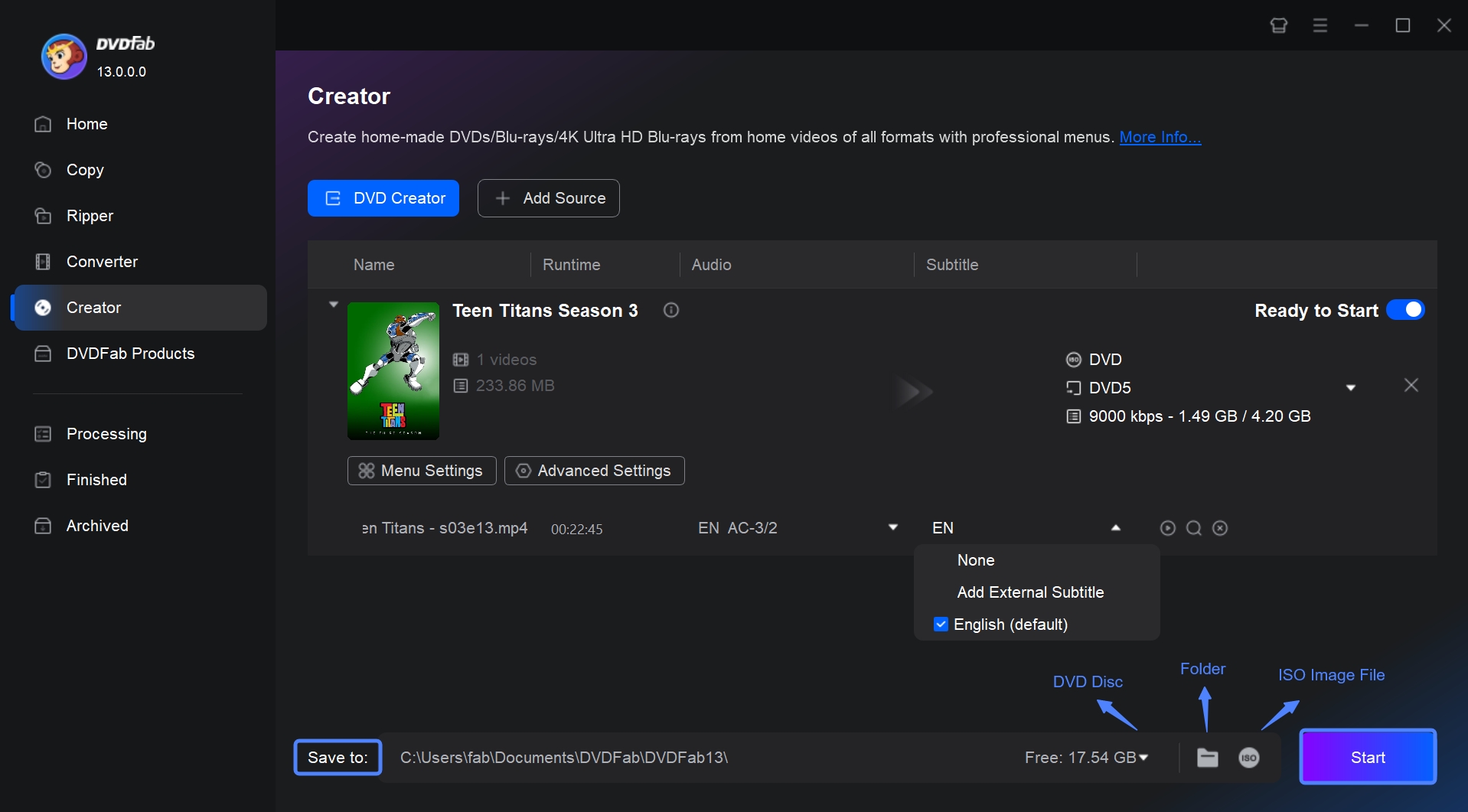
Free download and run DVDFab 13. Switch to Creator module > DVD Creator.
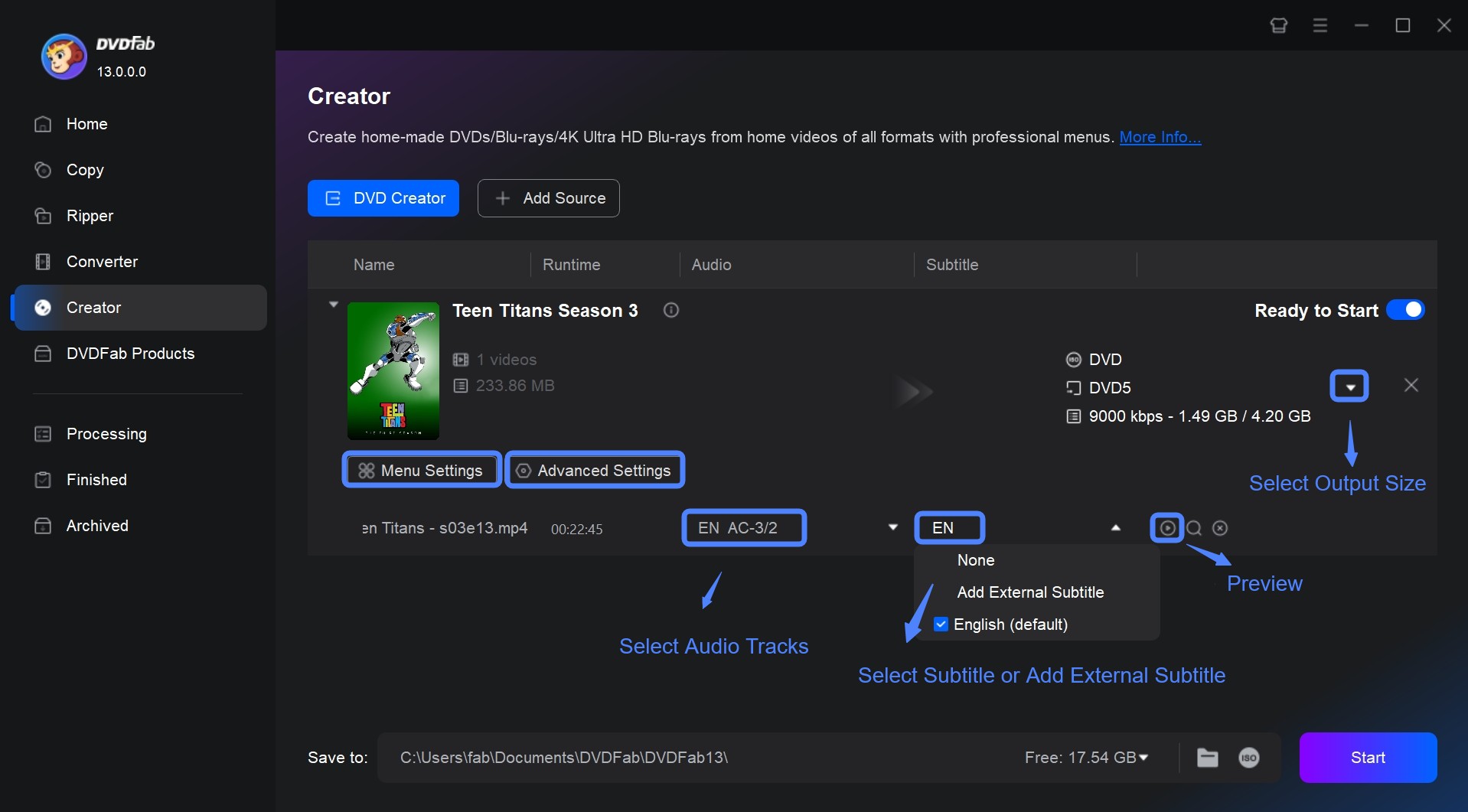
To import your videos to this DVD menu creator, click Add Source or drag your files from File Explorer or Finder into the panel. After loading the source videos, you will see all the input-output information and customized options on the interface.
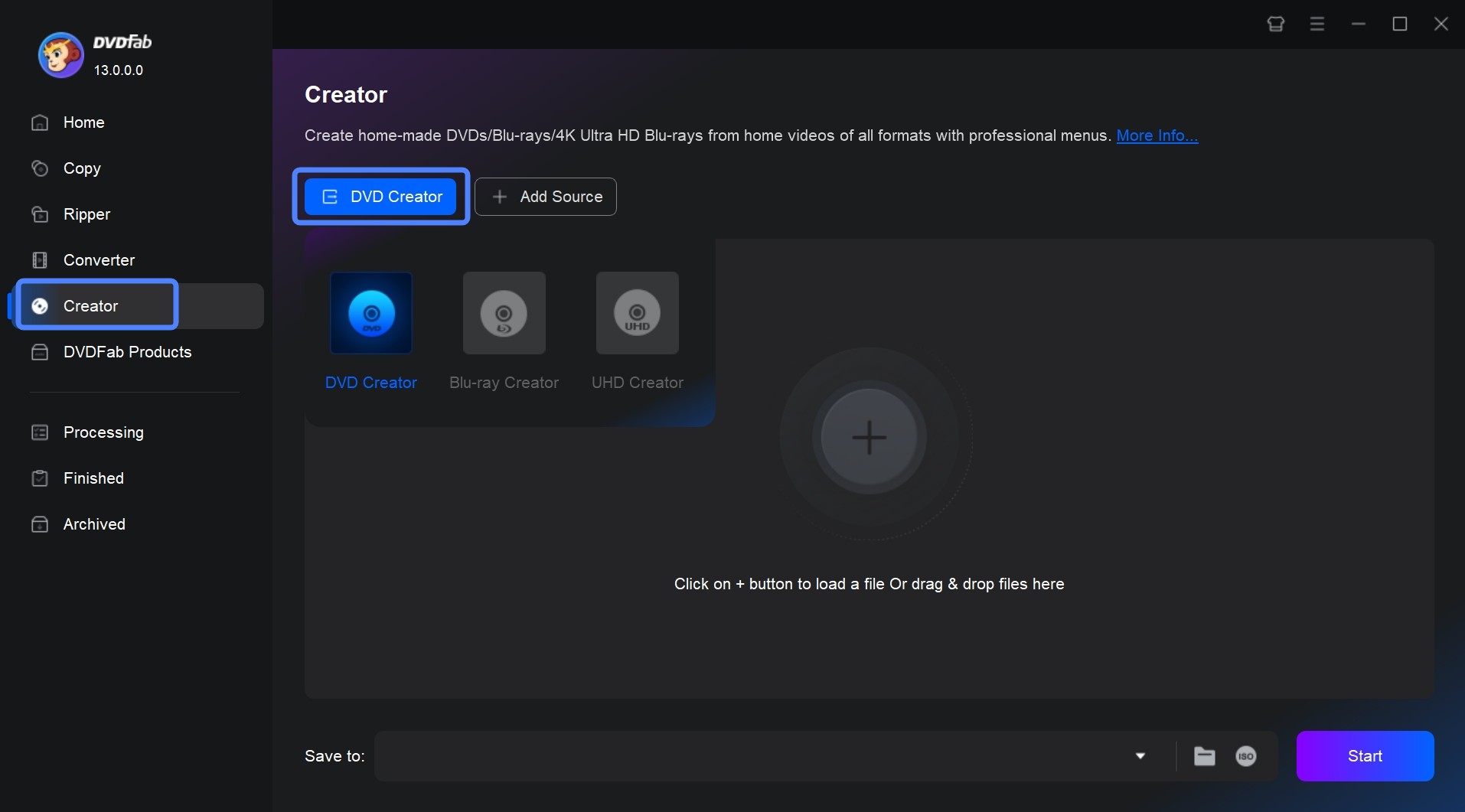
After loading the source videos, you will see all the input-output information and customized options on the following interface.
Step 2: Customize DVD Menu
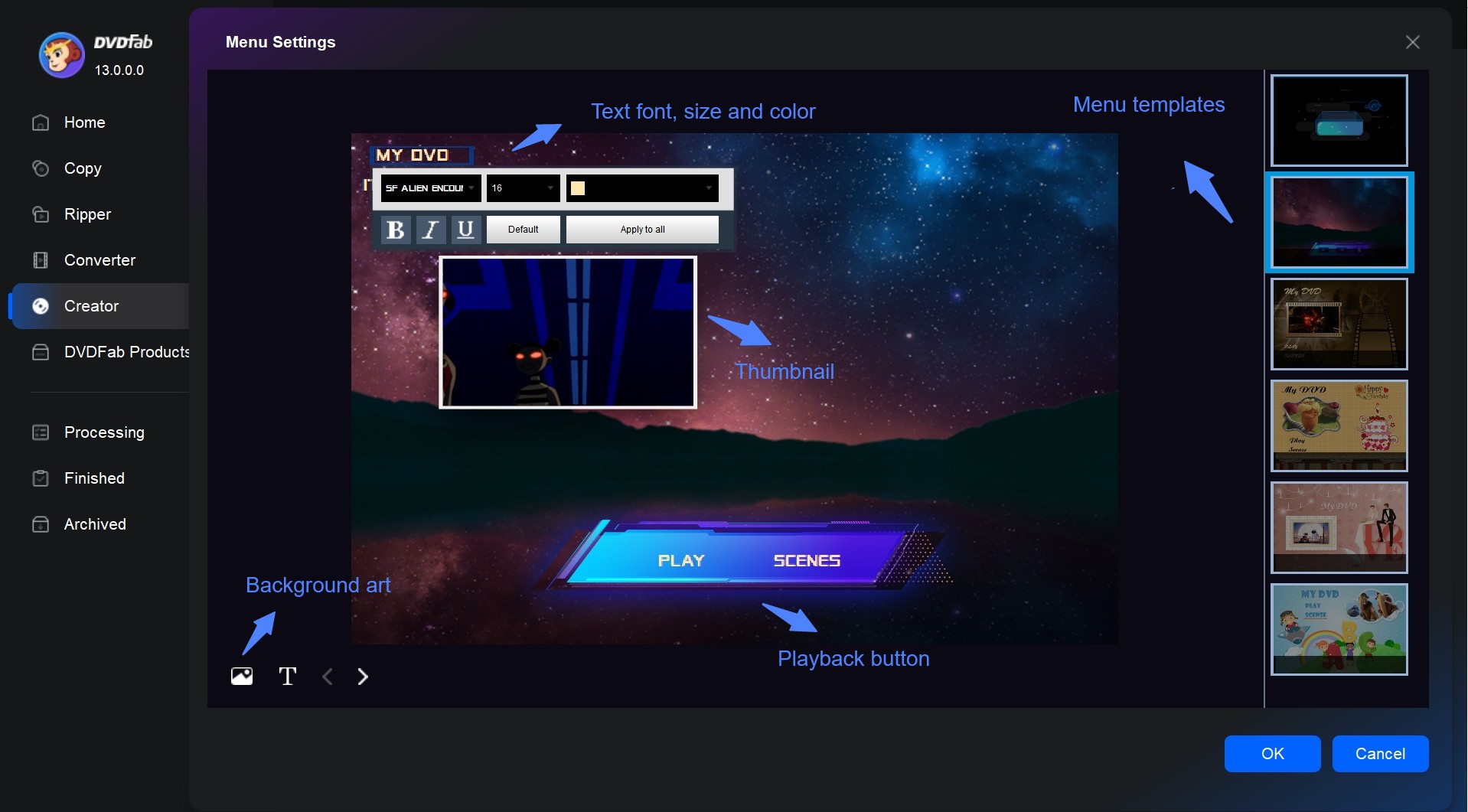
Click Menu Settings to open the menu creation and editing page.
- If you only want to use a preset template, the Menu Settings window offers templates in multiple themes such as tech, retro, kids, birthday party, and wedding. Choose the one that matches your project.
- If you would like to design your own menu, in the Menu Settings window click the image icon to upload a background from your computer. If you are not satisfied with the font, click the text on the menu to change the font, size, color, and style. You can also click the T icon to add text. Click the playback control widgets in the template to move or delete them, resize them, or switch their style.
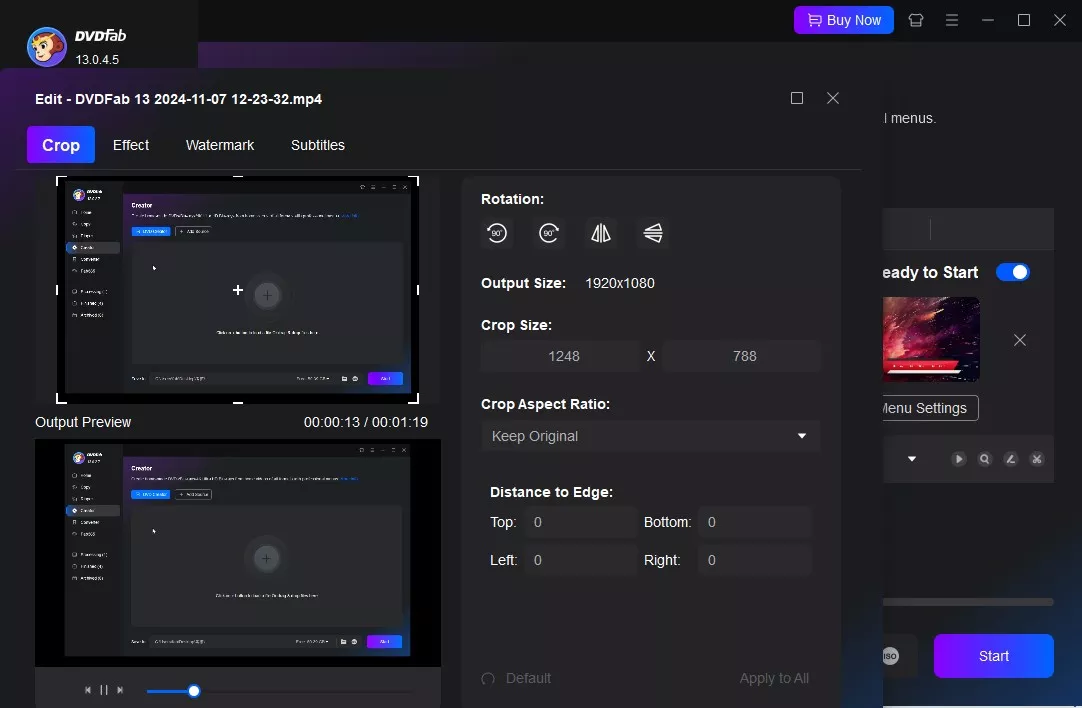
Go back to the main interface. Select audio tracks and subtitles you want to keep. If necessary, in the subtitle drop menu and click Add External Subtitles to import your subtitle file. If you want to edit the video, click Video Edit and Trim to cut unwanted clips, add watermarks, customize chapters, and apply filters. After that, click Preview to check the output.
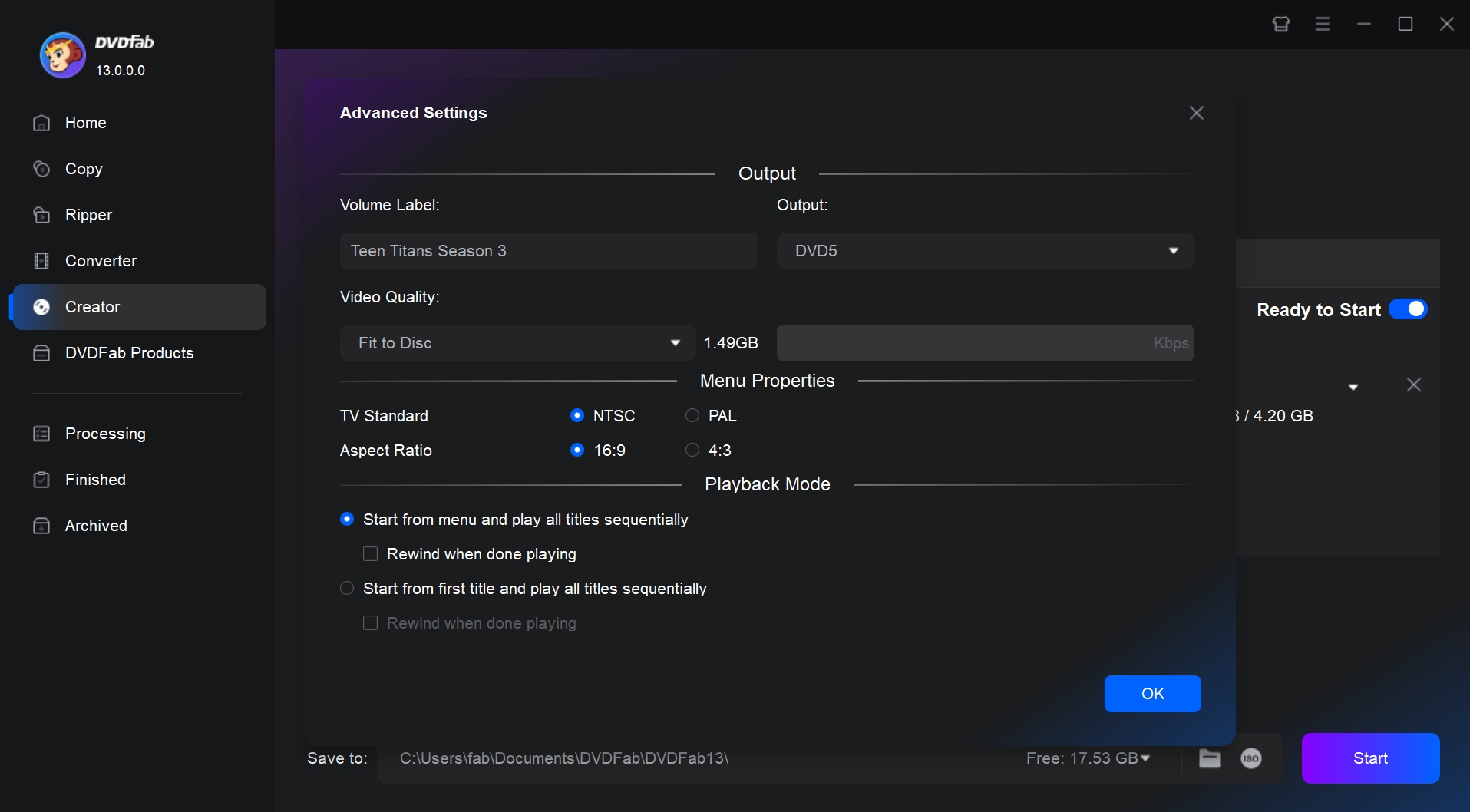
To select your preferred output size and quality, click Advanced Settings, and choose DVD-5 or DVD-9. Customize the menu properties and the playback mode as well.
Step 3: Start Burning a DVD with DVD Menu
Insert a blank DVD disc into the optical drive of your PC, or choose to save the created DVD as an ISO file or DVD folder on your HDD. Then, tap the Start button to begin the DVD menu-making process.
Video Tutorial: How to Make a DVD Menu with DVDFab
Other Top 6 Free DVD Menu Makers
if you're interested in exploring other ways of designing DVD movie menus, there are alternative options available for you to try out.
DVDStyler (Free DVD Menu Creator For Linux, Mac, PC)
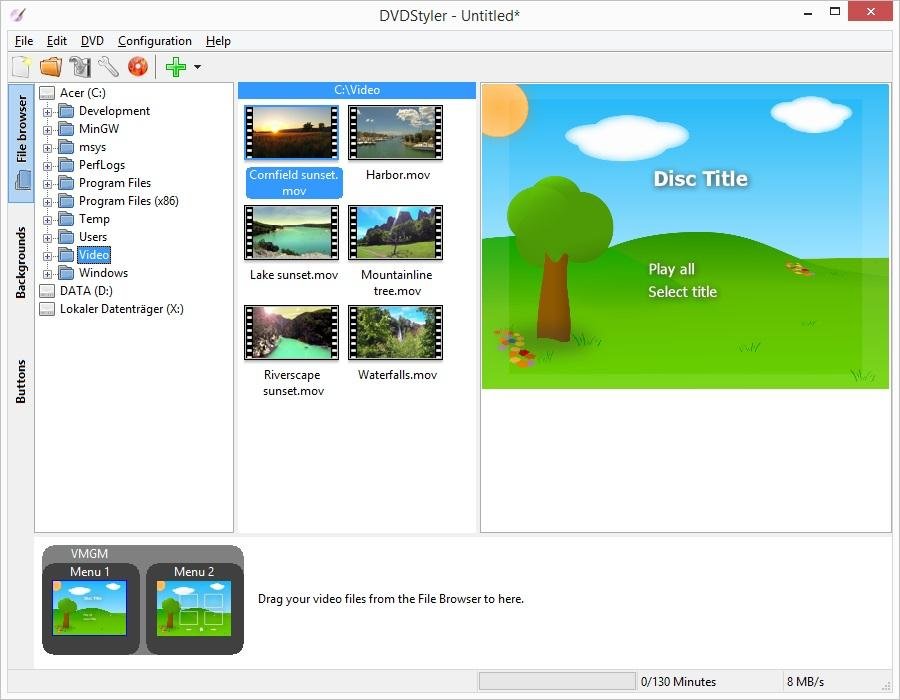
DVDStyler is an open source DVD burner that is designed to burn videos onto DVDs with professional-looking menus with preset lists of templates. Featuring a user-friendly interface and multicore processor, this DVD menu maker allows you to make an individually designed DVD menu: you can import background images and place text, pictures, buttons, and other objects anywhere on the screen, add multiple subtitle and audio tracks, and change button styles. It also supports common input formats such as AVI, MOV, MP4, MPEG, OGG, and WMV.
In our use, we found that DVDStyler also includes DVD scripting to customize menu navigation and can create photo slideshows, which makes it more versatile. Still, It has clear drawbacks: performance can be poor. While testing the latest DVDStyler 3.2.1, dragging video files into the program frequently caused crashes in our case. In addition, the installer has been distributed with ad-supported bundles by some channels (similar reports exist on SourceForge and from malware-analysis sites). Although the number of menu templates is decent, in our view many styles feel dated for software still updated in 2024. Even so, because it is free and offers powerful customization, we believe it still deserves a spot on a best free DVD menu maker list.
💻Available on: Windows, Mac, and Linux
👍Main Features:
- Burn multiple video file formats to standard DVDs.
- Select a preset menu template or design your own DVD menu.
- Allow to add multiple subtitles and audio tracks.
- Make photo slideshow.
👎Cons:
- The DVD burning process is indirect, requiring the creation of an ISO first.
- The software version and menu templates are outdated.
- It many fail to burn videos due to unavailable codecs or occasional error.
- Slow DVD processing and burning speed.
⭐Ratings:
- Menu Templates: ⭐⭐⭐⭐
- Menu Customization:⭐⭐⭐⭐⭐
- Format Compatibility: ⭐⭐⭐
- Speed: ⭐⭐⭐
iSkysoft DVD Creator (DVD Menu Maker For Windows & Mac)
iSkysoft DVD Creator enables you to burn videos to DVDs, folders, or ISO files, as well as create DVDs from photos. This good DVD menu maker can personalize your DVD by creating chapters or menus tailored to your needs. It also comes equipped with pre-installed DVD menu themes and an integrated downloader for additional templates. We included it on this list mainly for its format compatibility: in addition to supporting multiple media formats such as MP4, MKV, AVI, and MTS, it can also output to CD and BD.
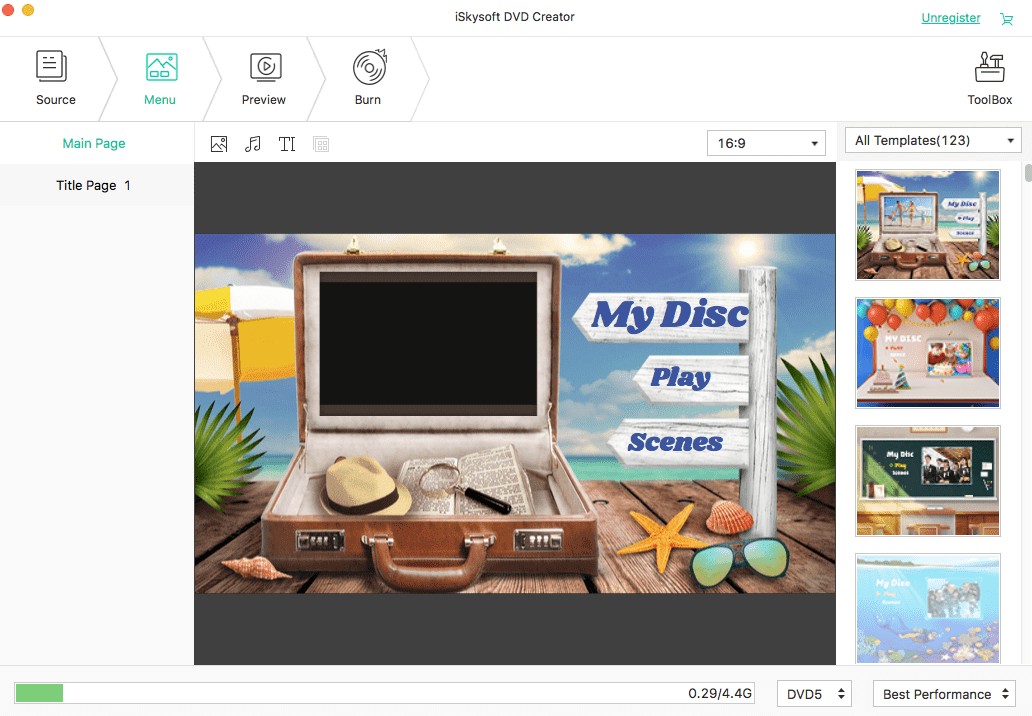
Now, here're the drawbacks. During the trial period, this DVD menu maker offers only 3 menu templates and adds a watermark to exports, so you need a paid upgrade to experience the full menu features. In our test burning a 3.6 GB MKV video, the program froze. After gathering feedback from multiple users, we suspect that iSkysoft DVD Creator is prone to crashing when burning large files over 400 MB.

💻Available on: Windows 10/8/7/Vista/XP and Mac OS X 10.10 or later
👍Main Features:
- Burn 150+ video formats to multiple types of DVD disc, ISO, or Folder.
- Come with customizable DVD menu templates in different theme.
- Provide built-in video editor to trim or crop DVD videos before burning.
- Make slideshows from photos and burn them to DVD.
👎Cons:
- Menu templates, video editor, and photo slideshows are paid ones.
- The output DVD is watermarked in free version.
- It may fail or crash when burning large files over 400MB.
- Relatively slow DVD burning speed.
⭐Ratings:
- Menu Templates: ⭐⭐⭐⭐
- Menu Customization:⭐⭐⭐⭐
- Format Compatibility: ⭐⭐⭐⭐⭐
- Speed: ⭐⭐⭐⭐
Roxio Toast 20 (DVD Menu Maker For MacOS)
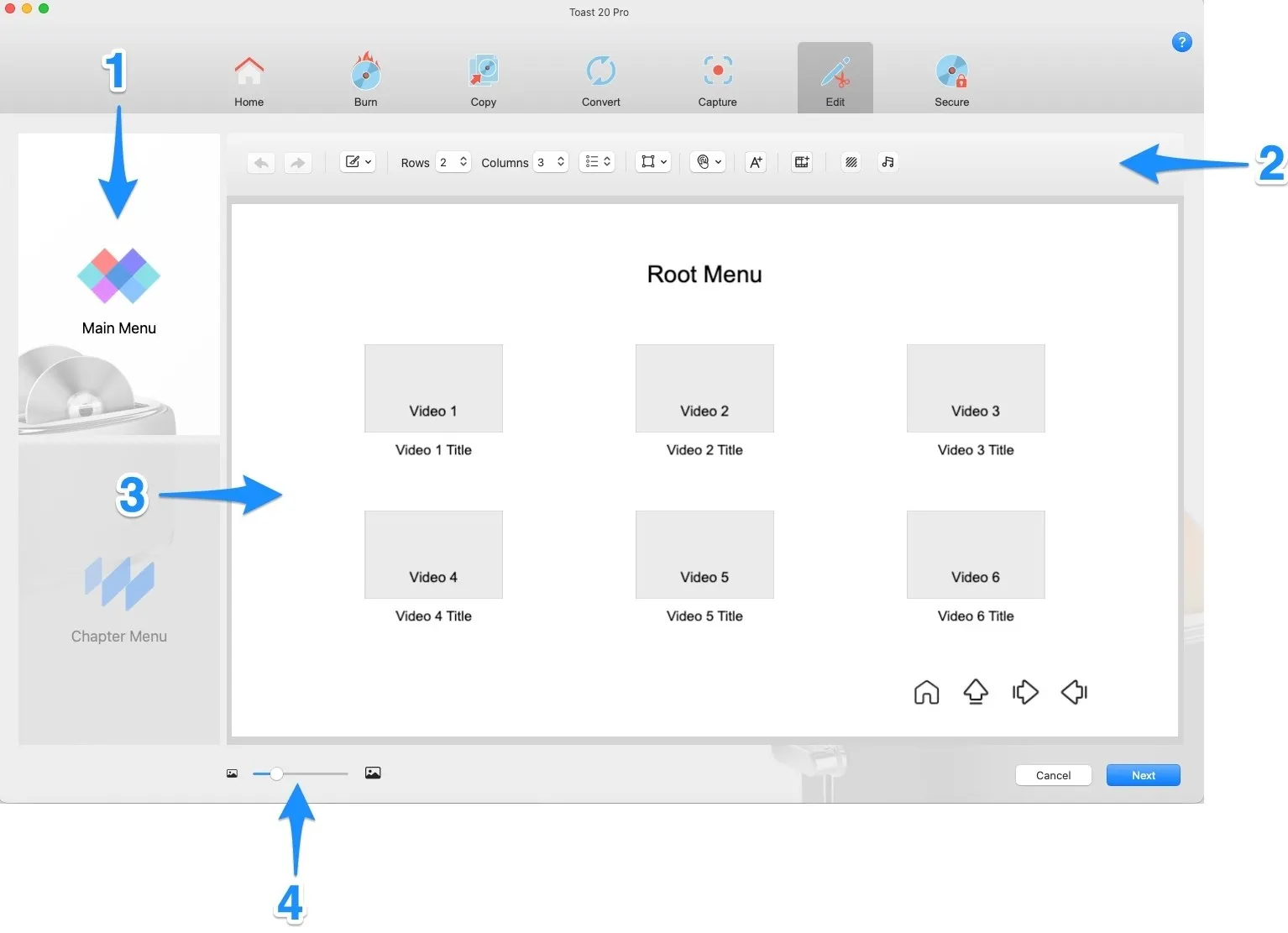
Roxio Toast 20 is the best DVD menu maker for Mac users. Everything you need to make DVD menus is in the Toast 20 Family. You can choose from a lot of different templates, add text, images, and background music to your menu, and then preview it before burning it to a disc. This DVD authoring software has advanced features like motion menus, interactive buttons, and the ability to make playlists.
Overall, Roxio Toast 20 is an easy-to-use DVD burner for Mac. However, it has two notable problems.
First, video quality: using the same source across seven DVD menu creation programs, Toast's output significantly degraded the image quality.
Second, burning speed: it's about the same as many free tools, yet this paid option isn't cheap. We also couldn't find any official public trial from the vendor. Given these points, you should think carefully before purchasing the full version.
💻Available on: macOS 10.14 (64-bit), 10.15, 11.0, Monterey 12.0, Ventura 13.3, and Sonoma
👍Main Features:
- Comes with a variety of templates, themes, and editing tools.
- Works with a lot of different disc formats, like Blu-ray, HD DVD, and AVCHD.
- Make exact copies of your DVDs or extract files from them.
👎Cons:
- Costs more than other software for making DVD menus.
- Redundant for users who only need to create DVD menus.
- Delayed technical support.
⭐Ratings:
- Menu Templates: ⭐⭐⭐⭐
- Menu Customization:⭐⭐⭐⭐⭐
- Format Compatibility: ⭐⭐⭐⭐⭐
- Speed: ⭐⭐
iDVD (DVD Menu Maker For macOS)
iDVD is a DVD menu maker for Mac that allows users to create home-made DVDs complete with menus, chapters, and special features. It was developed by Apple Inc. and was included as part of the iLife software suite. There are several themes and templates available for this DVD burner for Mac. With iDVD, you can easily import video files, photos, and audio from their Mac computer and arrange them into a polished DVD. It doesn't support selectable subtitle tracks, so the workaround is to burn the subtitles into the video before importing, or use a more advanced authoring software such as DVDFab DVD Creator.
Just a heads-up: this DVD menu maker is better suited to older Mac systems. The last version was iDVD 7.1.2 in iLife 11, and the app has been discontinued. Because the iDVD is 32-bit, it will not run on macOS 10.15 Catalina or later.
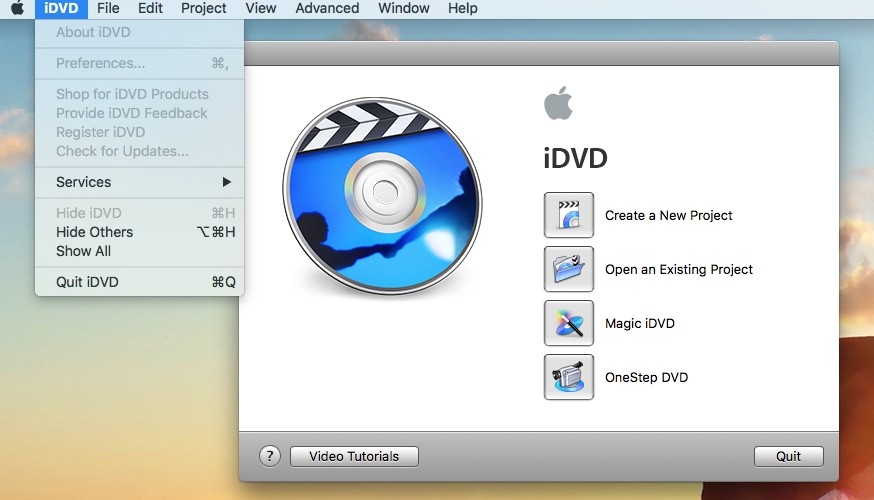
💻Available on: Mac OS X 10.9 (Mavericks) or earlier
👍Main Features:
- Create custom menu screens, add background music and sound effects, and more.
- iDVD integrates seamlessly with other Apple software, such as iMovie and iTunes.
- iDVD is compatible with a wide range of DVD players, and comes with various built-in templates.
👎Cons:
- Less suitable for advanced users or those looking for more advanced features.
- iDVD has not been updated since 2011 and not work on newer versions of macOS.
- It may not be compatible with newer devices that do not have DVD drives.
⭐Ratings:
- Menu Templates: ⭐⭐⭐
- Menu Customization:⭐⭐
- Format Compatibility: ⭐⭐⭐
- Speed: ⭐⭐⭐
Avi2DVD (Free DVD Menu Creator For Windows)
Avi2DVD is a free DVD menu maker available on Windows, enabling users to make DVDs from various formats of videos, such as converting MP4 to DVD. Its modular layout is popular with many users. In addition, it can accept files with multiple audio streams and up to three external subtitles. In Avi2DVD, the DVD authoring workflow is divided into five steps that appear as five separate tabs, each responsible for a specific task. The option to create a DVD menu is in the final step, where you can freely adjust images, text, and the audio/subtitle/chapter buttons to add a menu.
I have to be upfront here, if you want a DVD menu with stylish templates, you should consider other options. This DVD menu creator can be very time-consuming; from installation to burning, the overall process is noticeably slow (around 3 hours), and there is considerable room for improvement in conversion time and resource usage. That said, the output quality is good.
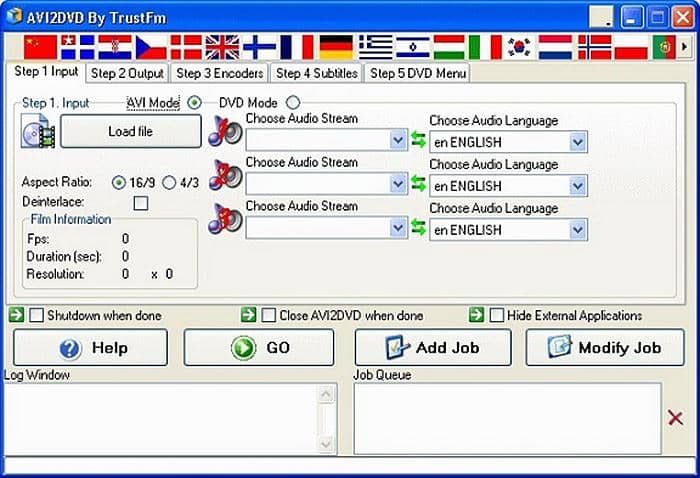
💻Available on: Windows XP, Vista, 7, 8.
👍Main Features:
- Supports High Definition (HD) films in avi, mkv and mp4 formats.
- Allows for easy main menu customization, such as image, chapter, audio and subtitles.
👎Cons:
- Difficulty in burning DVDs that keep audio and video in sync.
- Too complex for basic users with limited knowledge about video encoding.
- Installs a bundle of products without clear instructions or guidance, lacking help files or user assistance.
⭐Ratings:
- Menu Customization: ⭐⭐
- Format Compatibility: ⭐⭐⭐
- Speed:⭐⭐
DVD Flick (Free DVD Menu Creator For Windows)
DVD Flick is DVD authoring freeware that can make DVD menus. It excels for its input compatibility, supporting 53 types of file formats, 72 video codecs, and 42 audio codecs. It provides basic menu templates that you can edit with background images, text, and buttons. You can also add subtitles and multiple audio tracks to a DVD project, which is useful when your video includes different language options, and you can organize video files into titles and chapters.
We like that, as a free DVD menu creator, it comes without adware, spyware, or other limitations. However, you'll need to compromise on time and performance. In our experience, DVD Flick's encoding and burning process can be slow and may even crash, especially with larger projects. The software stopped receiving updates in 2009, and the latest release is 1.3.0.7. The official information lists support up to Windows 7, though we tested it on Windows 10 and it worked.
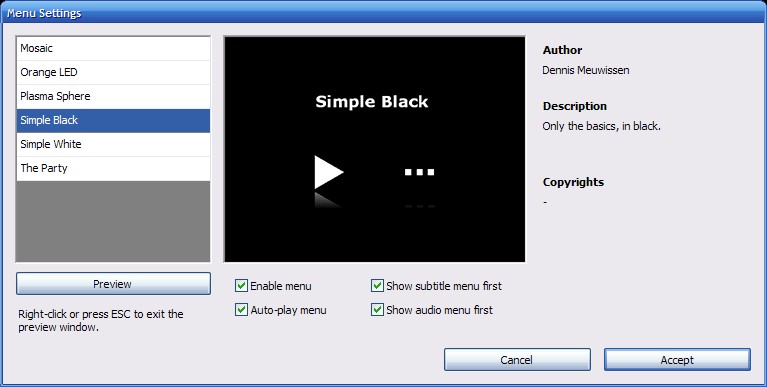
💻Available on: Windows 2000 Professional, or any edition of Windows XP, Windows Vista or Windows 7.
👍Main Features:
- Includes simple menu templates with options for personalization.
- Allows you to organize videos into titles and chapters.
- Supports a wide range of video codecs.
👎Cons:
- Very slow burning speed.
- Long out of date; may be incompatible with newer codecs and unstable on recent Windows versions.
- Sometimes ejects the disc with an error during burning.
⭐Ratings:
- Menu Templates: ⭐⭐⭐⭐
- Menu Customization:⭐⭐⭐
- Format Compatibility: ⭐⭐⭐⭐⭐
- Speed: ⭐⭐⭐
Comparison: Which Custom DVD Menu Maker is Right for You
We've summarized the extensive features in the chart below. You can compare the best DVD menu creators based on menu interactivity, customization depth, and rendering speed to find the one that fits your workflow.
| Software | Platform | Menu Capabilities | Video Editing | Burning Speed | Ideal For |
| DVDFab DVD Creator | Windows & Mac | Dynamic & Custom | Yes | Fastest (GPU Accelerated) | Users needing advanced menu customization, and GPU-accelerated batch burning. |
| DVDStyler | Windows, Mac & Linux | Static | No | Moderate | Beginners who want basic menu design and slideshow features. |
| iSkysoft DVD Creator | Windows & Mac | Static | Yes | Moderate | Users seeking built-in video editing, but don't mind upgrading for full features. |
| Roxio Toast 20 | Mac | Static & Dynamic | Limited | Moderate | Mac users wanting advanced DVD menus with playlist creation. |
| iDVD | Mac (old versions) |
Static (Dated) | No | Slow | Mac users with older systems needing simple menu creation. |
| Avi2DVD | Windows | Static (Basic) | No | Slow | Users looking for basic DVD creation but limited menu functions. |
| DVD Flick | Windows | Text/Simple | No | Slow | Users needing a free disc burning tool with multi-disc support. |
Final Recommendation
- If you want a DVD menu designer with a lot of features that works quickly and professionally on both Mac and Windows, DVDFab DVD Creator is the best choice.
- For Linux users or those seeking simple, free, and easy-to-use options, DVDStyler is a great choice.
- If you are a Mac user with more advanced menu customization demands and require versatile capabilities, try Roxio Toast 20.
FAQs
Does Windows 10/11 have a built-in DVD menu creator?
No, Windows 10 and 11 no longer include the legacy Windows DVD Maker. While you can use File Explorer to burn files to a disc, this creates a Data Disc, which plays on computers but rarely on standard DVD players. To create a video DVD with a navigable menu that works on TV, you need a dedicated DVD menu creator like DVDFab DVD Creator to author the correct VIDEO_TS structure.
Does Mac have a built-in DVD menu maker?
Not anymore. Apple discontinued iDVD years ago. The current built-in tool, Finder, simply burns raw video files to a disc (like a USB drive). If you want a custom DVD menu with "Play" buttons and chapter selection for a professional look, you must use third-party software compatible with modern macOS.
What is the free DVD menu creator for Linux?
DVDStyler is widely considered the best open-source option for Linux. It allows for cross-platform design and supports basic scripting. Other alternatives include QDVDAuthor and Bombono DVD, though beginners may find DVDStyler's interface more intuitive for dragging and dropping buttons.
Can you make a DVD menu with Adobe?
Technically yes, but it is no longer practical. Adobe's authoring tool, Adobe Encore, was discontinued after CS6 and is not included in Creative Cloud.
This left many video creators in a dilemma: professional authoring software is overly complex, while most free tools are simplistic and outdated. DVDFab DVD Creator was designed specifically to fill this gap. It offers the deep menu customization that Encore users miss, but with a modern, user-friendly interface that doesn't require a steep learning curve.
Conclusion
Creating a well-designed, intuitive DVD menu not only simplifies playback control but also considerably enhances the whole viewing experience. With a review of the top 7 DVD menu makers, we recognize the strengths and features each software offers and how to make DVD menu with the best tool. Pick the one that suits you best, and try burning a DVD with a menu for free to make your disc authoring more professional.

 How to Transfer and Burn iPhone Videos to DVD on Windows & MacBy Diana Smith - Jun 11, 2026
 How to Convert AVI to DVD on Windows and Mac in 2026: 6 Best ToolsBy Diana Smith - Jun 10, 2026
 How to Burn a DVD on Mac: 5 Methods That Work on macOS SequoiaBy Diana Smith - Jun 3, 2026
 How to Convert WMV to DVD Free and Easily: Windows / Mac / OnlineBy Wenny Yan - May 27, 2026