10 Best Free DVD Authoring Software for Mac & Windows in 2026: Tested

Summary: After testing the top candidates for best DVD authoring software, our verdict identifies DVDFab DVD Creator as the superior choice for users seeking professional menu customization and hardware-accelerated rendering on Windows and Mac, while DVDStyler is the open-source option for those strictly needing a free tool. This roundup reviews 10 leading programs based on real-world burning speed, format support, and ease of use to help you avoid outdated software and create polished DVDs efficiently.
While physical media offers a nostalgic touch, finding reliable DVD authoring software is a technical challenge due to compatibility issues with modern OS like Windows 11 and macOS Sequoia. Many legacy tools are now abandonware that fail to handle High-Res formats like MP4, MKV, or HEVC efficiently.
In this updated roundup, we tested 10 top-rated programs, filtering out the obsolete ones, to identify the best solutions for creating professional menus, fast rendering via GPU acceleration, and burning playable discs without quality loss. Whether you need a free open-source tool or a pro-level creator, here is the definitive list for your workflow.
Top Picks: Free DVD Authoring Software at A Glance
If you don't want to read every review in detail, here's a quick look at where each tool shines. You can skim this table to find the one that best fits your workflow, then jump to the full review for more detail.
| Use case | DVD Authoring Software |
| Best overall DVD authoring experience (with pro options) | DVDFab DVD Creator |
| Best free open source DVD authoring for casual users | DVDStyler |
| Best free cross-platform authoring for Linux users | DeVeDe |
| Free legacy DVD authoring tool for older Windows PCs | DVD Flick |
| Simple menu-driven DVD authoring | Bombono DVD |
| Basic free DVD authoring and burning combo on Windows | DVD Author Plus |
| Fully free Windows authoring tool for beginners | WinX DVD Author |
| Free DVD authoring toolkit for power users on Windows | AVStoDVD |
| Best free DVD authoring app for macOS | Burn |
| Best open-source GUI across Windows, macOS, and Linux (legacy) | Open DVD Producer |
In-Depth Review: 10 Best Free DVD Authoring Software
#1 DVDFab DVD Creator
- Create DVDs from 200+ formats, including MP4, MKV, WMV, MOV, and more.
- Output DVD-5/9, DVD±R/RW, DVD±R DL, plus DVD folders and ISO files.
- Includes customizable DVD menu templates and a built-in video editor.
- Up to 50× faster authoring with the latest hardware acceleration.
- Auto-synchronize all of the video metadata like title, cast, and cover art.
- Preview video at any time during the DVD authoring process.
DVDFab DVD Creator is a professional DVD authoring software available for Windows and MacOS. It can handle a wide range of common video formats and output to DVD-Video discs, ISO images, or DVD folders without issues. It can also combine multiple video files into a single disc, which is useful when you want to group clips or episodes together.
The program offers a solid set of DVD authoring options: you can build custom DVD menus from free templates and adjust the background, subtitles, audio tracks, aspect ratio, playback mode, and more. The interface is straightforward enough for beginners, but still gives more experienced users enough control over how the final disc looks and behaves.
- We installed the latest DVDFab 13.0.5.6 on a Windows 11 machine. After launching the program, we dragged in a 2h15min travel compilation recorded directly from our camera in MOV format. DVDFab picked up the source file and analyzed it in about three seconds. Since version 13.0.4.8, DVDFab has added a custom chapter feature, which we used in this test, along with the updated video editor to tweak exposure and crop out the black bars. The whole process felt very smooth with no noticeable lag. We then created the newly added menu, customizing the buttons and background, and burned a DVD-9 disc. The burn itself took around eight minutes, putting DVDFab the top of our best DVD authoring software tests. Overall, we'd describe it as easy to use yet surprisingly powerful.
⭐Ratings: 4.5/5 (Trustpilot)
💡Tips:
- DVDFab can author both DVD-5 and DVD-9 discs. For videos up to about two hours, DVD-5 is usually enough; if your project is longer and you care about quality, choose DVD-9 instead.
- DVDFab DVD Creator supports multi-core CPUs and GPU acceleration (NVIDIA, AMD, Intel Quick Sync, VideoToolBox), so make sure it's enabled in the settings for faster, more stable authoring.
- This best DVD authoring tool is actively updated, so always install the latest version to get the newest features.
#2 DVD Styler
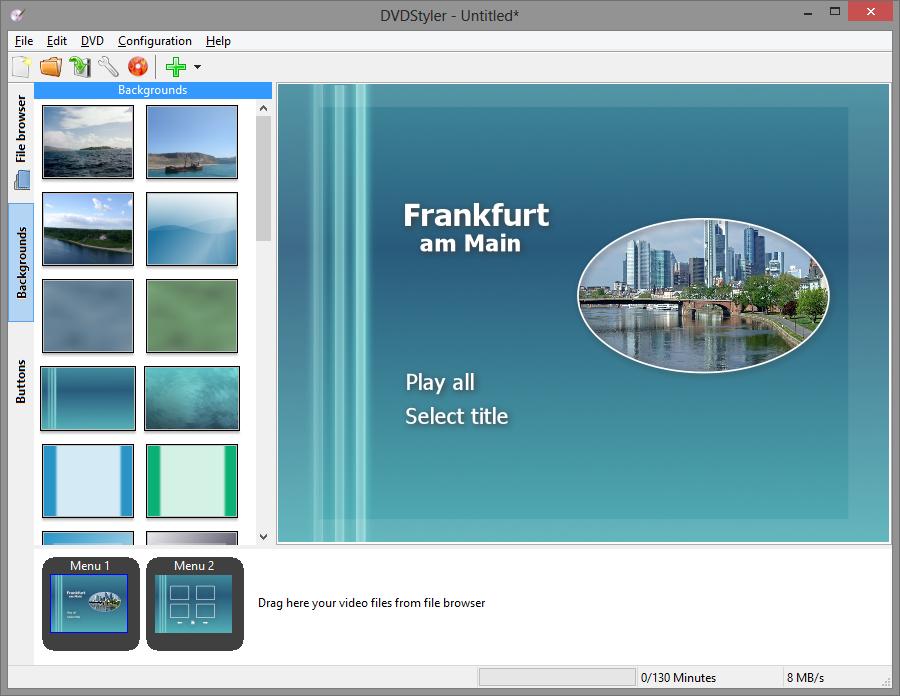
DVD Styler is a free and open source DVD burner for Windows, macOS, and Linux, released under the GNU GPL. It lets you turn a wide range of video formats, including AVI, MOV, MP4, MPEG, OGG, and WMV, into standard video DVDs that play on almost any standalone DVD player. You can drag and drop clips onto the timeline, build projects with multiple titles, and design your own interactive menus using SVG-based templates, custom backgrounds, buttons, and text.
- We installed the latest DVDStyler and loaded a 90-minute MP4 project. This DVD authoring software let us build a custom menu with background, buttons, and chapters, then encoded and burned a DVD-5 in a time comparable to other free tools, with no failed burns. However, its file size handling is less flexible. This free DVD authoring program won't automatically shrink projects to fit a single-layer DVD, so even a 4.1 GB movie may need to be authored as a dual-layer DVD-9 disc.
💻Available on: Windows, Mac, and Linux
⭐Ratings: 4.0/5 (SourceForge)
💡Tips: Only download the installer from the official site, choose Custom installation, and read every screen carefully. Decline any extra offers such as toolbars or search-engine changes (like Incredibar) so you get just DVDStyler itself and avoid unwanted add-ons.
#3 DeVeDe
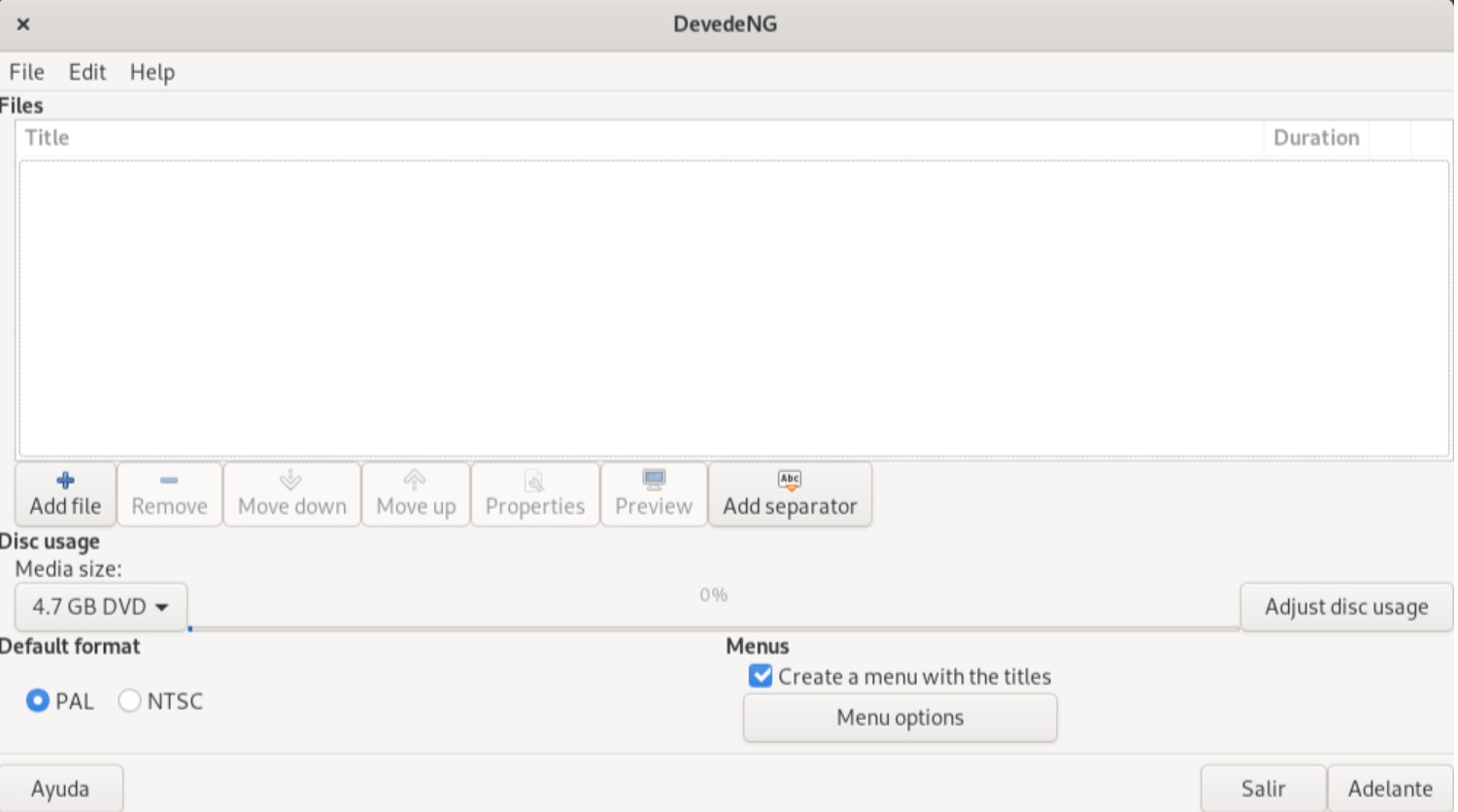
DeVeDe is also a free DVD authoring software that allows users to create video DVDs, Video CDs, China Video Disks, and DivX/MPEG-4 disks. This DVD converter supports various video formats including MPG, AVI, OGV, MOV, and others. It's a standalone program that creates menus, converts video files, and calls genisoimage, growisofs and dvdauthor to build DVDs.
- Using the latest DeVeDeNG 4.21.0 (released Feb 2026), we built a 75-minute Video DVD from a mix of camcorder footage and MP4 clips. The developer has fixed the FFmpeg detection bugs that plagued previous versions. The wizard-style interface is outdated but easy enough to follow, and authoring felt noticeably quicker than other free DVD burning program we've tried. However, there's one annoying quirk: once you pick an option on the start screen, there's no real "back" button. If you change your mind, you have to close the program and start again.
💻Available on: Linux and Windows XP/Vista/2000/2003
⭐Ratings: 4.0/5 (CNET)
💡Tips:
- In Edit → Preferences you can set how many CPU cores DeVeDe should use. Bumping this up on a multicore machine can noticeably shorten encoding time on longer projects.
- Let DeVeDe create an ISO image or VIDEO_TS structure, test it in a software player like VLC, then burn that ISO with Brasero, ImgBurn or another dedicated burning tool. Many users report this route is more reliable than burning directly from DeVeDe.
#4 DVD Flick
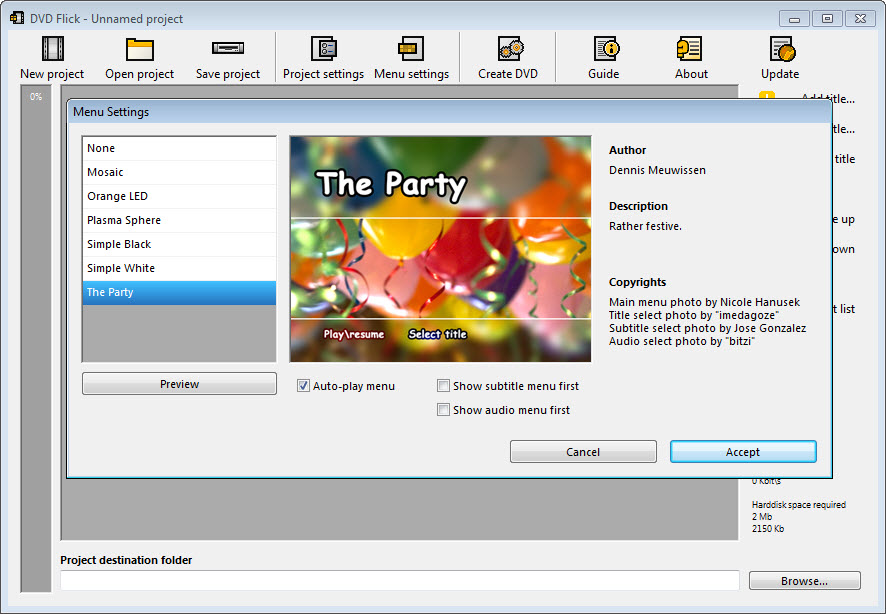
DVD Flick is recognized as one of the best free DVD authoring programs due to its comprehensive feature set. This program lets you convert video files into a format playable on a DVD player, and it supports an impressive range of over 45 file formats, 40 audio codecs, and 60 video codecs. It also enables users to add additional menus and subtitles.
- We tested DVD Flick (legacy version 1.3.0.7) and turned three MOV clips into a simple movie DVD with it. The built-in menu templates look basic but get the job done, and even though DVD Flick hasn't been updated for years, the interface is still fairly approachable for beginners. Burning speed was a little bit slow, but the finished disc played correctly on both our PC and a standalone DVD player. One thing to watch out for: multi-title projects don't get a menu by default, so you need to set this manually in the menu settings.
💻Available on: Windows 2000 Professional, or any edition of Windows XP / Vista / 7
⭐Ratings: 4.2/5 (SourceForge)
💡Tips: DVD Flick's output size estimation isn't always accurate, so a project targeted at a DVD-5 can sometimes end up slightly over the disc's capacity. To avoid wasted discs and having to re-author the project, it's often safer to output to a DVD-9 instead.
#5 Bombono DVD
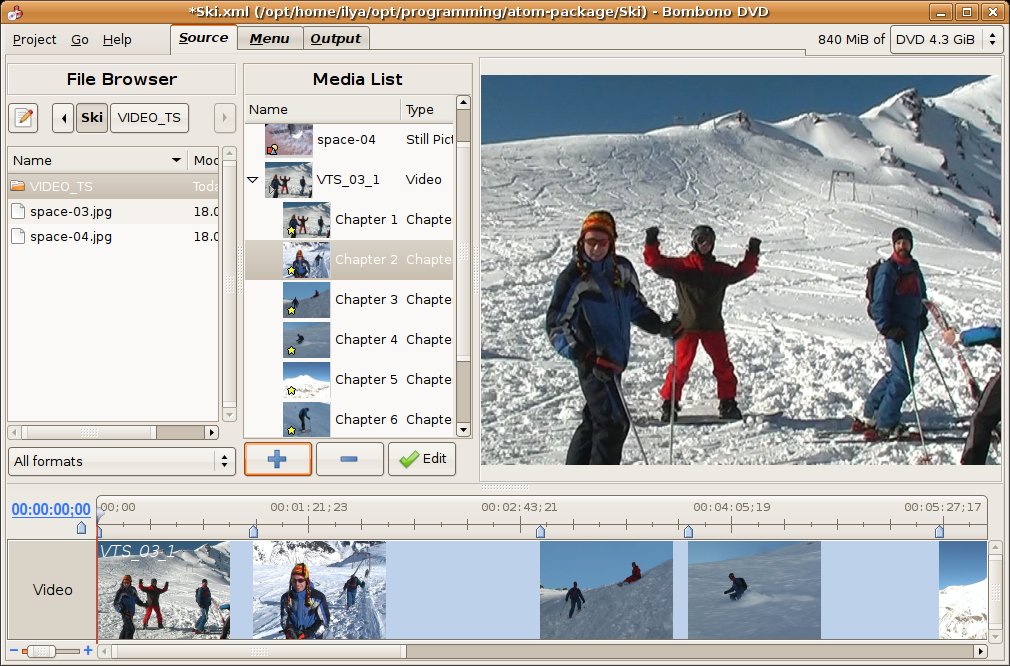
Bombono DVD is a powerful free DVD authoring software compatible with both Windows and Linux systems, though the full feature set on Windows requires payment. This free DVD maker boasts an impressive video viewer complete with a timeline and monitor for seamless navigation. Beyond creating DVDs, it also allows you to generate ISO files or even burn these files onto disks directly. Noteworthy features include motion menus and subtitle support, adding to its robust functionality.
- We used Bombono DVD to convert MP4 to DVD. During the testing, we found that the timeline viewer and visual drag-and-drop menu editor made arranging titles and thumbnails straightforward, and authoring felt stable with no crashes. We especially liked the motion menu feature, which is available even in the free edition. That said, compared with the paid version, the free build doesn't let you copy and paste menus and doesn't support multi-core CPU encoding, so larger projects can take longer to process.
💻Available on: Windows XP/Vista/7/8, Linux
⭐Ratings: 4.0/5 (SourceForge)
💡Tips:
- Some users report that Bombono clears the selected output folder before writing the DVD structure, so the safest approach is to set the destination to an empty, dedicated folder and never point it at your desktop or any directory that contains important files.
- The official site currently doesn't provide a free download, so you'll need to use a reputable software mirror instead, such as SourceForge or VideoHelp.
#6 DVD Author Plus
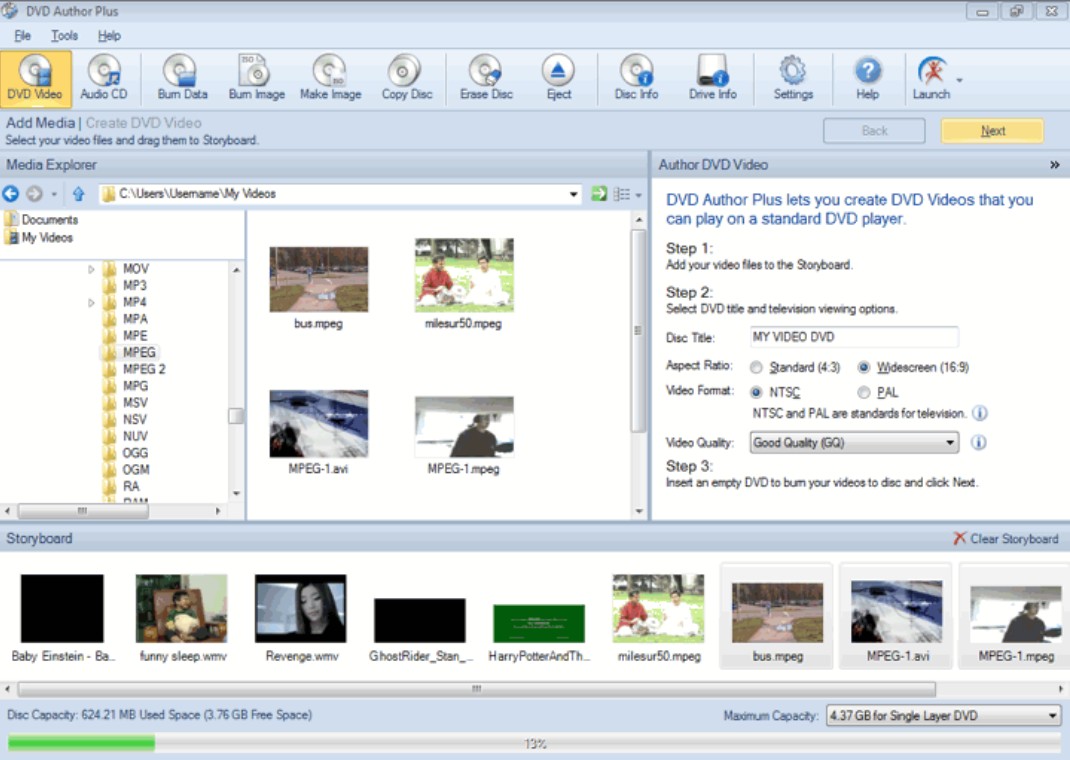
DVD Author Plus is a versatile DVD authoring software with free trial that allows you to back up valuable data, author home videos, or burn music with ease. Compatible with most DVD drives, it burns DVD Video discs that are playable on standard DVD players and Windows PCs. This tool also allows for data CD and DVD writing, and can create instant duplicates of existing discs.
- We tried DVD Author Plus 3.18. The Explorer-style interface is clean, and it produced a disc that played correctly on our standalone player. There are some drawbacks, though: there's no way to create menus or chapters, and dual-layer discs weren't handled properly in our trials. That said, if you just need a simple free DVD authoring software for basic discs, it can still do the job.
💻Available on: Windows 10/8/7/2019/2016/2012
⭐Ratings: 3.8/5 (CNET)
💡Tips: Recent versions of DVD Author Plus are bundled with extra "optional" software, so always download from a reputable source, choose a custom install, and carefully decline any toolbars, search-engine changes, or other add-ons you don't want.
#7 WinX DVD Author
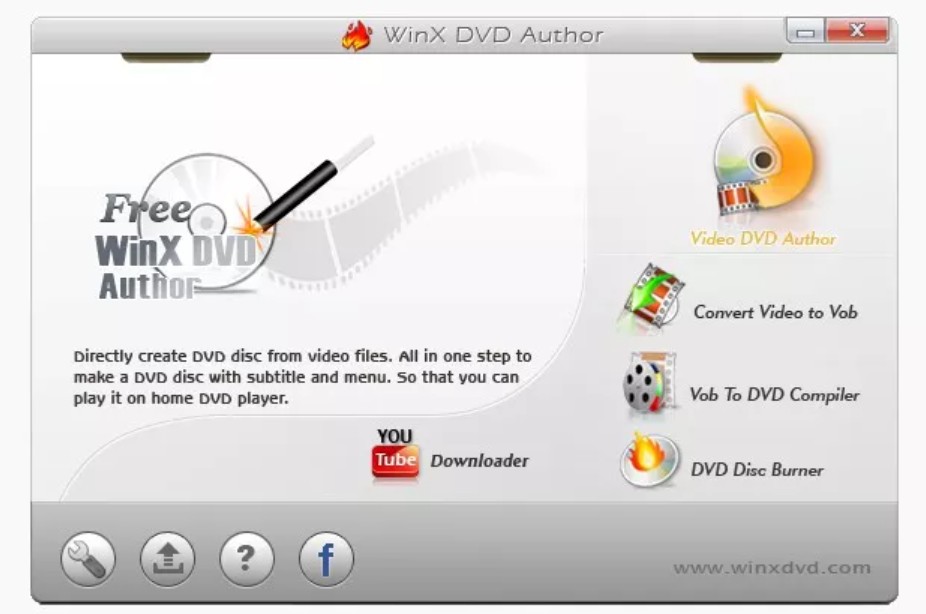
WinX DVD Author is DVD authoring software for Windows users. It can convert common formats such as MKV, AVI, MOV, and VOB into DVD-Video and then burn them to disc. The built-in wizard guides you step by step from importing videos and setting up menus to burning the DVD, which makes it very beginner-friendly. It offers basic menu templates and lets you create custom chapters, so it's well suited to turning home videos, phone clips, or online downloads into real discs you can play on a living-room DVD player.
- We used a 5.8 GB MOV home movie as our test project. DVD burning was extremely slow (around 35 minutes), but the workflow itself is very easy for beginners, and it does support basic menu creation (although the styles are quite limited). We also found that, unlike some other tools such as DVDFab DVD Creator, this DVD authoring software cannot output ISO files – it only supports creating DVD folders or burning directly to disc. Overall, though, it still sits in the upper-middle tier for completely free tools.
💻Available on: Windows 11, 10, 8.1, 8, 7, and others.
⭐Ratings: 3.5/5 (TechRadar)
💡Tips: WinX DVD Author is not as reliable as some professional DVD authoring software, so when you use it to create or burn DVDs, it's a good idea to close other unnecessary programs and let WinX DVD Author run on its own for a more stable burn.
#8 AVStoDVD

AVStoDVD is a free, open-source DVD authoring toolbox for Windows. It's built on components like AviSynth, HCEnc/FFmpeg, and DVDAuthor to transcode various video formats into DVD-compliant video structures. It supports multiple audio tracks, subtitles, and custom menus. Compared with simple one-click tools, this DVD authoring software offers very fine-grained control over encoding, so it's better suited to advanced users or anyone who cares about picture quality and bitrate tuning.
- AVStoDVD has a steeper learning curve and feels more technical than most basic tools. With the default settings, AVStoDVD automatically selects HCEnc as the encoder and enables multithreading. CPU usage is high during encoding, but speed is noticeably better than older free tools like WinX DVD Author – roughly twice as fast in our experience. Using the "Automatic" quality mode, the resulting DVD video looked stable and consistent on a TV.
💻Available on: Windows 10/8/7/Vista/XP
⭐Ratings: 4.3/5 (TechRadar)
💡Tips:
- After installation of AVStoDVD, first check that required components (AviSynth, HCEnc/FFmpeg, ImgBurn, etc.) are properly set up to reduce the chance of encoding or burning failures.
- AVStoDVD itself cannot burn directly to disc. If you install ImgBurn and enable integration in the settings, AVStoDVD can generate an ISO or VIDEO_TS folder and then call ImgBurn automatically to burn the DVD.
#9 Burn
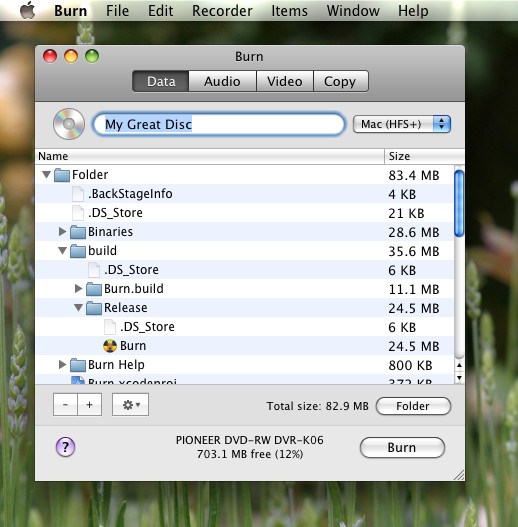
Burn is a long-standing, free DVD aurthoring app for macOS. It's lightweight with a very minimal interface, yet it supports multiple disc types including Data, Audio, and Video. For video DVDs, it can transcode common video formats to DVD-Video and apply simple menu styles, giving Mac users a way to keep making discs that play on set-top DVD players even after iDVD was discontinued. That said, its authoring features are much more basic than those of commercial tools.
- When we imported video files into Burn V3.1.8 on macOS, it prompted us to convert them to a DVD-compatible format. After confirming, it started encoding, generated the DVD structure, and then burned it to disc. The burn process itself was fairly stable. The menu options are very limited – you only get a few simple themes and title text – but for Mac users who just want to turn video into a playable DVD, it's usually enough.
💻Available on: macOS Mojave / High Sierra / Sierra, OS X El Capitan / Yosemite / Mavericks
⭐Ratings: 4/5 (CNET)
💡Tips:
- It's a good idea to have Burn create a video ISO first, test it with a player like VLC, and only then burn it to a physical disc.
- If your source footage is high-bitrate 1080p or 4K, consider re-encoding it with a video tool to a more reasonable bitrate before feeding it to Burn to reduce the risk of failed encodes or stuttering.
#10 Open DVD Producer
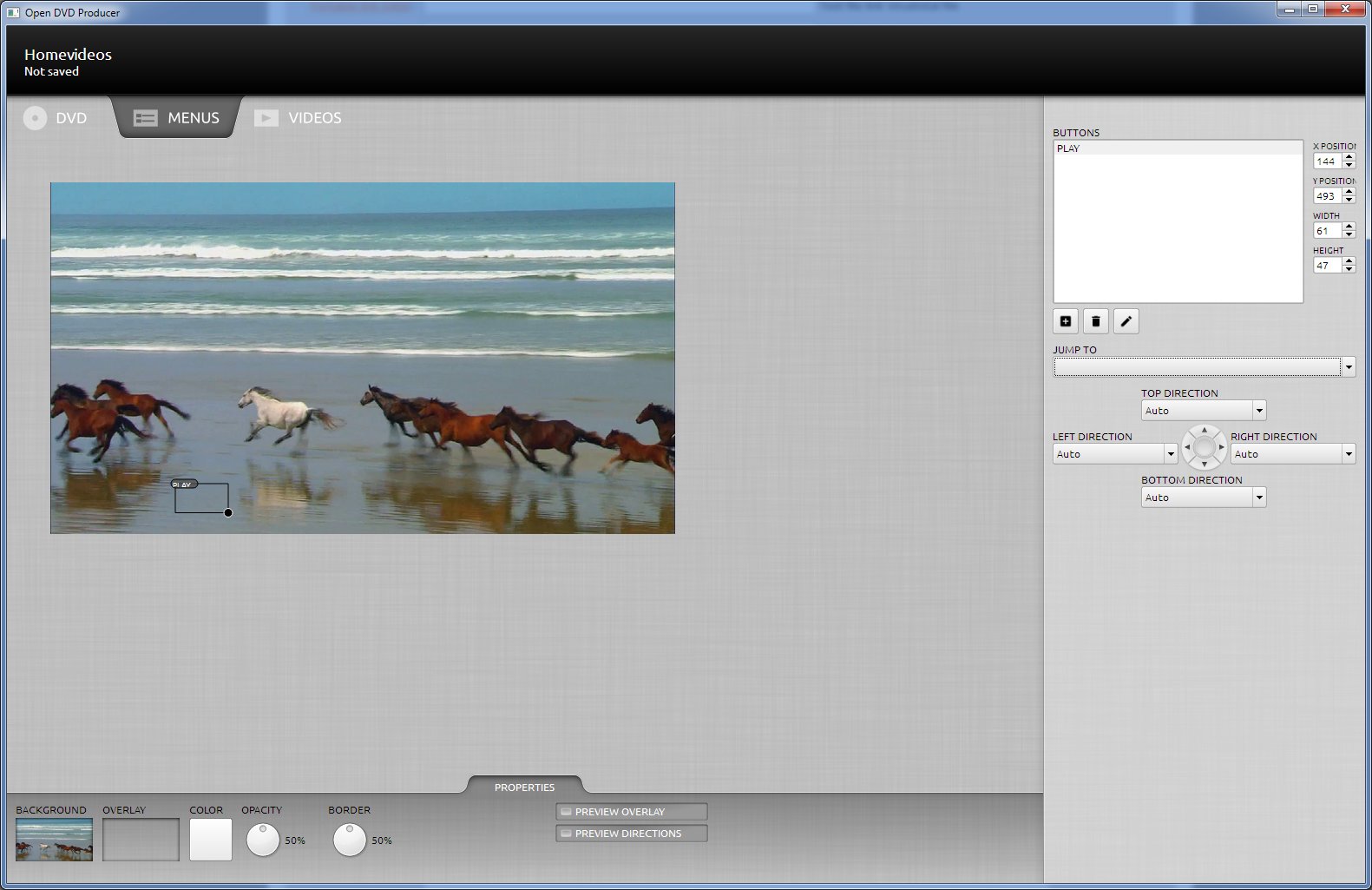
Open DVD Producer is a cross-platform, free, open-source DVD authoring program. It offers a visual menu designer, so you can add buttons, backgrounds, and chapter jumps in a GUI instead of working directly with command-line tools like dvdauthor.
- Because this DVD authoring program supports three platforms, we tested version 16.11 on three different machines. On macOS and Ubuntu it ran relatively smoothly. After dragging in our files, we could place buttons and thumbnails on the canvas, assign each button to the right title, and preview the menu layout. It also supports animated menus, but we noticed stuttering when those menus actually played back. On Windows 10, we ran into UI freezes and crashes during authoring, and had to reopen the project several times.
💻Available on: Windows / macOS / Linux
⭐Ratings: 3.6/5 (Softpedia)
💡Tips: Although this free DVD authoring software does support Windows, it's mainly been developed with macOS and Linux in mind. If you experience frequent crashes on Windows, it's better to switch to a more stable option such as DVDFab DVD Creator or DVDStyler.
Comparison of the Best Free DVD Authoring Program
Choosing a DVD authoring tool isn't just about burning a disc; it's about the editing and customization features available before you burn. For example, some tools allow you to trim video clips or design motion menus, while others are strictly for burning ISO files.
The table below compares the functional specifications of the top 10 program to help you check if they meet your specific requirements.
| Features/ Tools |
OS | Input Formats | Output Options | Menu Creation | Video Editor | Hardware Acceleration | Latest Update |
| DVDFab DVD Creator | Windows, Mac | 200+ video files | Disc, ISO, folder | Yes | Yes | Yes (50x faster) |
2026 (Updated monthly) |
| DVD Styler |
Windows, Mac, Linux
|
Limited video formats | Disc, ISO, Folder | Yes | No | No | November 2021 |
| DeVeDe | Windows, Linux | MPG, AVI, OGV, MOV | Disc, ISO | Yes | No | No | Feb. 2026 |
| DVD Flick | Windows | 45+ video formats | Disc, ISO | Yes | No | No | October 2015 |
| Bombono DVD | Windows, Linux | Popular formats | Disc, ISO | No | No | No | February 2016 |
| DVD Author Plus | Windows | Limited video formats | DVD, CD | No | No | No | March 4, 2019 |
| WinX DVD Author | Windows | Common formats (MP4, AVI, MKV, MOV…) | Disc, folder | Yes | No | No | February 22, 2024 |
| AVStoDVD | Windows | Common formats (MP4, AVI, MKV…) | Disc (with ImgBurn), ISO, folder | Yes | No | No | October 11, 2020 |
| Burn | Mac | Popular formats | Disc, ISO | Yes | No | No | September 30, 2025 |
| Open DVD Producer | Windows, Mac, Linux | Popular formats | Disc, ISO, folder | Yes | No | No | November 16, 2016 |
Free vs. Paid Features
Menu Customization: Most free tools lack menu features, or only offer static background images. If you want menus with background music, looping video thumbnails, and easy navigation, you typically need a premium tool like DVDFab.
Built-in Video Editor: Importing a video often requires last-minute touches, cutting out a TV commercial, cropping black bars, or adding a watermark. Tools with a built-in editor save you from having to use a separate video editing software before authoring.
GPU Acceleration: This is the biggest technical differentiator. Free tools rely on your CPU to transcode video, which can take 30-60 minutes for a movie. Software with GPU Acceleration offloads this task to your graphics card, reducing the time to under 10 minutes while keeping your computer usable for other tasks.
How to Use the Best DVD Authoring Tool: DVDFab DVD Creator
We consider DVDFab DVD Creator to be the best DVD authoring software in this roundup. It not only supports a wide range of both legacy and modern video formats and works smoothly on both Windows and macOS, but also includes menu authoring and built-in video editing. If you want to try this DVD authoring software for free, download it and follow the tutorial below.
Step 1: Launch DVDFab and load the source videos
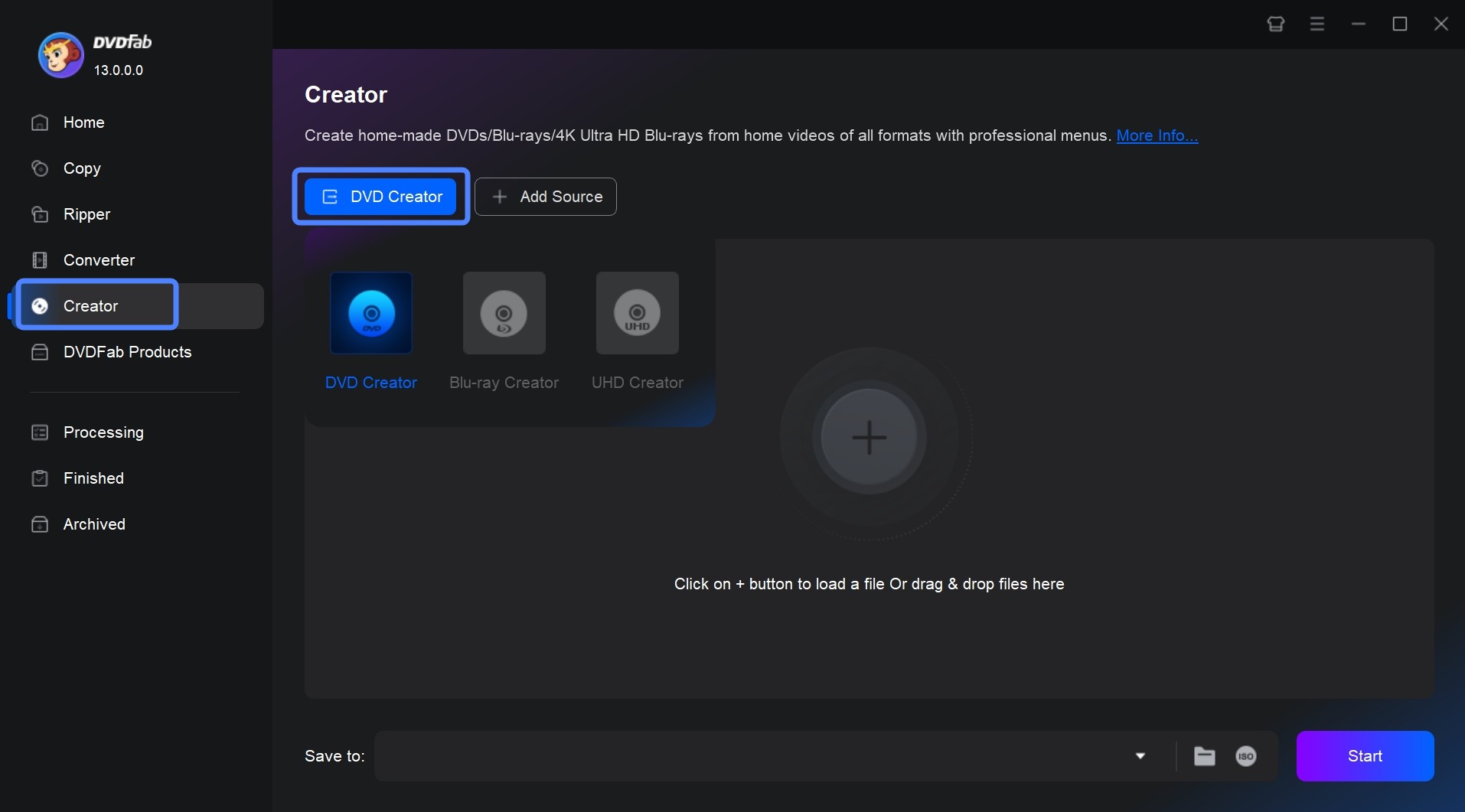
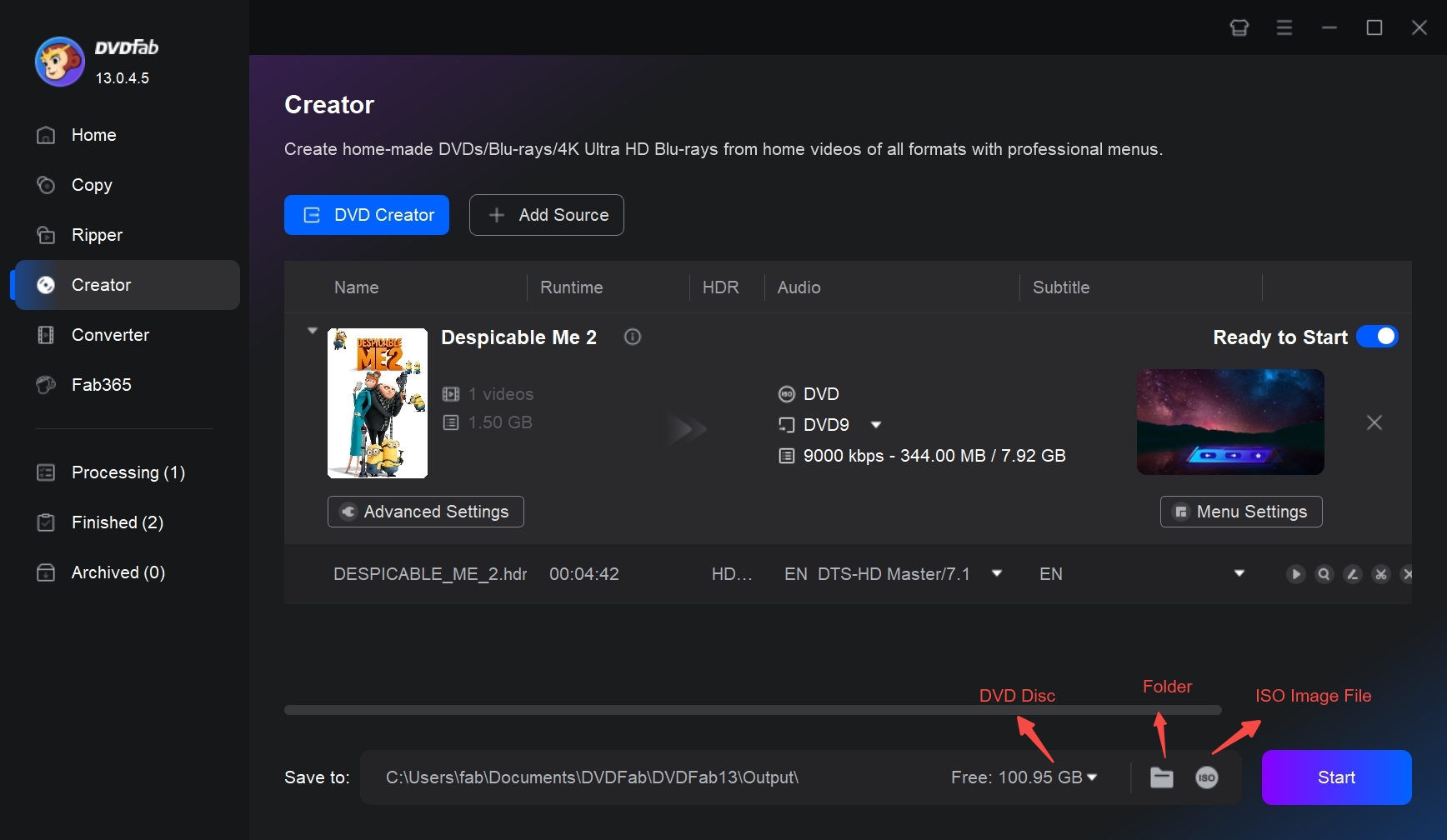
Launch DVDFab, choose the Creator module and load the videos you want to burn to DVDs. Or just drag those videos into the main interface per the on-screen instructions. Go to the mode switcher at the top left corner to choose the DVD Creator mode.
Step 2: Customize your DVD with built-in templates
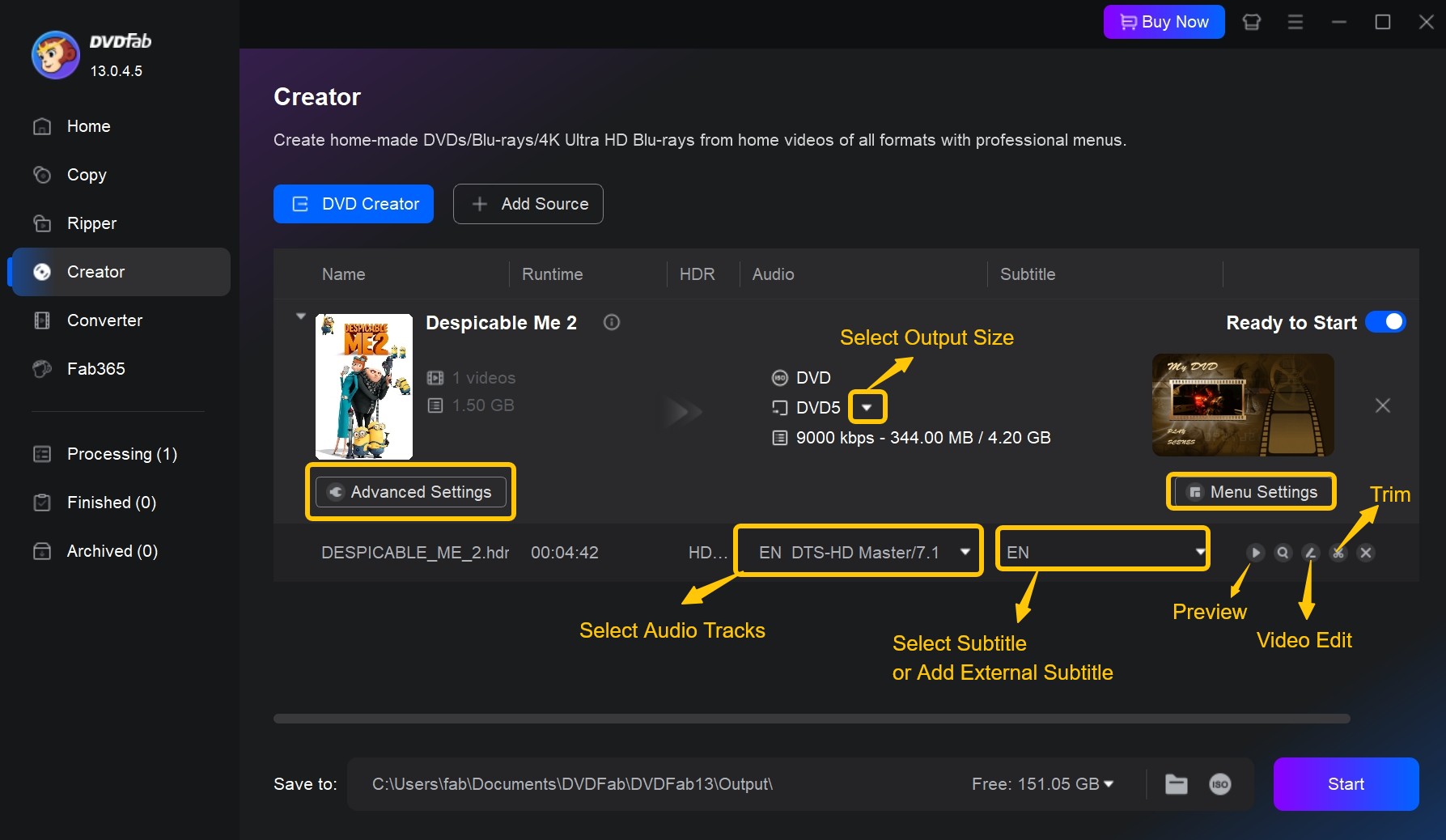
Once your source video is uploaded, all input and output details are displayed on the main interface. This is where you can choose audio tracks and subtitles or import additional subtitles.
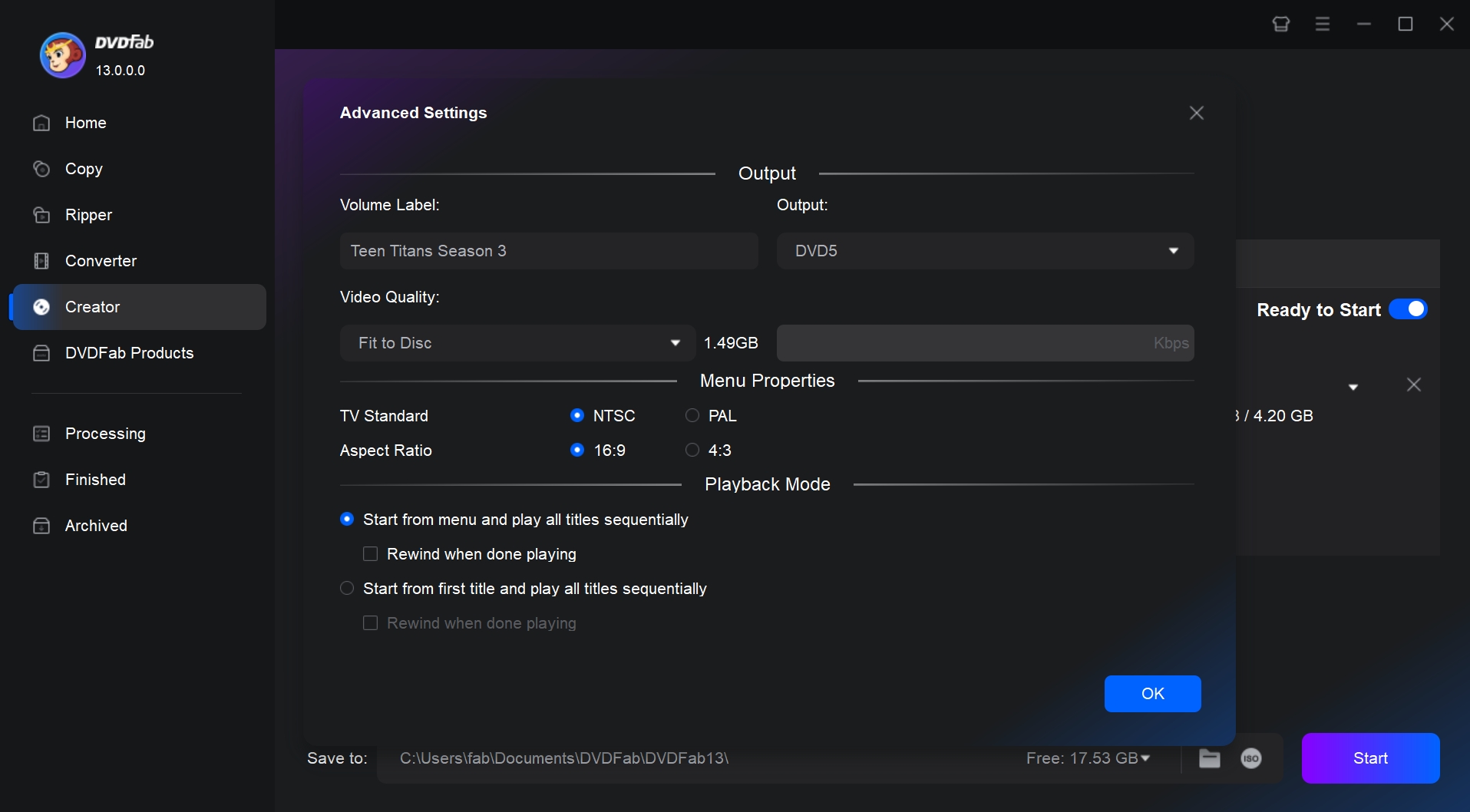
You can click the Advanced Settings button to customize the settings, including the DVD title, the output size between DVD-9 and DVD-5, the quality level, the TV standard between NTSC and PAL, the aspect ratio between 16:9 and 4:3, etc.
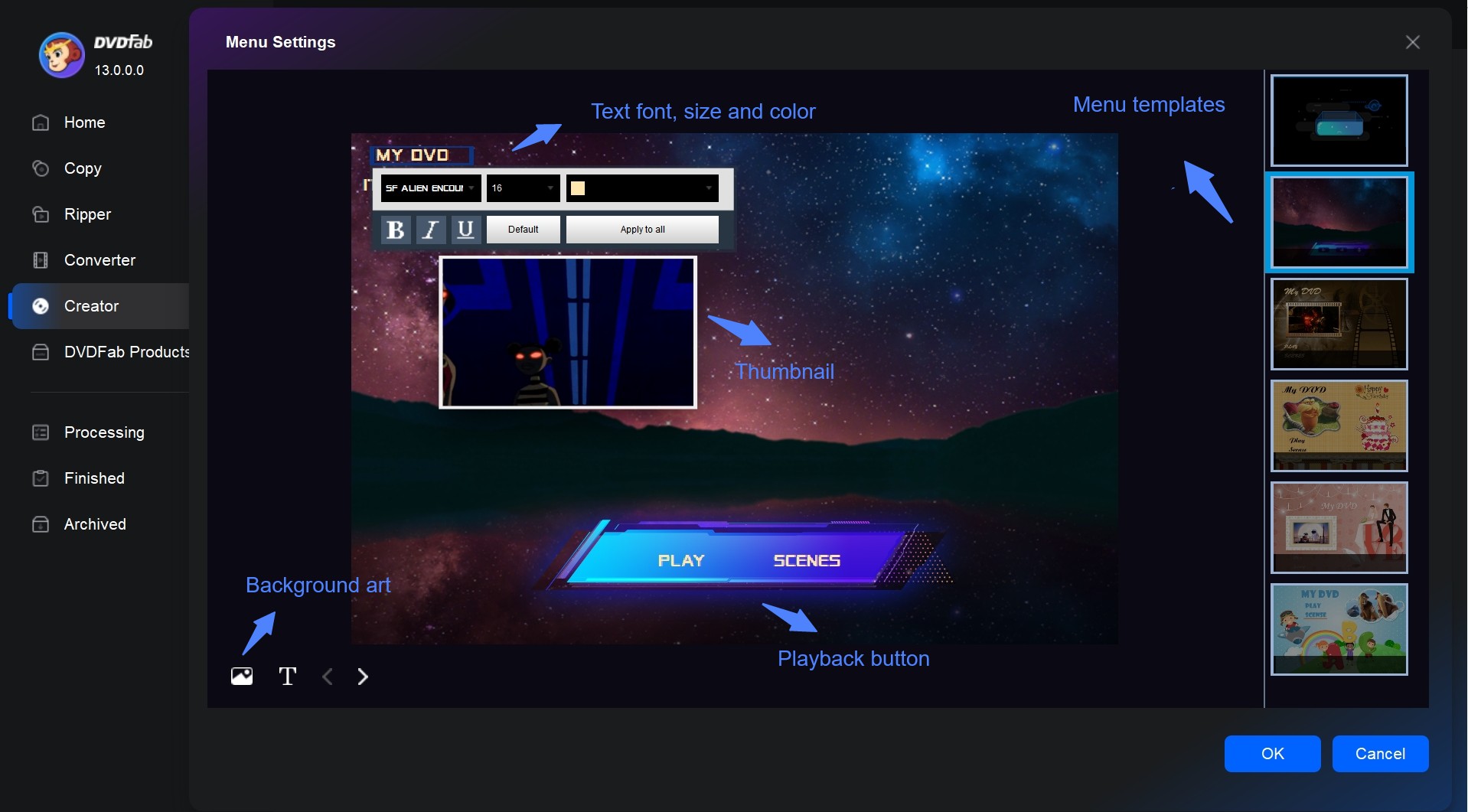
By clicking the Menu Settings button, it opens the window where you can freely create a DVD menu: click on the texts to directly edit the font, size, and color; click on a certain decoration widget to relocate and resize it; or click the Image Edit button to change the background image for the selected menu.
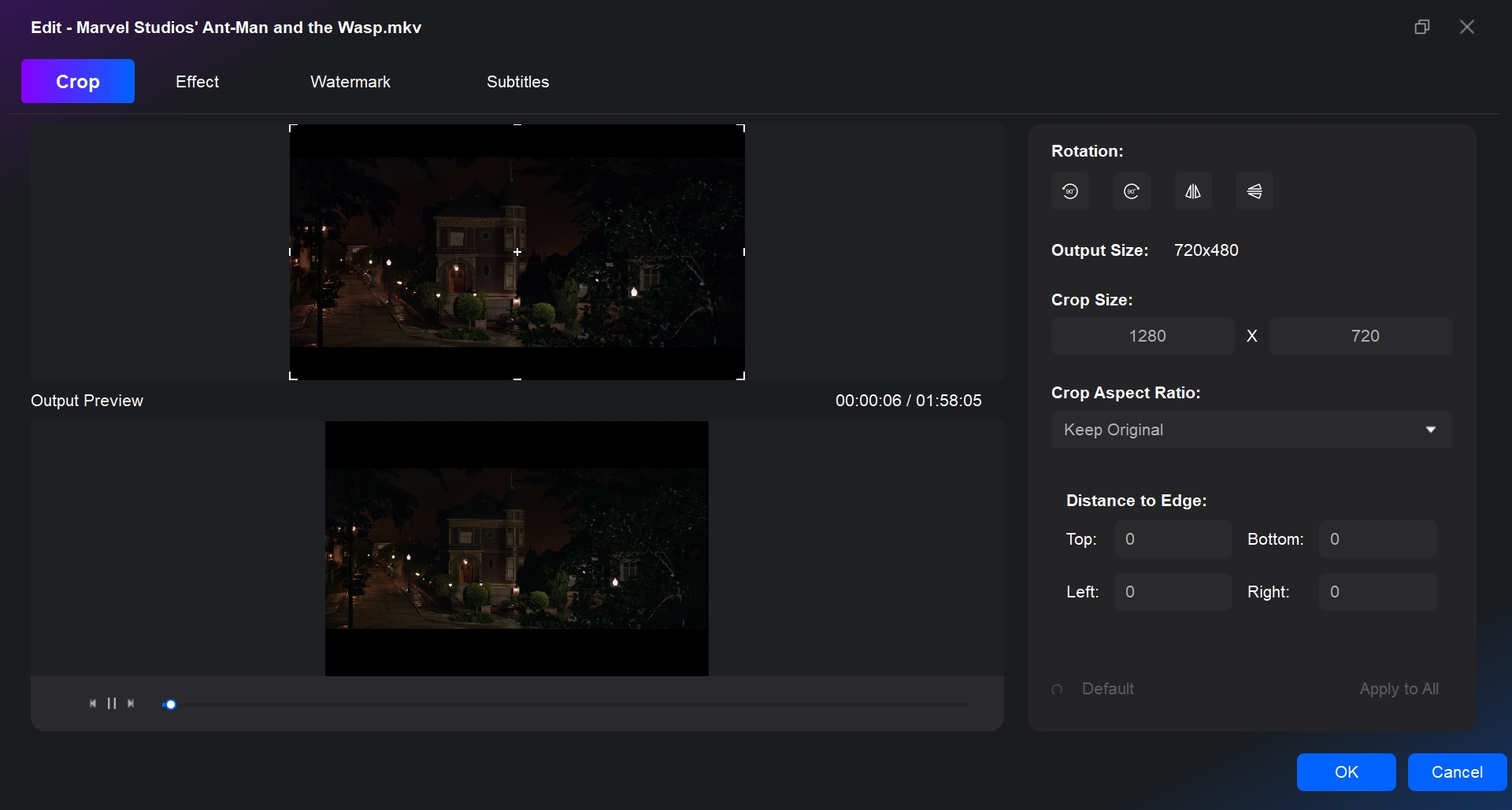
On the main screen, simply click the pencil icon (Video Edit module) and scissors icon (Trim module) on the right to start editing your DVD to your liking. You can adjust the ratio of the image, cut out unwanted segments, add text and image watermarks, and customize color settings.
Step 3: Start to author DVD easily
At the bottom of the main interface, you can select an output destination. To burn the resulting DVD movie to a blank disc, select your optical drive in the drop-down list box; to make a DVD folder on your hard drive, click the Folder icon; to produce an ISO image file, click the Image icon. Finally, click the Start button to start the process of your DVD authoring.
FAQs
What is DVD Authoring Software?
DVD Authoring Software is a program that compiles video, audio, and subtitle files into the specific logic structure required by a standalone DVD player, typically a VIDEO_TS folder containing VOB, IFO, and BUP files.
It performs two critical tasks:
- Transcoding: Converts digital formats into the standardized MPEG-2 format.
- Structuring: Creates interactive menus, chapter points, turning loose files into a playable movie on your TV.
What is the Best Free DVD Authoring Software for Windows?
Best Professional Option: While DVDFab DVD Creator is a paid tool, it offers a 30-day free trial with full features. It is the preferred choice if you need GPU acceleration for faster burning and access to modern, regularly updated menu templates that free tools lack.
Best Open-Source: DVDStyler is the top choice for Windows 10/11 users who need menu customization without watermarks.
Best for Legacy PCs: DVD Flick remains a reliable, lightweight option for older hardware.
Notes: When you choose free tools, always download from the official site and check how recently the software was updated. Some freeware may bundle extra offers or receive updates less frequently, which can affect stability and security.
DVD Authoring vs. DVD Burning: What's the Difference?
While often used interchangeably, these terms refer to two different stages of creating a disc.
The Creation Phase: DVD Authoring is the creative software process of assembling your video, audio, and subtitle files into a specific logical structure (usually VIDEO_TS folders) that a DVD player can understand.
- What it does: Creates menus, chapters, and transcodes video files into the MPEG-2 format required for standard DVDs.
The Writing Phase: DVD Burning is the physical process of using a laser to write digital data (0s and 1s) onto a blank optical disc.
- What it does: Transfers the authored files or ISO image from your computer's hard drive onto a physical DVD±R or DVD±RW disc so it can be inserted into a player.
Pro Tip: Comprehensive tools like DVDFab DVD Creator represent an All-in-One solution. They handle the authoring and then switch to the Burning engine to write the final result to your disc.
What is the Best DVD Authoring Software for Mac?
DVDFab DVD Creator stands out as the superior DVD authoring software for Mac with its comprehensive features and top-quality outputs. Compatible with all popular video formats and various DVD types, it offers versatility and adaptability. It also allows customization of DVD menus, audio tracks, subtitles, playback modes, and more. Despite delivering DVDs swiftly and efficiently, it does not compromise quality.
Conclusion
DVD authoring software remains a vital tool for multimedia enthusiasts and professionals alike. Whether you are preserving home videos or delivering a professional presentation, the best free DVD authoring software covered in this guide, from DVDFab DVD Creator to several free alternatives, can cover most authoring needs when chosen according to your workflow and budget.
Statement: DVD authoring software reviews presented in this article are grounded in fact. DVDFab has tested all products mentioned herein, documenting their performance throughout the testing process. Additionally, we analyze user feedback from major review platforms to extract valuable insights for our readers' reference.

 How to Burn Video_TS to DVD on Windows and Mac: 4 Methods That WorkBy Diana Smith - Jul 1, 2026
 Top 9 Free DVD Burners for Mac in 2026: Tested & ReviewedBy Diana Smith - Jun 23, 2026
![How to Convert MKV to DVD with Stylish Menu? [2026 Updated]](https://r3.dvdfab.cn/upload/resource/mkv-to-dvd-yO3k.jpeg) How to Convert MKV to DVD with Stylish Menu? [2026 Updated]By Wenny Yan - Jun 17, 2026
How to Convert MKV to DVD with Stylish Menu? [2026 Updated]By Wenny Yan - Jun 17, 2026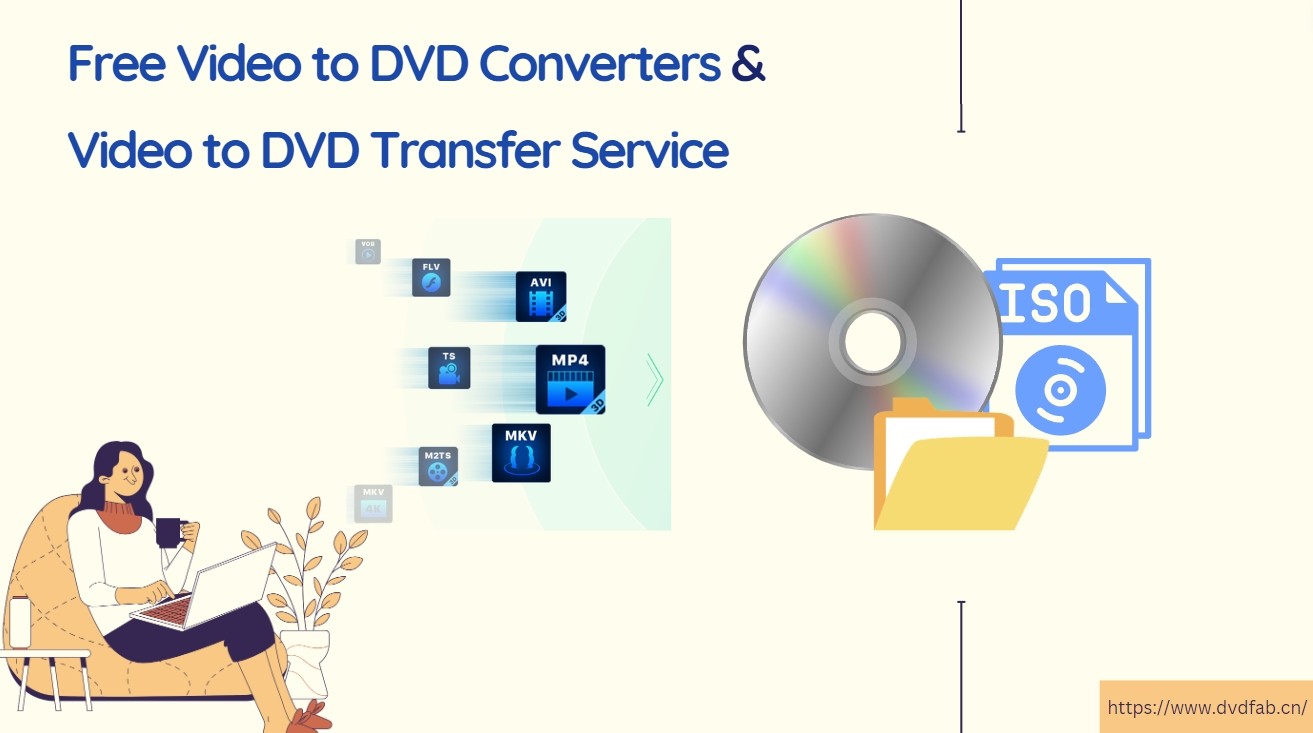 Convert Video to DVD: 8 Best and Free Video to DVD Converters in 2026By Diana Smith - Jun 15, 2026