9 Best Free DVD Copy Software in 2026: Tested & Reviewed

Summary: DVD copy software designed for backing up, cloning, compressing, and digitizing discs includes full-featured, high-speed options like DVDFab DVD Copy. Professional tools with free trials can remove various encryptions while creating 1:1 duplicates on blank discs, ISO images, or folders. For unencrypted discs, reliable free alternatives like ImgBurn and DVD Shrink remain suitable for straightforward burning and compression tasks.
Table of Contents
Physical DVDs are fragile. Between surface scratches and the gradual decay of organic dyes, your movie collection is always at risk. Creating a digital backup with free DVD copy software is the most effective way to preserve your media, but the process has become more technical in 2026. Modern discs often use complex structural protections, such as 99-title tricks, that cause many basic tools to crash during a backup.
For this guide, I benchmarked the latest versions of various DVD copy software on a Windows 11 system. I will break down the best free options and paid tools with free trials available today, helping you choose the right utility for your specific disc collection.
My Top Picks: Best Free DVD Copy Software in 2026
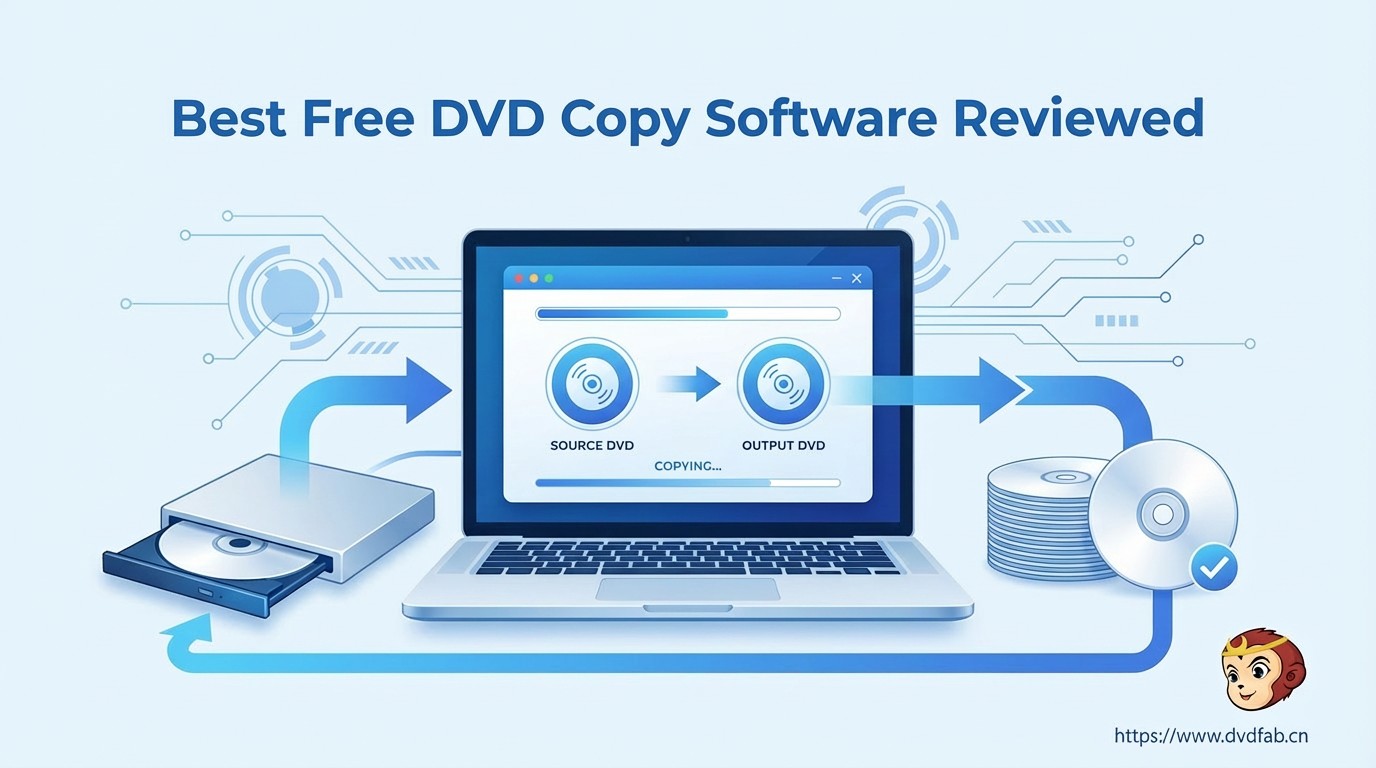
I have categorized the top DVD copy software options from my testing based on their ability to copy DVD to DVD, ISO, or digital formats like MP4 and MKV. Whether you require a 100% free tool or a premium trial to bypass high-level structural protection, check the key takeaways and comparison table below.
- Best for DVD Decryption and Backup: DVDFab HD Decrypter (see details) is the top free DVD Copy Software for copying some protected DVD/BD to disc, ISO, MKV, or MP4. For 2026 new releases, the DVDFab DVD Copy trial (see details) is recommended.
- Best for MKV Remuxing and Full-Disc Copying: MakeMKV is the gold standard for lossless "remuxing". Conversely, DVDFab DVD Copy is recognized for its superior speed in full disc cloning, especially with GPU acceleration.
- Best for Burning & Compression: Use ImgBurn for burning existing ISO files to physical discs. Use DVD Shrink to compress large dual-layer DVD-9 discs to fit onto standard DVD-5.
| Top DVD Copy Software Rated | |||||||
| Tool | Price | Last Updated | Input | Output | Decryption | Trustpilot Rating | Best For |
| DVDFab HD_Decrypter 13.0.6.2 | Free | June 10, 2026 | DVD, BD, ISO, folder | DVD, BD disc, ISO, folder, MKV/MP4 | Protections for DVD/BD released one year ago | 4.5/5 | Free decryption & basic backup |
| MakeMKV (Beta) 1.18.3 | Free | January 25, 2026 | DVD, BD, UHD | MKV | AACS, BD+ | 3.3/5 | 1:1 remux to MKV |
| DVD Shrink 3.2.0.15 | Free | July 25, 2004 | DVD, Folder, ISO | ISO, VIDEO_TS | DeCSS | 3.2/5 | Compress dual-layer to single-layer |
| ImgBurn 2.5.8.0 | Free | June 16, 2013 | DVD, ISO, Folder | DVD, ISO | ❌ | N/A | ISO burning |
| DVDFab DVD Copy 13.0.6.2 | Free Trial | June 10, 2026 | DVD disc, ISO, Folder | DVD 5/9, ISO, Folder | CSS, APS, RC, DADC, 99-titles, Cinavia, New | 4.6/5 | Full-featured DVD backup/copy modes |
| DVD Cloner XR 22.30.1494 | Free Trial | January 23, 2026 | DVD, BD, UHD | DVD | CSS, RC | 3.2/5 | 1:1 cloning |
How We Test Free DVD Copy Software
To compare how each DVD copy software performs in practical backup tasks, I tested disc recognition, output options, copying modes, and playback compatibility on the same Windows 11 test bench.
💻Test Environment
- Operating System: Windows 11 Pro (v23H2)
- CPU / GPU: Intel Core i9-14900K | Nvidia RTX 4090
- Optical Drive: LG GP65NB60 External DVD Writer (Firmware 1.02)
📀Test Scenario
I used two distinct disc types to evaluate software versatility across modern protection and standard backup tasks:
- Protected Input: Retail 7.8GB DVD-9 of "Inside Out 2" (2024), featuring complex 99-title.
- Non-protected Input: Standard 4.7GB DVD-5 containing unencrypted data.
- Output Goal: A 1:1 ISO Image for archival cloning and a device-compatible H.264 MP4 for mobile playback.
📑The Testing Process
Step 1: I first reviewed each program's main features, including supported input and output formats and video editing capabilities. I then investigated their user ratings from the popular site Trustpilot.
Step 2: I measured the seconds required for the software to identify the correct main movie title. Then I executed a full 1:1 backup to the SSD while monitoring CPU/GPU usage.
Step 3: I checked the resulting ISO and the MP4 output on both VLC Media Player and a standalone Sony BDP-S6700 Blu-ray player. This includes checking for audio sync issues and digital artifacts.
Step 4: I categorized the programs into "Popular Free," "Classic Free" (no longer updated), or "Free Trial" groups. I then summarized the results in a test table and described their main features, pros, and cons in the following detailed reports.
Top Rated Free DVD Copy Software (Modern & Powerful)
Modern DVD copy software must handle more than just reading data; it needs to navigate complex disc structures and offer flexible backup options. Here are the top-rated truly free tools that provide robust features for standard DVD backups.
DVDFab HD Decrypter (Best for Older Discs, Simplified Free Mode)
DVDFab HD Decrypter is a top free DVD copy software that allows you to copy and convert nearly any DVD or Blu-ray released at least one year ago. It can remove common protections such as CSS, RC, and Sony ARccOS on supported older discs, then save the result as a disc copy, ISO file, folder, MKV, or MP4. You can choose Full Disc to keep the whole structure or Main Movie to save only the main title.
Beyond basic cloning, this tool includes a built-in video editor for tasks like trimming, cropping, adding subtitles and watermarks, and more. During my recent testing, it successfully identified the correct main movie title on older commercial discs where other freeware struggled. Its intuitive interface remains a significant highlight for beginners who prefer a straightforward DVD copying workflow.
This tool delivers reliable decryption for older content but excludes support for the latest 2026 encryptions and lacks disc compression features. You can upgrade to the premium version, DVDFab DVD Copy, for those advanced features. Recent updates, specifically spanning versions 13.0.5.2 to 13.0.6.2 (released Jun 10, 2026), have added support for new Blu-ray Java protections and refined the software's stability when reading complex and damaged discs. I rank it as the top choice for occasional users because it provides advanced decryption algorithms for free. Its consistent stability on Windows 11 makes it my preferred solution for basic DVD backup.
OS:
Key Features:
- Removes common protections like CSS, RC, APS, and Sony ARccOS.
- Backs up older DVDs to ISO files or folders on a local hard drive.
- Converts physical discs into digital MKV and MP4 video formats.
- Offers Full Disc and Main Movie copy modes.
- Includes a built-in editor for basic video customization.
Pros and Cons:
- 100% free with no expiration for older discs.
- Copy both DVD and Blu-ray discs.
- Extremely user-friendly interface for beginners.
- Maintains 1:1 original video quality during backups.
- Cannot decrypt discs released within the last year.
- Lacks compression from DVD-9 to DVD-5.
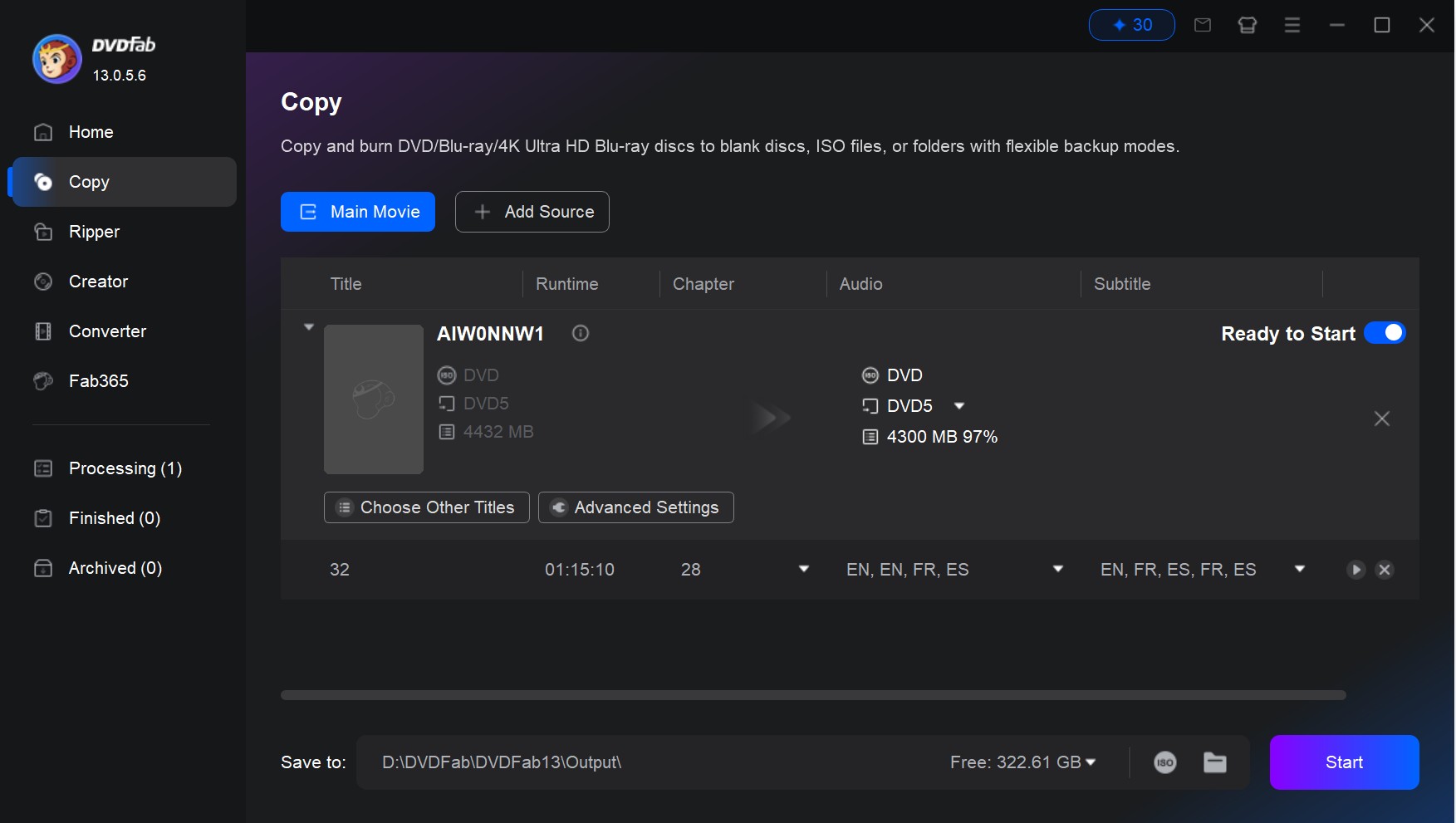
How to Copy a DVD with DVDFab HD Decrypter
Step 1: Insert your disc and launch the DVDFab HD Decrypter, then select the Copy module.
Step 2: Choose either Full Disc or Main Movie mode.
Step 3: Select chapters, titles, audio tracks, subtitles you want to copy.
Step 4: Select your desired output format as ISO, Folder, MP4, or MKV and click Start.
MakeMKV Beta (Best for Lossless Backup, Free for DVD)
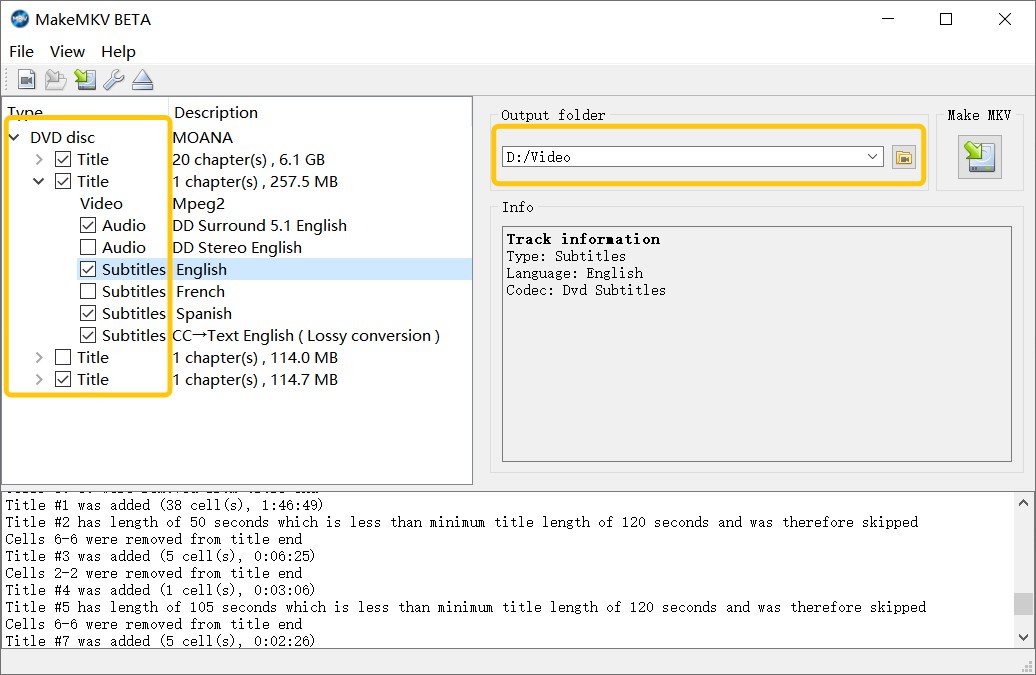
MakeMKV is a popular and highly recommended free DVD copy tool known for its ease of use and reliable performance. It preserves video and audio track, retains chapters, and keeps all metadata intact, while automatically handling most disc protections. Compatible with Windows, Mac and Linux, it offers both free and paid usage: DVD ripping remains free, while Blu-ray features require a paid key.
The software stands out for its "remuxing" capability, which converts as fast as your drive can read data because it does not change the video stream. The new 1.18.3 beta (released in Jan 25, 2026) also improves handling of mastering errors and structure-protected discs. My testing showed it can rip decrypted DVD video directly to various media players, bypassing the need for intermediate file conversion.
MakeMKV is a good choice for quality-focused users who want MKV files, but it only exports MKV and does not offer DVD compression, ISO output, disc burning, or video editing. I rank it highly for its technical purity, as it ensures a perfect 1:1 digital duplicate of the disc's data. However, the "MakeMKV Beta Key" renewal process can be frustrating for casual users who prefer a set-and-forget solution.
OS: Windows, Linux and Mac
Key Features:
- Rips DVDs and Blu-rays to MKV files without re-encoding.
- Preserves all audio tracks, including HD audio and 5.1 AC3.
- Retains all chapter markers and original meta-information.
Pros and Cons:
- Very easy to use, with a straightforward interface.
- Handles AACS and BD+ protections.
- Maintains lossless video and audio quality.
- Only exports to MKV file.
- No advanced editing or customization options.
- Cannot copy DVD to disc, ISO or folder.
- No compression, so file sizes can be large.
How to Copy a DVD with MakeMKV
Step 1: Insert the DVD into your optical drive and launch the MakeMKV application.
Step 2: Click the large optical drive icon to allow the software to analyze the disc structure.
Step 3: Select the specific titles, audio tracks, and subtitles you wish to preserve from the tree view.
Step 4: Set the output folder destination and press the "Make MKV" button to begin the lossless ripping process.
Classic Free DVD Copy Software (Legacy Tools)
Legacy free DVD copy software provides specialized solutions for compressing oversized discs or burning physical media. While these tools are no longer updated and lack support for 2026 new encryptions, they remain essential for managing unprotected home movies or refining local ISO archives.
DVD Shrink (Best for DVD Compression)
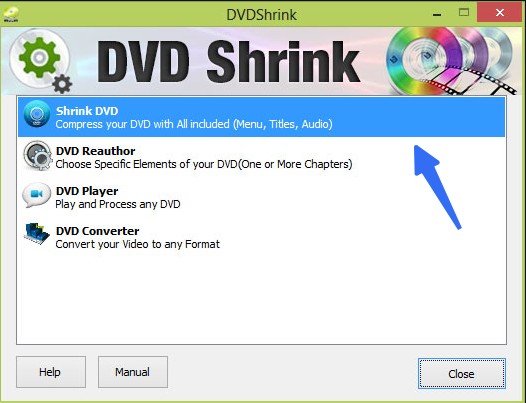
DVD Shrink is a classic and widely-used free tool for copying and backing up DVDs on Windows. It's especially popular to compress large dual-layer DVD-9 discs into smaller DVD-5 formats. You can choose to copy the entire disc or just the main movie, while trimming extras, languages, or subtitles to save space. The program also lets you save your copies as ISO images or DVD folders on your computer for later burning.
The software features a "Re-author" mode that provides a drag-and-drop interface for creating custom DVD structures from existing files. My testing confirms its continued efficiency on Windows 8, where it can shrink an 8GB DVD folder to 4.7GB in approximately 30 minutes depending on hardware. Because it lacks a built-in burner, you need a separate burning tool such as ImgBurn to create a physical disc.
DVD Shrink is a classic re-authoring tool, but it cannot decrypt modern DVD protections and has not received an official update since version 3.2.0.15 in 2004. I rank it as a useful legacy option for users who need DVD-9 to DVD-5 compression or title selection on unencrypted or already decrypted DVD folders.
OS: Windows XP, Vista, 7, and 8
Key Features:
- Offers compression options to fit dual-layer DVDs onto single-layer discs.
- Features a Re-author mode for custom title and audio selection.
- Saves output as ISO or DVD folder.
Pros and Cons:
- Free and easy to use.
- Operates as a lightweight, portable executable under 1MB in size.
- No support for protected DVDs.
- No longer updated.
- Interface is dated and lacks modern OS compatibility.
- Requires separate software for final disc burning.
How to Copy & Compress a DVD with DVD Shrink
Step 1: Open the disc or DVD folder to allow the software to analyze the content and compression levels. Select the "Re-author" button if you wish to strip away extras and keep only the main movie.
Step 2: Adjust the compression settings manually or set them to "Automatic" to fit your target disc size.
Step 3: Click the "Backup" button to configure your target device as an ISO image or a hard drive folder.
Step 4: Press "OK" to begin the transcoding process and save your compressed DVD files.
ImgBurn (Best for Burning ISO to Disc)
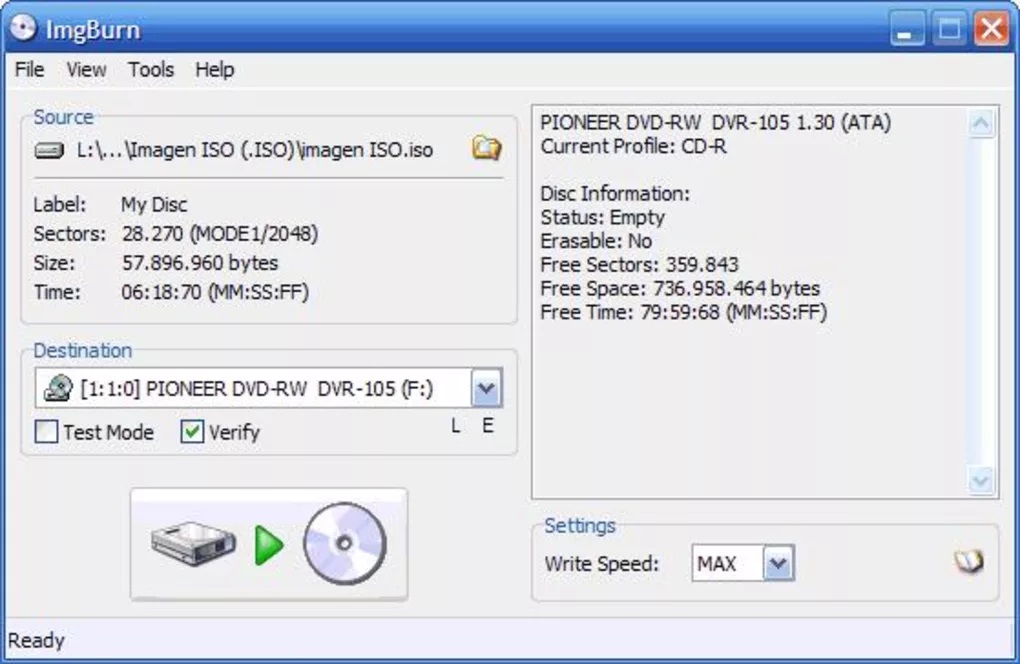
ImgBurn is a lightweight and free optical disc burning tool best known for writing various image file types to recordable media. It supports a wide array of formats beyond ISO, including BIN, CUE, and DVD, making it a universal tool for burning digital backups back to physical discs. While it does not include decryption features, its burning engine is widely considered one of the most stable and accurate in the industry.
Beyond simple burning, ImgBurn offers a "Verify" mode to check disc integrity against the original image and a "Discovery" mode for testing drive capabilities. It is particularly useful for advanced users who need to adjust low-level drive settings like booktype or write speed.
ImgBurn is a good choice for burning ISO images, but it cannot rip encrypted DVDs, compress DVD-9 to DVD-5, or edit video content. I rank it as a companion tool for users who already have an ISO file and want to burn it to a playable physical DVD. The latest release, v2.5.8.0, dates back to 2013, so users should download it carefully from a trusted source.
OS: Windows 95, 98, Me, NT4, 2000, XP, 2003, Vista, 2008, 7, 8, and 10 (including all 64-bit versions).
Key Features:
- Writes ISO, BIN, IMG, and many other image formats to disc.
- Builds bootable discs and images from local computer files.
- Verifies disc readability to ensure the data is functional.
Pros and Cons:
- Extremely small footprint with low resource usage.
- Supports nearly every optical disc format and drive.
- Offers deep technical logs for troubleshooting burns.
- Cannot circumvent any form of copy protection.
- Interface can be intimidating for beginners.
- No support for direct disc-to-disc copying.
- No built-in video editing.
How to Copy DVD/ISO to DVD with ImgBurn
Step 1: Choose the source ISO or DVD file by clicking the folder icon under the Source section.
Step 2: Insert a blank DVD into your drive and ensure the correct destination drive is selected.
Step 3: Adjust the write speed in the settings to ensure a stable and error-free burn.
Step 4: Click the large "Write" icon at the bottom to begin the burning process.
Best Paid DVD Copy Software with Free Trials (Premium Options)
While freeware and legacy tools handle basic DVD backup needs, they often struggle with the latest commercial releases or massive disc libraries. If free utilities fail to read your newest discs or take hours to process a single task, professional-grade DVD copy software may be necessary. These premium options provide functional free trials, allowing you to verify their success rate against complex structural protections before purchasing.
DVDFab DVD Copy (Best Overall, 1:1 Clone or Compression)
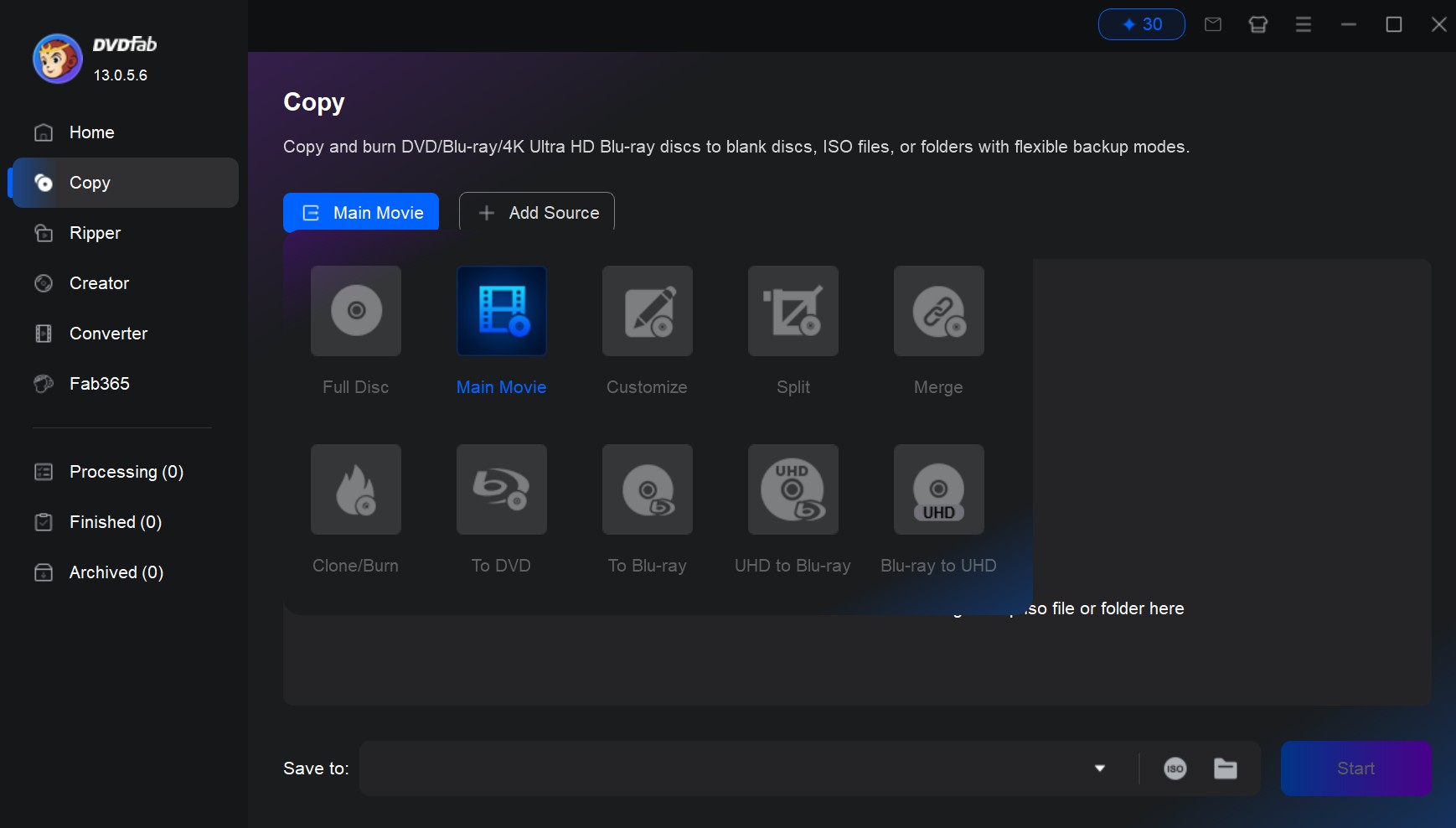
DVDFab DVD Copy is a professional DVD copy software that can clone or compress a wide range of DVDs, including many newer commercial releases. It utilizes DVDFab's Cloud Decryption Service to help decrypt newly purchased, encrypted DVDs quickly on secure cloud servers, and it can remove common protections such as CSS, APS, Region Code (RC), and DADC. The software supports six distinct copy modes, including Full Disc, Main Movie, Clone/Burn, Merge, Split, and Customize, providing total control over the backup structure.
The utility distinguishes itself with advanced features like Cinavia removal and ultra-fast GPU acceleration, which can complete a full disc backup in as little as five minutes. During testing, its "Customization" mode was particularly impressive, allowing for the selection of specific chapters and audio streams to optimize storage space. Recent updates, such as version 13.0.6.2 (Jun 10, 2026), have further refined its stability.
I rank this as a top choice for serious DVD collectors because its cloud decryption and steady updates help keep modern discs accessible. While the free trial comes with limitations, the power and speed it offers make it one of the most reliable tools for DVD copying tasks.
OS:
Key Features:
- Employs cloud-based decryption for the latest disc protections.
- Offers six flexible copy modes including Full Disc, Clone, and Merge.
- Copy DVD-9 to DVD-9 or DVD-5 to DVD-5 losslessly.
- Compresses large DVD-9 content to fit standard DVD-5 discs.
- Supports multi-core CPUs and NVIDIA/AMD GPU acceleration for maximum speed.
Pros and Cons:
- Frequent updates to support the newest disc releases.
- Excellent 1:1 output quality for clones and ISOs.
- Industry-leading backup speeds via hardware acceleration.
- Free trial is limited to three complete discs.
- Advanced AI features require additional module purchases.
How to Copy DVD to DVD with DVDFab DVD Copy
Step 1: Launch the latest DVDFab DVD Copy and select the "Copy" module.
Step 2: Insert your DVD or load an ISO file into the software for automatic decryption and analysis.
Step 3: Choose a specific copy mode, such as "Full Disc" or "Main Movie".
Step 4: Select your output destination as a blank disc, an ISO image, or a local hard drive folder.
Step 5: Click the "Start" button to begin the DVD copying process.
DVD Cloner (Best for 1:1 Cloning)
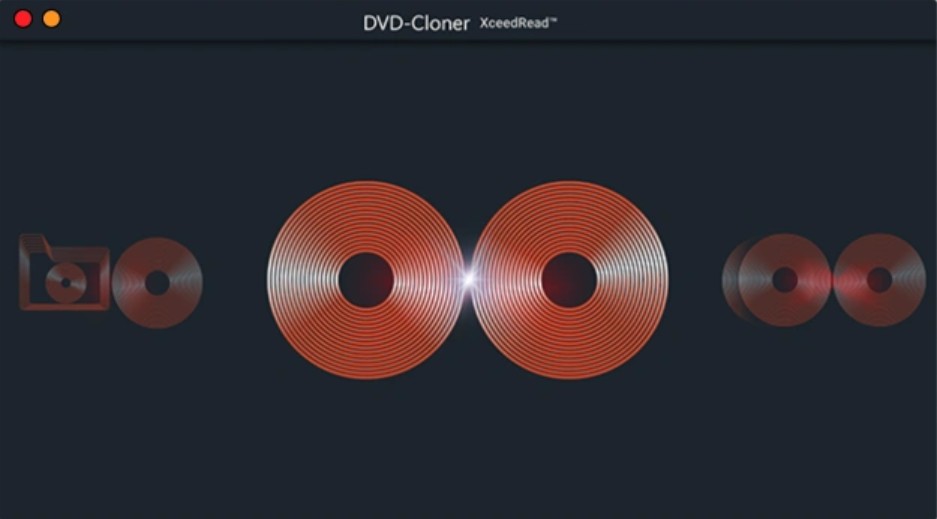
DVD Cloner XR is a long-standing tool specialized in high-quality DVD duplication and 1:1 cloning. Its primary function is to create perfect digital copies or physical duplicates of encrypted commercial discs. It features an "Express" interface for beginners and an "Expert" mode for users who require manual control.
The software can also combine multiple DVDs onto a single Blu-ray disc and a built-in "Smart Analyzer" to handle modern disc tricks like IFO disruptions and added bad sectors, along with older protections like CSS and Region Code.
DVD Cloner works well for duplication tasks, though its decryption library can occasionally lag behind top-tier suites on the newest tricky releases. I rank it highly for its simplicity and specialized focus on 1:1 cloning, which is ideal for those who primarily want to duplicate their physical library. However, the free trial is somewhat restrictive, often only allowing for partial disc copies or limited uses. DVD-Cloner XR V22.30.1494, released on March 20, 2026.
OS: Windows Vista, 7, 8, 8.1, 11, 10
Key Features:
- Excellent decryption ability, handles most DVD copy protections.
- Offers multiple copy modes, including full disc, main movie, split, merge, and ISO creation.
- Uses Smart Analyzer to crack protections, including IFO disruptions and bad sectors.
- Combines multiple DVDs onto one DVD±R DL or a Blu-ray.
Pros and Cons:
- Simple and intuitive interface.
- Excellent cloning accuracy for backups.
- Trial version often places limits on copy length.
- No Support for Mac system.
- Larger file sizes when making 1:1 copies.
How to Copy DVD with DVD Cloner
Step 1: Open the application and choose between "Express" or "Expert" mode based on your needs.
Step 2: Place your source DVD into the drive for the software to begin the scan.
Step 3: Select the copy type, such as "1:1 DVD Copy" or "Movie Only".
Step 4: Pick your destination and click the "Start" button to begin the cloning process.
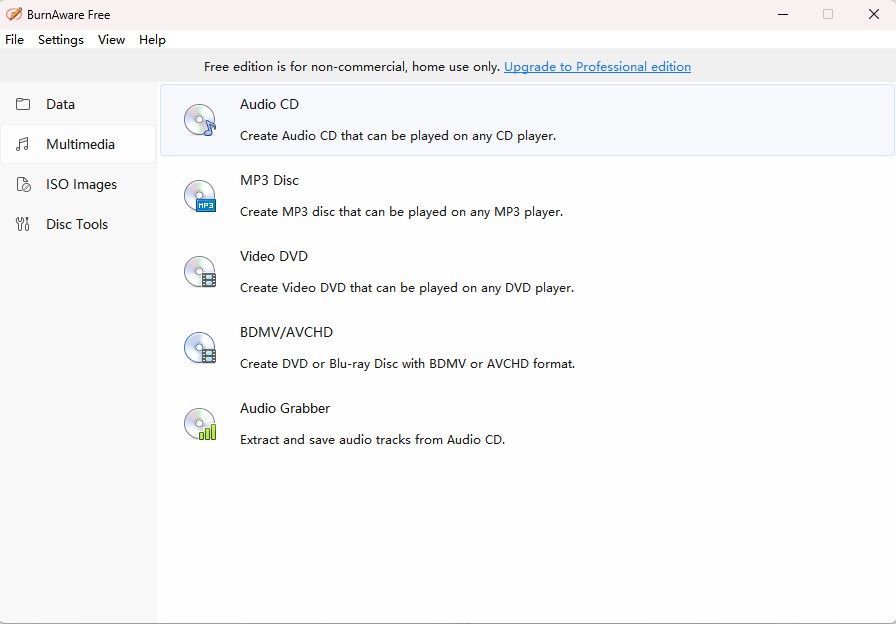
BurnAware Free (Best for Direct Disc to Disc Copying)
BurnAware Free is a lightweight disc burning tool for CD, DVD, Blu-ray, and ISO tasks. The Free edition supports burning data/audio/video discs, making and burning ISO images, and backing up discs to ISO images. Direct disc-to-disc copying, however, is available only in the Premium and Professional editions.
The paid editions add features such as disc spanning and disc copying, while the Professional edition also includes data recovery and audio grabber tools. My testing showed that it is exceptionally lightweight and stable on Windows 11, with a clean interface that avoids the bloat found in other suites. It is a reliable choice for users who need traditional burning tasks, but Free edition users should treat it as an ISO and disc-burning tool rather than a full DVD copier.
BurnAware is a top-tier burning suite, but it does not natively include decryption for protected commercial DVDs, requiring third-party tools/drivers to handle encrypted content first. The trial is time-limited, for example, the Microsoft Store listing notes a 10-day trial for the Professional edition. The latest official update is V19.1, released on Jun 2, 2026.
OS: Windows
Key Features:
- Enables direct disc-to-disc copying for physical media duplication (Premium/Professional).
- Creates and burns standard ISO images and supports image burning workflows.
- Provides data recovery tooling (Professional) to browse and extract files from discs.
- Supports disc spanning across multiple discs (Premium/Professional).
Pros and Cons:
- Clean, lightweight user experience.
- Support most common optical media types.
- Does not remove copy protections.
- No Support for Mac system.
- Free version excludes key disc-copy features.
How to Copy DVD with BurnAware Free
Step 1: Launch the Premium/Professional version and select "Copy Disc" from the main window.
Step 2: Select your source drive containing the DVD you wish to copy.
Step 3: Choose your destination drive or set the output to an ISO image file.
Step 4: Verify the settings and ensure any verification option is checked for accuracy (if available).
Step 5: Click the "Copy" button to start the copying process.
iFunia DVD Copy (Best for Mac)
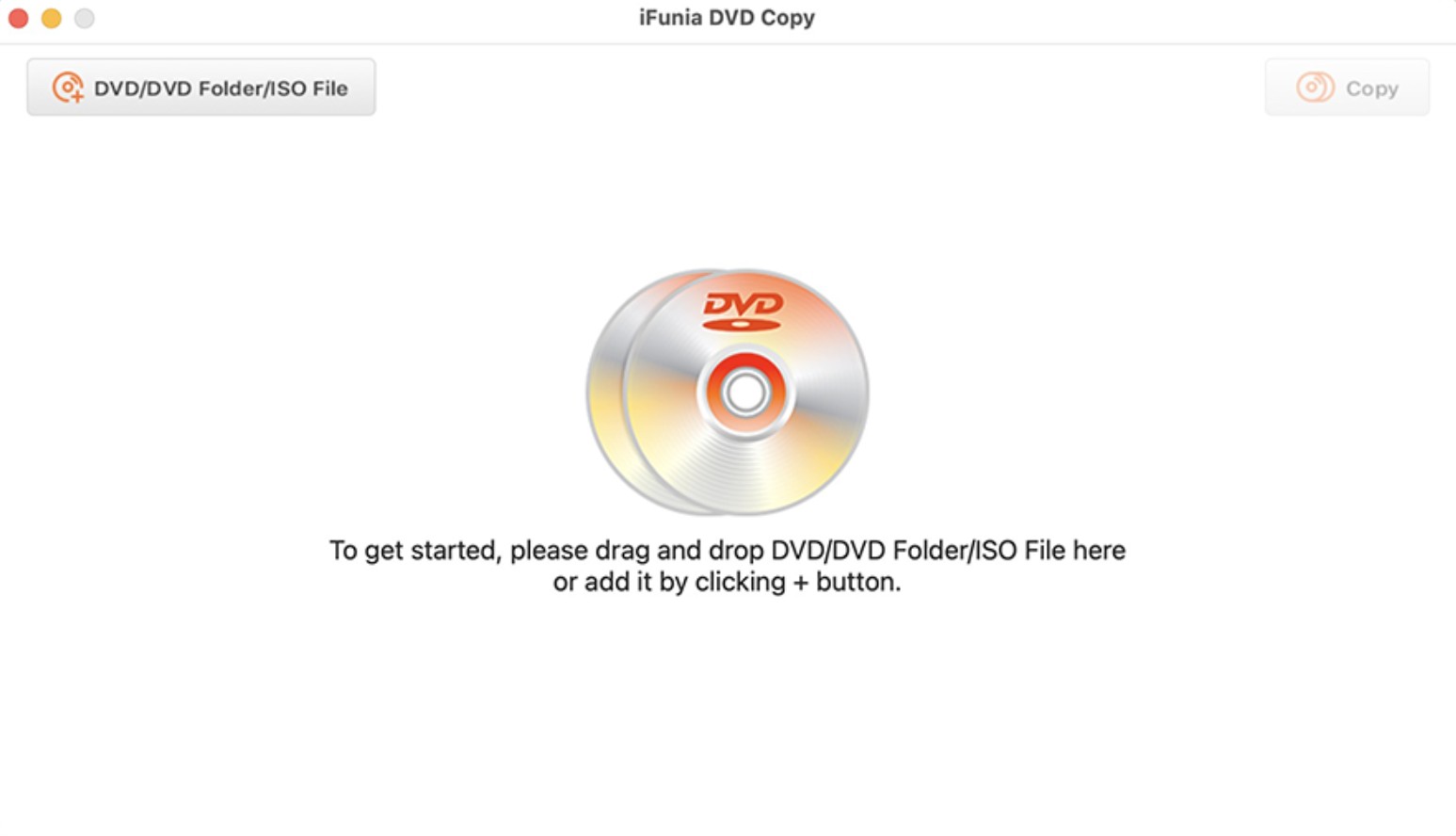
iFunia DVD Copy is a streamlined utility designed for high-speed DVD cloning and archival, with support for both Mac and Windows systems. It provides three primary copy modes: Full Movie, Main Movie, and Custom, allowing users to strip away unwanted content to save space.
The software is known for its simplicity, offering a 1:1 copy mode that maintains original titles, menus, subtitles, and audio tracks. It can save DVDs directly to local folders or ISO images for playback on media centers, and burn VIDEO_TS folders or ISO images back to disc.
This tool is excellent for users who want a no-nonsense backup experience, though it lacks the advanced cloud-decryption approach used by DVDFab for newly purchased encrypted DVDs. The free trial allows for limited usage, giving you a chance to test its compatibility with your specific DVD drive. iFunia does not publish a clear public version number or release-date changelog on its main product page, but its Guide page shows "Updated on June 28, 2023".
OS: Windows 10+ & macOS 10.11+
Key Features:
- Provides 1:1 DVD cloning with no quality loss in 1:1 workflows.
- Can remove copy protection or bypass regional codes.
- Backs up DVDs to ISO images or VIDEO_TS folders and can burn them to disc.
Pros and Cons:
- Simple and fast setup process.
- Lightweight and low on system resource consumption.
- Lacks decryption for new discs.
- Cannot compress DVD videos.
- Trial version has limited functional capacity.
How to Copy DVD with iFunia DVD Copy
Step 1: Open the program and load your DVD disc into the source selection area.
Step 2: Choose your desired copy mode, such as "Full Movie" for a complete backup.
Step 3: Select the output format, either as a physical disc, a DVD folder, or an ISO file.
Step 4: Configure any specific audio or subtitle preferences in the custom settings.
Step 5: Press the "Start" button to begin the copy process.
WinX DVD Copy Pro (Best for Sector-by-Sector DVD Cloning)
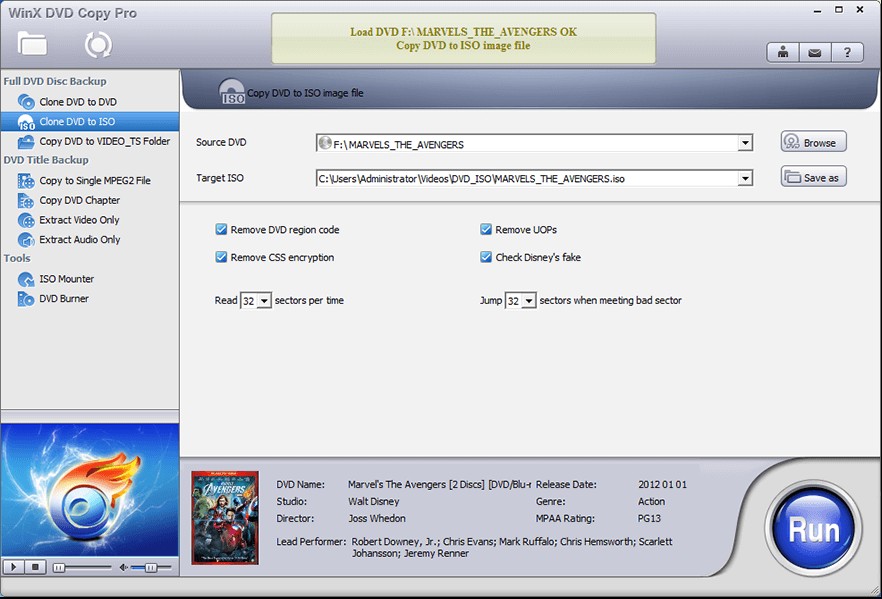
WinX DVD Copy Pro is a Windows DVD backup tool that can easily clone or copy DVD collections. It offers flexible copy modes, such as full disc backup, main title extraction, and ISO creation, making it suitable for different backup needs. The software stands out for its fast performance, straightforward interface, and the ability to bypass many common DVD protections like CSS and region codes.
It include a built-in DVD burner, providing a complete end-to-end solution for disc backup and duplication. In my testing, its sector-level copy mode was impressively stable, successfully handling discs with minor physical damage. It supports bypassing common DVD protections such as region codes, RCE, CSS, and more.
WinX DVD Copy is a robust choice for cloning, but its interface feels somewhat dated compared with newer 2026 tools. The latest official update is V3.9.8, released on August 10, 2023, so it may fall behind on the newest copy-protection schemes found on new DVDs. The free trial is available but limited, encouraging users to upgrade for unlimited sector-by-sector copying.
OS: Windows 11/10 and lower
Key Features:
- Performs sector-by-sector DVD cloning to ISO or MPEG-2.
- Includes an Intelligent Bad Sector Recovery engine for damaged discs.
- Offers multiple copy modes for specialized tasks.
Pros and Cons:
- Useful for restoring and preserving old or damaged discs.
- Integrated burning tools for complete workflows.
- Only available for Windows.
- Free trial restricts some advanced features.
How to Copy DVD with WinX DVD Copy Pro
Step 1: Insert your disc and choose "Full DVD Disc Backup" from the sidebar.
Step 2: Select the target ISO or DVD folder destination on your hard drive.
Step 3: Enable the "Bad Sector Recovery" if you are working with a scratched disc.
Step 4: Adjust settings to skip blank sectors or read broken sectors intelligently.
Step 5: Press "Run" to initiate the cloning process.
FAQs
Is it legal to copy a DVD?
For the question "Is it legal to copy DVDs", please first refer to your country's laws and then think about your purpose to make copies. In some countries it is illegal to bypass the CSS, APS or other protections on DVDs, so the behavior of copying DVD may be at risk of violating the Digital Copyright Act.
But in some countries, the law says that people have all the rights to deal with the things they purchased only you don't infringe the copy right. That defines that you can copy copy-protected DVD for personal use, but you cannot make copies of these copyrighted DVDs for distribution or any commercial use. Any actions of spreading these copyrighted contents should be illegal.
What do you need to copy DVDs?
To copy a DVD, you primarily need a compatible optical drive and reliable software.
- Hardware: An internal or external DVD/Blu-ray drive is essential.
- Software: You need a tool like DVDFab for encrypted commercial discs, or DVD Shrink for unprotected content.
- Storage Space: Ensure your hard drive has at least 5GB to 9GB of free space per disc for 1:1 backups.
Are there any DVD duplication services?
Yes, professional DVD duplication services like Blank Media Printing offer mass DVD duplication starting
.73 per disc.
Service Scope: Most companies require you to mail a master disc or upload data for accurate duplication.
Options: You can choose from standard DVD-R, professional grade, or dual-layer discs with custom printing and packaging like sleeves or jewel cases.
Turnaround: Standard production typically takes 3 to 7 business days, with rush services available for 24-hour delivery.
DVD Copy Software vs. DVD Ripper Software
The primary difference lies in the output format: Copy software creates a 1:1 clone, while Ripper software converts the content into digital video files.
- DVD Copy: Makes a perfect 1:1 duplication onto a new disc or as an ISO image/VIDEO_TS folder on your hard drive, preserving original menus and quality.
- DVD Ripper: Extracts the data and converts it into compressed formats like MP4, MKV, or AVI for playback on mobile devices and gaming systems.
- Storage: Copying results in large files (up to 8.5GB), whereas ripping allows for significant compression at the cost of some video quality.
What are the common DVD types and formats?
DVDs are categorized by their storage capacity and physical structure, with DVD-5 and DVD-9 being the most prevalent.
- DVD-5 (Single Layer): Holds up to 4.7GB of data, roughly 133 minutes of video; common for homemade discs.
- DVD-9 (Dual Layer): Holds up to 8.5GB, used by most commercial Hollywood movies to maintain high bitrates.
Recordable Formats: DVD-R and DVD+R are write-once formats, while DVD-RW and DVD+RW are rewritable up to 1,000 times.
Wobble Technology: DVD-R uses a simpler wobble system for older player compatibility, while DVD+R offers better error correction for high-speed burning.
How to choose a right DVD copy software?
A powerful DVD copy software should come with a decrypter that can bypass the protections on commercial DVDs. Let's see what other factors may influence the quality of a powerful DVD copy tool.
Copy Mode: A good DVD backup software program should not only copy DVDs in 1:1 ratio without compression but also have the ability to compress DVD-10 to a smaller size.
Quality: A good DVD copy software should output exact copies which are indistinguishable from the original under 1:1 copy, and should give a copy with minimal quality loss when users choose to compress their DVDs.
Copy Speed: though a DVD is not as large as a Blu-ray movie, you still need take some time to copy the nearly 5 G or 10 G contents from a disc. You won’t want to spend more than one or two hours copying a DVD disc.
Output Formats: DVD-5 or DVD-9 should be the basic output formats. But if a DVD copy program has the ability to output ISO files or DVD folders for digital storage we believe it will bring great convenience to you.
Customization Tools: A DVD copy expert will give you some customization tools to copy your DVDs in your way. You should have the choices to copy the exact part you want or to get rid of the protections or not.
Conclusion
Choosing the right DVD copy software depends on whether you value technical purity, high-speed automation, or simple archival. DVDFab is the ultimate multi-tool for bypassing new protections, cloning or compressing DVDs. For legacy tasks like shrinking dual-layer discs, DVD Shrink remains an effective, lightweight classic. By understanding your specific needs - whether it is 1:1 cloning or mobile-friendly digital conversion - you can build a reliable backup strategy for your media collection.

![How to Burn ISO to DVD on Windows 11 and Mac [2026]](https://images.dvdfab.cn/media/Screenshot_2026-08-07_at_10.57.26_d3iqro.png/public) How to Burn ISO to DVD on Windows 11 and Mac [2026]By Diana Smith - Aug 7, 2026
How to Burn ISO to DVD on Windows 11 and Mac [2026]By Diana Smith - Aug 7, 2026![How to Rip DVD to ISO on Windows 11/10/8/7 and Mac? [2026 Update]](https://r3.dvdfab.cn/upload/resource/dvd-to-iso-ei38.jpeg) How to Rip DVD to ISO on Windows 11/10/8/7 and Mac? [2026 Update]By Wenny Yan - Jun 17, 2026
How to Rip DVD to ISO on Windows 11/10/8/7 and Mac? [2026 Update]By Wenny Yan - Jun 17, 2026![Top 11 ISO Creators to Create ISO File on Windows & Mac [2026 Updated]](https://r3.dvdfab.cn/upload/resource/create-iso-file-ytTu.jpeg) Top 11 ISO Creators to Create ISO File on Windows & Mac [2026 Updated]By Wenny Yan - Jun 16, 2026
Top 11 ISO Creators to Create ISO File on Windows & Mac [2026 Updated]By Wenny Yan - Jun 16, 2026![How to Copy DVD to DVD or Computer on Windows 10/11/8/7 [Tested Ways]](https://r1.dvdfab.cn/upload/resource/how-to-copy-dvd-windows-10-hO78.jpeg) How to Copy DVD to DVD or Computer on Windows 10/11/8/7 [Tested Ways]By Wenny Yan - Jun 16, 2026
How to Copy DVD to DVD or Computer on Windows 10/11/8/7 [Tested Ways]By Wenny Yan - Jun 16, 2026